Showing posts with label youtube. Show all posts

Thursday, 12 April 2018

LinkedIn for Business: 9 Unfailing Ways to Connect with Ideal Clients


LinkedIn could connect you to future customers. Yet, how many of your current customers are converted LinkedIn leads? If your answer is a few or none, you are yet to unlock the potential of your LinkedIn presence.
John Nemo build his business on LinkedIn. It took him 90 days post-quitting to match his old job’s 6 figure salary with the revenue generated via LinkedIn leads by his marketing agency.
Everyone who matters to your business is approachable on LinkedIn. But how?

shake hands superman GIF-downsized

1. Create client-centric profile descriptions

Most LinkedIn users have profiles that resemble online resumes. While this format works for employees who want a job change, it does nothing for business owners, agency partners, business development executives and consultants.
How do you address client concerns and solve their problems?
Don’t fall into rut of writing about your achievements in third-person. Instead, try proactive storytelling. Clients care about how you can solve their problems.
Who can you help and how?
Begin by identifying whom you can assist with your abilities – CEOs? Marketers? Models? Then, make a note of the different ways in which you can help them. So, you should be able to say that, for example, you can help small business owners set-up their web presence by building them websites.
How are you different from other service providers like you?
Tell this story on your LinkedIn profile. You can expand this story by filling in the details, which can be more of how you assist clients and why your services work better than others. Establish clear-cut differentiators here, so you can make an impression on profile visitors and stay top of mind for a long interval of time.
Can other people substantiate your claims?
You can also increase the credibility of your claims by curating testimonials on your LinkedIn profile. Ask your most satisfied clients and partners to share their experience as testimonials. You could even share testimonials in the video format.
Text vs video – how visitor-friendly is the content on your LinkedIn profile?
LinkedIn doesn’t yet support native video upload in the profile section, but you can use YouTube and SlideShare video links under [Link to Media] to provide access to video. Apart from testimonial videos, you can also share how to videos, advice, information and tips, or impressive company news and updates. In fact, if your profile itself provides value to visitors, they’re more likely to follow you and approach you for advice and services.

2. Leverage LinkedIn’s Advanced Search

LinkedIn’s search engine works wonders with profile hunting. You can find anyone (who’s on LinkedIn) on LinkedIn – if you know your target and have the right keywords. On both the web and mobile apps, you can search for people using Job Roles.
Who are you looking for?
You can’t drum up business by barking up the wrong tree. That’s why it’s critical for you to know exactly whom to target. Social media managers? Marketing VPs? Or Digital Analysts? Who is it that makes the calls on decisions related to your business?
What’s the right Job Title?
LinkedIn’s search is keyword-specific. So if you’re hunting for [Social Media Manager], only the profiles listing that exact Job Title and the profiles that include those words as part of their Job titles will appear. When searching for someone in particular job role, it makes sense to try a few variations so you don’t miss any prospects.
Which filters can save you time?
Location and Industry filters can help you narrow-down your prospect list to only high-potential prospects, so you don’t have to waste time and energy reaching out to those who are not likely to convert.
Should you use InMail or send a Connection Request with a custom message?
Either works, but if your business has long sales cycles, it probably makes sense to turn prospects into connections. Longer sales cycles demand more contact between a business and it’s prospects. So, you’ll probably need to send 2-3 cycles of messages with some time in between them and that’s easier done when the prospect is a contact.

3. Craft compelling custom invites

LinkedIn’s inbox is where you build relationships. And your invite can help make an impactful first impression. That’s why it’s super-important to customize every invite/message that you send out.
How can you personalize invites?
The more you know about a prospect, the more you can personalize the invites that you send out. In fact, even viewing a profile on LinkedIn can have some impact. I’d even suggest viewing profiles first, taking notes and going back to send invites a few days later. Try and use details that prospects have revealed on their profiles to customize the invites that you send to them.
Can you initiate live-chats with prospects?
LinkedIn messaging is now real-time. You can see little dots next to a person’s chat window when they’re online and typing. If you have warm leads who you’d like to convert, you can always initiate non work-related chats when they’re online from time to time.
What value can you offer within messages?
Again, LinkedIn prospecting is all about what value you bring to the table. Can you show prospect clients transformation even before they turn into clients? The transformation doesn’t have to be great and it certainly shouldn’t cost you money. But if there’s something substantial that you can share with prospects in the initial invite or later messages, you should.
Are you being intrusive?
Just because someone has accepted your invite, doesn’t mean that they want you to send them messages. Ask for permission, always. Get feedback, always. And try and craft your messages so they’re genuine and noticeable.

4. Consciously share conversion-oriented content

What you share on LinkedIn matter a lot because it’s the only contact that prospects have with you away from messages. Sharing content because everyone says you should can be more counter-productive than anything. Everything you share should have a purpose.
How can you curate exceptional content?
Everything you share should ideally be exceptional. But finding exceptional content on a daily basis can be taxing – unless you have a team of people just for the job. However, you can simplify the task with the assistance of a content curation app such as DrumUp.
What are the types of content that you can share on LinkedIn?
Remember Seth Godin’s purple cow principle when curating content for LinkedIn. Unless it’s a purple cow, people won’t pay attention. They’ll continue scrolling through their feed without giving your post a second look. What are the types of content that will make them stop and look?
Videos? Content in story-form? Content with powerful visuals? Content with a catchy copy?
Take your pick and ensure that you choose well for every post.

How can you simplify content sharing and engagement on LinkedIn?
By using a social media management tool like DrumUp, you can organize your content assets within your scheduling tool and create an engaging content queue using analytics data and themes that you can get an overview of in calendar-form.
Whose content can you share for additional engagement and relationship-building?
It’s a great idea to share other people’s content on LinkedIn for extra-engagement and exposure. Anything you share with attribution will earn you goodwill and trust from your audience and the people whose content you share.

5. Collaborate with your community via LinkedIn Groups

LinkedIn Groups are where professionals in the same industry network, share content and opinions. There are tons of active LinkedIn Groups that you can join to build rapport with people in your industry.
How many relevant types of LinkedIn Groups can you work with?
You don’t have to stick with one type of LinkedIn Group to attract the attention of prospects. You can also join Groups in similar niches, within your industry (to find co-marketing partners) and in parallel niches (so you can find potential advocates).
What can you do in Groups to build relationships?
Every marketer who joins LinkedIn Groups typically just uses them as extra channels to share the content that they create. Again, think purple cow. What can you do on the Group that will initiate conversations with its members?
How can you convert Groups conversations into business conversations?
It’s not enough to just have conversations in Groups. You also need to figure out a way to take your prospects from Groups to business discussions. It’s best to have these routes planned in advance. For instance, you could share/comment on conversion-focussed content – view someone’s profile – leave a few days of time in between – and then send them a connection request with a personalized invite.
Can you create/manage your own LinkedIn Group?
Managing LinkedIn Groups is effort-intensive. Unless you can invest that kind of time and effort, it doesn’t make sense for you to own a LinkedIn Group. If you have decided to go ahead and create one, you need to have a core-objective, rules and a moderator to monitor Group activity. As it’s not advisable to create a Group just promotion, you have to decide how you will connect participants of that Group to your business eventually. If your Group adds value, chances are that people will inquire about services/products on their own.

6. Get employee advocacy right

Employee advocacy can reduce the length of your sales cycles, promote more conversions and increase your customer retention rate if implemented properly. Client-facing employee advocates can help you boost such business goals if they are given the right content to share.
What content can you get client-facing employees to share on LinkedIn for maximum impact?
The success of your employee advocacy program depends on your content, among other factors. Considering LinkedIn is the platform, the best types of content you share are – client success stories, how to articles and tips that also feature your products and services.
Which employees can you get to be a part of the program?
While you can get just about anyone to participate, some selective participation can do your program a lot of good. For instance, you can get sales executives to share content useful to people in the last stage of your sales cycle. Other employees can share content that’s targeted at the rest of your conversion funnel.
What this means is basically this. Sales executives can share something like – 5 Factors to Consider When Purchasing Riding Gear while other employees can share something like – 6 Safety Measures to Take When on a Ride in which one point can be about riding gear and feature your products.
How can you convert the attention you earn via employee advocacy?
What’s the point in having people share content at random if it doesn’t amount to anything? Every piece of content you share should have a purpose, a road back to your products and means to measure its impact. Custom URLs can help with two out of three of those requirements.

7. Enhance your brand’s personality

When there are tons of LinkedIn Pages to follow, why should audience members follow yours? Even if you’re giving people value, you can’t expect them to follow you if you’re not very interesting. That’s why it’s important for you to enhance your brand’s personality, so audience members have the opportunity to connect with you.
What personality traits can you associate with your brand?
When building your brand’s personality, you have to assign it certain traits. And these traits need to have an impact on your target groups. What kind of humor suits your brand? Will you be sassy, quiet and meek or outspoken? The answer to these questions will shape your brand.
How can you express your brand’s personality via the content you share on LinkedIn?
It isn’t enough to just assign traits to your brand. You also have to figure out how you will express those traits through LinkedIn content. Will you share jokes? Will your post text exhibit humor? Will you reproach people making the wrong choices in terms of products?
Is it necessary to regulate content shared by employees to ensure it matches your brand?
Some companies strictly regulate employee activity on social media while others take a more relaxed stance. The choice is yours. I would recommend requesting employees to share more on-brand content without enforcing them to do it. Usually, when you get employees in at the grassroots level as in the case of employee advocacy, employees are more enthusiastic about cooperating.

8. Converse with relevant LinkedIn users

Listening is a critical part of building relationships, on LinkedIn and otherwise. One way to show your connections that you are listening is by reading their content and engaging with it. That’s why commenting becomes so important on LinkedIn. Even the marketing greats like Brian Dean still dedicate time to this activity.
What are the different ways in which you can strike conversations with LinkedIn users?
You could initiate conversations by asking questions. The questions don’t have to be related to your work. They can always be casual questions that everyone wants to answer. But, if you’re seriously looking for leads, you can post more conversion-focussed questions and content.
How do you ensure that the conversations you have on LinkedIn are goal-oriented?
Every conversation you have on LinkedIn need not be goal-oriented, but you can earn business on LinkedIn only when you make conscious conversations. Ensure that you know exactly whom you’re conversing with and which conversations you’re joining. Also, be sure that the conversations you’re having are pushing you towards a specific goal.
How do you turn conversations into conversions?
Firstly, it’s important to keep track of the conversations you have using a CRM or an excel sheet. CRMs work better because you can classify leads as cold and warm leads on some of them. When you’re keeping track of conversations, you’re more likely to achieve goals through them.

9. Publish stories instead of regular updates

Stories generally perform very well on LinkedIn. People share success stories of clients and other people to inspire their connections and give them actionable insights. Storytelling enables you to grab attention, awaken emotions and create memories, all of which are a critical part of making an impact on your target groups.
What kinds of stories can you share on LinkedIn?
Client success stories are probably the best form of content that you can share on LinkedIn. By sharing client success stories, you can show prospects your ability to help companies achieve their goals. However, you can also share employee success stories to attract the right talent and success stories of people in your industry, in general, to provide your audience with insights.
How can you place your products and services in stories?
While you can’t make your products and services the heroes of LinkedIn stories, you should definitely mention them strategically. It’s always best to make your target audience members the heroes of LinkedIn stories and place your products as the tools that can assist them in achieving their goals.
How can you add visuals to your storytelling on LinkedIn?
While the rest of social media has already been taken over by visuals, LinkedIn remains a primarily textual platform. That gives you the opportunity to experiment with visuals and begin to capture the interest of your target audience before your competition.
Wrap
Everyone important to your business is available and accessible on LinkedIn. With the right idea for content and the right outreach strategies, you can make invaluable connections on LinkedIn that can help you generate substantial revenue.
Feature image: asierromero / Freepik

Saturday, 17 March 2018

How to Increase Audience Engagement on YouTube using Content Marketing Tools


YouTube is an indispensable platform for social media and content marketers, especially now that audience members are consuming YouTube content like never before. People are spending as much as 72 minutes a day watching video content, and marketers are keen to make the most of this trend to increase audience engagement. However, engaging an audience on a highly competitive platform such as YouTube can be tough. But with the help of the right strategies and content marketing tools, you can have the impact your desire on the social media platform. Here’s a 3-step process to increasing audience engagement on YouTube using content marketing tools or content curation apps such as DrumUp.
 

1. Create channel(s) on YouTube for your types of content

Many people do a great job on this first step. They create excellent content that’s on-point, timely and entertaining. Some brands choose to have one central YouTube channel where they publish all of their content, while others split their content based on categories across multiple YouTube channels.
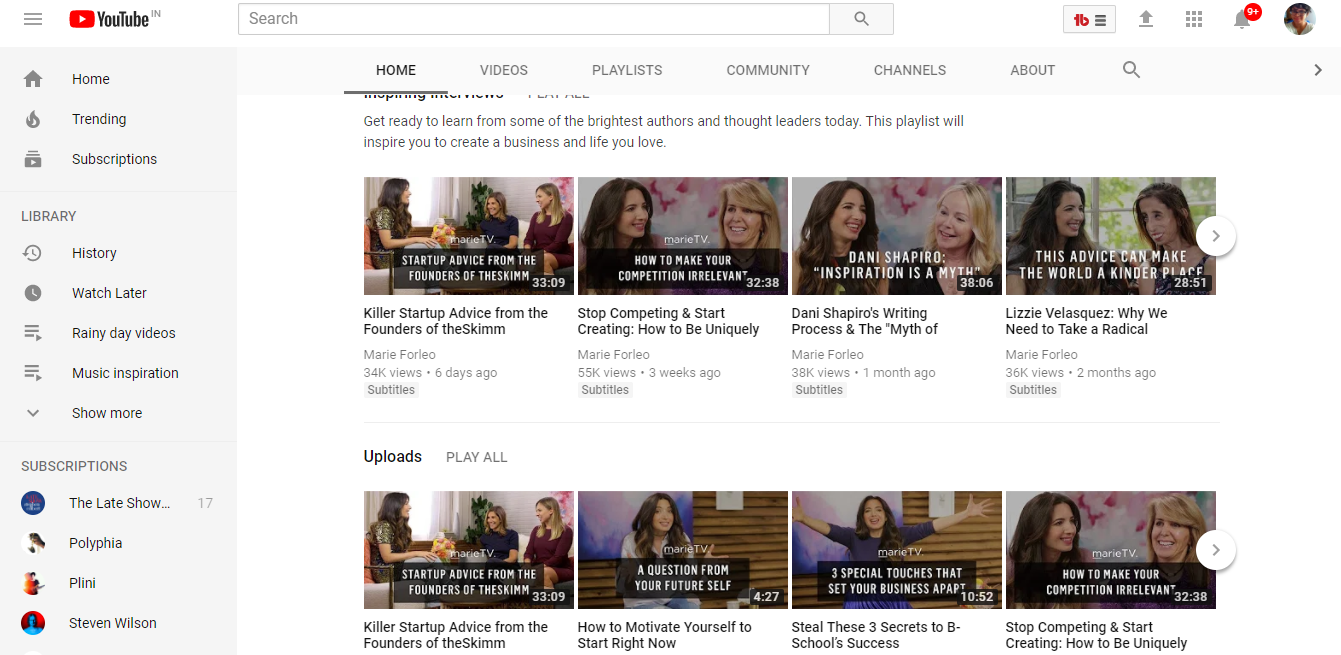
Irrespective of what you choose to do, it’s critical to first have a channel that contains your content. This is your home-base using which you will attract and engage your target audience. Marie Folio’s YouTube channel is a great example. Her brand focuses on start-up advice and inspiration.

4
 

2. Create visually-enticing design

Apart from having a channel for relevant content, it’s also critical to have great design, so you can attract your target groups’ attention.
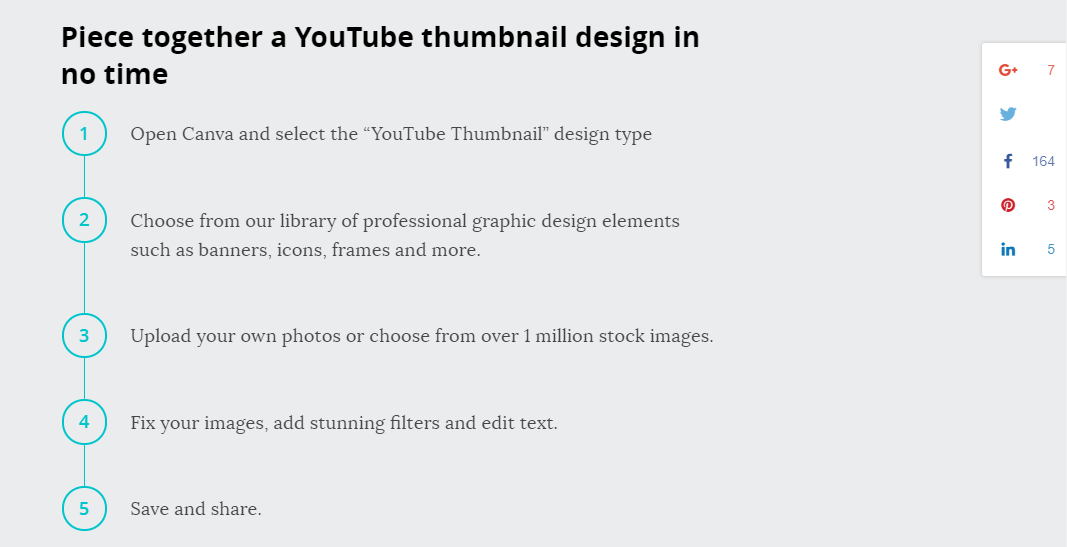
Great design is a combination of having great video titles and alluring thumbnails. Clickbait still works, but how much of clickbait you apply depends on the tone of your brand and your personal preferences. It’s also important to consider displaying your most interesting stills as thumbnails on videos. To do so, you can use photo editor and graphic design tools such as Canva, which allow you to alter already-existing templates for your use.

5
 

3. Promote YouTube videos to your social media followers on Facebook, Twitter and LinkedIn

YouTube by itself is difficult to run, if you’re not already viral or popular. But you can use your existing following on Facebook, Twitter and LinkedIn to increase audience engagement on YouTube.
Here’s an effortless way to do it using DrumUp’s RSS feed reader & content library.

Path 1 – Automatically share YouTube videos to Facebook, Twitter and LinkedIn as soon as they are published.

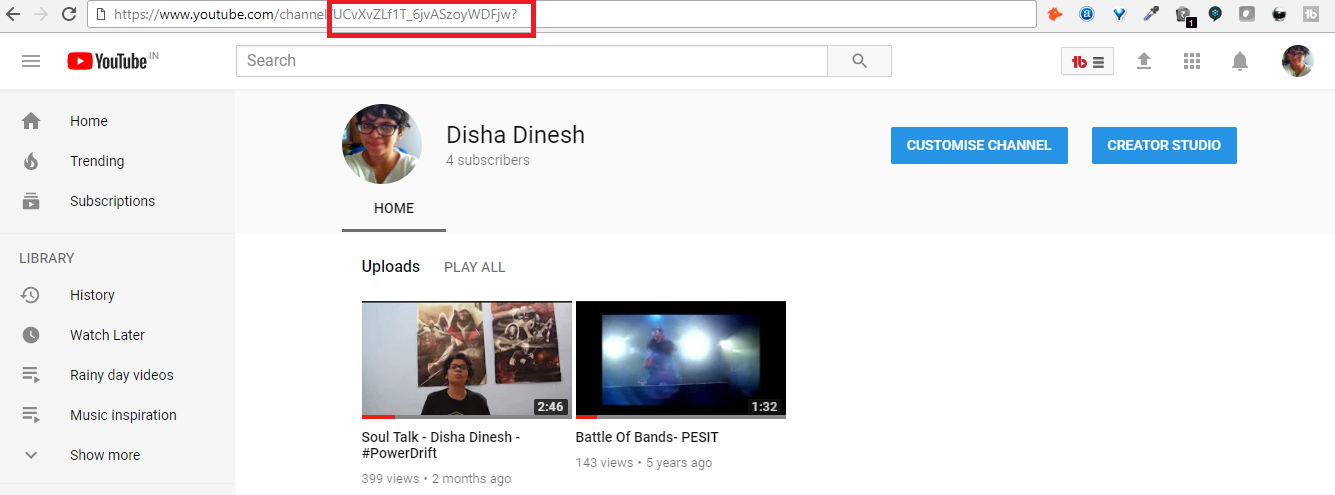
  • Go to your YouTube channel and get the channel ID.

6

     
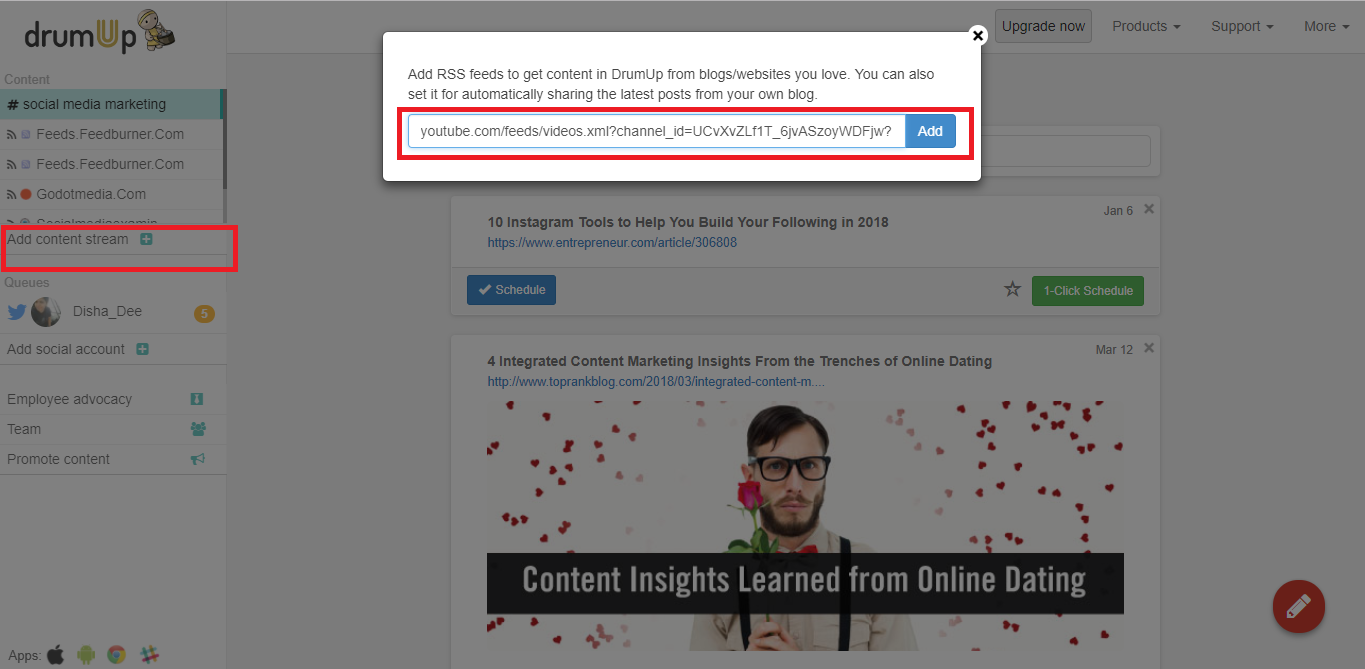
  • Insert the channel ID to this URL https://www.youtube.com/feeds/videos.xml?channel_id=<channelIDHERE>.
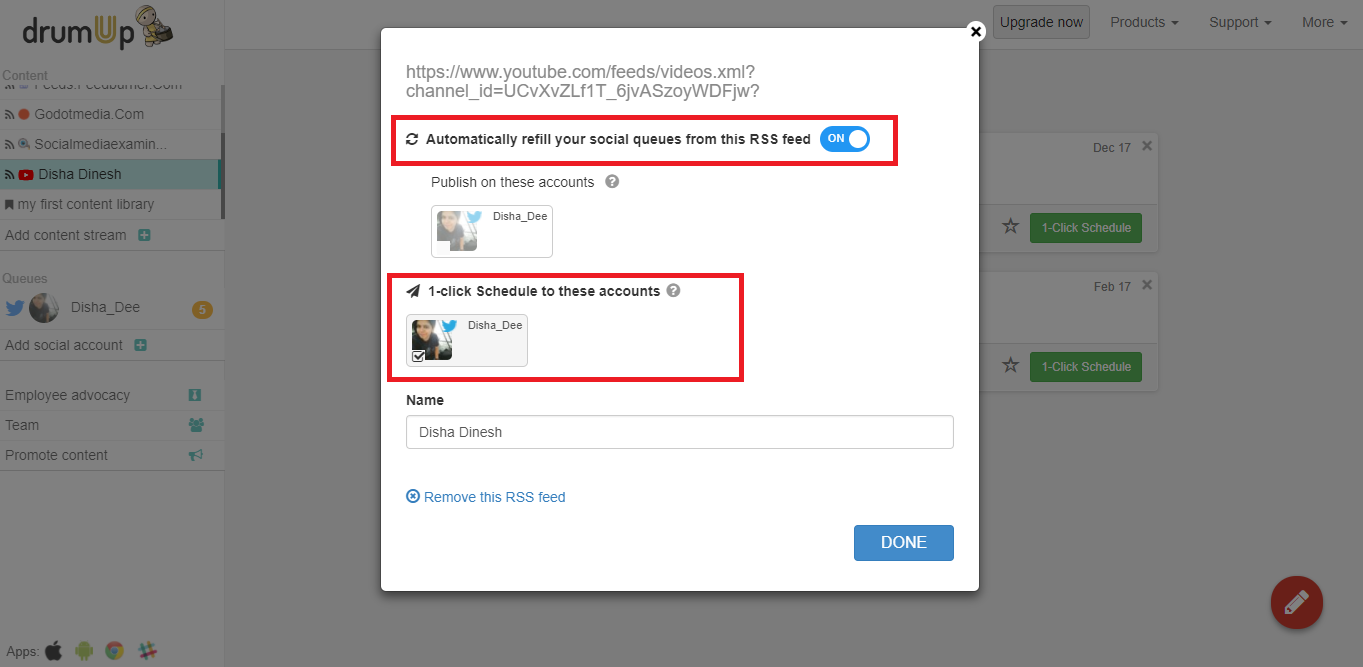
  • Add the complete URL to your DrumUp feed reader.

7

     
  • Choose between custom/1-click/auto scheduling to share content on your attached social media (Facebook, LinkedIn and Twitter) accounts. DrumUp will automatically take you to the screen below once you have added your RSS feed.

8 

Path 2 – Share evergreen videos automatically every once a while to your audience to keep them engaged.

  • Follow Path 1 from Step 1 to Step 3.
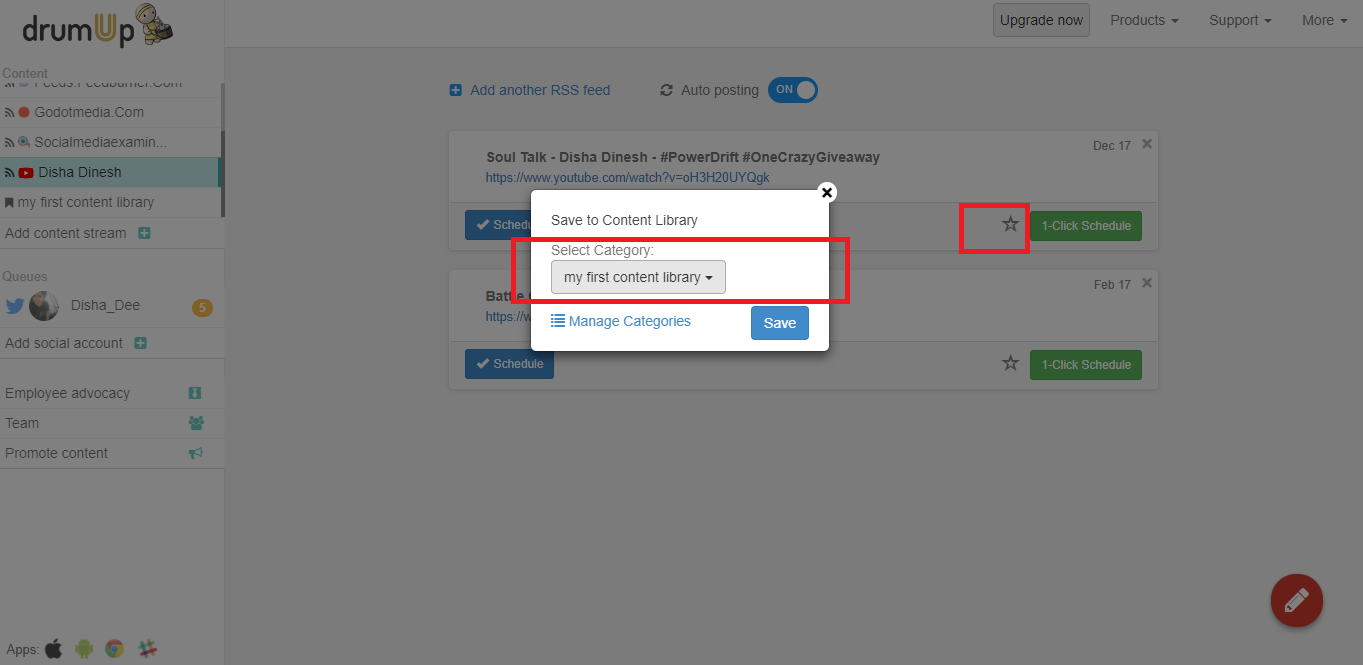
  • Once your YouTube posts appear in the feed channel, choose the videos qualify as “evergreen videos” and add them to a content library by clicking on the Star icon.

9

     
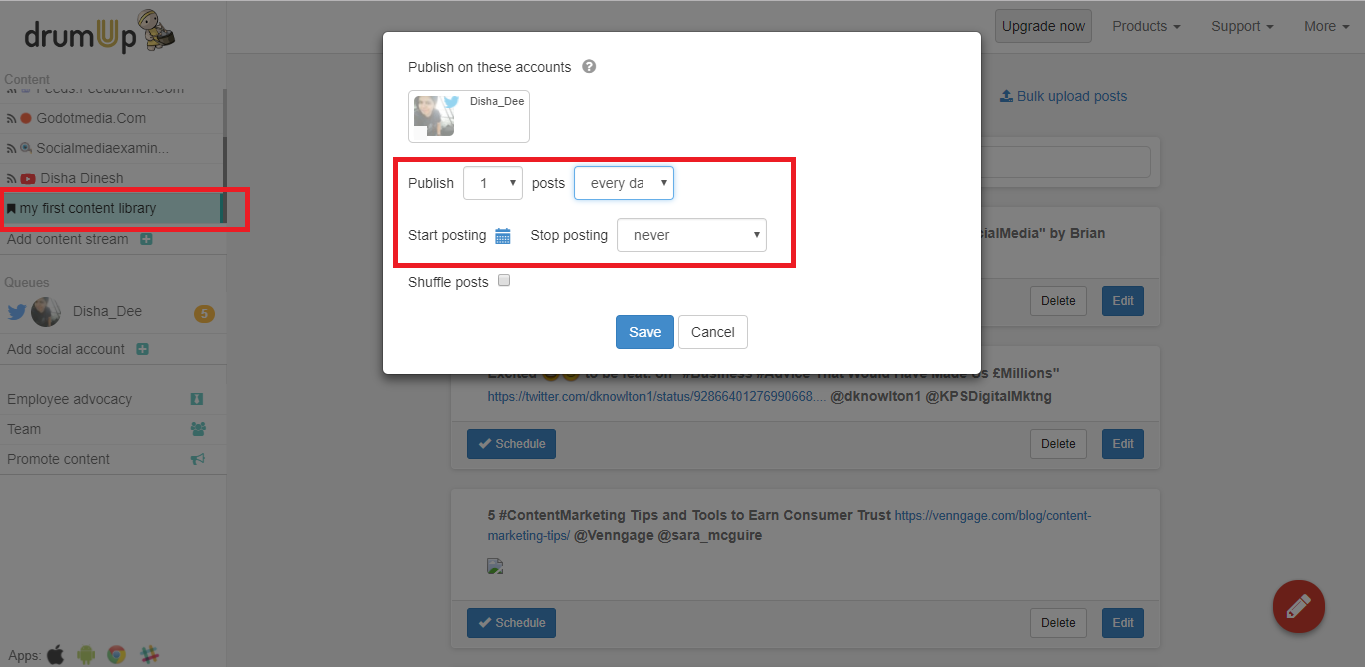
  • Once you have filled your library, choose automatic publishing and set a frequency to keep your audience engaged.

10 

You can apply Path 1 and Path 2 to your own YouTube channel, and/or any other channels that publish content relevant to your target audience.

Video content can be powerful to engaging your audience and convincing them to eventually convert into paying customers. All you need is the right set of content marketing tools and strategies.


Source

Wednesday, 17 January 2018

Take 5…Video Marketing Tips That Is!


We talk a lot on our blog about marketing your business through different mediums (email, blogging, social media,etc.). One medium that often gets left out of the discussion is video marketing. Video marketing has been gaining momentum due in part to the meme/viral phenomenon that has taken effect lately. Many businesses are interested in taking advantage of the rising meme popularity in order to emulate the viral effect. However, your video doesn’t have to go viral to be a powerful marketing medium. Why should you use video to market your business and how should you do it? Read on my friends…
Video marketing, like email marketing, is a great way to succinctly deliver information to customers. We are all used to taking in information from video (TV, movie, meme, YouTube). As a result, many of us have become more comfortable learning visually. Delivering information on a product, service or company through video can help to keep your audience’s attention longer and make what you have to say more easily understood.
You can also build rapport with viewers by introducing your CEO, a satisfied customer or other individuals within your organization and allowing them to deliver useful information. This puts a friendly face to a name and customers are able to meet who they are doing business with, making you and your company appear more accessible and present.
Now you have the why, let’s get to the how. Check out these 5 video marketing tips, then break out the smart phone, digital camera or other recording device and get posting!
  1. Make it useful – Whether you address frequently asked questions, deliver a how-to, give tips, make viewers laugh or entertain them in some other way it’s important to add value to your video. There is no point in creating a video without giving customers incentive to watch.
  2. Give it a purpose – Much like creating an email with a clear call-to-action, you’ll also want to give your video a purpose. Focus on one theme or purpose such as answering a specific question, delivering an “about us” or offering information on one of your products or services.
  3. Keep it brief – We’re all crunched for time and looking for the quickest and easiest way to get the information we need. Video can be a perfect way to quickly and efficiently communicate; a good length is between 30 seconds and one minute. If you have more to say or are finding it difficult to keep your video succinct, break it into two parts or multiple videos.
  4. Publicize – Link to your video in email (linking a screen shot of the thumbnail works well) and post it on your blog, website and social pages. And, set up a page on your website, a YouTube channel or any other video hosting account where you can compile all of your business’ videos for easy sharing access.
  5. Identify – Title your video with relevant keywords and descriptive words both to make it easier to stumble upon in search engines and to make it easier for customers find and forward. Take advantage of built-in keyword suggestions, category selections and tags by hosting companies like YouTube. And, always include a URL at the end of the video to allow viewers to copy and save or share with others.
Do you have any videos you’re proud of? Do share. We’d love to see them!


Saturday, 13 January 2018

How to Create a YouTube Channel


If you're reading this article, then I probably don't need to tell you that video content accounts for over 74% of all online traffic, or that over five billion YouTube videos are watched every single day. You're clever.
You already know that YouTube is an important content tool, and you're ready to start leveraging video for your own business.

Download our free guide to learn how to create and utilize video in your marketing to increase engagement and conversion rates. 


This article will cover everything you need to know about creating a YouTube channel, so you can start uploading your own videos and growing your audience today.

1. Create a Google account (if you don't already have one).

To watch, share, create, and comment on YouTube content, you'll need a Google account.

If You Don't Already Have a Google Account

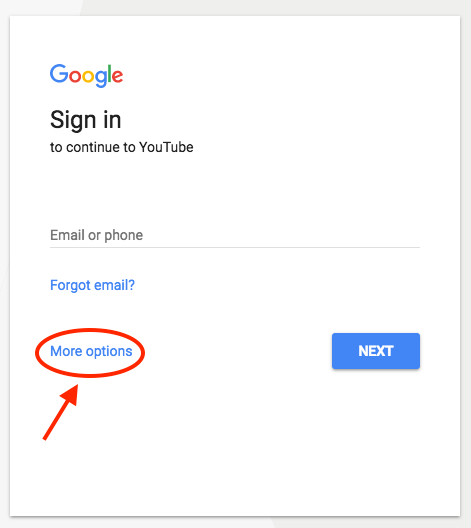
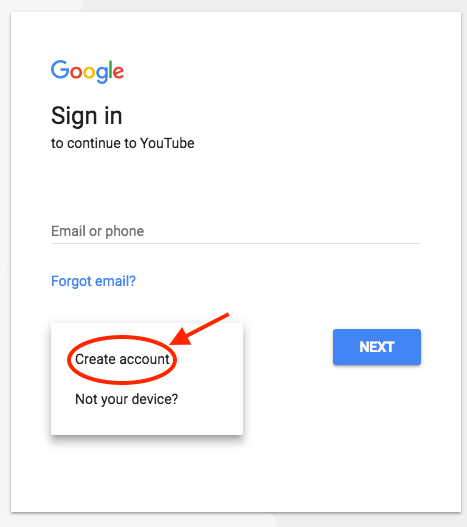
Go to youtube.com and click "sign in" in the upper right-hand corner. From there, you'll be taken to a Google sign-in page. Click "more options":
Then, click "create account":

From there, you'll be asked to follow a few steps to create a Google account. Once you've completed them, proceed with the steps below.

If You Do Already Have a Google Account

Go to youtube.com and click "sign in" in the upper right-hand corner. From there, you'll be taken to the same Google sign-in page above. If you have multiple Google accounts, be sure to select the one you want to be associated with the YouTube channel.

2. Optimize your channel with brand details.

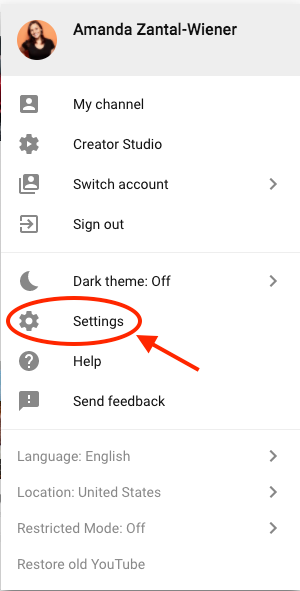
Once you're set up with and signed into your YouTube account, it's time to create a channel. Back at youtube.com, click your user icon in the upper right-hand corner. You'll see a drop-down menu, where you'll want to click "settings."

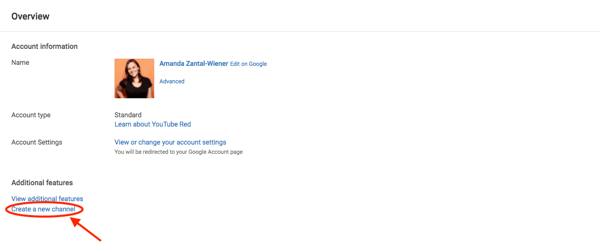
From there, you'll be taken to your account overview. Under "additional features," click "create a new channel."

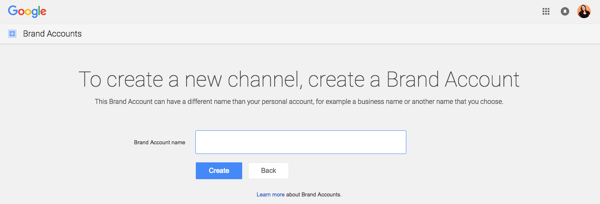
The first step is to create a Brand Account. It can be whatever name you want, and doesn't have to be the same name that you used to create your Google account -- but we do recommend that it reflects the brand the YouTube Channel will represent.
After you enter the Brand Account name, you might be asked to verify the account via text message or voice call. If that happens, enter the code you receive from the option you choose.
Once you've verified your Brand Account, you'll be taken to the dashboard for your channel. Now, it's time to start customizing it. 


3. Customize your channel.

There are two elements of customization for a new YouTube channel: descriptive details, and visuals.

Descriptive Details

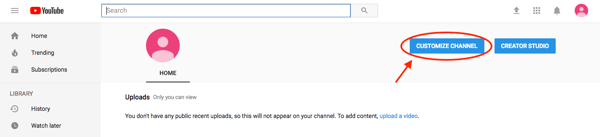
From your channel dashboard, click "customize channel."


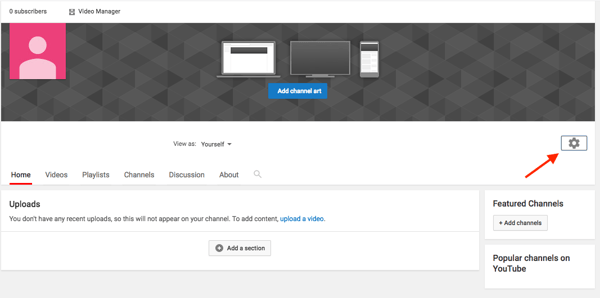
We'll start with the fundamental details about your channel. After you click "customize channel," you'll be taken to your basic channel page, where you'll see a cogwheel on the right.

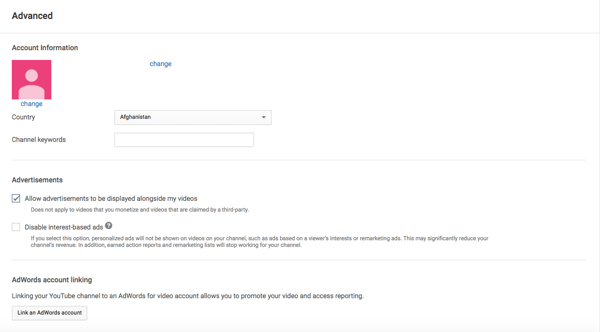
Click that, then click on the section that says "advanced settings."

Here's where you'll enter some basic information about your channel, like the country where it's based, as well as optimize it for discoverability by adding keywords that describe what it's about and selecting whether or not you want it to appear as a recommended channel on other account pages. It's also within these settings that you can link an AdWords account, add a Google Analytics property tracking ID and make advertising selections.
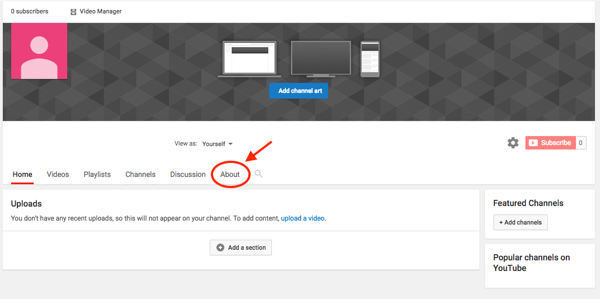
Next, you'll want to add your channel description and links. Back on your channel customization dashboard, click on the "About" tab.

There, you'll be asked to fill in such details as a channel description, which you can optimize for discoverability -- more on that later -- as well as contact information, and links to your website and social media channels. Up to five links can overlay your channel art, meaning that the banner on your profile page will contain icons for the links you choose to overlay on this list.
For example, if you wanted to overlay your banner with a link to your Facebook Page, it might look like this:

 
Your channel art is part of your channel's customization, which we'll move onto next.

Visuals

When it comes to creating and adding channel art, Google has a plethora of resources for content owners, from a gallery of images to image editing tools.
One of the trickiest parts of channel art is creating a responsive banner that matches dimensions for various user experiences, like desktop, mobile, or TV. Luckily, Google has this handy image that represents the best dimension for each viewing platform ...


Source: Google

... as well as this concise video explainer:

Need a little inspiration? Check out this post with some of the best YouTube banners we've found.
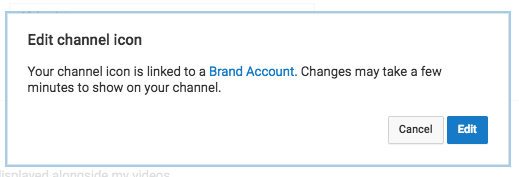
You'll also want to upload your profile photo. If your channel is linked to a Brand Account, as is the example we've used in this step, then you'll need to update this image in the "about me" section of your Google account. Note that this rule also applies to your channel name when using a Brand Account.
When you click "change" under your profile icon, you might see this message:

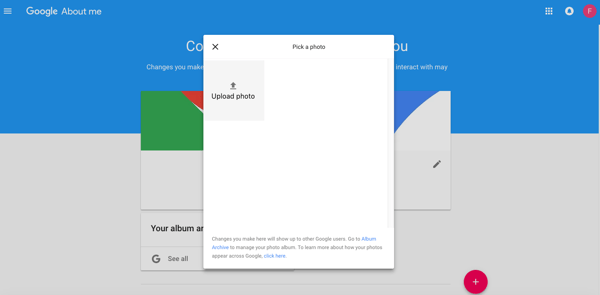
Click "edit," and you'll be taken to this page, where you can edit your Brand Account information, including your profile photo (which will be displayed on your YouTube channel).

We recommend choosing an image with dimensions of 800 x 800 pixels.
Next, it's time to add your channel art, like a banner image. Back on your channel customization dashboard, you'll see
Cover art dimensions on mobile and more, best tips (), etc ...

4. Add videos and optimize them for search.

Optimizing your channel for discoverability is just the beginning. Once you start adding videos, you'll want to optimize them for search, which in turn helps users discover your video.
But this goes beyond giving your videos accurate, clear, and concise titles -- though that is important. Below, we describe some of the most important things to optimize on YouTube. (For a fully comprehensive post on YouTube SEO, visit this post.)

Title

When we search for videos, one of the first things that our eyes are drawn to is the title. That's often what determines whether or not the viewer will click to watch your video, so the title should not only be compelling, but also, clear and concise.

Description

This should be limited to 1,000 characters -- and remember that your viewer came here to watch a video, not to read a lot of text. Plus, YouTube only displays the first two or three lines of text, which comes to about 100 characters, so front-load the description with the most important information.

Tags

Using tags doesn’t just let viewers know what your video is about -- they inform YouTube, too, which uses tags "to understand the content and context of your video," according to Backlinko. That way, YouTube can associate your video with similar videos, which can broaden your content's reach. But approach with caution -- just as with your title, don't use misleading tags because they might get you more views -- in fact, Google might penalize you for that.

Category

Choosing a category is another way to group your video with similar content on YouTube -- but that might not be as simple as it sounds. YouTube's Creator Academy suggests that marketers "think about what is working well for each category" you're considering by answering questions like:

  • Who are the top creators within the category? What are they known for, and what do they do well?
  • Are there any patterns between the audiences of similar channels within a given category?
  • Do the videos within a similar category have share qualities like production value, length, or format?
That's it -- you've officially not only created a YouTube channel, but now also know how to optimize its content for discoverability. For more information on how to best leverage YouTube for marketing, check our entire collection of resources.


Source

Saturday, 23 December 2017

Three Ways To Grow Your Community Online


 Online marketing is a constantly evolving challenge. One day we are told email marketing is the key to success and the next that email is dead. The way we think about reaching, capturing and engaging with our audience and our customers’ needs to reflect how they themselves engage online.
For me, that’s all about community. Ironically as we become more and more enmeshed in our digital worlds, the desire for connection becomes even greater. So how do we bring those two worlds together?
Here are 3 easy to implement ways to grow your online community.

Launch a Facebook Group

Facebook Groups are a fantastic way to build community around your core area of expertise and knowledge and like most things online, it’s about the quality of engagement, not the number of members. Of course, you want to grow your group, but do not be put off from setting one up by thinking that you need thousands of members for it to be successful, you don’t.
What you do need is to provide value and a real sense of community. That will require you to dedicate time into the group each day, to initiate conversations, to engage in others conversations and of course to steer the group itself.
So how do you start one? Pick a topic that you are passionate about and that is related to your core business. Start a group and make sure that you have some great graphics in place for your FB banner etc. You want to start your group looking as well put together and professional as possible. You don’t need to pay a designer to do this, you can do it very simply using apps like Canva.
Now its nearly time to start inviting people into the group, but before you do that, make sure that you’ve embedded some great content into the group. Here’s some examples:
Have a series of webinars already set up that people can join.
Create checklists and other useful documents that your members can use.
Set up regular discussions: Monday Meet Ups, Friday Promos – it sets a theme and an expectation for what people can get from the group.
Final part … start to invite people to join!
TOP TIPS
Just remember to not add people to groups without their permission, this is really, really annoying and will likely prevent anyone from joining. Instead send a personal message, whether through FB itself or another medium … just make sure that the message is personal and not the same message sent to multiple people. It is crucial that you do this for the first 20,50, 100 people. They will be the ones that create the most engagement in your group and make new members who come to ‘look’ at the group want to stay.

Facebook Live Broadcasts

Love or hate video, it’s here to stay and the best way to get involved is FB Live. Pick a topic that you want to talk about or share with your community and press Live Video … that’s all you need to do to get started.
FB Live will allow you to build relationships with your community far quicker and deeper – it’s the next best thing to meeting people in person. FB Live gives you an opportunity to showcase both your knowledge and your personality. This does not mean that you need to be an extrovert to make FB Live work for you, all you need to do is be yourself.
As FB Live is part of Facebook, they make sure that those videos are seen by far more of your community than other videos that you post, like You Tube, so it’s a great way to reach more people.
TOP TIPS
Set up a schedule so that people know what time and days you will be broadcasting. Consistency is key. I have a regular FB Live, every Wednesday at 6am GMT on my Facebook Business Page – everyone now knows they will always find me there, every week at the same time and each week, our audience grows.
Make sure you name your FB Live each week and include a link to your website / landing page – you do this in the text as you launch your FB Live.

Create Content That People Can Share

Whether you’re creating inspirational quotes, blogs, FB Live Broadcasts or Community Groups, you want people to share them. Sharing is caring and the best way to grow your community is through recommendation.
Make sure your content isn’t just about you and promoting your business; you want to provide real, meaningful value that people want to share. Your content wants to showcase your genius, give tremendous value and leave people wanting more.
TOP TIPS
Make sure that you have links to your website or relevant landing page in all your copy.
If you’re going to do inspirational quotes, make sure they are relevant and original … your own where possible!
Remember to ASK people to share your content! Sounds simple, but it’s easy to forget. IF you want people to share your FB Live broadcasts, you have to ask people and remind them how to do it. If you want to grow your Facebook Group, you want your members to recommend other people to join. Make that easy for them to do so; not just by asking them, but also by providing them with the links that they need to share.
If you’re not already in my Facebook Group, The Freedom Collective, what are you waiting for?! ☺

Monday, 18 December 2017

The Video Marketing Funnel: Proof it Works and 5 Easy Steps to Follow


 Everywhere you look right now you can see the virtual cries that "THIS IS THE YEAR OF VIDEO MARKETING!" In fact, as I browsed the internet, researching this topic, I saw that claim absolutely everywhere.


The video phenomenon is a huge hype all over the internet, and it's intimidating. Many marketers think of video as a quicksand pit designed to swallow time effort and money for little reward — especially as they don't feel qualified to make something that could compete in the world of viral media. 
It's such a shame because it really doesn't take much. You can do it, it won't break you or your bank, and the potential reward is awesome. 
I asked content marketing and social media strategist Brian Honigman whether he thought that video marketing was essential for marketing success, to which he replied:
"Video isn't a requirement for success with marketing, but it's one form of content all businesses should consider experimenting with to best reach their audience.
Small businesses need to realize that you don't need a film crew and a studio to create compelling video, if you invest in the proper equipment, choose the right ideas and develop footage that's of use to your audience you can drive results with video for your organization."
— Brian Honigman, CEO of Honigman Media, regular contributor to the Wall Street Journal, Forbes and others
So if you're dead-set against creating video, you don't have to fear that it'll bring you down. However, it's a really really good idea! So where's the real life proof that newbies can rock the world of video marketing? I've got a great new story for you...

The Proof 

An example of an everyday marketer (not a video guru) getting traffic and leads from YouTube. 

I was talking to a colleague the other day, and she was telling me about her enthusiasm for video marketing. Before I continue, it's important you understand the background here.
  • She's not a long-term video expert with oodles of experience with YouTube and video creation.
  • She's just running an affiliate site, like many of the people who will read this post.
  • She has a newish website (roughly 6 months old) and has only been playing with YouTube as a platform for part of that time (about 4 months).
  • Her videos are mostly just PowerPoint words on a screen with a voice-over of her talking, plus a little screen capturing.
  • She doesn't have fancy tech, just the microphone on her laptop. 
However - she has managed to get thousands of views already, and it's only very early days. Check out this image of her latest month:
youtube graph
And remember, this is without complicated Hollywood budgets or skill levels. Just a marketer having a crack at YouTube marketing. She even said, "I'm sure these numbers can be improved on. My channel isn't optimized very well. I've been lazy with that."
So how does she make money from this? I asked her, and she told me about her process and why it works (which I'll cover in more detail for you in the steps below).  
"1) I create engaging videos that are of genuine quality. I teach people new things about my niche, things that make them go "WOW" - things they've never heard before. 
2) I put a link to a squeeze page in my video description and encourage people to sign up to it in my video.
3) My squeeze page redirects to a high-converting sales letter once someone opts in. They also receive emails promoting products.
The reason it works well is that people discover me on YouTube, watch my video and view me as an authority in my niche.
I'd say that for every 50 views, I get 1 sign-up. And for every 10 signups on average, I make a sale (sometimes more, sometimes less, 1 in 10 is a safe number) from my front-end VSL (video sales letter) I redirect them to."
It's a neat little funnel, and there is so much you can do with it! You can get traffic, leads and conversions, and grow your brand reach at the same time. And video isn't like on-site articles; you won't get penalized for duplicate content. You can share your videos across the board on social media. It's the medium that just keeps on giving. 
So now, from my discussion with my colleague and a bit of poking around, I've broken it down so you can take advantage of the process yourself. 

Is Video for You?

You need to assess how competitive the YouTube environment is in your niche to see how difficult it'll be for you to break into. 

While the above example is showing great promise of success, I can't promise that this'll work across the board. You have to think about whether or not your niche will have a lot of competition on YouTube.
An example of this is the ridiculously high number of make-up tutorial videos on YouTube.
make-up tutorial on YouTube
Yep, that's right: 32,900,000 results. Almost 33 million video make-up tutorials. And I can tell from the video thumbnails that the video standard is going to be quite high. If you were to make one of those videos, you'd have a lot to compete with.
In saying that, many niches have under-utilized YouTube, and have a lot of room for new videos. Comparing the above example to affiliate marketing tutorials, you can see there are only 84,200 results, and I can tell from these thumbnails that the videos have a much lower production quality level:
affiliate marketing tutorials
You can do your own search on YouTube for the types of videos you're thinking of making, whether it be a tutorial or how-to for your niche audience, or a video blog series. See how many videos there are, and what kind of quality there is.
If there are masses of high-quality videos, that doesn't mean it's impossible or that you should avoid video marketing. It just means that you'll have to put in a little extra effort when it comes to finding a unique angle so that you can stand out among the crowd or cater to more specific searches.
If there are few videos, or they're really generic and you know you have more to say on the topic, then you should definitely give it a go. 

Step 1: Decide Where You'd Like to Send Traffic

This will help you to sculpt the content of your videos to the target audience of that page. 

You don't always need to send traffic to the same place with your videos, you can change it up and link to wherever on your site is most relevant to each video.
But if you really want a solid strategy for conversions, it's probably best to have an idea of the best place to send them before you create the videos. Here are the top couple of options for you to consider:

Option A: If You Have a Mailing List, Send Them to Your Squeeze Page

Sending your viewers to a squeeze page like the one in the image below is the best option for converting your YouTube traffic into a large amount of enthusiastic leads. 
squeeze page
If you don't have a squeeze page, you should at the very least have opt-in's of some kind on your site or you're missing out on a great deal of leads and ongoing conversions! If you don't have a mailing list and newsletter set up but you'd like to, the fastest and easiest way is via AffiloJetpack, so feel free to check that out if you're interested.
If you do have a squeeze page already, just make sure you've optimized it to get the best results. I recently wrote a blog post about this here, so pull any tips or tricks from there as necessary. 
Think about the type of person you'd like to sign up to your mailing list. What are they looking to know? What are they enthusiastic about? Keep this in mind through the next few steps. 

Option B: Send Them to Your Most Relevant High-Converting Content

The other place to send your YouTube traffic is your content, particularly if your on-site content and the YouTube video add value to one other. 
content
This option is generally for you if:
  • You don't have a mailing list set up, or
  • Your target is to get more engagement for your on-site content
Choose the content that will be the most useful to your audience, preferably something you know that converts well. Think about the audience for this content. What are they looking to do? What challenges are they facing that your site helps them with? Keep this in mind through the next few steps.

Step 2: Create Some Videos

It doesn't have to be rocket science: There are simple ways!

This is the part that frequently turns people off. I asked Brian Honigman about this, and he replied:
"Video seems overwhelming because everyone's fearful that they'll do it wrong or that it won't be perfect. With creating video, it's important to experiment first to see what works and doesn't work for you. There are endless videos, articles and courses on how to do video, it's just a matter of taking the time to find out what works for your business."
- Brian Honigman, CEO of Honigman Media, regular contributor to the Wall Street Journal, Forbes and others
I could spend all day going over your options as far as video is concerned, but thankfully I have a quirky little blog post from not too long ago that covers the topic already in detail for you called, "Video Content: Super Fun! Super Effective."
video content lesson
You'll find what you need to know there as far as how to film or edit your videos simply and effectively, but I'll cover the main points to keep in mind for this purpose here:
  • Look around YouTube for other videos in your niche (how-to's, general discussions etc...) 
    • What do they do well? Anything you could emulate that wouldn't be too difficult to pull off?
    • Is there any way you could do a similar thing but better? 
    • What unique information can you give them?
  • You must think about how your video can help your audience with their problems, or enlighten them to options that they might not have thought of.
  • Make sure you keep your content relevant to the page you're sending people to (whether that's a squeeze page or on-site content).
    • Your target audience should be the same for both.
    • If you're sending them to content, you could even explain the gist of some of that content to people in a video then send them back to the full lesson.
  • Important: Include a call to action in your video!
    • Ask them to click on the link in the description below.
    • Tell them how they'll benefit from going there. Is there a freebie they can sign up to get? Or more useful content there for them? 
    • An example of this might be to say at the end: "Thanks for watching. Remember to click on the link in the description below to get [benefit]."
Once you've created a video or even a short series of videos, it's time to upload them to YouTube. I'll quickly show setting up a channel for anyone who doesn't already have one, and then I'll run through the best process for adding your videos. 

Step 3: Set up a Channel for Your Brand (If You Haven't Already) 

This doesn't take long, and it becomes a neat little brand-associated hub for any videos you create. 

You really do want a channel separate from your regular Google account so that you can personalize it to your brand. If you already have a channel set up, skip forward to step 4. If not, it's really super simple; just follow along the instructions in this step.
Start by making sure you're signed into your main Google account, then head to www.youtube.com/channel_switcher. You'll see a button with "Create a new channel" on it. 
Create Channel
Then all you need to do is fill in a channel name (preferably in line with your brand/website name), and then select a category (which will more than likely be product or brand).
enter details
Then there's just the Pages Terms, and you can click "Done." Simple as that. Once you get into your channel, there are a few areas you might want to edit to align with the images and information associated with your brand. These include a profile picture, cover photo (called "channel art"), and the "About" information for your channel.
Channel Updates
channel description
Quick tips for your channel information:
  • Use the same brand images that you have on your website.
    • This will make the connection between your channel and your site obvious, and strengthen your brand image overall.
  • Have a compelling description.
    • Make sure you state clearly and simply what people will find on your channel.
    • Then add a quirky phrase or some personality; YouTube is for information but also for fun!
Once you've edited these to look like a good channel profile, you're ready to start uploading your videos. 

Step 4: Upload Your Video(s) to YouTube

Think carefully about your title and description. Include all relevant information, and don't forget to link back to your site. 

Whenever you're signed in and navigating around on YouTube, you'll see there's an "Upload" button in the top right corner. 
upload button
When you've got your video(s) ready, simply click this button. Then it's really easy to drag and drop a video in, or you can select one by clicking on the big central icon. 
upload video
Then, while your video is uploading, you can add a title for your video, a description letting people know what they'll learn by watching, and a few tags describing the main topics in your video. 
Make sure that you don't forget to put that link back to your website in the description here, especially if you've mentioned it in your video. Otherwise, it's like inviting everyone to a party at your place and then not being home: Awkward. 
Then click "Publish" and your video is live and ready to go.

Step 5: Spread the Love! Get Your Videos Some Initial Exposure

You need to take your YouTube videos and promote them in a variety of places where your target audience will be likely to see them.

There are a few ways you can get more views for these videos, especially when you've just launched them and they need a base number of views to show that they're worth watching.

Paid Traffic (Optional, Good for Getting off the Ground)

You can direct paid traffic to your YouTube videos by advertising through AdWords here.
I asked my colleague from the case study earlier in this post if she recommended AdWords and she said this: 
"Definitely, I did that. To get enough traffic, I had to pick a really big, open couple of keywords ('dropshipping' and 'dropship') and advertise for all searches using those keywords.
I found for me, the best place for a content-driven video was in the 'recommended video' on the sidebar and in the search results. I think I spent no more than $50; it was really cheap."

Social Media

Often you'll be trying to figure out what you should be posting on social media to build your brand image. In this instance, you get a win-win when you post your videos to social media. You get something of value to share with your followers, and you can promote your video at the same time.
Try to be active on the social media pages of other authorities in your niche. If you see people asking about the topic of your video or you find a discussion in which your video would genuinely be relevant (don't force it!), share it there.

Forums

Forums are not a thing of the past. Many people still use them to keep up with topics of interest to them or to ask questions. This can be a great place to find topics for your videos, but also for you to link to your YouTube videos when they'd be of use. You help others by answering their questions, and you get to promote your material at the same time.

Don't Forget Your Takeaways!

takeaways
So the aim of the game is to go away and...
  • Assess whether or not video marketing will be worthwhile for you.
    • Is your niche particularly competitive on YouTube?
    • Do you have something unique to bring to the table?
  • Create your YouTube channel.
  • Create a small series of videos to begin with.
  • Include a CTA in your video.
  • Upload your videos to YouTube.
  • Include a link to your squeeze page or relevant content in the description.
  • Promote your YouTube videos wherever you can do it (without forcing it).
  • See if you can't get some views, turn some of those views to leads, and some of those leads to conversions.
I'd like to leave you with one final tip from Brian Honigman. I asked him, "If you could give someone just one ultimate video marketing tip or piece of advice, what would it be?" He answered:
"The main thing to think about when developing video content on behalf of your business is to ensure it's related to the interests of your audience and not overly promotional of your company's offerings. Think about what would drive value to your customer base, while still relating to what you sell.
For example, Moz, the marketing software company, has become known in the SEO and overall marketing industry for their video series Whiteboard Friday. In this video series, members of the Moz team explain how to approach certain marketing topics like link building or content marketing myths and more.
This series is done in house and is extremely simple, but has driven widespread results for the organization since it's of value to their customer base without having to regularly call out their marketing software through the videos.
Strike this balance with your video marketing efforts in order to ensure success."
- Brian Honigman, CEO of Honigman Media, regular contributor to the Wall Street Journal, Forbes and others
Let me know in the comments below if you have any questions whatsoever about video marketing, or any comments about it if you've already given it a go. I'd love to hear from you. 
Best of luck with your video marketing!