Showing posts with label google analytics. Show all posts

Thursday, 29 March 2018

The Top 25 Tools Every Successful Blogger Needs

If you’re trying to make money by blogging, you need to promote and drive traffic to your website through an online marketing strategy. Add these 25 tools to your blogging arsenal to create quality content and accomplish your marketing goals.

Blogging Tools

First and foremost, you need to craft content your audience will enjoy and share. These tools will help you create, edit, and analyze your content.

Google Drive

As a blogger, you’ll have several files, drafts, and ideas floating around your computer. Keep all of your media, documents, and content in one place with Google Drive. If you work with other bloggers or colleagues, this is an excellent tool for collaborating and organizing campaigns, as well.

Grammarly

No one is perfect, not even top bloggers. We all make mistakes, but we don’t want to publish our errors online. Before you hit the looming “Publish” button, run your content through Grammarly. This free grammar checker will catch glaring spelling, grammar, and punctuation mistakes and also offer suggestions to improve your work.

Hemingway App

In the world of blogging, you want your writing to stand out from the crowd. The Hemingway App helps you fine-tune your content and cut out the fluff. Those who want to improve their writing chops derive a great deal of value from using Hemingway.

CoSchedule Headline Analyzer

Arguably one of the hardest parts of blogging is finding the perfect headline. A headline must be catchy, SEO-friendly, and intriguing enough to drive traffic to your blog. Rely on CoSchedule’s Headline Analyzer to discover headlines that work for your audience and search engines alike.

BuzzSumo

Understanding what topics and types of content generate top social media engagement is vital information for bloggers. BuzzSumo is an in-depth blogging tool designed to help writers discover relevant topics, top influencers, and other key data including social media insights. Bloggers also use this tool for content inspiration by researching competitors and trends.

Canva

Everyone knows blog content must also be intriguing to the eye. Canva allows bloggers to easily create stunning visuals for blog posts, social media, and other content. The tool also provides simple tutorials for those who need help along the way.

SEO Tools

Once you’ve created your content, you must optimize it to rank well on search engines. These SEO toolsare used by blogging professionals to increase website traffic, improve search rankings, and analyze their content’s performance.

Google Analytics

Every blogger must have a Google Analytics account. This versatile tool offers insight into your website’s performance, traffic acquisition, and audience. Bloggers use Google Analytics to discover what channels their traffic is coming from, how long people stay on their website, and where their readers are located.

Yoast SEO

Yoast SEO is a popular WordPress plugin used to optimize a website and blog content for search engines. Everything from the technical aspects of SEO to improving the readability of a page can be accomplished using this handy plugin.

Google Keyword Planner

If you want to rank on Google, Bing, and DuckDuckGo, you need to know what your audience is searching for. Google Keyword Planner provides expansive information about keywords, search trends, and more to amplify your content marketing efforts.

Keywordtool.io

Another popular keyword research tool is Keywordtool.io. Using Google’s autocomplete feature, this tool assists bloggers in identifying potential keywords for their blog content. Best of all, this tool is completely free!

Moz Open Site Explorer

To generate a wealth of traffic to a blog, you must have quality backlinks directing people to your website. However, some of these links may also be malicious or damaging. Moz Open Site Explorer shows bloggers what links are pointing to their website along with other crucial link information.  

SEMRush

Bloggers looking to advance their search engine optimization efforts should subscribe to SEMRush. As one of the leading SEO tools, SEMRush provides in-depth analytics, competitor research, display advertising information, and so much more. Bloggers will have an abundance of search marketing information at their disposal with this tool.

Social Media Tools

Bloggers are especially active on social media platforms such as Pinterest, Twitter, Instagram, and Facebook. To maximize their audience engagement and content distribution on these platforms, bloggers rely on these tools:

Social Sharing Bars

With the goal of offering readers a simple way to share content, the majority of blogs use a social sharing bar or buttons embedded in or near their content. If you look to the left of this article, you’ll notice a social sharing toolbar on our blog. These widgets entice readers to share the content with their friends and followers online.
To add this capability to your blog, use one of these social sharing tools and WordPress plugins:
Once you install any of these social sharing tools on your blog, remind readers to use it!

Social Media Scheduling Tools

Bloggers are also responsible for distributing their own blog content and engaging with fans on various social media platforms. As you might imagine, this can be quite cumbersome. To speed up the process, bloggers schedule their social media posts in advance using a variety of tools. These social media scheduling tools allow you to create posts for specific platforms and assign when you’d like it to publish.
Top social media scheduling tools include:
Take advantage of these tools by scheduling as much content in advance as possible. This leaves you with ample time to create more content and interact with your followers.

Email Marketing Tools

Another way to drive readers to your blog content is through email marketing. From regular newsletters to announcements, email marketing keeps your audience informed and engaged.
To start your email marketing campaigns, you must collect email addresses from interested readers. WP Subscribe and Optin Forms are both excellent choices for creating subscriber forms for your blog. These forms should be strategically placed throughout your website to entice readers to sign-up.
Once you’ve collected enough subscribers, you can create and send emails through tools like Constant ContactRemember to only send your subscribers top quality content—never spam!

Bonus Tool: WordPress

We recommend that all bloggers use WordPress to create and manage their blog. WordPress is a versatile content management system that gives bloggers complete control over their content, tools, and website design.
Over to you! What blogging tools do you use? Share your thoughts in the comments below.


How to Use Instagram Analytics to Grow Your Following

Did you know Instagram has more than 500 million active users and counting? Are you using Instagram to build a following for your personal brand, blog, or company? If so, you might be wondering how you can grow your follower count without engaging in odd tactics such as buying followers.
The best approach lies in Instagram’s native analytics platform, known as Instagram Insights. This platform is only accessible to users with an Instagram business account.
Here, you can find information about your followers, content, and Stories. By knowing how to interpret and implement this data, you can develop a quality growth strategy for your profile.
To find Instagram Insights, navigate to your Instagram profile on your smartphone – this feature is not available in the browser version of Instagram. In the top right-hand corner of your screen, you will see 4 vertical bars of varying sizes. Click this icon to access Instagram Insights.

Navigating Instagram Insights

Instagram Insights offers surface-level analytics about your followers, posts, Instagram stories, and promotions. This data is communicated through metrics including:
  • Impressions: The total number of times your posts have been seen
  • Reach: The number of unique accounts that have seen your posts
  • Engagement: The number of times a post was liked, saved, and/or commented on by users
Additional metrics include profile views, website clicks, email clicks, and directions clicks.
When you first open Instagram Insights, you will be presented with a 7-day view of your account. Here you will find the number of impressions, reach, profile views, website clicks, and email/call clicks for the most recent week.
Under this section is Followers. This is where you can find information about your followers, such as:
  • Gender
  • Age
  • Location
  • Activity (Categorized by hours and day of the week)
Directly below Followers, you will find a section full of your Posts. In this area, you can look at various metrics for your content, including reach, impressions, and engagement. You can also organize the posts by date range, metric, and type of content.
Following the Posts section is Instagram Stories. If you post regularly to Instagram Stories, you will find details about their engagement here. In addition to impressions and reach, this section provides insight into the following metrics:
  • Taps Forward: The number of taps to see the next photo or video
  • Taps Back: The number of taps to see the previous photo
  • Exits: The number of times someone exited your story
  • Replies: The number of replies (to your Inbox) a photo or video in a story received
  • Swipes Away: The number of swipes away from this photo or video to skip to the next account’s story
Lastly, Instagram Insights also shows information about any promotions you may have launched on the platform.
Play around with the various sections of Instagram Insights. Once you know how and where to find specific information within the tool, it’s time to utilize the data and grow your Instagram following.

4 Ways to Leverage Instagram Analytics and Grow       Your Following

After becoming comfortable with the built-in analytics platform, use the data to test out the following growth ideas.

1. Determine When Your Audience is Active

Instagram does not serve content to users in chronological order, meaning there is no true “best time to post.” However, you can discover when your audience is most active. You can find this information in the Followers section of Instagram Insights organized by day of the week and time of day.
Using this insight, plan to post your Instagram content within these time frames. Be sure to track the success of each post and time and adjust your schedule if necessary.

2. Appeal to Your Target Audience

When reviewing the Followers section in Instagram Insights, does the age, gender, and location information align with your target audience? If so, you’re doing something right! If not, you need to examine your posts and identify why you’re appealing to a different market than initially intended. Adjust your content accordingly to attract attention from the right audience.
On the other hand, if you’re unsure about who your audience is, Instagram Insights will tell you. With the audience demographic and geographic information in mind, you can craft relevant and timely content to appeal directly to this particular segment of your market.

3. Understand the Type of Content Your Audience Engages With

Users won’t want to follow your account if you don’t post content they are interested in. Using the Posts section, look at the engagement, impressions, and reach data for your Instagram Stories, photos, and videos. Out of the three content types, which tends to generate the best results? You can also organize your content by certain metrics and time periods. This is beneficial in determining what type of content your followers tend to interact with most.
For instance, use the tool to organize your posts by engagement over the past year. What do you notice? Did you do something similar in the copy? Did you use a specific hashtag that generated a lot of likes? Perhaps your image was stunning. Or, maybe your video asked viewers to comment below. Identify the commonalities between your top posts and implement them throughout your upcoming content.
By having a consistent and engaging presence on Instagram, you’ll attract more followers within your target market as time goes on.

4. Analyze Your Call-to-Action

Data from Instagram Insights is an excellent way to determine if your call-to-action (CTA) is working or failing. For instance, many accounts tell users to “click the link in their bio” for more information. In addition to the traffic acquisition data from Google Analytics for that particular webpage, Instagram Insights can tell you how many people clicked on the link in your bio over the last seven days. This information can help you test which calls to action work best to drive a specific action, such as website or call clicks on your profile.
Another commonly used call-to-action asks people to comment or tag a friend. By organizing your content by comments in Instagram Insights, you can see how many followers completed that action.
However, since you’re interested in growing your followers, asking people to follow your account (if they don’t already) is a beneficial call-to-action to use. Monitor your follower account to see if this CTA works well with your particular audience. If not, use the information from Instagram’s analytics to pivot accordingly!

How to Calculate Growth Rate

While Instagram provides basic metrics, such as follower count, it does not offer in-depth insight such as growth or engagement rate. You must calculate this information on your own. Alfred Lua of Buffer provides excellent insight on how to calculate growth rate and engagement rate using data from your Instagram Analytics account.
To find out how much follower growth your profile has experienced, perform the following equation:
[(Followers Then – Followers Now) / Followers Then] x 100
This results in the percentage change in growth over a particular period of time.
After adjusting your Instagram content strategy using the tips provided above, use the Growth Rate calculation to determine how well these tactics have performed in increasing your overall follower count.
How do you use Instagram Insights and metrics to grow your following? Share your thoughts and experiences with us by commenting below.


Sunday, 28 January 2018

16 Email Marketing Tools You’ll Want for 2018


As the New Year rolls around, it's a good time to start incorporating new email marketing tools into your routine. But, who has time to try and test a bunch of marketing tools? Not to worry. Pinpointe has you covered.
We've created a list of 16 email marketing tools that we've vetted and believe are essential to your email campaign success this year. The tools are designed to save you time, help you create stronger emails, grow your list and give your response rates the boost they need in the New Year.

Images

Tool #1: Pixabay

Free image library

Every email needs a quality image (or two) to draw subscribers in, but they're often hard to find and expensive. Unless you've started creating your own image library by taking pictures of your employees and clients, you're probably turning to stock photo sites. And stock photo sites are pricey. Not to mention the images are sometimes cheesy, to put it politely.
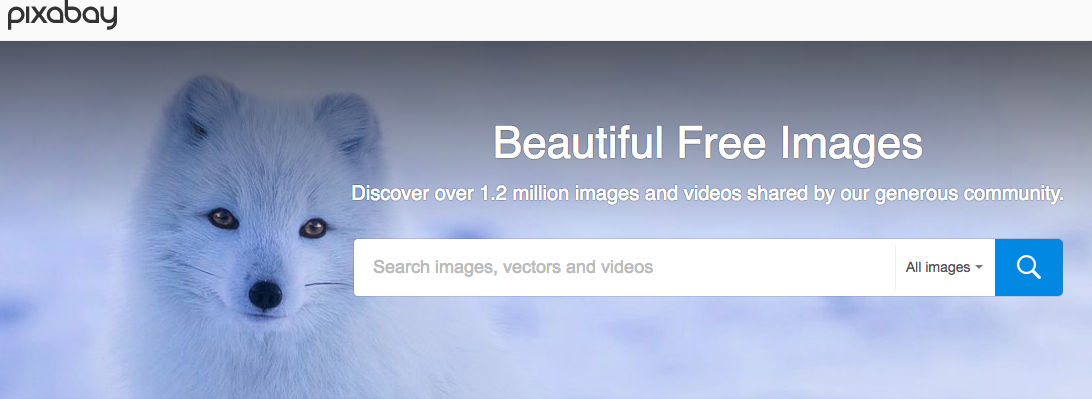
Pixabay is a great solution. It's a FREE photo library that looks and acts just like the pricey stock photo sites. You can search the database and get dozens of great options with every search. You should add the photographer's name to your post, but other than that, the images are yours to use.
pixabay - email marketing tools

Tool #2: IM FREE

Free image library

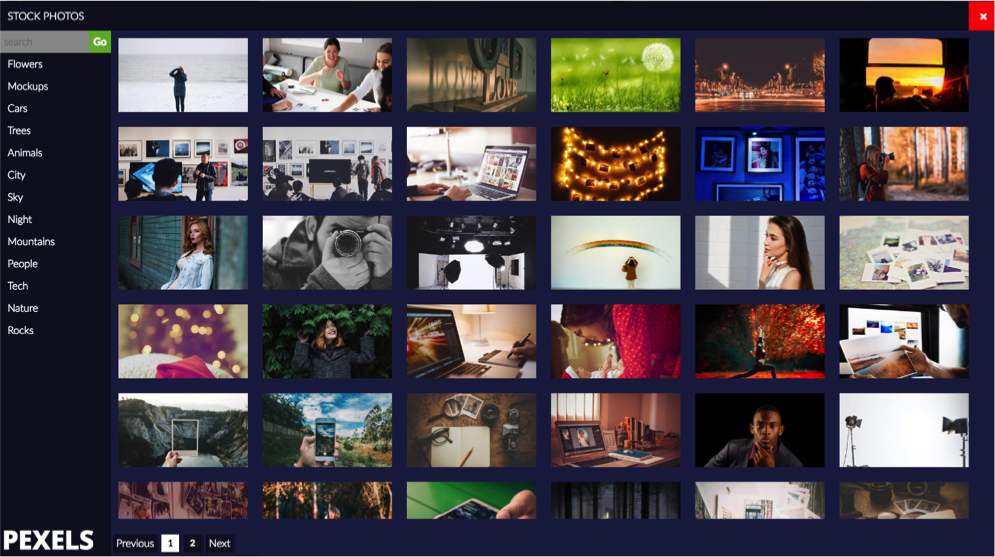
IM FREE is another photo website you can lean on. The photos in this collection are professionally done and provide quality images for business concepts that are harder to visualize, like education or technology.
The database is searchable, but it's easiest to search via categories like Nature, Transportation or Lifestyle.
This photo library doesn't have the wealth of images that Pixaby does, but it's always growing. It's a good one to bookmark and keep an eye on, especially if you're looking for a more obscure photo.

Tool #3: Pinpointe's image library

Free image library

Pinpointe customers don't have to get photos from a third-party site, they can access an image library from their account.
As you're creating an email, all you have to do is click on the Image Library and you'll have hundreds of pictures to choose from. Forget searching, downloading, resizing and importing a photo. Simply pick the images you want and drop them into your email template. Done.
Pinpointe image library - email marketing tools

Tool #4: Rszr

Image resizer

How many times do you need to resize an image? Too many to count, right? Whether you're adding an image to your email or changing out the cover art on your Facebook page, marketers need an easy-to-use photo-resizing tool. You could use well-known, feature-heavy software like Photoshop, but if you just want a basic resizing tool, try Rszr.
Not only can you resize and save an image in a few clicks, but you can also do some basic editing like cropping or erasing part of a photo. It's the perfect tool for on-the-go marketers.

Tool #5: JPEGMini

Image compression

As you're creating an email campaign, file size might not be a top priority, but it should be. Image files are notoriously large and they can slow download times. If you're sending an email with a large JPEG, it could take additional time to load on a subscriber's phone or laptop. It's a pet peeve for subscriber's who want to view emails quickly.
Before you add an image to your email, or to any digital platform, use JPEGMini first. You simply upload the picture and it compresses the file for you. No quality is lost. The picture looks the same; the file size is just smaller.

Tool #6: Awesome Screenshot

Editable screen-grab tool

Need a screenshot? Whether you're showing customers how to do something online or want a snapshot of your own website for marketing purposes, use Awesome Screenshot.
This tool lets you capture the entire page, including the content that's "below the fold." In other words, if you need a snapshot of a website that you have to scroll through, this tool can do it. It captures it all. And, you can even edit the image afterward.
You can access the tool through its website or you can download it as a Google Chrome extension, so it's always on your toolbar.

Email brainstorming

Tool #7: Answer The Public

Brainstorming tool

Do you ever run out of ideas for email campaigns? It happens to everyone. You can only send so many coupons, right? When you're stumped for ideas, turn to Answer the Public. This website can help you brainstorm ideas.
Simply enter a keyword into the search bar and Answer the Public shows you what kind of questions people have surrounding your topic.
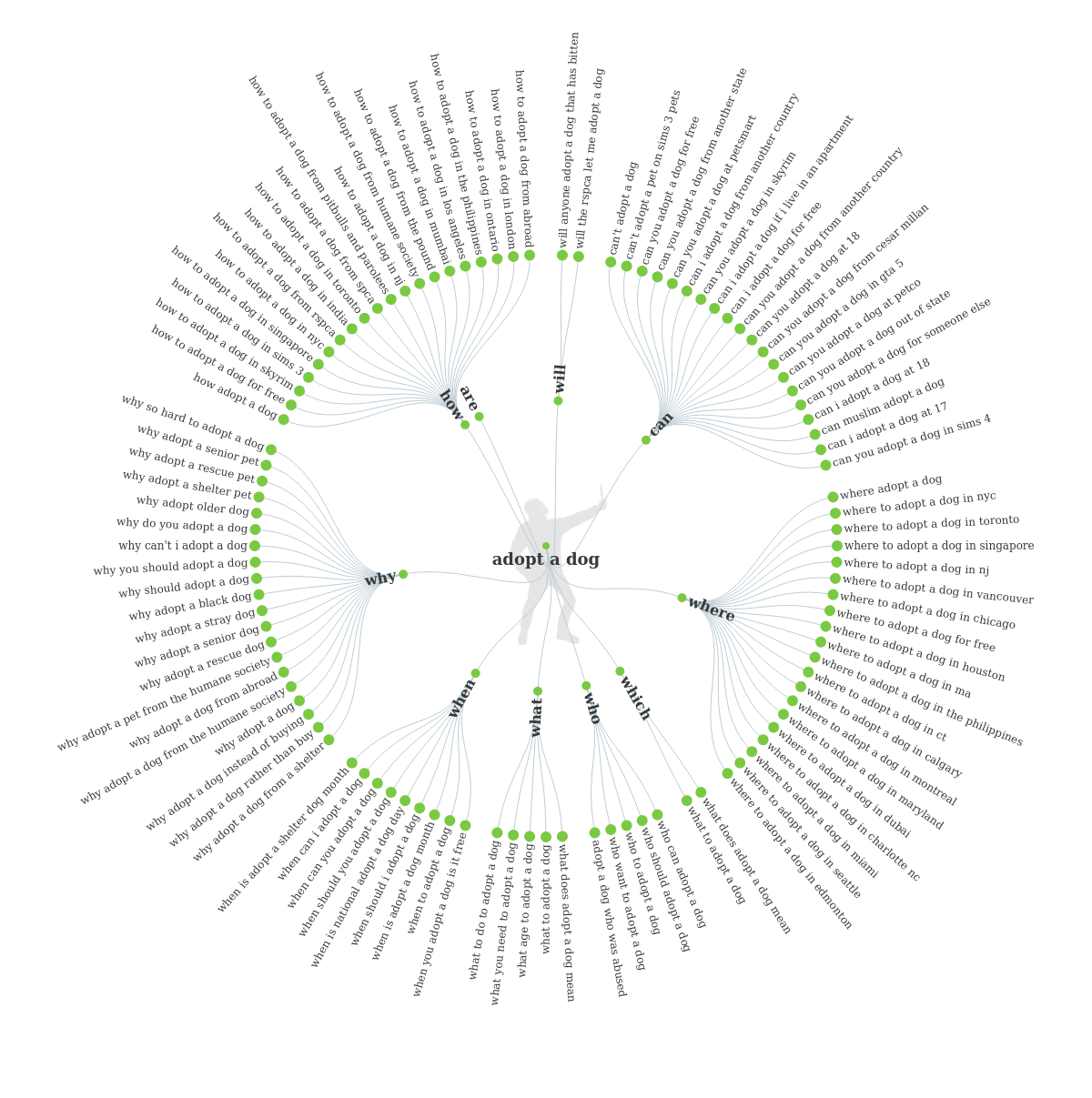
For instance, if an animal shelter is looking for ideas for their next email campaign, they can enter the words, "adopt a dog" into the search bar. Answer the Public provides a visual wheel of questions that people typically look up when they're planning to get a new four-legged friend.
Here's the "wheel of questions" that Answer the Public provides pertaining to the keywords.
email marketing tools - answer the public
You can use these questions to inspire email content. For instance, one of the questions is, "Why does it take so long to adopt a dog?" Create a blog post that answers this very question and send it to a segment of your list that's shown interest in pet adoption.

Email design

Tool #8: Canva

Graphic designer

To spice up your email, add a graphic. Don't have graphics skills? Don't worry. Use Canva. This online platform makes it simple for anyone – even those with zero graphics knowledge – to create stunning graphics.
Create a cool graphic for an event, upcoming contest or holiday sale. The options are endless. Here's a quick graphic created for an event using Canva: 
canva - email marketing tools
Yes, creating a graphic takes a little more time than just typing up a quick message, but visuals have the ability to draw a subscriber in and help them digest information faster.
Research from 3M shows people process images 60,000 times faster than text, which is why taking a few extra minutes to create a visual is a worthy investment.

Tool #9: Bomb Bomb

Video email

Adding video to your email can add a personal touch. Bomb Bomb is a tool you can use to record a quick video for your customers and engage them in a way that text can't.
This tool is especially helpful for sales teams who work best face-to-face. Create a video to check in on your existing clients, or record a special welcome message for new clients. Remind clients about an upcoming appointment with a quick video or remind them about an approaching deadline.
Bomb Bomb makes it simple to record a video from your laptop and insert it into an email. Once subscribers open your email, the video starts moving instantly, which encourages customers to open it. 
Give it a try, and see how you can incorporate video into your email marketing strategy.

Spam detection

Tool #10: Mail Tester

Spam scoring tool

Even the most reputable companies can send an email that gets trapped in a spam folder.
Without knowing it, you may have made choices in your design or text that spam filters don't like. Adding too many images, using spam words or accidentally including broken links in your email can keep your email from inboxes.
Before you send your email, put it through a spam checker to make sure your email is delivered. You can send a copy of your email to Mail Tester and you'll get a spam report. The report shows you what to fix to pass through spam filters. It's a simple step that ensures your subscribers will see your email.
 

Tool #11: Pinpointe's spam checker

Spam scanning and scoring

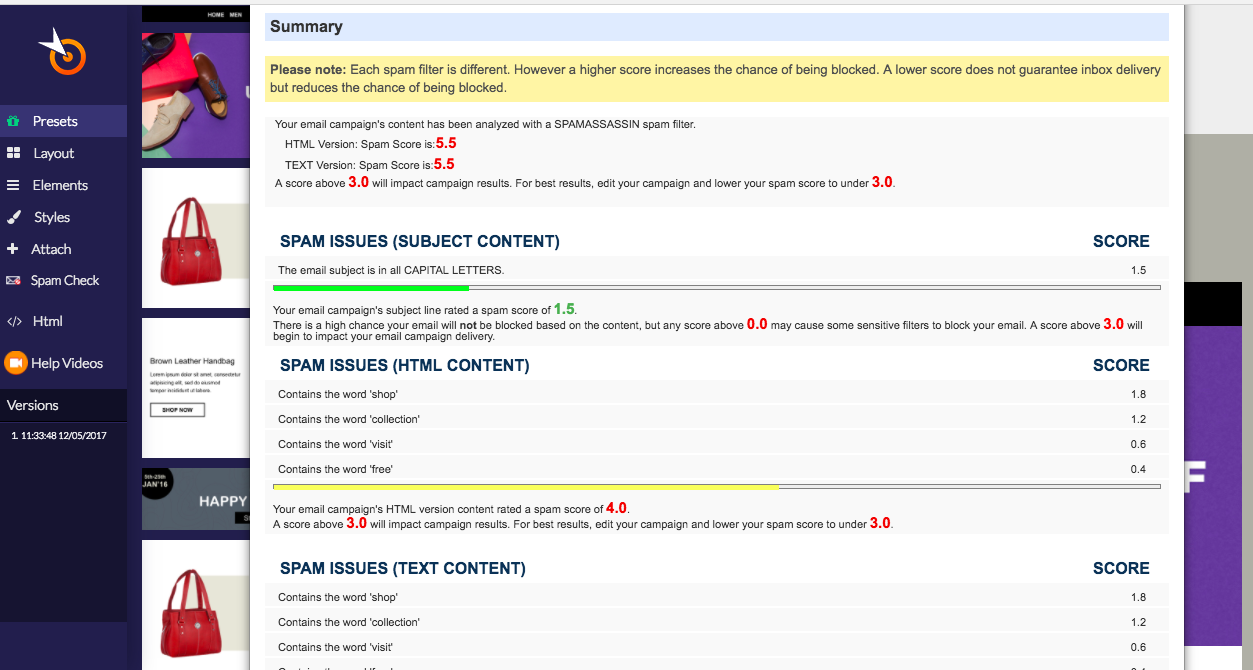
Pinpointe users can run a spam test right from their account. Just create your email and run a test with just one click. You'll get a spam score and a report that shows you how to improve it. It might suggest eliminating spam words or changing your subject line from ALL CAPS to lower case. Once you make the suggested changes, run the test again to make sure spam filters won't flag it.
Having the spam checker accessible while you create an email is a big time saver. You don't have to leave the site to know if your email is "spammy."
Pinpointe Spam Checker - email marketing tools

Email automation

Tool #12: Pinpointe's triggered emails

Automate emails

If you're still sending emails manually, it's time to move into the modern area of email marketing and use automation.
With Pinpointe, you can pre-make emails and trigger them to send automatically based on a specific time or behavior. For instance, if a subscriber RSVPs for an event, that action can trigger a confirmation email that thanks him or her for signing up and reiterates all of the important information.
You can also schedule emails to arrive in a subscriber's inbox on a specific date.

Analytics

Tool #13: Google Analytics

Next-level metrics

As you create and send emails, you have to gauge your success by checking your analytics. Most email service providers give you access to data like, open, click-through and conversion rates.
That's a great start, but if you're ready to use grown-up metrics, turn to Google Analytics. With Google Analytics you get next-level data that gets down to the granular level.
If you're using a reputable email service provider like Pinpointe, you can link your campaigns right to Google Analytics for a streamlined switch.
Accessing in-depth data helps you make changes to your email campaigns that can dramatically improve your response rates.

Tool #14: Google URL Builder

Link builder for Google Analytics

When you add links to your emails, create the URL in Google's URL Builder. By doing so, you can help Google Analytics track the success of specific campaigns.
You'll be able to see which email drove the most traffic to your website, or how many subscribers signed up for your newsletter after receiving a special offer.
Basically, you get more detailed data by building individual links for each campaign.

List growth

Tool #15: Woobox

Contest tool

Hosting a contest is one of the easiest ways to collect new email addresses. However, hosting a contest can be time-consuming if you don't have the right tools.
To help manage the contest and the contacts that come in, try Woobox. You can create giveaways, photo submission contests, fun quizzes – you name it. 
You can also use Woobox to create a customized Facebook tab that features products, encourages fans to shop or direct them to your newsletter sign up form.

Tool #16: Hello Bar

Sign up banner

Sit back, relax, and collect email addresses from your website with a Hello Bar. The Hello Bar is a small bar that sits at the top of your website and encourages visitors to sign up for your email list.
It's a great alternative to a pop-up ad, which can sometimes turn visitors off. The Hello Bar isn't annoying or disruptive, it just sits at the top of your site. It's usually a bold color to draw visitors to it. The purple bar below is an example of a Hello Bar.
hello bar - email marketing tools
There you have it. With these 16 tools,  you'll get your year off to a great start.


Source

Wednesday, 15 November 2017

5 Ways To Funnel Hack Winning Lead Magnets In Your Industry To Build Irresistible Opt In Offers


Is the content on your blog not producing the leads you expect of it?
Have your lead magnet efforts dried up and aren’t generating opt-ins?
If you’re looking for a bit of a refresh in your opt-in strategy, then these 5 steps should help get you on the right path.

Back in the day (just to make myself feel old) most websites and blogs would have an opt-in box either at the side of the blog or the bottom of the website.
This was enough back then, people landing on your blog or website would willingly subscribe to your newsletter.
While this was best practice back in the day, as ever, strategies started to evolve, and it has now become extremely popular for businesses to create lead magnets to entice opt-ins.
These lead magnets most commonly come in the form of downloadable guides and whitepapers.
Because it has become common practice for businesses to use downloadable guides and whitepapers to generate opt-ins, people have started to grow immune from it.
It is now time to evolve again and look at different ways to opt-ins.
To do this, you can follow 5 simple steps to funnel hack winning lead magnets in your industry.
Here are those 5 steps to create winning lead magnets to build irresistible opt-in offers:


1. Look At The Kindle Marketplace

To create winning lead magnet ideas, you need to understand exactly what it is people really want and not what you think they want or what you want them to know.
Fully understanding what it is your users want will help you improve you’re the opt-in rate.
But how do you find out what your target audience want?
One of the best places to look and one of the most unused places to look is in the Kindle marketplace.
It may sound a little strange right now, but you will soon come to realize why this is such a good place to look.
Go to the Kindle marketplace and browse the category listing for your niche.
Once you have found this, sort the eBooks by top sellers.
You now have a whole list of content ideas that are not only good but are what your target audience is clearly interested in because they have bought it.
You can use these ideas to repurpose your eBook for a funnel hack winning lead magnet.
This is a great tool to use to look for content ideas that very few marketers and businesses are using.
As you can see from the screenshot below, there are plenty of categories and sub-categories, so you are sure to find books that are relevant to your niche.

Image1 (1)


2. Find Out What Your Competitors Sell

Another place you can discover ways to increase your opt-in rate is to look at what your competitors are selling.
While I always say it is important to stay ahead of the competition, it is even more important not to fall behind which is why analysing what they are doing is important.
You specifically want to look at competitors who have the majority share of your target audience.
Browse their website and reviews what products they are selling.
Are there any products that are under $20?
Does that product have some positive reviews?
Is that product mentioned on social channels?
Have a look for a product of theirs that fits all or most of these things and use it or your website but to offer it is a free lead magnet rather a product customers can buy.
For example, a website that sells bicycle has a video guide that they sell for $5 that shows their customers how to do stunts.
You see that it is well received from the comments and social mentions which are a clear sign that this is something your target audience wants.
You can repurpose this to create your video with the difference being you offer it free as a lead magnet.
It doesn’t just have to stop there; you can use different product ideas from competitor websites for your lead magnets and split test which work best.


3. Browse Udemy For Course Ideas

Why do people come to read the content on your blog?
Why do they submit their contact details to download your eBook?
Because they want information and learn about what you know.
Think of your lead magnets as offering your target audience mini-courses on something you are an expert in.
What you might not know is that online are becoming more and more popular than ever before thanks to the likes of Udemy, which is a website where universities and individuals can publish their courses.
If there is ever a place to find what it is your target audience wants to learn about, it is on the Udemy website.
All you need to do is go to the Udemy website, enter a relevant search term and browse through the relevant online courses.
For example, I used the search term “landing page” and found that people are paying up to £259 for content to help them improve their landing pages and ads which you can see from the list below.

Image2

If people are paying for these courses, surely they would want them for free?
This is a great way to create some winning lead magnet ideas.


4. Simply Ask The Contacts In Your Email List

If you want to know what you target audience wants to learn about and what goals and challenges they face then there is no better place to go than to your customer base.
Why not make the most of your existing customers by sending them survey style emails to find out what makes them tick, what they want more of and what they want less of.
Using the power of your existing customer base will help you attract new customers.
As well as survey style posts, you can also send them finished content that you have not published yet and ask their opinion.
Is there anything they would change? Is there information that they feel could have more explaining? Is it valuable to them?
These are questions you can ask them when sending them your unpublished content, but I wouldn’t bombard them with too many questions.
Make it easy for them to respond.
Not only will this help you refine your led magnet ideas but it will also help to build your relationships with your customers and keep them loyal.
It is a win-win situation for you, your target audience and your customers.


5. Use BuzzSumo To Find What Is Trending

Many marketers will always tell you to look at your Google Analytics to find which content on your blog is most popular to understand what works.
While there is nothing wrong with this advice, it is hard to do when you haven’t got much content on your blog or not enough data.
If this is you, then there is another tool you can use to help determine what content is working… BuzzSumo.
This very clever and useful online tool will tell you what topics are trending as well what key influencers are sharing that content.
If you discover a trending topic that is relevant to your niche, then it makes sense also to talk about that topic to join the trend.
All you need to do is go to the BuzzSumo website and enter a search term that is relevant to your niche.
This will then bring up a list of all relevant topics that are trending.
In the left-hand side of the BuzzSumo search results page, you will see that you can filter the results by the age of content.
If you want to find topics that are trending right now, then you can filter to only show posts that are published in the last 24 hours.
If you want to find a topic that has just generally worked no matter the timeframe then leave the results as it is or extend the dates.
As well filtering by the age of posts, you can also filter by the language, country and post type.
As you can see in the screenshot below, each post will provide you with how many times it was shared on each of the popular social networks as well as the total amounts of shares.
This is a clear indication of how well your target audience engages with content.

Image3


Conclusion

These 5 tips should give you plenty to get started on evolving your lead magnet strategy to give your opt-in rate a much-needed boost.
The more effort you put into your lead magnet strategy, the more you will reap the rewards.
If you put content up for the sake of it, then it isn’t going to get you the opt-in results you want.

What different lead magnet strategies and ideas have you tried?

Let me know by leaving your comments below.

Source

Wednesday, 18 October 2017

15 Cheat Sheets Every Successful Digital Marketer Needs


It’s not easy being a digital marketer today. You need to know and do everything from content strategy to writing and editing, SEO, social media marketing, analytics and so much more.
So how do you stay on top of it all?
(I’ve developed my own cheat sheet for content marketing ROI – because that’s the biggest challenge I hear from marketers today.)
But here are 15 cheat sheets from some amazing sources that will make your life easier and help you get the results you want from your digital marketing efforts.
  1. The Anatomy Of The Perfect Blog Post
Marketing ROI Formula Download

How do you create the blog posts that will get your audience’s attention and stand out from the sea of content out there on the web? This infographic gives you the blueprint for writing a great blog post, everything from the headline to intro, main copy, visual elements and social sharing.

anatomy blog
  1. The Periodic Table of Content Marketing
This periodic table highlights the eight areas that are key to your content marketing success. You’ll find everything from content marketing goals to content formats, types, topics and metrics you need to track to deliver great content your customers will love.


  1. The Web Developer’s SEO Cheat Sheet
For SEO newbies and experts, this cheat sheet from Moz includes all the SEO best practices you’ll want to know to keep your websites SEO and search-friendly, including HTML elements, social metadata, URL and hyperlinking tips.
  1. Everything You Need To Be A Social Media Rock Star
This handy infographic shows you everything you need to know about image sizing for your social media profiles, keyboard shortcuts, best days and time of day to post on Facebook, Twitter, Pinterest, YouTube and Instagram, to help you get the most out of your social media marketing efforts.
  1. The Ultimate Inbound Marketing Checklist
This eBook-like cheat sheet walks through all the key components of a successful inbound marketing campaign and how you can go about accomplishing each, everything from blogging to social media, lead generation, email marketing, marketing automation and analytics.
  1. The Ultimate List Of Blog Post Ideas
Running out of topic ideas for your next blog? This comprehensive infographic shares over 50 content topics and types that will surely fire up your inspiration today and help you create quality, valuable content to keep your audience coming back for more.

ultimate list blog post topics
  1. A 50-Point Checklist For Creating The Ultimate Landing Page
Don’t think your landing pages are delivering the results you want to see? Here’s a checklist you can use to make sure you’re not missing any of the key 50 elements that will help you build a remarkable landing page that converts.
  1. The Ultimate 101 List of Copywriting Awesomeness
Creating compelling content is no easy job. This cheat sheet covers 101 writing do’s and don’ts to help you write great content that engages and converts.
  1. Content Distribution Strategies For Blogs Of All Sizes
Creating valuable content is only half the battle. If you can’t get your content in front of your target audience, you’re not going to get the traffic and conversions you’d like to see from your blogging efforts. This checklist from Buffer shares 11 effective strategies they’ve learned from content promotion experts to help you get your content out there and make sure it is seen by as many of your target customers as possible.
  1. The Ideal Length Of Everything Online
Wondering what the optimal length is for your social media and web content? SumAll and Buffer pulled together this amazing infographic that summarizes the ideal length for your tweets, Facebook and Google+ posts and more.

Ideal Length Online
  1. The Ultimate SEO Checklist
This infographic from SEO & Digital Marketing agency LeapFroggr is a must-have for any digital marketer’s toolbox. It includes practical SEO tips and best practices you can implement, everything from market and competitor research to on-page and off-page SEO, to ensure your great content and websites are getting searched and seen by your target audience.

SEO
  1. A Complete Conversion Rate Optimization Checklist
How do you make sure your web pages are attracting and converting your target audience? Here’s a helpful checklist that walks you through the 6 essential steps to successful conversion rate optimization, so your target visitors are taking the action you want them to take.

CRO
  1. Google Analytics Metrics and Dimensions Cheat Sheet
If you’re new to Google Analytics or need a refresher, here’s a great cheat sheet that provides a comprehensive overview of all the Google Analytics metrics and dimensions you’ll want to be tracking to measure and improve the ways customers engage and interact with your website.

  1. SEO Best Practices For Blog Posts
Totally new to SEO but want to optimize your blogs for SEO and search ranking right away? This infographic offers six important SEO best practices you can implement today, with a checklist you can hang to your wall as a quick reference for future blog posts you’re creating.
  1. The Ultimate Google Algorithm Cheat Sheet
With Google constantly updating their algorithms, it’s hard to stay up-to-date with it all. This comprehensive article from Neil Patel helps you understand some of the key ranking factors that will impact your website ranking in search results.

What other cheat sheets and resources do you use to improve your digital marketing efforts? Please share your ideas below!

Source