Showing posts with label Opt-in. Show all posts

Wednesday, 27 June 2018

How To Create Squeeze Page Headlines That Boost Your Opt In Rates (+10 Headline Ideas You Can Steal)


 Is your opt-in page getting you the leads you want for your affiliate marketing offers?
Are you giving something away for free but still unable to capture your audience's attention?
Well, your headline might be the problem. 
You don't need me to tell you that a web user has a very limited attention span.
Even if you are giving something away for free on your website, a powerful, catchy headline that stands out is super important. Without it, you're unlikely to capture their attention -- and without their attention, you're not going to convert any leads.

When it comes to your squeeze page or form, if you get the headline right, you immediately boost the effectiveness of your offer. But, when you get it wrong, you can say goodbye to your leads. 

What Makes a Good Headline for Opt-Ins?

Fact: A good headline should grab the user's attention.
This is true for all headlines, but even more so in the case of opt-in pages or lead generation forms, because without your user's attention, you won't be able to convince them to convert. 
So how do you create a headline that grabs attention? There are a lot of great formulas for headline writing: for web content, for blogs, for email subject lines, for social media, etc. While many of the principles are the same, the advice below is specific to writing an optimized headline for opt-in/squeeze pages and forms.
Your headline should:
  • Solve a problem.
  • Be very specific.
  • Appeal to the user's emotion.
  • Be useful.
  • Be formatted to stand out from other text on the page.
Of course, no headline can be all of the above. But if you aim to factor in at least one or two of these, your headline is definitely going to be more powerful. 

How to Create an Attention-Grabbing Headline 

1. Focus on One Thing Only

It's time to really think about what it is you're offering your audience. 
Think about it and then narrow it down to be really specific. The information you provide in your headline should tell your audience whether or not your offer is of value or interest to them. 
If your headline is vague and lacking any real focus about what your audience will gain from your offer, you're unlikely to get the results you want from your opt-in box.   
Jon Loomer's opt-in form is highly specific in nature. It invites users to sign up for a free workshop about a specific type of Facebook advertising copy. There's no confusion about expectations or what the offer actually includes. It's direct and focused. 
jon loomer

2. Offer Value

If you can clearly identify your audience's problem and sell the solution in your headline, you have a winner!
Get inside your audience's head and think about what it is that they really, really want. 
Your headline must immediately convey the usefulness and benefits of your offer to your audience. Otherwise, they are unlikely to continue reading. 
The headline on Quick Sprout's page, for example, immediately addresses an audience concern: getting traffic. Quick Sprout takes this concern, frames it into a question and then offers to send the user tips to make this traffic happen (in exchange for their email address). It's simple, it's specific, and it's definitely clear about what value it offers to its audience.
quick sprout

3. Use Proper Formatting

The way you format your headline has a huge impact on how it is received and how it performs with your audience. 
Needless to say, your headline should be formatted so it stands out from the rest of the text on the page. You can do this by making the text bigger, by making it bolder, or even by using a different type face. A different color also often does the trick. 
If your headline needs to be lengthier than usual, break it up with visual cues (e.g., punctuation) such as em-dashes or even ellipses. 
This opt-in form from Unbounce makes sure the headline stands out not only by making it bigger and bolder, but by placing it on a black background. It's definitely the first thing that catches your eye. 
unbounce

4. Keep It Simple

A headline that works doesn't actually need to be something ground-breaking at all. In fact, when you keep it short and simple, you are more likely to succeed with it. Often, the real message gets lost in cleverness. 
Also, the length of the headline is also a factor worth considering. A shorter headline, one you can read at a glance, is usually more effective than a long-winded sentence. Most people scan online content, so a simpler, shorter headline will make sure your message is communicated more effectively. 
You don't always have to be creative or clever when straightforward will do just fine. 
Bidsketch's opt-in headline is incredibly simple. It conveys what the product does (creating proposals), while at the same time highlighting the simplicity of the process ("in minutes"). Without trying too hard, it offers a solution simply by talking about the usefulness of the product. There's nothing gimmicky about it. The simplicity is what works. 
bidsketch 

5. Pair It With a Powerful Sub-Heading 

A good sub-heading can sometimes be just as powerful as your headline. Combine them to really pack a punch with your message.
Sub-headings work by backing up the interest that your headline piques. You can't possible say everything in a headline. Use the sub-heading to continue the though process and provide a bit more information (such as further benefits) about your offer.  
For example, Chris Ducker's pop-up opt-in box does a great job using the sub-heading to further explain his business bootcamp offer.
chris ducker

10 Headline Ideas to Get You Started

Stuck for ideas and not even sure where to start? 
Here are 10 headline suggestions to help get your creative juices flowing. 
You can reword these ideas to generate your own headlines for your opt-in boxes. Or, you can use them as inspiration when writing your own from scratch.
Simply replace the X's with the words of your choice to create a headline appropriate for your offer. I've got a few examples under each idea to give you an idea of how it would work. 

1. A Simple X-Step Strategy to Reduce XXXX 

Some examples headlines you could create: 
  • A simple 4-step strategy to reduce your blood pressure.
  • A simple 5-step strategy to reduce your refund rate.
  • A simple 3-step strategy to reduce your weight. 

2. Free Report Reveals: What You Must ALWAYS Do to XXXX (Don't Do This and XXXX)

Some examples headlines you could create: 
  • Free Report Reveals: What you must ALWAYS do to ensure men call you back after the first date (Don't do this and you'll always be left wondering "why didn't he call?")
  • Free Report Reveals: What you must ALWAYS do to gain muscle mass quicker. (Don't do this and you'll be spending all your time at the gym with no results)
  • Free Report Reveals:  What you must ALWAYS do for better conversion rates. (Don't do this and you'll be wasting your advertising dollars)

3. Can You be Sure that XXXX? Take Our X-Minute XXXX Test Right Now to Discover the Truth!

Some examples headlines you could create:
  • Can you be sure that your partner loves you as much as you love them? Take our 3-minute love-meter test right now to discover the truth!
  • Can you be sure that you made the right career choice? Take our 5-minute career counselor test right now to discover the truth! 
  • Can you be sure your website is search engine-friendly? Take our 6-minute website SEO health test right now to discover the truth! 

4. NEWSFLASH: Free Report Uncovers a Cunning Trick to XXXX

Some examples headlines you could create:
  • NEWSFLASH: Free report uncovers a cunning trick to stopping dog obedience problems for good!
  • NEWSFLASH: Free report uncovers a cunning trick to curing your insomnia and helping you sleep better!
  • NEWSFLASH: Free report uncovers a cunning trick to solving your child's attention issues for good!

5. Free Report Reveals: X Strange But True Secrets to XXXX

Some examples headlines you could create:
  • Free Report Reveals: 9 strange but true secrets to increasing your vocal range.
  • Free Report Reveals: 15 strange but true secrets to a happier marriage.
  • Free Report Reveals: 3 strange but true secrets to getting rid of your fear of heights. 

6. A Brand New Way to Learn XXXX

Some examples headlines you could create: 
  • A brand new way to learn to play your favorite songs on the guitar.
  • A brand new way to learn how to knit your first sweater. 
  • A brand new way to learn to code. 

7. X Sneaky But Legal Ways that You Can XXXX

Some examples headlines you could create: 
  • 12 sneaky but legal ways that you can save money on your taxes.
  • 15 sneaky but legal ways that you can increase your click-through rates.
  • 3 sneaky but legal ways that you can make an income on eBay. 

8. X-Minute Video Reveals Exactly What to do When XXXX

Some examples headlines you could create:
  • 5-minute video reveals exactly what to do when you want to win back the love of your ex.
  • 7-minute video reveals exactly what to do when you have a panic attack.
  • 4-minute video reveals exactly what to when you have to do your makeup in a hurry. 

9. Free X-Part Mini Course Reveals: The Astonishing Secrets of How to XXXX (Apply These Methods and XXXX)

Some examples headlines you could create:
  • Free 6-part mini course reveals: The astonishing secrets of how to plan a blockbuster wedding on a shoestring budget (apply these methods and your friends will swear you hired a professional wedding planner!)
  • Free 10-part mini course reveals: The astonishing secrets of how to save $20,000 in less than a year (apply these methods and you'll never have to worry about money again!)
  • Free 6-part mini course reveals: The astonishing secrets of how to pick up girls, anywhere (apply these methods and you'll always have a date on Saturday night!)

10. If You are Struggling to XXXX, Watch this X-Minute Video on XXXX Right Now!

<>Some examples headlines you could create:
  • If you are struggling to reduce stubborn belly fat, watch this 5-minute video on how to lose weight -- even if you have a slow metabolism -- right now!
  • If you are struggling to make ends meet, watch this 6-minute video on how to save money without sacrificing your lifestyle, right now! 
  • If you are struggling with disciplining your kids, watch this 4-minute video on how to punish your kids without being a meanie right now! 
Before you get started, it's important to remember that not all of these are going to work for your site. Different headlines work for different sites and demographics. Some of the above headlines are quite long, so you can, and should, break them up as a headline and a sub-headline so they work better. 
The key is to write, test, see what works, and do it all over again. Keep testing till you can settle on a formula that works for your audience.
There you go, now that you have some tips and headline ideas - are you ready to write/ rewrite the headlines for your opt in pages?
Do you have a headline suggestion we missed? Got more questions about writing headlines for opt in forms? Leave us a comment! We'd love to hear from you. 


Wednesday, 31 January 2018

How to Use Email Marketing to Grow Your Business


 Using email marketing is one of the most important aspects of growing your online business because it allows you to build a loyal list of customers who trust you. It offers you the opportunity to upsell your customers on products or services you are not promoting on your website.

In fact, email marketing is so powerful that it can quickly bring growth to your business if you do it well. When you build an email list, you will have an entire community that is different from those who converge on your website. It means that they have willingly opted-in to receive more
information from you. You can endorse your products, recommend other products, and even sell them high-priced items.

Moreover, email marketing is a flexible and convenient way to grow your online business. However, before you start sharing anything with your subscribers, you have to do a test to determine how often you should market to your subscribers. You also have to test different kinds of email content to see which will convert well.

After reading this article, you should know what email marketing is all about and how to make use of it in growing your online business.

How to Setup Your Email Marketing Campaign


Step #1: Choose an Email Provider


The first step you need to take is to select an email provider. You can choose from several email providers with varying account features and fees. You may want to start with a free account to test things out first.

When you first get started, you will probably only have a small subscriber base; most start with less than a hundred subscribers. MailChimp is a popular provider that gives you the option to start with a free account. Once you grow your subscriber base past a certain threshold, you would have to upgrade to a paid account.

Another very popular email provider is Aweber. Aweber offers lots of features, and is very inexpensive which is helpful especially when you are just starting out. Aweber offers custom templates for a newsletter, automation of blog updates, creation of multiple lists, and other useful features. If you have fewer than 500 subscribers, you would start with an account fee of $19 a month for unlimited emails. Since Aweber also uses a sliding fee scale, the more subscribers you have, the more you pay.

Step #2: Setup Email Lists


In order to grow your business, you need to create an email list. Your blog readers can sign up for your email list on your blog to read more of your content or receive updates about things you don’t post on your blog. You need to focus on this list as it will be how you bring people into the foremost part of your sales funnel.

If you already have a client base, you should create a separate list for them. As clients, they will need more diverse content than new subscribers. Since you have already established a relationship with them, it will be much easier to offer them new products and services.

To make your email lists more successful it is important that you do not spam them with too much content. That is why we mentioned in the introduction that you should first determine how often you should market or send content to your list. Doing this properly will help you to retain your list members for a long time.

Now that you have a list in place, what are the things you can offer your subscribers?

You can offer your subscribers information such as tutorials, a guide, white paper, or a training course in a monthly newsletter. This is the sort of content your readers will be glad to have in exchange for their email addresses. You can use a collection of the posts on your blog to develop a tutorial or a training course or design a professional PDF file or a powerful PowerPoint presentation.

Another way is to hire a ghostwriter to write a white paper or a guide for you. Once you have this ready, you need to show your visitors how to get the guide or the training course by displaying it conspicuously on your website. You can do this by creating an opt-in form on your website.

Step #3: Creating Opt-in Forms on your Website


Now that you have learned how to create an email list and what to offer your subscribers when they join your list, you need a way to obtain their email addresses.

Depending on your email provider. there are different opt-in forms that you can create to obtain email addresses. Essentially, you should have at least one opt-in form on your website. The most popular is the sidebar opt-in form that goes in the right or left corner of your blog. Research shows that the right corner converts more than the left side so you might want to keep that in mind when selecting the placement of your opt-in form.

Another popular opt-in form placement is below every post on your website. This can be very effective because it can serve as a call to action. Your readers have just finished reading your post, and they can easily subscribe to see what else you have to offer or read more of your posts. This is where the guide or training course you have created earlier comes into play. Simply use a call to action such as “Subscribe to this blog and get free access to our guide/training course as well as exclusive information only available to subscribers.”

#4: Build a newsletter for your subscribers


While most of the content that goes on your website will automatically be available to your email subscribers, a newsletter takes things a step further by ensuring that your subscribers can have access to exclusive information only available to subscribers. However, you have to make this content unique and helpful.

If you want your customers to appreciate your content, make it a habit to send them the newsletter every month. Package it with lots of actionable, useful content—which you can easily come up. You will be providing value to your subscribers while growing your online business.

Conclusion


If you use email marketing right, you can easily build different income streams for your online business. This ultimately will give you more capital to expand and grow your business. Pay close attention to the steps above, take action, and be consistent in your email marketing campaign.


Source

Wednesday, 10 January 2018

The Advantages of Segmenting Your Email Lists


 No matter how perfect an email you send, there will always be a small number of causalities (aka “unsubscribes”). As reported by MarketingProfs, the average unsubscribe rate is 0.25%. That may sound negligible, but if you have an email marketing list with 2,000 subscribers, that’s 6 potential customers lost!

Luckily, there are ways to minimize your loss, and one of the best ways to keep unsubscribes at a minimum is to use list segmentation. By targeting specific groups within your list, you can greatly improve the effectiveness of your email marketing campaigns.


Why Segment?


Happy CustomerIncrease sales & engagement
You probably wouldn’t sell San Francisco Giants T-shirts to your customers living in St. Louis (go Cards!). If you know your customers in one region have a preference for some products or services over others, you can target those groups with special offers for the things they most likely want. You may want to offer a special on air conditioners, for example, to a geographic area where temperatures are high on average. If you have a winery, send special emails to your Chardonnay lovers about your white wines. Or if you offer services, create a series of tips or how-tos for people currently using one of the services so they can get more out of it.

You can also segment your lists based on ‘engaged’ users who open and/or click your emails often. These users interact with your emails frequently and will give you an excellent understanding as to what content they desire or like the most via opens and clicks.

Reward customers
Segmenting is a fantastic way to say, “Hey, thanks!” By offering special discounts to your repeat customers, you’re able to show appreciation and sell at the same time. You can also observe their buying behavior and offer them more of the products or services they buy the most while reducing the number of emails they receive about items they’ve shown no interest in.

Avoid being seen as spam
When you email too frequently, your emails run the risk of being marked as spam by recipients. This can be avoided if you’ve managed their expectations at the time of sign up by letting them know how often they’ll receive email from you. When you segment, however, you also send fewer emails to the same list and curb some of this risk.

Tips for Better List Segmentation

  • Collect enough information to segment
    When your subscribers sign up for your email list, capture the information you’ll need to successfully segment your list. For example, if you want to segment by geographic area you’ll want to collect your recipients’ zip codes. If you want to target them by a preference, you’ll want to ask more specific questions. In our winery example, you’d want to know if recipients prefer red or white wines. Adding a question or two to your opt-in form will make segmenting your list much easier down the line. If you find that you haven’t been collecting the right info, you can always ask your readers to update their preferences.
  • Review purchase history
    You may have a monthly newsletter that goes to everyone and then more targeted emails that advertise specific products or services. Use segmentation to create lists of  people in your database based on past activities such as purchase history or those who clicked a buy link in your email. Offering special promotions to your customers that you know already buy from you can lead to increased sales and help maintain a loyal following. Or, try creating segments based on where your customers are in the buying cycle. Have they just signed up for your service, but not made a purchase? Are they still in the “free trial” stage? Send emails to these specific audiences to either get them to use your service, help them through any other process they may need, or to eventually make a purchase.
  • Use your email reporting toolsYou may not have a lot of geographic information on your customers – but that’s okay! If you’re using VerticalResponse or a similar ESP, you can use the information you already have in your email reporting. Use your reporting to see who clicked certain links in your emails. For example, if you had a sale on candles in your last email, you could send a new, targeted email with a special offer for candles to the people who clicked that link.
Of course, you can do much more than that!  Segmenting your email marketing lists is a lot easier than you may think. If you’re a VerticalResponse user and you want to know how to use our segmenting tools to create targeted mailing lists, read our text tutorial and/or watch our video, “Create Targeted Lists Using Segments.”

Segmenting your email marketing lists can be as simple or as complex as you want it to be, but every little effort helps in keeping your customers satisfied and your lists growing. Even if you run a small business, you can benefit from segmenting. We’d love to hear you segment your lists.


Source

Monday, 8 January 2018

Start The Year Off Right: Clean Your List


As digital marketers, we know that one of the most important metrics of business is the size of your email list.
But hear this: email marketing is evolving.
As the CEO of Sendlane, I’ve been fortunate enough to see a lot of email marketing data come through our hands (to the tune of over 7 billion emails).
It’s interesting to see the different types of email list sizes and compare the actual activity that comes with them.
And, I’ve come to realize that the question is no longer the “size of your list.”
Now it’s “how active is your list.”
And yes, I’m talking about your open and click-through rates.
Because size doesn’t matter as much anymore… engagement is what we are aiming for, right?
Now, here’s a quick disclaimer: if you read something and worry about it going against what you’ve heard in the past, don’t let that deter you.
This entire article is based on my experience with Sendlane and the data we’ve analyzed over the life of the company.
Basically, the information comes from email marketing that is happening right now in the REAL world!
Now, I want to start off by debunking some MYTHS about “Cleaning Your List” so let’s dive right in!

The Myths

1. You need a service to clean your list

If you built your list the right way and have opted in subscribers (people who actually gave you permission) the idea of a “clean up service” is not the one for you.
Clean up services were created for people who buy data – aka buy email lists.
They will generally clean up known bounces, bad emails, spam traps, and more.
But if your email is permission based (which it should be) this should not be a concern.
So save your money – unless you REALLY want to spend it 🙂

2. They will open my email eventually!

Back when I started in 2009, I remember building my first email list.
I BABIED them.
I was scared to email them.
And when they stopped opening my emails, I started to get worried but I kept trying.
But, inactive subscribers aren’t just waiting for you to send the perfect email before they take action.
Here are the facts – 4 easy reasons why subscribers usually become inactive:

  1. They no longer own or use the email (aka they changed emails)
  2. They ignored enough of your emails (the email algorithm is now placing your messages in their spam).
  3. They marked your email as spam (Ouch! I know, but it’s human nature, either by accident or on purpose).
  4. They are simply no longer interested (and too lazy to unsubscribe).
Look, these are not the ONLY reasons – but these makeup MOST of the reasons why a subscriber may no longer be active.

3. It’s my Autoresponder service

If you are blaming your problems on your provider and thinking you have to move your list you might be right.
It’s true – not ALL Email Marketing Services (aka Autoresponders) are created equal.
But any reputable one, with a mass number of customers, will be pretty equal at the end of the day.
So, if you are bouncing back and forth between big providers (Sendlane, MailChimp, ConstantContact, etc.) expecting great results, you are doing yourself (and your marketing) a disservice.
Look, I wish I could sit here and tell you that Sendlane is the absolute best, but that would be a myth…
Your service doesn’t determine your activity.
But I will tell you what does if you keep reading!

Let’s focus on reality now

Now that we’ve gone over those 3 myths, let’s hone in on what is REALLY going on.
And luckily, these are also things you actually have the power to change.
So, here they are – 5 things that really affect your delivery:

  1. Your actual email – simply put, the words that YOU put in your email can cause spam. Avoid the spam and email “curse words.” Really though, just STOP using these words!
  2. Your links – You would be SHOCKED at how many links are blacklisted. Get a tool like ClickPerfect and keep yourself protected.
  3. Your FROM email address – This is something people overlook. Is your domain aged? Does it have a website attached to it? Does it have good reputation? Consider an email address that reflects you professionally.
  4. The TIME you send your email – Simply emailing at different times of the day can EASILY affect your open and click rates.
  5. Your list is INACTIVE – Yes, I said it. If Joe Schmoe from 2011 doesn’t read your emails then it’s time to let them go!
And just as before, these are not the ONLY reasons for your delivery problems, but are 90% of why your emails are most likely not getting delivered.
Now that you’ve heard the 3 myths and their breakdown, let’s jump into the actual logic of properly cleaning your list!

How To Clean Your List (The right way)

It’s time to start talking about the actual task of CLEANING your list, the proper way.
List cleaning is actually much SIMPLER than it sounds – but also scary to a person who may or may not be accustomed to the idea.
If you’re using any email platform (such as Sendlane, MailChimp, Aweber, Get Response, Constant Contact, etc.), you’ll have simple and powerful segmentation tools available to you.
These will help clean your list painlessly.
The cleaning itself is generally done using the “Segmentation” tool.
Using Google, Wiki or a search in your AR tool’s help desk will reveal how simple it is to create a segment for your inactive or active list.
Now before you start, here’s the ONE basic rule of thumb:
“If a person has not OPENED an email from you in the last 120 days (4 months) – It is time to delete them from your list.“
Listen, I know that seems “short” but on the Internet, it is a LONG time.
If in 4 months they haven’t paid attention to your emails, what makes you think they will 121 days later?
Scroll above and read MYTH 2 again 🙂

BUT WAIT – What about “List Re-Engagement?”

The age old question – one that everyone who is CLINGING to their email list asks.
I’m going to give you the hard truth again.
If the person on your list has been IGNORING YOU for 120 days and you send an email saying, I’m going to delete you… and they open that email, does that really make them an active subscriber?
In the day and age where each subscriber costs you money (in the form of the monthly subscription to your autoresponder service) AND each subscriber can affect your overall delivery, why are you looking to re-engage someone who hasn’t OPENED an email in 120 days?
It’s the harsh reality and even if it sounds crazy, it’s time to let them go.
You only want people on your email list that are ACTIVE and want to listen to you.

What Do I Do With My Old, Inactive Email List Segment?

If you have a segment of your list that hasn’t opened an email in ages, there’s still lead potential to be had.
You can upload it into your custom audiences on Facebook or Google and create advertisements for them.
They are a warm lead as they opted in with you AND they were at one point active with your newsletter.
So take advantage of that!
Create a targeted ad and get them to buy or opt in to your list again.

Closing Thoughts and the Truth About Cleaning Your List

This is one of those articles people will either love or hate.
Those that love it will understand the importance AND benefits of cleaning your list.
Those who hate it, only hate it because they know what they NEED to do and the thought of removing people from your list is very scary.
But here are the 3 things you will achieve with a proper list cleaning:

  1. You’ll have a more active and engaged list, one that will want to hear from you more often, buy from you, and respond to you.
  2. You’ll save money. Each subscriber adds another tick mark to your list size. That list size determines how much you pay monthly. Don’t pay for dead weight.
  3. Your OPEN and CLICK rates will increase. This happens for people every time I recommend it, and even in regard to my own list. Because you’re delivering LESS email and it’s getting HIGHER engagement, the ISP (like Gmail, Yahoo, MSN, Hotmail, etc.) will favor your emails for the engagement and push it into the inbox.
So today is the perfect day to start!
In the comments below, let me know which one of my tips were your favorite and if YOU plan to clean your list after reading my article!


Source

Sunday, 7 January 2018

Email Marketing Promotions Gone Wrong


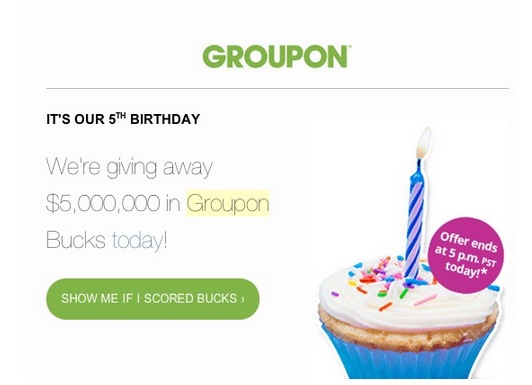
 When Groupon celebrated their fifth birthday, they sent out an email marketing promotion to their subscribers. Here’s what they did right, wrong and what you can learn from it:
What They Did Right
Groupon did a lot of things right. They used email to reach out to their opted in subscriber base and they used a compelling subject line with a limited time offer “We’re Giving Out $5,000,000 in Groupon Bucks Today.” Plus, there was a sense of mystery–you had to log in to see if you scored bucks.
What They Did Wrong
But here’s where things went awry… when the recipient clicked the call-to-action button with great anticipation of scoring bucks, many were met with a lackluster response to the effect of, “You didn’t score.” Not very encouraging or friendly.
While you can’t expect everyone to win, Groupon ended up annoying some pretty loyal customers with this promotion. A few of my team members expressed the sentiment of “Couldn’t they have at least given me a dollar?” Their thought was, if they had gotten something/anything, they would have felt better about making a purchase vs. getting nothing after spending a lot of dough with Groupon.
What You Can Learn From It
If your company does promotions, take a lesson from Uber. They totally nailed it in their National Cat Day promotion. You can also structure your promotions in a way where everyone feels valued, from your existing customers to new prospects you’re trying to get in the door. By offering a variety of offers all the way through the funnel, you’ll make sure you get customers and keep them.
For example, at VerticalResponse, we wanted to reactivate some customers who hadn’t sent any email in a few months. So we sent an email letting them know we were giving away 10 million email credits and had made a mystery deposit in their accounts. We made sure everyone on the list received credits as an incentive to log in and send some emails on us. And, the likelihood that they’ll buy more credits and send more email out went up exponentially. Plus, they got an unexpected surprise. A win-win.
How do your promotions serve your business and your customers? Share in the comments.


Wednesday, 3 January 2018

5 Ways to Help Your Customers Fall In Love with Your Business


Valentine’s Day. Some people love it, and others not so much. But regardless of how you feel on a personal level, it’s a great opportunity to use email marketing to let your customers know you appreciate them. In addition, there’s some lovable tactics you can use all year long to keep top of mind with your customers.

5 ways to help your customers fall in love with your business:
1. Ask their opinion (and use it!): We hear a lot about engaging customers by asking for testimonials, reviews, and survey responses. If you have a good relationship with your customers, they’ll likely give you what you’re asking for, especially if you’re offering a nice incentive like free shipping or a discount on their next order. But once you get this info, what do you do with it? How about putting it in an email and use it to sell more! I received a fun Valentine’s Day email with the subject line: Customers Kiss and Tell their Favorites! This is a great idea because people buy from people.
2. Communicate Clearly: Another Valentine’s Day email I received had a subject line that wasn’t quite as good (imo): Go South for VD – Fares from $9 Each Way. The discount on airfares is great, but they should have thought twice about using the acronym VD. And it wasn’t clear that the email was about Valentine’s Day until it was opened. It’s better to cut to the chase and say what you mean in the subject line, rather than playing with double-entendres that have possible “ick-factors.”
3. Get Personal: Using personalization such as first name or company name can make your customers feel special and unique. This is something you can test in your subject line or the body of your email. But be careful to make sure your information is accurate since no one likes being called the wrong name!
4. Use Flattery: I received an email from a make-up company a while back that said, “You’ve got a fabulous flair for beauty.” They were engaging their customers and asking for product reviews. And you know what? Flattery got them everywhere. Their compliment made me feel great and I wrote a glowing review for them.
5. Give Breathing Room: According to “The Social Break-Up,” the number one reason people unsubscribe from opt-in emails is over-mailing. It’s best not to smother your email recipients. Instead, monitor unsubscribe rates and find a frequency that works well for your business.
What tactics do you use that keep your customers falling for you all year long?


Sunday, 24 December 2017

Using Facebook for Business the SMART way: 3 Ways to Monetize Boosted Posts


 Have you ever thought to yourself... "Why bother with social media, really? I mean, it's so hard to measure the worth of social campaigns directly. So much of it is just general exposure, and how vague is that? Especially when it comes to paying for this exposure with boosted posts on Facebook."
Many people think along these lines, and fair enough too, considering that a business must always consider the return on investment for any venture.
The unfortunate part comes when some marketers make the mistake of trying to monetize their efforts on Facebook right there and then, to make it "worth it" sooner rather than later. 
Their instinct is to rush into posting "Come and buy this thing we've got!" or "We've got a sale! Quick, go now!" They want to make money to justify their time and effort, and they want to make it now. My response to that is this:
Patience Iago
Don't panic that your social media efforts don't directly lead to sales, as trying to push things in that direction too quickly can actually damage your brand image. It might seem like an excitingly low-cost option for plastering hard-promotions in people's faces, but nobody wants that all up in their face. 
It's like walking up to a group of friends while they're happily discussing Sue's new baby and interrupting them only to say, "Hey! Want to buy some stuff?" You'd either get ignored outright or an array of disapproving looks and then ignored.
Facebook itself has come to the party on this front to speak on behalf of its peeps:
people hate spam from pages
You must use Facebook as a social entity, even for business. If you succeed, people will go willingly to your website, and then you'll have your chance to monetize in the much more appropriate on-site location. This slightly slower lead-based method is much more powerful. And the way things are going, you'll have to adapt just to stay in the social feeds...

Why You Should Take Monetization OFF Facebook, and ONTO Your Website

Let's start with why you shouldn't try to sell straight from Facebook, then I'll hit home why you should sell via your website...

Reason 1: You'll Put People off Your Brand

People go to social media to relax. It's a social space. People hate being pitched to in their social space. They'll hate you like a man who's just sat down in front of his favorite channel with a beer at the end of the day hates door-to-door salesmen.
You want people to love your brand! You want people to look forward to your posts! You want them to listen to you and go through to your website because they like and respect you.
This reason alone should be enough to convince you not to post hard promotions on Facebook, but if you're still not convinced...

Reason 2: Soon These Promotion-Heavy Posts Won't Even be Been. Facebook is Making Sure of It!

Straight from the horse's (or rather, Facebook's) mouth: "Now we’re bringing new volume and content controls for promotional posts, so people see more of what they want from Pages."
It's becoming "not worth it" in the most literal sense. Here are their outlines, so you know what to avoid in your future posts:
spammy Facebook posts
So keep Facebook content-based. Link to articles and blog posts rather than promotions. Make your status's informative or interesting.

Reason 3: Your Website is a Much Stronger Platform for Promotion Anyway

There's not much you can do to convince someone in one Facebook post, but there's a lot you can do to convince someone with a whole webpage. You're better off being the cool guy to hang out with, the one who leaves promotions at home. It's not as direct, but it's worth it.
In saying that, monetization is important, and it has to happen sometime, so I'm going to show you the 3 best strategies for monetizing this social traffic once you've gotten it to your site. First though, you need to get the traffic there, so I'll cover that quickly.

How to Direct Traffic to Your Website with Boosted Posts

You need to think carefully about which page on your website you'll be promoting. It has to have something that is enticing in itself, like an interesting and informative article, or an e-book that they can grab for free that they might like. You'll decide the specifics of what this will be depending on which of the 3 monetization strategies you choose.
You need to link to that page on your website along with the best reason why they should go there, and then Boost that post. Be creative! Get people excited about your website and, in particular, this post. That tagline and the image with the post can make or break the success of your boost, so choose wisely. All the information you could need to know on boosting Facebook posts can be found in last week's blog entry here. 
So! You're getting them there, they're excited, now what do you do?

Monetization Strategy 1: Promote Affiliate Products in Your Content

Give them an article to remember. I'm talking like woop woop-worthy content. I know, easier said than done, but if you're struggling for ideas, try this guide here. Think about what they'll actually want to read, and deliver it straight to them.
Then, subtly, link to a relevant affiliate product that you promote. Make sure to work this into the content in a seamless way.
I particularly like how Dating Metrics does this. It doesn't even link directly to the sales page from the posts (which are informative and entertaining with infographics and humor and everything!). It links to the site's review of the product. It's a bit more drawn out, but it gives the site more of a chance to convince visitors about a product before they leave the comfort of its pages.
Affiliate Link Example

Monetization Strategy 2: Ask Visitors to "Like" Your Page

Boomerang that traffic from Facebook right back at social media with on-page social buttons; it'll create a form of lead for you. 
social following funnel
This strategy once again relies on you having quality content on your website. Content is a marketing priority for so many reasons, and inspiring people to commit to following your brand via social media is just one of those reasons.
If the article you send people to is compelling, and they choose to follow you, then you can continue to send them posts — some of which will have affiliate promotions included. This saves you money, as you're securing continued exposure that won't cost you like boosted posts do. 
You'll also be increasing your brand reach organically when others share your posts on their own feed. The more your audience grows, the more likely it is to snowball organically.

Monetization Strategy 3: Offer a Free Gift to Encourage Opt-Ins

This is much like the previous strategy but with a mailing list rather than a following on social media. You want people to sign up to your mailing list so you can then go on to promote affiliate offers to them in a newsletter series.
You can encourage them with a free gift (such as an e-book or audio clip with helpful information for them) that they can get via email; all they have to do is sign up with their name and email. You can then email them regularly with helpful newsletters, and strategically placed affiliate promotions.
Email marketing has proven itself to be incredibly lucrative time and time again, so using boosted posts to build your mailing list is a fantastic idea. There are two main ways to do this:
  1. You could boost a post sending them to an article or blog post on your site, and feature the gift and signup in the side-bar of that page, or at the bottom of that post.
  2. You could boost a post sending them to a squeeze page: a page that has the sole purpose of encouraging someone to sign up. It will have the name and benefits of the free gift, as well as the signup form, but nothing else to distract from this focus. 
squeeze page
So if you're feeling game, try boosting strategic posts, and see if you can't monetize them with one of these methods. It's going to require a little trial and error, as there are so many variables that could give or take from your success, but rest assured that there is definitely some great potential with Facebook's boosted posts.

Monday, 11 December 2017

How the GDPR Affects you: Consent


 Starting May 2018, the GDPR will affect how you can collect email addresses in a big way. Don’t wait until then – act now, otherwise everyone you are currently sending emails to will need to opt-in again!


What is going to change?

A desire to collect as much data as possible has led to businesses and marketers making use of tactics such as pre-ticked checkboxes to assume consent. This is known as ‘implied consent’, and will no longer be justifiable. Up until now, it was acceptable to pre-tick a checkbox when asking for permission to send regular newsletter or marketing emails, but as of May 2018, there must be a positive action made in order to sign up.


What about my data?

If your existing processes and records meet the standards required by the GDPR, then there is no need to acquire any further consent for your data. It is important that you don’t store unnecessary data so the data you have may need to be reviewed.
If your records don’t meet the standards required, then you are not alone. Unfortunately, as of May 2018, you will need to have standards compliant consent from every individual on your list. You may want to start emailing your list to request consent, in a GDPR compliant manner. Providing an incentive to opt-in can go a long way here.
Our Maxservices team can help with this – contact them for assistance.


Accountability


Why is this happening?

These new regulations are designed to reduce the risk to consumers in the event of a data breach by only collecting the data that is required, and only keeping it for as long as is necessary. When asked, you will be required to prove that you have consent to email an address. In the event that you cannot prove it, there may be legal action – including fines.
This further complicates the opt-in process, because it is still debatable whether a “single” opt-in can be proven.


What do I need to include?

A data collection page must include:


  • Your company name, and any third parties who will be using the data
  • A clear explanation of why you are asking for the visitor’s data
  • What you are asking the visitor to sign up for
  • What content the visitor will be sent
  • Assurance that the visitor has the right to withdraw their consent at any time, and how they can go about doing this

  • The consent should be unbundled, meaning that it should be separate from other terms and conditions. It should not be a requirement of signing up for a service unless it is necessary in order to use the service.
    Ideally, you should also unbundle the consent for each method of communication, eg. for email, post, SMS, and telephone.
    The opt-in must be ‘active’ rather than ‘implied’. Use unticked opt-in boxes so that an action is required to give consent.

    GDPR Form

    What is the difference between a single and double opt-in?

    A single opt-in process is completed when a visitor enters their email address on a page and clicks submit. At this stage, they are added to a newsletter or marketing list. However they could have made a mistake in their address, or intentionally entered an incorrect address.
    A double opt-in process resolves this by adding an additional step. After entering and submitting their address, they must respond to an email in order to opt-in. Sounds lengthy, but this gives us proof that they did sign up, and we are able to store this along with a timestamp for reporting and auditing purposes.


    Data Protection

    Will we see a reduction in signups due to this process?

    Unfortunately, there is no doubt that this will slow the growth of your email lists. However, there is a quality over quantity benefit here – these double opt-ins are far more likely to engage in future.
    To counter the slower list growth, there are a few options to try and improve your signup rates. Some examples are:
  • Popup forms
  • Offering the visitor a chance to opt-in before being provided with an article or download
  • Using inbound channels such as social media to send visitors to forms

  • What else do I need to be aware of?

    The rules apply to email addresses that you have been given in real life, too. The correct way to collect email addresses requires that people have given you the same positive affirmation required for collecting addresses online. You must be able to prove it if necessary. One possible solution for in-store or exhibition data collection is to use a tablet with a correctly designed sign-up form.
    It is worth noting that you can still email addresses with no personally identifiable data – such as info@oxfordstones.com.


    Source