Showing posts with label email campaign. Show all posts

Wednesday, 8 August 2018

9 Reasons Your Emails Get Rejected


It’s email dating 101: there’s nothing worse than waking up, checking your email, and find that annoying email from last night – trying to get back into your inbox for a second round.

As with dating, a lot can go right in an email. The person you’re currently sharing your message with might just be the perfect customer for your brand. Your email might appeal to their needs and build a lifelong relationship. Or your recipient may discover that while you two have no chemistry, your product would be a perfect match for one of their friends.

But (also like dating) a lot can go wrong. If you’re striking out in your email campaigns, you’ve got to tweak your pitch. Here are nine reasons that marketing emails get rejected – any of these sound familiar?

1. Your subject lines made a bad first impression.

Your recipient’s experience with your email starts before it’s ever opened – with the subject line. A lot is riding on these 50 characters or less. Some classic subject line “don’ts” include boring copy, ALL CAPS, excessive exclamation points, and – of course – deceiving messages. The subject line “Warning” or “Re:” might earn you opens, but it won’t earn you customers.

What to do:  A/B test all your subject lines. Make sure they reflect your email’s intent.

2. You bored them to death.

Are your emails dry, long, and/or monotonous? Imagine that the recipient is looking for her shoes, her dog is barking to be let out, and she’s late for a meeting. She does not have a year to spend on decoding and analyzing your jargon. This is your chance. Don’t waste it.

What to do: Don’t be afraid of a little “edge,” a human touch, or even a fun, unusual inclusion. And don’t write a novel – the faster you get to your CTA (when you ask for a second date), the better.

3. You forgot to test your display.

You wouldn’t show up to a date in a stained shirt, or with toilet paper stuck to your shoe – which is why you check out your appearance before you arrive. Email is similar. Don’t show up in your buyer’s inbox without testing your display.

What to do: Before you send out an email, test it on all email clients – and don’t forget mobile.

4. You advertised a bigger, better, or cheaper version of yourself.

Don’t exaggerate your height in your online dating profile, and don’t make false promises in your emails. Are you a car dealership? Splendid – I’m in the market for a car! But don’t claim your deals are “once in a lifetime” if you’ll be holding the exact same sale next weekend.

What to do: You’re looking for a long-term relationship, not a one night stand. There’s no need to advertise your challenges, but if you highlight qualities you don’t really have, your customer will eventually find out.

5. You forgot his/her name.

During my worst date in college, the girl admitted she’d forgotten my name. She explained that she’d gone on a lot of dates recently, but the damage was done. Guys and girls, you need to personalize your emails – at the very least, don’t use the wrong name.

What to do: When you email your database, use first names if you’ve got them.  This is easy if your marketing automation allows you to use “tokens” in your emails.

6. You brought up money too soon.

Email is not the place to ask for a sale – it’s like asking your date to buy your dinner while you’re still eating appetizers. Many people read emails while they’re rushed, busy, or waiting in line for coffee, which is why an email is a great place to build relationships with your customers or to educate them on your product or deals. Don’t address your greed – address their needs.

What to do: Don’t mention pricing in your email. Mentioning a free trial or referral program is fine, but don’t overdo it.

7. You overshared. Again.

Your audience doesn’t need emails about how you’re remodeling your building, or how your company recently celebrated its fourteenth month in business. Save these kind of updates for your blog or social…or for a phone call with your mom.

What to do: Keep your emails about the reader. They should be interesting and entertaining to people who aren’t already 100% invested in your brand.

8. You came off as insecure.

Making fun of the competition just makes you look insecure. And if you’re saying this to customers of your competitor, it’s even worse – they hear, “Everything you own is terrible, and ours is better.”

What to do: Take the high road. If you are truly better than your competitors, the proof will be in the results.

 9. You didn’t listen.

Email marketing is about conversations. Don’t send multiple emails on a topic your audience isn't interested in; don’t send the same email twice; and – if you have the technology – don’t offer them content they’ve already viewed on your website or on social.

What To Do: Use marketing automation to listen and respond to your audience’s preferences and behaviors. Set up a subscription center. Run a survey. Listen.

Ok, supernova: you are now prepped and ready to make it past the spam filters, past your audience’s apprehensions, and into their hearts. Still wondering why your emails are getting rejected? Drop me a line in the comments below. 

Source

Wednesday, 13 June 2018

How to Make Your Email Campaign More Clickable

The makeup of an email newsletter can vary tremendously. Some businesses include entire articles in their emails, others send a list of headlines with a teaser paragraph and thumbnail and some just list out headlines.
What works best, in terms of engaging recipients and getting people to click? We asked Stephanie Miller, vice president of member relations at the Direct Marketing Association. As a digital marketing expert, she helps businesses connect with the people, resources, and ideas they need to optimize their response and revenue.
Her first message: there’s no magic bullet that solves this question. However, here are five strategies that will help you arrive at an email campaign that works for best your audience.
Think about your users
It may seem counterintuitive, but putting an entire article in a newsletter can create a better experience for your readers. They can open your email on their computer or mobile device, read your content and then delete or forward it when they’re done. Most businesses want to strike a balance between the user experience and the needs of the business. “It can be a really good experience but, of course, you don’t have any clicks to be sure that they’re reading anything,” Miller says.
Listing a series of articles and links instead of entire posts seems like a solution, but it’s not always the user-friendly option. “You risk people skimming and not clicking on more than one article or not clicking on any articles because they’re on their device and maybe it’s just kind of clunky. Then they miss the content,” says Miller.
Sending too much content can also be stressful for some audiences, especially if they’re busy and don’t have time to read everything.
Explains Miller: “You really have to think about the experience and think about, ‘Is my objective to get the content and create a good experience that’s content-driven, or is my goal to drive them to a website?'”
Test everything
The best layout for your specific email newsletter depends on your audience, and the best way to determine an ideal format for yours is to test several options. “You don’t know what’s going to work best, so you test it,” says Miller. “You can certainly gather ideas and try some best practices, but you never know for your particular audience what’s going to resonate.”
Tracking the rate at which recipients click on the links in your emails over time is one way to test how changes affect audience reaction. Running split tests—where half of your readers get one format and the rest get another—is another way. Talking to your readers, via surveys, on the phone during support calls or in person at events is also key: ask them whether or not they find value in what you’re sending them and why. Use that feedback to guide your decisions and modify your newsletter layout, if needed.
Be relevant and consistent
Email subscribers like to know what they’re getting. If a reader finds a subject line intriguing they expect to be able to find that content easily when they open your email. Make it difficult for them, or worse yet, create a misleading subject line, and you’ll leave readers frustrated or annoyed.
Smartly segmenting your list, or targeting specific groups in your list with highly relevant content, is another way to make sure the recipients of a particular message are interested in the content, which will boost the rate at which they click.
Make links visible
“You want to make sure that your content is visible with images turned off,” Miller points out. Making sure that you have links within the text of your email for your readers to click even if the images, such as a call-to-action button, don’t load is essential.
Have any advice of your own to add? Share away in the comments.


This post contributed by guest author, Yael Grauer. Grauer is a Minneapolis-based freelance writer and editor. Find her online at Yaelwrites.com.


Sunday, 28 January 2018

16 Email Marketing Tools You’ll Want for 2018


As the New Year rolls around, it's a good time to start incorporating new email marketing tools into your routine. But, who has time to try and test a bunch of marketing tools? Not to worry. Pinpointe has you covered.
We've created a list of 16 email marketing tools that we've vetted and believe are essential to your email campaign success this year. The tools are designed to save you time, help you create stronger emails, grow your list and give your response rates the boost they need in the New Year.

Images

Tool #1: Pixabay

Free image library

Every email needs a quality image (or two) to draw subscribers in, but they're often hard to find and expensive. Unless you've started creating your own image library by taking pictures of your employees and clients, you're probably turning to stock photo sites. And stock photo sites are pricey. Not to mention the images are sometimes cheesy, to put it politely.
Pixabay is a great solution. It's a FREE photo library that looks and acts just like the pricey stock photo sites. You can search the database and get dozens of great options with every search. You should add the photographer's name to your post, but other than that, the images are yours to use.
pixabay - email marketing tools

Tool #2: IM FREE

Free image library

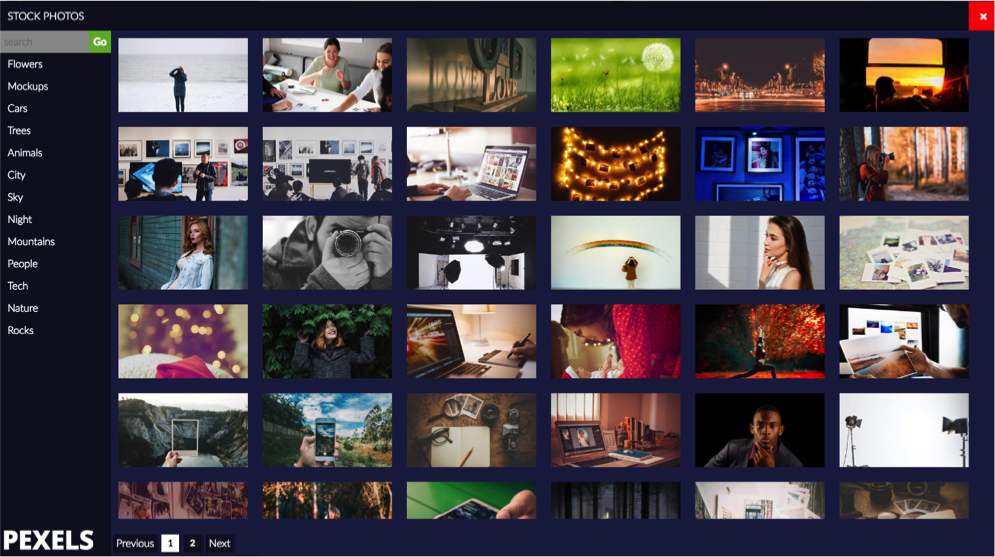
IM FREE is another photo website you can lean on. The photos in this collection are professionally done and provide quality images for business concepts that are harder to visualize, like education or technology.
The database is searchable, but it's easiest to search via categories like Nature, Transportation or Lifestyle.
This photo library doesn't have the wealth of images that Pixaby does, but it's always growing. It's a good one to bookmark and keep an eye on, especially if you're looking for a more obscure photo.

Tool #3: Pinpointe's image library

Free image library

Pinpointe customers don't have to get photos from a third-party site, they can access an image library from their account.
As you're creating an email, all you have to do is click on the Image Library and you'll have hundreds of pictures to choose from. Forget searching, downloading, resizing and importing a photo. Simply pick the images you want and drop them into your email template. Done.
Pinpointe image library - email marketing tools

Tool #4: Rszr

Image resizer

How many times do you need to resize an image? Too many to count, right? Whether you're adding an image to your email or changing out the cover art on your Facebook page, marketers need an easy-to-use photo-resizing tool. You could use well-known, feature-heavy software like Photoshop, but if you just want a basic resizing tool, try Rszr.
Not only can you resize and save an image in a few clicks, but you can also do some basic editing like cropping or erasing part of a photo. It's the perfect tool for on-the-go marketers.

Tool #5: JPEGMini

Image compression

As you're creating an email campaign, file size might not be a top priority, but it should be. Image files are notoriously large and they can slow download times. If you're sending an email with a large JPEG, it could take additional time to load on a subscriber's phone or laptop. It's a pet peeve for subscriber's who want to view emails quickly.
Before you add an image to your email, or to any digital platform, use JPEGMini first. You simply upload the picture and it compresses the file for you. No quality is lost. The picture looks the same; the file size is just smaller.

Tool #6: Awesome Screenshot

Editable screen-grab tool

Need a screenshot? Whether you're showing customers how to do something online or want a snapshot of your own website for marketing purposes, use Awesome Screenshot.
This tool lets you capture the entire page, including the content that's "below the fold." In other words, if you need a snapshot of a website that you have to scroll through, this tool can do it. It captures it all. And, you can even edit the image afterward.
You can access the tool through its website or you can download it as a Google Chrome extension, so it's always on your toolbar.

Email brainstorming

Tool #7: Answer The Public

Brainstorming tool

Do you ever run out of ideas for email campaigns? It happens to everyone. You can only send so many coupons, right? When you're stumped for ideas, turn to Answer the Public. This website can help you brainstorm ideas.
Simply enter a keyword into the search bar and Answer the Public shows you what kind of questions people have surrounding your topic.
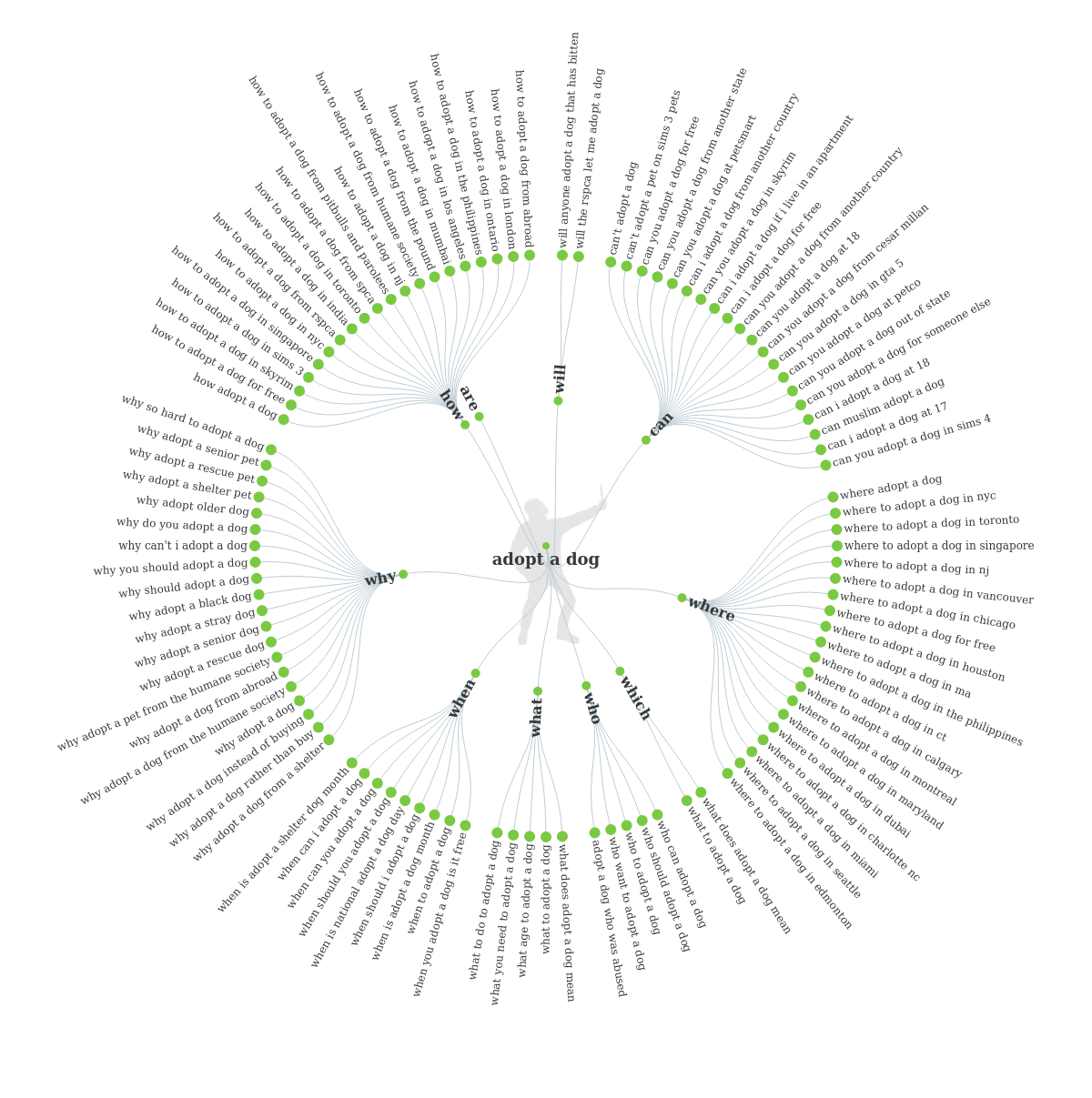
For instance, if an animal shelter is looking for ideas for their next email campaign, they can enter the words, "adopt a dog" into the search bar. Answer the Public provides a visual wheel of questions that people typically look up when they're planning to get a new four-legged friend.
Here's the "wheel of questions" that Answer the Public provides pertaining to the keywords.
email marketing tools - answer the public
You can use these questions to inspire email content. For instance, one of the questions is, "Why does it take so long to adopt a dog?" Create a blog post that answers this very question and send it to a segment of your list that's shown interest in pet adoption.

Email design

Tool #8: Canva

Graphic designer

To spice up your email, add a graphic. Don't have graphics skills? Don't worry. Use Canva. This online platform makes it simple for anyone – even those with zero graphics knowledge – to create stunning graphics.
Create a cool graphic for an event, upcoming contest or holiday sale. The options are endless. Here's a quick graphic created for an event using Canva: 
canva - email marketing tools
Yes, creating a graphic takes a little more time than just typing up a quick message, but visuals have the ability to draw a subscriber in and help them digest information faster.
Research from 3M shows people process images 60,000 times faster than text, which is why taking a few extra minutes to create a visual is a worthy investment.

Tool #9: Bomb Bomb

Video email

Adding video to your email can add a personal touch. Bomb Bomb is a tool you can use to record a quick video for your customers and engage them in a way that text can't.
This tool is especially helpful for sales teams who work best face-to-face. Create a video to check in on your existing clients, or record a special welcome message for new clients. Remind clients about an upcoming appointment with a quick video or remind them about an approaching deadline.
Bomb Bomb makes it simple to record a video from your laptop and insert it into an email. Once subscribers open your email, the video starts moving instantly, which encourages customers to open it. 
Give it a try, and see how you can incorporate video into your email marketing strategy.

Spam detection

Tool #10: Mail Tester

Spam scoring tool

Even the most reputable companies can send an email that gets trapped in a spam folder.
Without knowing it, you may have made choices in your design or text that spam filters don't like. Adding too many images, using spam words or accidentally including broken links in your email can keep your email from inboxes.
Before you send your email, put it through a spam checker to make sure your email is delivered. You can send a copy of your email to Mail Tester and you'll get a spam report. The report shows you what to fix to pass through spam filters. It's a simple step that ensures your subscribers will see your email.
 

Tool #11: Pinpointe's spam checker

Spam scanning and scoring

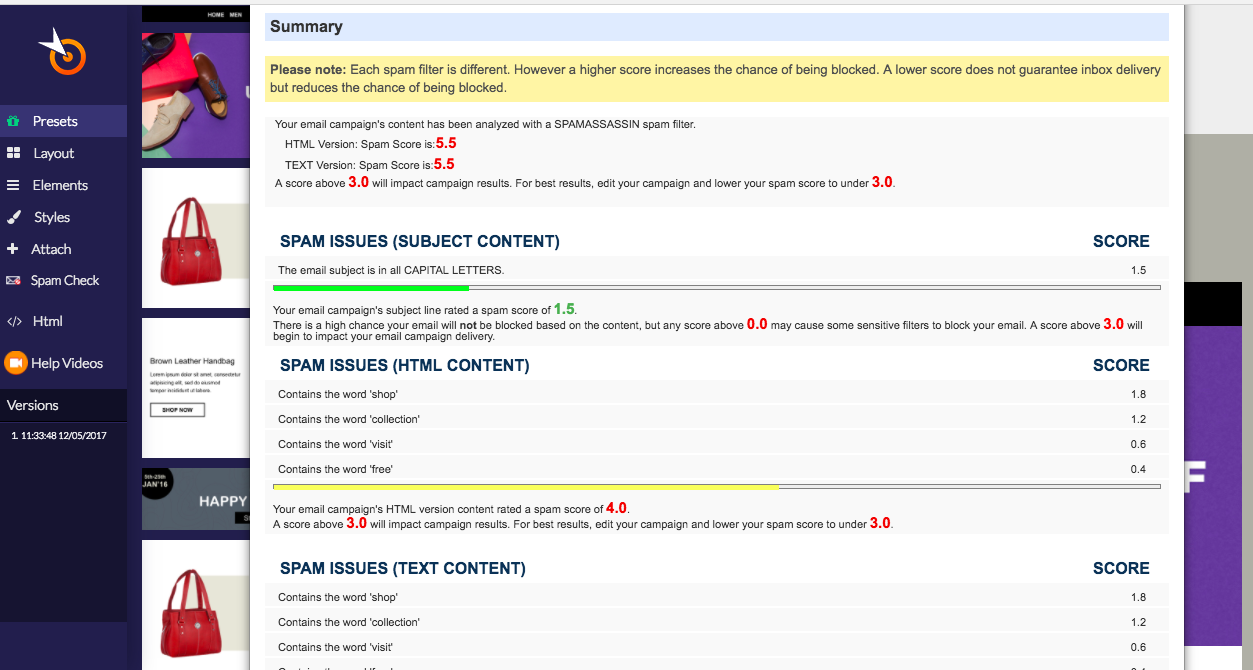
Pinpointe users can run a spam test right from their account. Just create your email and run a test with just one click. You'll get a spam score and a report that shows you how to improve it. It might suggest eliminating spam words or changing your subject line from ALL CAPS to lower case. Once you make the suggested changes, run the test again to make sure spam filters won't flag it.
Having the spam checker accessible while you create an email is a big time saver. You don't have to leave the site to know if your email is "spammy."
Pinpointe Spam Checker - email marketing tools

Email automation

Tool #12: Pinpointe's triggered emails

Automate emails

If you're still sending emails manually, it's time to move into the modern area of email marketing and use automation.
With Pinpointe, you can pre-make emails and trigger them to send automatically based on a specific time or behavior. For instance, if a subscriber RSVPs for an event, that action can trigger a confirmation email that thanks him or her for signing up and reiterates all of the important information.
You can also schedule emails to arrive in a subscriber's inbox on a specific date.

Analytics

Tool #13: Google Analytics

Next-level metrics

As you create and send emails, you have to gauge your success by checking your analytics. Most email service providers give you access to data like, open, click-through and conversion rates.
That's a great start, but if you're ready to use grown-up metrics, turn to Google Analytics. With Google Analytics you get next-level data that gets down to the granular level.
If you're using a reputable email service provider like Pinpointe, you can link your campaigns right to Google Analytics for a streamlined switch.
Accessing in-depth data helps you make changes to your email campaigns that can dramatically improve your response rates.

Tool #14: Google URL Builder

Link builder for Google Analytics

When you add links to your emails, create the URL in Google's URL Builder. By doing so, you can help Google Analytics track the success of specific campaigns.
You'll be able to see which email drove the most traffic to your website, or how many subscribers signed up for your newsletter after receiving a special offer.
Basically, you get more detailed data by building individual links for each campaign.

List growth

Tool #15: Woobox

Contest tool

Hosting a contest is one of the easiest ways to collect new email addresses. However, hosting a contest can be time-consuming if you don't have the right tools.
To help manage the contest and the contacts that come in, try Woobox. You can create giveaways, photo submission contests, fun quizzes – you name it. 
You can also use Woobox to create a customized Facebook tab that features products, encourages fans to shop or direct them to your newsletter sign up form.

Tool #16: Hello Bar

Sign up banner

Sit back, relax, and collect email addresses from your website with a Hello Bar. The Hello Bar is a small bar that sits at the top of your website and encourages visitors to sign up for your email list.
It's a great alternative to a pop-up ad, which can sometimes turn visitors off. The Hello Bar isn't annoying or disruptive, it just sits at the top of your site. It's usually a bold color to draw visitors to it. The purple bar below is an example of a Hello Bar.
hello bar - email marketing tools
There you have it. With these 16 tools,  you'll get your year off to a great start.


Source

Thursday, 14 December 2017

Email List Segmentation: How Much is Too Much? Not Enough?


 You probably know by now that segmentation improves email marketing performance significantly, so if you’re still operating primarily in “batch and blast” mode it’s time to start slicing and dicing your subscriber file.
Marketers who practice list segmentation see better open and click-through rates, fewer unsubscribes and better deliverability. The reasons are obvious: segmentation creates discreet audiences we can laser-target with offers, creative, and information crafted specifically for them, at just the right time. This in turn improves relevancy and response, while decreasing complaints or blocking. Who among us doesn’t want to see more of this kind of email in our inbox: messages that speak to us as if we’re the center of attention, and show up at the perfect moment (or not at all?)
Too Little?
Let me begin by addressing the easy part of the question: how much email list segmentation is not enough?
Zero segmentation for one – so get on with it already! I’d also suggest if you’re not segmenting by at least these key attributes, you’re leaving opportunity on the table:
Customer Life Cycle Stage (new, existing, loyal, inactive) – new customers have different needs – and response propensity – than existing or inactive customers, so recognize these distinct stages with message appropriate to each
Geography – Simple geographic segmentation is necessary and relevant to national and certainly global companies. Accounting for seasonal, weather, cultural and current events differences reflect an understanding of where your customers live and how geography affects their habits, lifestyle and needs. It also allows you to hyper-target distinct populations with super-relevant messaging when a specific event – like a natural disaster, sporting or political event – takes place.
Product/Brand Interests – You’re likely not selling one product at one price point, so recognize your customers by product type, brand interests, or your different lines of business.
Purchase History – Not all buyers spend alike, which is why analyzing them by the tried-and-true RFM (recency, frequency, and monetary amount of purchase) formula can yield insights as to who your most valuable customers are, who needs nurturing, and who deserves your most lucrative offers.
Of course there are infinite additional ways to segment (age, gender, education level, content preferences, lead scores, sales funnel stage, customer personae and more), many of which depend on your business type and marketing goals. Still, if you’re newer to segmentation starting with the four types above will at least get you moving in the right direction.
Too Much?
With segmentation so powerful, 1:1, dynamically customized email is on the rise and easier than ever to implement in most ESP and marketing automation platforms. Sophisticated marketers have embraced email automation to the point where so many of their campaigns are sent based solely on individual behavior or conditions, that they’re facing a new challenge: how much segmentation is too much?
I’m all for email marketing automation – in fact automated campaigns produce somewhere along the lines of 5x the revenue and ROI of broadcast email – so much so that these highly-targeted “triggered” emails (like cart abandonment, welcome and onboarding campaigns, up-sell offers, etc.) should be part of most if not all programs. The downside? You’re often sending to an audience of one or very few people, which can leave most of your email subscriber base untouched if you haven’t built a diverse and multi-layered messaging mix.
Consider that you might be over-segmenting if:
  • You have no broadcast email campaign in your program such as a newsletter, monthly bulletin, weekly special, featured news item, monthly webinar or content, etc. Yes, broadcast campaigns have their place in your overall mix: they provide continuity, credibility and a predictably recurring touch-point for your entire list. You want this because not every subscriber will be equally engaged nor engaged to the point of qualifying for automated email.
  • You’re not conducting segmentation or engagement analysis to mine for high-value customer segments and buyer correlations. Which subscribers open and click on your email the most? Who are your frequent buyers? Have you searched for correlations between product purchases and/or content interests across categories?Mine your data for the propensity and interest of customers who purchase one thing to also need a related product or service. Do women who buy a dress almost always return to purchase an accessory like jewelry or a handbag to go with it? Do guests in your resort hotel usually need to book local excursions and activities – or ground transportation to and from the airport? Do first-time diners come back within the next 30 days to eat in your restaurant again – or recommend it to friends? Searching for behavioral correlations like these can yield opportunities not only for automated 1:1 cross-sell, up-sell and follow-on offers, but also for campaigns segmented to a group of like customers based on purchase history.
  • All of your email campaigns are automated based on individual behavior. Yes, you want as many 1:1 automated campaigns as possible relevant to your business, but these are by far not the only email campaigns you should be sending.
  • You’re seeing declining open and click-through rates across your list. Again, likely an indication that you’re not engaging often enough with large swaths of subscribers to keep them interested.
Optimize Targeting with a Diverse Messaging Strategy
Optimal segmentation is both art and science and is achieved by creating a multi-layered email campaign strategy that ranges from broad to specific and includes a mix of general, promotional, categorical, segment-specific, and individually-triggered messages. True, the most sophisticated (and successful) email programs can become complex due to the risk of high frequency and/or overlapping campaigns for certain subscribers, which is where suppression and campaign prioritization rules can help. But once we accept that balance – neither too general nor too specific a level of segmentation – is key, and that subscriber engagement is our priority, we’re fully harnessing the power of email.
Check out our Email Marketing courses to learn more about how you optimize your targeting and strategy.


Tuesday, 12 December 2017

The email marketing quotes Hall of Fame


Create something memorable and it can inspire many others. In the email marketing quotes Hall of Fame only the worthiest, deepest, truest and soundbite-iest are considered. Read them, share them and most of all Quote them every chance you have.

Feel free to let your own digital marketing efforts be inspired, and tell me if you would like to nominate.


The email marketing quotes Hall of Fame – you can’t help but share these right now.

  1. Email has an ability many channels don't: creating valuable, personal touches – at scale (tweet this)
  2. Cher’s “If I could turn back time” is actually about her sending an email campaign with a mistake in it ~ Alex Williams (tweet that)
  3. Treat your email program like the movies – give a preview so they know what to expect (tweet this)
  4. You don’t have to create the most interesting thing ever, just the most interesting thing at the moment. ~ Lee Clow’s Beard (tweet this)
  5. Set a target goal for how many email subscribers you’d like to reach every month. (tweet this)
  6. An email without clarity is like an annoying mime: Just say what you want or get out the way! ~ Jordie van Rijn (tweet this)
  7. There is no formula for the perfect email – Authentic and honest messaging works. (tweet this)
  8. Open, click and unsubscribe rates are pretty poor measures for email engagement. (tweet this)
  9. Email is easy…if you want it to be. Simplify before you get complicated. (tweet this)
  10. Signing up is a powerful signal of intent to buy. Send them email until they do ~ Dela Quist (tweet this)
  11. I want to do business with a company that treats emailing me as a privilege, not a transaction. ~ Andrea Mignolo (tweet it)
  12. To get the right message to the right person at the right time you first need to get the right data to the right database at the right time ~ John Caldwell (the right tweet)
  13. Email is the Jason Bourne of online: somebody’s always trying to kill it. It can’t be done. (tweet)
  14. Perhaps not surprisingly, cash is still the #1 driver for consumers to share their information (tweet it)
  15. 90% of marketing doesn’t work because it doesn’t get done. ~ Neil Bradman (tweet this)
  16. The right Email vendor can make the difference between succes and frustration. ~ Jordie van Rijn (tweet this)
  17. Design like you are absolutely right, then optimize like you were wrong from the start. ~ Jordie van Rijn (tweet)
  18. Data means « given » in Latin. So kindly ask your clients to share it with you. ~ Benoît De Nayer (tweet that)
  19. Losers try to convince people they’re thirsty. Winners sell ice water in the desert. ~ P.Marshal (tweet that)
  20. About A/B split-testing: Your “winning” version may still suck. (tweet this)
  21. Your winning email might be a female bodybuilder; as strong as they come, but ugly as hell. ~ Jordie van Rijn (tweet this)
  22. Relevance is irrelevant once the consumer chooses you. ~ Bob Frady (tweet this)
  23. Email Is The New Email ~ Jordie van Rijn (tweet this)
  24. Use low commitment CTAs. Emails are invites, landingpages are parties ~ Matt Byrd (tweet it)
  25. Every click is a wish. (tweet that wish)
  26. If #socialmedia is the cocktail party, then #emailmarketing is the ‘meet up for coffee’. The original 1 to 1 channel. ~ Erik Harbison (tweet )
  27. Email Acquisition is like cutting hair, must happen regularly, can be done well, but one bad experience can scar forever ~ David Baker (tweet)
  28. An email address is like a customer’s “digital fingerprint” ~ David Daniels (tweet)
  29. When you have written your headline, you have spent eighty cents out of your dollar. ~ David Ogilvy (tweet)
  30. Having a lot to say is never a good enough reason to actually say it ~ Lee Clowes beard (tweet)
  31. Bait without a hook is just food ~ John Hayes on email CTAs (Tweet that bait)
  32. Tell me and I will forget, show me and I may remember, involve me and I will understand ~ Confucius (450BC) (Involved Tweet)
  33. Email is the most popular function on the SmartPhone, so lets call it what it is: A SmartMailer. ~ Jordie van Rijn (Tweet this)
  34. The most successful call-to-action in the world is the letter X, make yours better. ~ Andrew Hanelly (Tweet this)
  35. Good content is a commodity, great content is a scarcity (tweet it)
  36. If you are not seeing the email channel as a money making machine, you have the wrong strategy ~ Hans Smellinckx (tweet it)
  37. Email is the Alpha Mail. ~ Russian ESP slogan (tweet it)
  38. Money is the best Feedback. ~ Claudiu Murariu (tweet it)
  39. Don’t debate “Chicken or Egg, which came first?” Bring the Chicken ~ Jordie van Rijn (tweet it)
  40. Email is a push channel, so we need to push it to work harder ~ Kath Pay (tweet it)
  41. On the highway to user/product love, lifecycle emails are road signs providing timely guidance, not annoying billboards. ~ Samuel Hulick Tweet it
  42. To not have an email address is the digital equivalent of being homeless. Without it you can’t shop online, bank online or engage with social media. ~ Dela Quist
  43. Every email is a customer survey of your target market, by testing they vote on what resonates best with them ~ Kath Pay (tweet it)
  44. Unsubscribe rate is the #1 email marketing KPI: Kaput Performance Indicator. ~ Jordie van Rijn (tweet it)
  45. How to write a good email: 1. Write your email 2. Delete most of it 3. Send ~ Dan Munz (Tweet)
  46. A bad email reputation is like a hangover–hard to get rid of and it makes everything else hurt. ~ Chris Marriott
    (Tweet)
  47. Not enough talk about the importance of brand in email. Customers don’t sign up for email – they sign up for your brand. ~ Bob Frady (Tweet)
Quotes are ideas distilled into mindblowing concentrate, the thoughts to share.


Thanks to all in the community for sharing and tweeting these great email marketing quotes. If any quote is mis-quoted, mis-attibuted or missing, please do enjoy to use the comment section below.


Source

Monday, 11 December 2017

3 Changes To Your Email Marketing For Success


 So you have email marketing set up for your business, but it’s not doing as well as you would like. What changes can be made to encourage better results? Take a look at our suggestions to help destine your email marketing for success.
Whether your email marketing has been running for months or years, it’s vital to take a step back every now and then to look at your process to ensure you it’s maximising its full potential. If you have found yourself in this position and looking for ways to improve your email marketing, take a look at our 3 top changes we suggest.


Automate your Emails with Automation

Automation is a crucial tool for email marketers. Without it, you will be trailing behind your competitors who are using it. Not only does automation save time and money, it also helps you to improve your overall relationship with customers. So how can automation help change your email marketing?

Targeted Email Programmes
Welcome, nurture, loyalty and milestone are just a few of the countless email programmes you can create based on the behaviour of subscribers – engaged or not engaged with an email. Using automation saves time having to create and send multiple daily emails as once it’s set up it does all the work for you!

Save Time
Having automated workflows/programmes allows you to send multiple campaigns 24/7, which is a massive time saver. Once a workflow is set up and running, emails can be sent throughout the day leaving you time to carry out other important tasks.

Planned Campaigns
Visualising and creating workflows/programmes in front of you will encourage you to plan more meticulously. Having a workflow and all its stages will open your eyes to more opportunities and will benefit your overall marketing strategy.

Personalised Emails
Automated emails and personalisation go hand in hand. Combined they allow you to tailor your emails and send unique content to individuals, creating a more personal and relatable customer experience.

Relevant Emails for Recipients
Automation allows you to tailor and send email campaigns more efficiently. Sending relevant content to suitable recipients will encourage more clicks and in return create more conversions.


Clean your Lists

Keeping your lists clean is standard practice for email marketers. It can sometimes get neglected but your subscribers are one of the most important components of email marketing so here are a few tips to help you maintain a clean list of data.

Double Opt-In Subscription
A double opt-in process provides extra peace of mind and an archived record that individuals have signed up to receive your marketing campaigns. It’s also great for highlighting any errors to the users’ details allowing them to edit and rectify if necessary.

Provide a Preference Center
Having a preference center allows your subscribers to update their details if any changes take place, this, in turn, helps to keep your list up to date and clean.

GDPR
The General Data Protection Regulation (GDPR) will be coming into legal force in May 2018 so it should be of high priority on your list. It will affect the way you collect your email marketing data in quite a big way. It’s good to get to grips with all the changes, regulations and how to ensure you are up to date with your data collection now.
Find out more about GDPR here.

Let People Unsubscribe If They Want To
As part of the CAN-SPAM Act, every email you send must include a clear unsubscribe link and you must then honour these opt-out requests promptly. It may seem like a step backward to make it easy for users to unsubscribe but it is actually very beneficial for keeping your data lists clean. When sending campaigns you are aiming to target engaged users so it’s good practice to get rid of the uninterested recipients.

Take a more in-depth look into your list housekeeping here.


Measure, Analyse and Improve

Analytics are there for a reason, they allow you to track and evaluate the results of your campaigns – whether they are good or bad. Making time to take note of the number of opens, clicks, bounces and unsubscribes can give you an insight into what is working well and what isn’t – which is crucial for any email strategy.

Once you have the stats in front of you – don’t just ignore them. Findings should be addressed and adjustments to your future strategies should be made. These changes should then be monitored to ensure they are helping to improve your campaigns and not sending them backward!


Source

Thursday, 7 December 2017

7 Tips to Help You Set up a Killer Email Drip Campaign


How are you planning to market your products and services?

That's probably the most relevant question for any business owner.

And the answer isn't an easy one.

Not because you don't have any marketing procedure to embrace, but because you're spoilt for choice these days.


But have you ever given a thought about embracing drip marketing for your business?
They are in-vogue these days.

Want to know why?
Because email drip marketing increases the open rate of emails significantly.

Average single open rate of drip campaigns is 32.85%. In fact, drip open rates are about 3 times higher than the click through rates of emails sent individually.

So, there’s no reason why you shouldn’t start a drip campaign to increase the return on investment for your business.

So, what's the best way to do that?

In this post, I’ll discuss how powerful drip campaigns are and will share actionable tips to build a killer email campaign that’ll increase sales and enhance customer retention.


Benefits of Email Marketing

Email is an extremely effective marketing tool for businesses, both established and start-ups. And that's not without any reason.
Did You Know?
• 82% of B2B and B2C companies use email marketing to reach out to their customers.

• Automated email messages experience 70.5% more open rates and 152% greater click-through rates than any business email.

• With email marketing, you are 40 times more likely than Twitter or Facebook to get new customers for your business.

Besides, here are a few benefits of email marketing, which can come in really handy at times.

• It reduces your marketing costs by helping you go digital.
• You can easily connect with your target audience.
• It helps to spread the word about your business.
• Ensures that you can connect with existing customer and attract potential ones.

In short, email marketing can help you reach out to a wider audience within a short time.

So, what is an email drip campaign?

An email drip campaign refers to sets of automated emails, which are sent out based on various aspects, such as user actions, specific timelines, and so on. For example, when a user registers for an account or performs an action on a site, an email is sent out to him. So, the emails sent out for drip campaigns are not required to be written manually every time. They are chosen from a set of already written emails, which are sent out to share the necessary information with the audience at the right time.

Is the email drip campaign really useful? How do they work?

Let’s have a quick look at a couple of case studies about the use of the email drip campaign.

Case study 1: A visitor registers on your website. An automated email is sent to the user to welcome him.

Case study 2: A document detailing your business is sent to a user. If he opens it, he is given one option. If he doesn't open it, another method is tried until the end of the drip.

This flowchart from the infographic on the website of Pardot, the marketing automation company, is a perfect graphical representation of the details of the drip campaign.

graphical representation of the details of the drip campaign

So, the email drip campaign can come in extremely handy to establish a brand name for your business. But that’s not an easy task. You’ll have to ensure that the right steps are undertaken to give an edge to the email drip campaign’s efforts.

So, how can you make your email drip campaign effective?

Here are a few tips that can come in quite handy for the purpose.

Know What You Want to Achieve

Why are you planning to begin an email drip campaign?

The objectives are usually quite simple: it's either to boost the sales and get new customers, to increase brand awareness, or to retain the existing customers.

But when you are starting the campaign, you should have a clear idea, which of these things you want.

How will having a clear goal help?

You can plan your steps of the email campaign in such a manner that they are meant to achieve the target you've already set for yourself.

Focus on the Quality of the Content

You have planned your email drip campaign. You have a proper goal in mind and you have also decided about the frequency of sending out the emails.

Yet, you are not achieving the desired results.

There can be several reasons behind this.

The most common, in fact, is that the quality of the content shared on the emails is not quite as good as your target audience would like them to be. Remember, when you are sending out emails for marketing and for generating leads, you can't send out any write-up.

So, you must create excellent email content before sending them out. Ensure that the content is engaging. You can shift from sharing simple text-based content and include various other media, such as images, videos, and so on.

Decide the Frequency

When you are engaging in a marketing campaign involving emails, you need to focus on one thing properly.

That's the frequency of sending out the emails.

You must have a clear idea about how frequently you should mail your current and prospective clients.

• 42% people think you should email your customers 2-3 times a week.

• 17% thinks you should mail 4-6 times.

• Only a few people (4%) think sending mails more than six times a week actually helps.

The frequency of sending out the emails will depend on the objective of your campaign.

For what are you sending the emails?

This will define whether the emails should be sent on a daily, weekly, fortnightly, or monthly basis.

Remember, one of the most important reasons for sending the emails through drip campaigns is to ensure that your brand remains in the mind of the current and prospective customers. It will also drive them to subscribe for your products and services.

The whitepapers or other documents can also be sent through drip campaigns. And these are mostly sent out on a fortnightly or monthly basis.

You can also set the time of sending out the emails. They should be planned in such a way that the target audience gets it during such a time of the day when he is most likely to open and go through it.

Keep an Eye on the Sequence

Even when you are sending the emails following the right frequency, you might get it wrong somewhere else. For example, you might send the emails on a wrong sequence. And that can be as bad as it can get!

In fact, an error like this can impact your brand name. Besides, your target audience might feel that you are spamming them.

How can this happen?

Here's an example.

When a person registers on your website, you are supposed to send a welcome email. You have set it to send out on day one. The next day, you are supposed to send out an email, which will ask the user how his experience of using your website has been.

Imagine a situation where the second email is sent out first and then, the user receives the first email the next day. This surely is going to be a debacle.

So, it is essential that you keep an eye on the sequence at which the emails are being sent out. This will help you perform the email drip campaign in a proper way.

Maintain a Checklist

There are quite a few things that you need to manage while creating an email drip campaign.

But it’s really not an easy task. And with so many things to do, you might miss out on one or two.

Well, that’s really going to be the worst thing possible. Missing even a single of those emails or sending them on a date, which isn’t scheduled can have an extremely negative impact on the email drip campaign.

So, is there a way to solve this problem?

Of course, there is.

You can create a checklist, which will help you keep a track of all the steps of the campaign.

It will also come in handy to have an idea of the emails, which are going to be sent to the potential as well as existing customers through the campaign.


Source

Saturday, 18 November 2017

7 Things to Consider When Planning Promotional Email Campaigns


Whether you are jumping into your first promotional email campaign or are a long-time veteran of email marketing strategy, there are factors you have to consider every time you begin planning a new email campaign.
Ignore one of these factors and you’re likely missing out on customers, conversions, and revenue. That would be a shame, since — done well — email marketing has the highest ROI of any digital marketing channel. Before diving into your next promotional campaign, make sure you’ve closely examined each of the following.
Warning: This blog will leave you with more questions than answers. And that’s perfect. Because you’ll be asking the right questions.

1.  Who is your audience?

Developing promotional campaigns that drive ROI requires knowing your audience beyond vague demographic personas. That’s a good place to start, but the factors that really influence the success of an email campaign are less cut-and-dried.
They involve answers to questions such as: When do my customers want to hear from me? What content and messaging inspires my customers to act? How can I segment my lists so that I’m always talking to the right customers at the right time about the right thing?

2.  What is your offer?

Your offer isn’t the “20% off” coupon or a “BOGO” discount. Your real offer is what your customer stands to gain. In fact, when your offer becomes the “20% off” in the minds of customers, you can run the serious risk of cheapening your product or brand.
With some savvy, brands can effectively use discounts to get customers in the door, especially in B2C, but the real incentive for buyers should be more meaningful than that.
What will they be able to accomplish that they couldn’t before? How will their life be easier or more enjoyable? It should be on their terms. In other words, the messaging you choose should identify the pain point or benefit your customer feels or wants and how your product or service will help them. It should not be a list of product features.

3.  What do you want customers to do?

Or, put another way, what — after engaging with your email content — do you hope your customers will want to do?
Every email you send throughout your campaign should guide your customer toward a single, clear action. As you plan your promotional campaign, determining exactly what that specific action should be is key.
Use precise, descriptive language when writing your calls to action. “Shop more products,” for example, communicates an action more clearly than “See more.”  Also, be aware of how much you’re asking your customer to do. “Shop now” requires a lower threshold of action than “Buy now” and feels like less of commitment to the user.

4.  Is there an opportunity to get interactive?

Emails that encourage interaction right off the bat get a customer to start engaging with your content and brand. For example, Casper tested a new interactive email review form against its standard static form and saw double the response rate.
Like email personalization and automation, interactive content in email is growing more sophisticated all the time. Brands today are sending emails that allow customers to shop products and fill their carts without ever leaving the email. Even including a simple interactive element like an animated gif could boost your conversions. A/B testing can help you discover what works for your audience.

5.  How does this campaign integrate with your other marketing efforts?

Chances are, a number of your email subscribers engage with you in other channels. How can you use these overlaps to maximize engagement and develop fuller customer journeys?
Anymore, people expect omni-channel experiences from brands. Your email marketing efforts should not happen in a silo. Think about how they integrate with your social media, website, and in-store experiences (if applicable.) Tools like Journey Builder help you create integrated cross-channel experiences that strengthen your customer relationships.

6.  What will you measure?

Benchmarking for promotional campaigns is crucial to honing your email marketing strategy. First, ask “What does success look like?” Is it increased conversions, new leads, revenue, and so on? From there, determine what KPIs will best illustrate how well you achieved success. Then set benchmarks to measure against throughout your campaign.
This will help you understand what worked — and what didn’t — for your campaign and lead you to insights for improving your next one. Tools like Email Studio make this easier by helping you track and optimize your email journeys.

7.  Is your customer at the center?

This goes back to #1. Ask yourself, “Does this campaign serve my customers? Does it invite them to engage with my brand on their own terms?" This final gut check will ensure that your campaign will be relevant and meaningful to the people who matter most — your customers. This, more than anything else, will determine the success of your promotional campaign.
Running any successful email campaign requires careful thought and planning, whether it’s your first or your hundredth. In the end, though, it’s time well spent.
Check out these 5 Proven Email Campaigns No Customer Can Resist for more winning ideas to inspire your next email campaign.