Showing posts with label videos. Show all posts

Saturday, 24 February 2018

How Instagram Marketing Can Reshape Your Business Visually


One of the greatest boons of running a business today is the ability to carve a niche in the minds of the customers through social media. Of all the social media channels available, Instagram plays a very important role in carving this niche because it is entirely a visual medium. Unlike marketing on other social media channels, Instagram marketing is purely image based. This makes it a marketing favorite for most types of businesses.
Whether you are a product based or a service-based industry, Instagram helps in reshaping your business visually. Through the use of interesting images, GIFs and videos, Instagram is able to grab the attention of the customers and convey important messages to them. Instagram stories help in real time marketing thereby reaching the right audience at the right time. With the right social media management tool, you can make an impact for your business on Instagram.
Here’s a list of the advantages that social media marketers enjoy when marketing via Instagram.

1. Instagram allows businesses to introduce products to customers

Whether you want to introduce a new product or existing product to the customer, Instagram is the right choice. Through attractive and engaging visuals, you can explain to the customers how to use the product in everyday life, how to use the product creatively and how it can solve their problems.
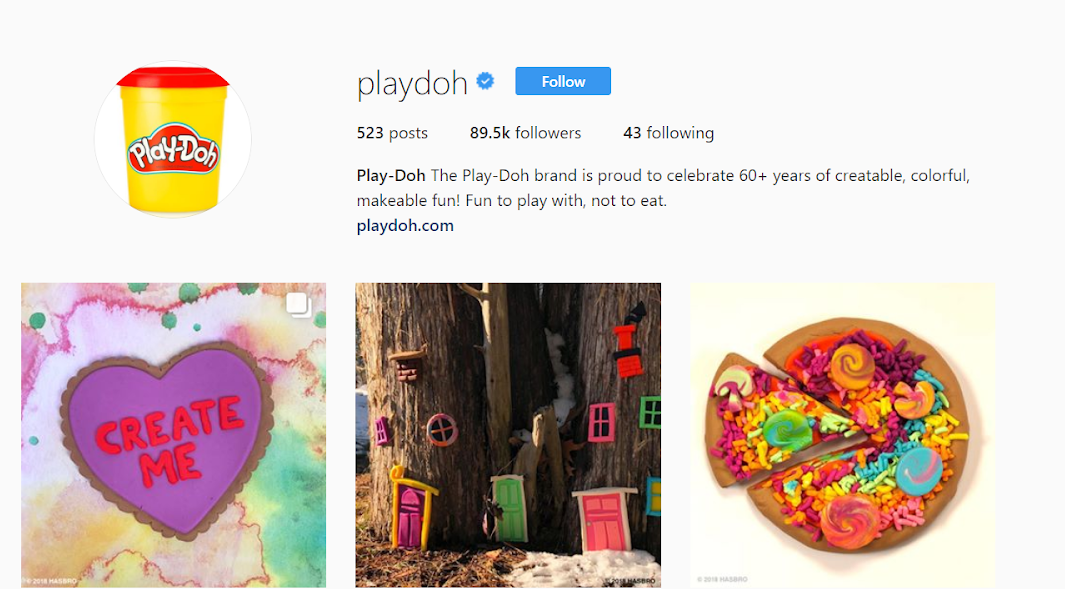
For, e.g., Playdoh’s Instagram page has videos and images that show interesting and creative ways to use their products. Those who purchase Playdoh’s products can experiment with such creative ideas or get inspired by such images to try new products.
1
Companies can use such images with interesting copy, to keep target groups hooked. Marketers can use tools such as the Hemingway app when coming up with attractive and compelling copy for Instagram marketing posts.

2. Instagram allows customers insight into businesses

Transparency is a critical element that contributes to the success of a business. Customers like knowing what happens inside a company. Who is the face behind the posts customers see on Instagram? Who takes the beautiful pictures and videos that end up on a company’s profile?
These are just a few examples of the things that customers would be interested to know. By publishing pictures of employees, celebrations in the company and even meetings, your company can endear customers to the people that make your brand. This relationship-building can help in building brand loyalty and shaping your business online.
Tools like Activepresenter help in creating interesting “behind the scene” videos which can be shared with customers.

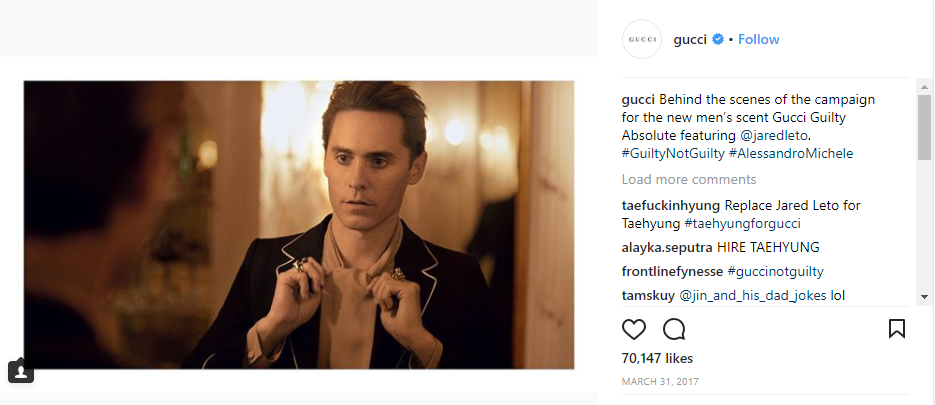
The above screenshot of Gucci’s Instagram page shows Behind the Scene shots of creating an ad campaign for the brand’s new men’s scent – Gucci Guilty Absolute. On seeing such pictures, customers feel like they’re a part of the process and develop loyalty towards brands that share such instances.
Screenshot 2018-02-20 10.27.32

3. Instagram provides a platform for important event announcements

Instagram is the right platform to announce important upcoming events. Marketers can use Instagram to post an image of the brochure along with a video tour of the place where the event is to be conducted, or a video ad for the event. Such posts provide customers an immersive experience of what they can expect at the event.
The event details can be posted real time, or you can use a social media management app like Drumup to schedule the posts for publishing in advance. Managing an event can be nerve-wracking, because of tasks that have to completed in a timely manner. With Instagram scheduling, you can create your content calendar in advance and not rely on your memory to follow your publishing schedule.
2
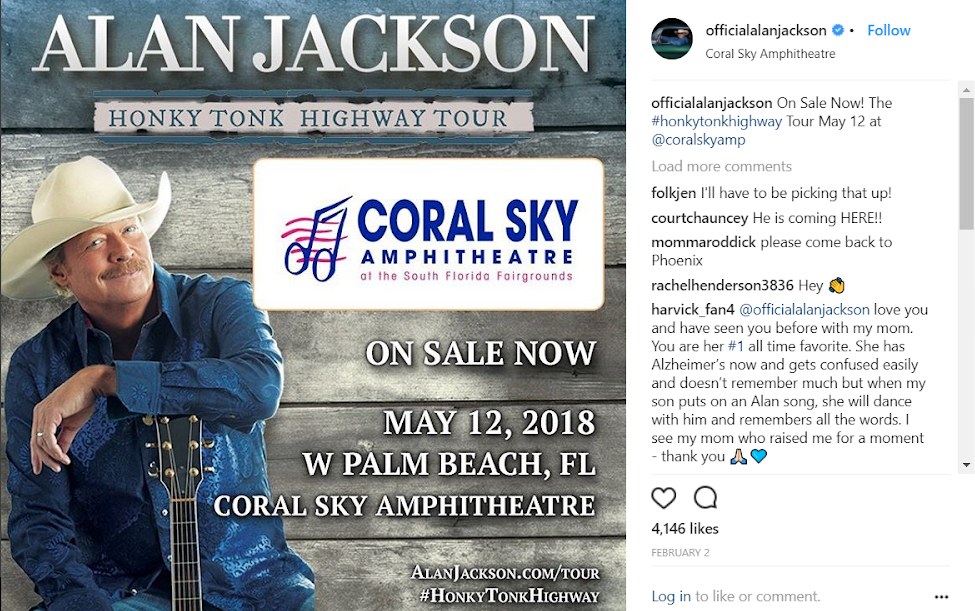
Here’s an example of Alan Jackson’s Instagram post, which he has used to announce a tour date and venue. The event details are posted visually and ahead of time, allowing the message enough time to sink-in among his target audience who can take action accordingly. These kinds of posts help in building your personal brand and business.

4. Instagram is a great platform to highlight the social responsibility aspect of your business

The social responsible acts of a business have a direct impact on its perceived goodwill. Most businesses indulge in forms of social responsible activities to connect with their audience powerfully outside of business. Broadcasting of social responsibility activities helps in building customer loyalty and reshaping your business’s persona in the minds of customers.
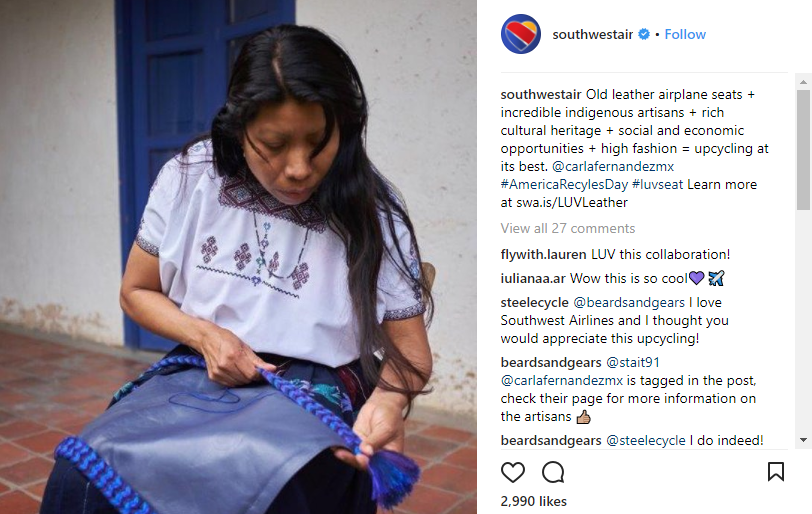
Social media, and especially Instagram, is a great platform to let customers know about the social side of a business. For e.g., Southwestair’s Instagram picture shows how their old airplane seats are upcycled with help from indigenous artisans. This throws light on the social responsibility of the business and how it cares about matters such as upcycling that are super-relevant in today’s world.
Screenshot 2018-02-20 10.29.22

5. Instagram is a great platform for employee appreciation

By posting pictures on Instagram of employees celebrating career milestones or other important events in their lives, or simply by posting employees’ opinions about something, the company not only boosts the morale of employees but also shows the customers that they care for their employees. This creates an impression in the minds of customers that the company is not just about business. Employees are an integral part of the company, and it’s important for the company to show loyalty to them as well. This helps in reshaping the company’s persona in the minds of customers.

Screenshot 2018-02-20 10.30.56
In the above example, Mailchimp has posted a picture of one of its employees giving his opinion about the company and other general things. The background of the picture shows how “super cool” and relaxing MailChimp’s work atmosphere is. This provides an impression to customers that Mailchimp not only values employees and their opinions but also provides a very relaxing and comfortable place for employees to work. This helps in creating a good impression, which can have a positive impact on the business, in the minds of the customers.

The Instagram stories advantage

Instagram stories is a very important feature that helps companies to connect with their customers. The poll feature provided by Instagram stories help companies in obtaining the customer’s opinion about something. For, e.g., it is common for online jewellery shops to ask their customer’s opinion regarding the type of jewellery they would like to see. Thus, customers get an impression that the company values their opinion which in turn helps in building their loyalty and reshaping your business.
Instagram stories also appear above all posts in Instagram feeds, a premium space that gives businesses the chance to capture the attention of their audience. Plus, brand storytelling has always been a powerful means to making an impression on potential customers.
Thus, Instagram is a very powerful tool that companies can use to promote their product and service and get closer to their customers. By making use of the various features of Instagram in the most effective manner, companies are not only able to promote their business but also carve a niche in the minds of customers.
Feature image via Thought Catalogue, Unsplash 

Saturday, 10 February 2018

LinkedIn Marketing Insights: 7 Top Trends in LinkedIn Posts


Among all social media networks and their posts, LinkedIn and LinkedIn Posts stand unique. Do you know why? This is because unlike Facebook, Twitter, and Instagram, networking here is on more professional grounds. Your Facebook friend who might be very casual and friendly to you will present himself/herself differently in front of you as your LinkedIn connection.
So, what sort of posts fall under top trends in LinkedIn posts – let’s take a look – turn by turn.

1. Images and videos in LinkedIn Posts


According to a survey conducted by Social Media Examiner, 74% of social media marketers use visual assets in their social media marketing, ahead of blogs (68%) and videos (60%).
In addition, when people hear information, most probably three days later, they can remember only 10% of that information. On the other hand, if a significant image is corresponding to that same information, three days later, people can retain 65% of the information.
This indicates how important it is for you to use visual content comprising videos and images. Furthermore, according to the latest update of LinkedIn, you can now upload or record video on your LinkedIn mobile app.
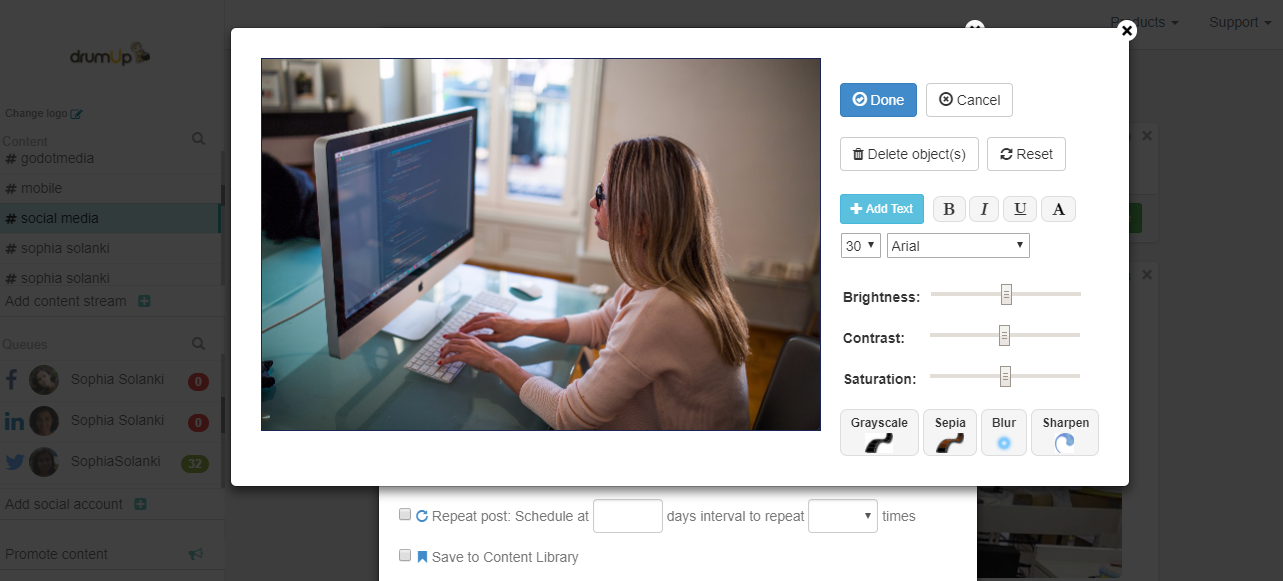
Image 4 Image editing

Note: Unlike Twitter or Facebook, only one image can be included with posts that are going to be published to LinkedIn. However, the ability to add multiple photos is available now on iOS and is coming soon to Android and desktop.

2. Call-to-actions in LinkedIn Posts


CTA is a tool for an effective B2B lead generation. And, LinkedIn being a social media marketing platform try to include call-to-action in your LinkedIn posts wherever logical and possible. Of course, you should not sound like a salesperson.
The best place to add call-to-action is your blogs on LinkedIn Pulse. CTA, being a critical as well as a visual item for blog posts, helps the reader get more information to move along their journey and to resolve or satisfy their need or problem with your product or service.
One school of thought suggests that every LinkedIn Posts should end with a proper CTA unless you are writing or posting just for the sake of keeping your account active. There is no hard and fast rule on the type of CTA. However, you can include CTA in your LinkedIn posts in the form of:
  • Engaging image that conveys that what they will get by clicking on it
  • URL to your customized landing page    
In addition, you can directly ask for opinion or feedback to drive your users to the comments box.

3. Article marketing on LinkedIn Pulse


LinkedIn Pulse is one of the best places for publishing and promoting your articles and blogs. This is indeed an effective way to drive traffic to your website and boost brand awareness. It is strategic to share content that makes sense coming from you as well as makes you look like an expert but doesn’t directly relate to your offerings.
Few things to be considered while doing article marketing on LinkedIn:
  • Always include author bio, it will give credibility and build trust of your users.
  • Beautify your story/article by adding banner images, it increases click through rates.
  • Use images inside the article. Note: Images that are at least 700 x 400 pixels suit best.
  • Do not forget to add tags. The tagging feature enables you to label your post using categories such as “web development” or “digital marketing.” These specific tags will make it easier for users to reach your post.

  • Tip: Always aim to publish an article that interests your clients and users even when they are not in need of your services.

4. Long-form content in LinkedIn posts


Having said article marketing is a booming trend, let’s focus on the length of articles as well. These days long-form content not only work best for your SEO, but it also enhances user experience. When you create and publish your own original content on LinkedIn’s Pulse, you invite yourself in the competition of building a network that is relevant.
Remember, it usually takes a considerable amount of patience and time to build an audience of followers. However, with LinkedIn Pulse, if your voice is exactly in line with users’ requirements, you can get noticed as an expert in your field and boost your professionalism.
Long-form content also performs well and gathers traffic over time. To make the most of long-form posts, create an extensive social media schedule to reach a wide audience.
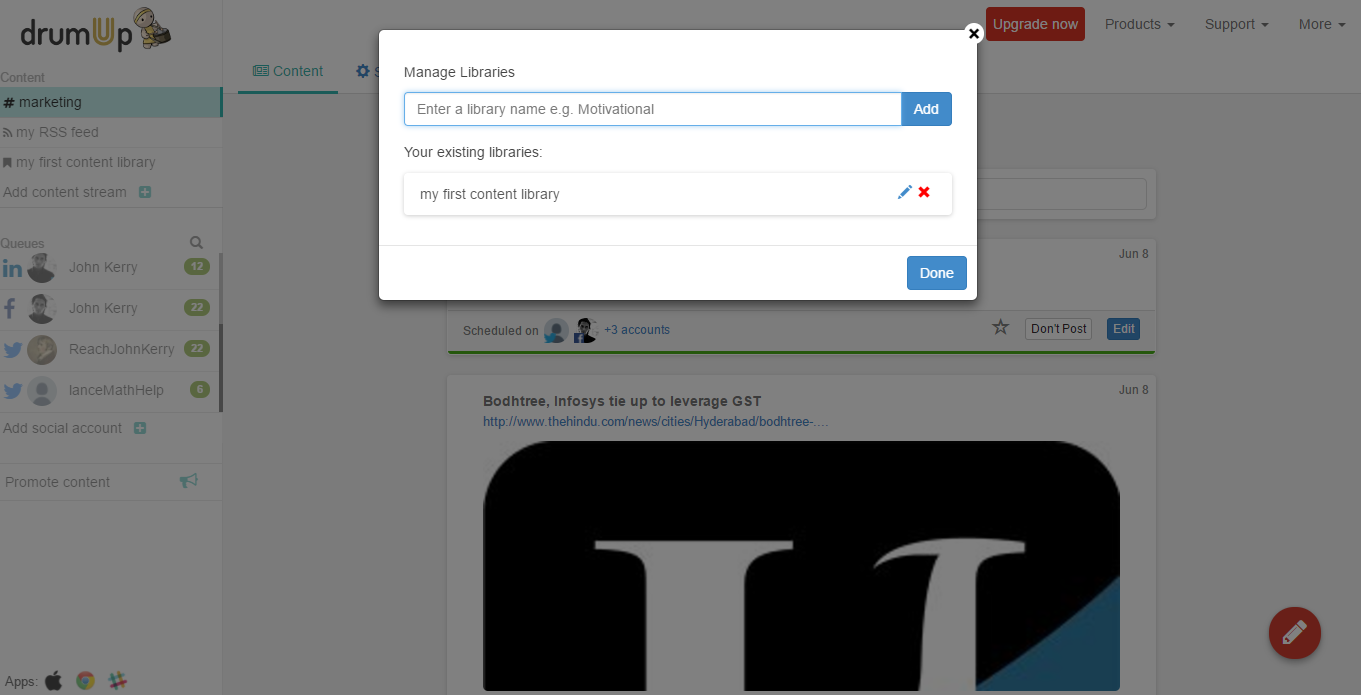
On DrumUp, you could store post sections or different versions of post promotions in libraries and set them on “auto-post” for a pre-decided interval of time.
Add content library

According to research, “Posts between 1900 and 2000 words perform the best and gain the greatest number of post views with titles having a length between 40 and 49 characters.”

5. Timely, relevant, and conversational LinkedIn posts


When it comes to posting your original content or sharing others’ content, don’t just do it as an activity or just for the sake of doing it. Rather, do it using all your analytical skills and relevance of the content.
Few examples on what sort of content should you post that sounds timely, relevant and conversational:
  • Tips about succeeding in any particular marketing activity
  • Tricks and tactics to standout unique in competition
  • How to posts to help users understand the required processes
  • Questions to instigate conversations
L’oreal has built up a following of over 700,000 people by posting timely, relevant and conversational posts.
All the times it is not possible to provide tips, tactics, strategies, and so on. There you can always re-purpose evergreen content and help your users by providing with the content they need at their finger tip.

6. LinkedIn Page posts


Whatever LinkedIn posts, you want to post – choose to post it from LinkedIn page over the LinkedIn profile. You can expand network through your profile. But as a business what all you need is a dedicated base of followers. At the end of the day, people trust on what’s happening inside the business, where it is heading, and how it is doing. For this, they visit your fan page. And hence, make the optimized use of it. To increase the number of your followers, make a compelling LinkedIn posts for them to sign up for your free report, newsletters, video series, blogs, webinars, podcasts and others. This is a secret sauce for moving your social contacts to your email list.
If you are sharing your posts from LinkedIn Page to various groups, make sure you check their terms of participation. Some groups permit discussions only and restrict links to your content or site.
Tip: Make sure your twitter account is connected to your LinkedIn profile, so your twitter handle is included in the tweets people share.

7. LinkedIn posts with the personal touch


Of course, LinkedIn is a way professional network. However, at times, a personal touch is also required to boost engagement. In case your LinkedIn following is much lesser as compared to followings on Twitter, Facebook, Instagram, Google+, and other networks, what best you can do is a cross-promotion. Cross post the URL of your posts on other networks with an added compelling social prompt and post it on LinkedIn. This will, for sure, help you build your LinkedIn connections.
Since this is a social network, and you are looking forward to expanding relationships with people, include some personal elements which build their trust in you. Not on a daily basis, but occasionally add a bit of you into your LinkedIn status updates. Such posts could be testimonials, your new venture, mention of a new client, and any new learning, certification, or achievement.
Closing thoughts
B2B social media marketing on LinkedIn has always been a challenge for most of the search marketers. However, keeping the recent and most working trends of LinkedIn posts in mind, we are sure – you will not regret your time invested in LinkedIn marketing. Pump up your energy and start exploring LinkedIn posts trends which are aligned with your marketing goals. Any of the above mentioned Posts will surely excite your readers.

Sunday, 24 December 2017

3 Ways to Increase Website Traffic With Snapchat


SNAPCHAT has been around since September of 2011, but it has recently been gaining more popularity than ever before. Through this exciting social media platform, users may send photos and short videos to one another. While it may seem like a redundant app in the face of texting and Instagram, there are actually numerous reasons for its popularity – all of which make it possible to use Snapchat to increase your website traffic.

You see, Snapchat allows users to send images and videos (commonly referred to as ‘snaps’) to chosen recipients. Users are able to add text, emojis, and images to the picture or video before sending it. Videos and images can be up to ten seconds long. After that timer is up, the media vanishes and is deleted from the Snapchat servers – gone forever.
While this short lifespan may sound a bit counterproductive, it actually makes the snaps seem that much more relevant and important. Because the media will disappear after opening, there is a certain sense of urgency to them. In this case, the old adage of “less is more” truly fits the bill. This is a big part of why millions of people are actively using this app several times a day.
In fact, Snapchat has roughly 60 million total installs, which makes it bigger than Instagram was when it sold to Facebook for $1 billion. Out of all of those 60 million installs, Snapchat has 30 million monthly active users. Out of those active users, 55% (16,500,000 people) use Snapchat on a daily basis. That’s a lot of prospective customers!
You can benefit from this large app engagement by using Snapchat to increase your website traffic.

How Snapchat Stories Work

In order to effectively use Snapchat, it’s helpful to understand how the Story aspect of the app works. It’s pretty simple, and is sure to increase your customer engagement:
  1. Aim the camera and press the large gray circle to capture an image; press and hold that button to take video
  2. Edit and add the photo or video to your Story.
    • The “x” at the top-left corner lets you delete that Snap and start over.
    • The icons on the top right let you add stickers, bits of text, or drawings.
    • The bottom left offers a timer that lets you change the length of time (up to 10 seconds) the image will be shown while your customer watches your Story. You can also tap the downward arrow to save the video or image to your device. The “+” lets you add the video or image to your Story.
  3. Confirm you want to add the Story with the pop-up that will show once you press the “+” to add the image or video.
  4. Watch your Snap Story to get an idea of what your customers are going to see when they watch your Story. If you change your mind about including it, you can delete it from your Story.
Now, let’s check out the three main ways to use this feature to boost your website traffic:

1. Add Personalization to Your Brand

While blogging is undoubtedly a critical component to any business website, that content isn’t as raw and personal as unedited, short snaps. Snapchat is all about sharing real-life, real-time things that gives your clients and customers a peek into the person behind the brand name.
One of the best ways to increase your website traffic is by personalizing your brand – and Snapchat can help you do exactly that. Give your followers and customers a peek into your life by sharing pictures of your morning coffee, your adorable cat, or a behind-the-scenes glimpse of your office area.
Interact with your business community by getting in touch with them and sharing images with them directly. You can create short videos or fun images (use the drawing feature!) to ask questions related to your latest content, product, or blog post. Ask your followers to snap you back with a comment, or to leave one on your latest blog post. Not only will this increase the traffic to your website, but it will also give you a way to personalize your brand and interact with your customers.
Just like with Instagram and other social types of social media platforms, Snapchat can be used by influencers to boost brand awareness and audience reach. By joining up with other influencers in your industry niche, you can give your website traffic a jumpstart as a new demographic is reached. Influencers who are familiar with Snapchat, and are skilled with the app, would be able to create exciting video and image content that will enhance your brand’s voice and personalization. Give it a try by letting one of your like-minded business friends “take over” your Snapchat for a day!
Do something that sets your brand apart from the rest. For example, someone shot an entire music video using Snapchat and the different lenses/filters available. Doing something different like this will increase interest and engagement with your brand, and will get people talking.

2. Special Offers

Perhaps one of the best ways to use the immediacy of this app is for the distribution of coupons, giveaways, freebies, and other such promotions. You can use Snapchat to send out special discount offers on your products or services, have them interact with your website (leave a comment, share a post) in order take advantage of special promotions, and host giveaways that center around your website. This is an excellent way to drive engagement to your business and increase your website traffic.
Sharing special offers through Snapchat is a great way to boost your traffic, since this app makes it easy to offer a variety of incentives. Numerous businesses use social media to host giveaways and other contests that ask customers and/or followers to like, share, and comment for a chance to win a big prize. Snapchat is a great tool for this! In fact, a staggering 67% of college students stated they would most like to receive discounts or promotions via Snapchat.
Everyone loves giveaways and promotions, but adding a creative spin to the traditional discount will boost your website traffic. For example, you could offer discounts or promotional codes to the customers who watch your entire Snapchat story, or who respond to it with a picture of them holding your product/using your service. Not only will this increase customer-brand engagement, but it will also increase your site traffic.
Finally, Snapchat is great for providing special content to your customers that they wouldn’t receive on your other social media platforms. This gives them some unique insight into your brand, and gives a feeling of exclusivity. Fashion brands like Michael Kors have used Snapchat to show off their collections to followers before the collections ever hit the runway. If you have some new products or services about to come out, you could do something similar. Have them enter a code, comment on a blog article, or share content from your site to show they watched the Snap. Make sure to remind them they won’t find this information on any of your other social media channels (Instagram, Twitter, Facebook, etc.). This will give a sense of urgency to following your brand on Snapchat, and will get them to be more involved in the things your business is doing. This will give your traffic a boost, and increase engagement on the app.

3. Highlight Fun Events

Keep your customers in the know by sharing fun pictures and videos from certain events. If you’re hosting or taking part in any fun things like grand openings, trade shows, conventions, charity events, etc, then Snapchat is a great way to keep your customers in the loop. Sharing video and pictures of these events will give your customers direct access to this fun portion of your business, and will make them feel included and special.
Do you have a new product you’re about to release? Giving customers a special sneak peek of an upcoming product is a great way to ramp up the excitement and get them talking. Since the image or video shared over Snapchat will disappear after a VERY short amount of time, the immediacy factor will boost engagement. You can send the most loyal of your customers exclusive information like upcoming deals, discounts, promotions, etc. This will make them feel like a special part of your business, and will keep them loyal. It will also most likely lead to them sharing this great information, which would drive traffic to your website. For example, Mashable has an App of the Day story on their Snapchat, highlighting a fun new app each day. It has some funky music, an animated example of the app, and a bit of a description about the app itself. It keeps followers informed, engaged, and interested.
Is your business hiring? Use Snapchat to find your next employee! For example, GrubHub has used Snapchat to find an intern equipped with “wicked Snapchat skillz.” By using the Snapchat Stories feature, the company posted an image slideshow that instructed candidates to apply with a snap of their best Snapchat doodle art. By doing something similar with your own company, you would not only show your company is a fun place to work, but would also give your website traffic a boost as people check it out and/or apply.

Final Thoughts

Snapchat is a great way to drive customers and clients to your business website. If you haven’t already started incorporating Snapchat into your marketing strategy, it’s time to change that. This app gives your company a chance to connect with prospective customers from within your target audience, expand your audience reach, and even include a new demographic.
The sense of immediacy and exclusivity makes it perfect for several types of marketing campaigns, such as:
  • Behind-the-scenes glimpses into your company
  • Finding your newest intern or employee
  • Special offers, promotions, and discounts
  • Sneak peeks of new products or services
  • Sharing slice-of-life happenings and special events, like trade shows and office birthdays
Fun and casual is a style that lends itself well to Snapchat, something which gives your company the chance to let your business brand shine through. Use its creative nature to think outside the box and set your brand apart from others within your business’ industry niche.
Do you use Snapchat for your business? How do you use Snapchat as a way to increase your website traffic? Let us know in the comments below!

Tuesday, 21 November 2017

How to Learn Social Media Marketing: 30 Resources for Beginners


Social media is no longer an optional marketing channel -- it's a necessary one.
But that doesn't mean results are a given. When it comes to social media, you'll either have a lot of success interacting with your customers, or you'll see little results -- and that depends on the level of effort you put into it.
Few brands do social media really well, and those who do, see great things come from it. But for everyone who does social media well, there are hundreds of others seemingly spinning their social wheels with no tangible results.
For many, social media is simply a place to post links to content they've created in hopes that thousands will see it, click through, and share with their followers. So they have profiles on every network, and every network looks exactly the same; line after line of self-promotion.

Click here to learn about using social media in every stage of the funnel.

 This is not going to bring results. In fact, Facebook's algorithm now penalizes link-based content, and Instagram has made it all-but-impossible to share a link.
Half-heartedly sharing your content on social media is not social media marketing. It's spamming.
Social marketing is a lot of work, and it takes time listening and responding. After all, it's social, and anything social takes an investment of effort and skill.
To hone these skills, check out these resources that will help you develop the skills needed to be effective on social media. (You may want to bookmark this post so you can easily refer to it again later.)

How to Learn Social Media Marketing: 30 Free Resources

Blogs About Social Media

Social marketing is a science involving special communication skills. And the landscape changes constantly.
One of the best ways to develop your social media prowess and to stay up-to-date is to follow experts in the field. These blogs are always fresh with actionable information you can use to improve your marketing:

1) Social Media Explorer

SME is both a strategic services agency and a blog with a bevy of social media and marketing experts. The SME blog is consistently considered one of the most insightful in the industry, and several of its authors have written popular books on several aspects of digital and social marketing.

2) Scott Monty

Monty is a marketing guru who covers a ton of subjects. However, his social media articles are always eye-opening. If you haven't heard of him yet, check out his "this week in digital" posts -- these will keep you up-to-date with all the news on social, and every other aspect of digital marketing as well.

3) Social Media Examiner

Not to be confused with Social Media Explorer, the Examiner is one of the top blogs in the world for social media. Its social media reports are filled with all the important data social marketers want, and the blog posts are filled with valuable tips, as well. If I had to pick just one social media blog to follow, this is the one I would choose.

4) HubSpot Marketing Blog

Right here on the HubSpot Marketing Blog, you can find breaking news and actionable how-to guides on every social network there is.

Ebooks About Social Media

These ebooks will provide deeper information on specific networks and topics.

6) How to Use Instagram for Business

This step-by-step guide explains the reasons to create a business Instagram account and how to execute on Instagram to drive results.

7) A Visual Guide to Creating the Perfect LinkedIn Company Page

If you're building a company page for the first time, or trying to upgrade your page, this guide will show you exactly how to do everything from crafting an engaging company description to creating an eye-catching banner image.

8) How to Attract Customers with Facebook

This multi-page ebook will show you how to use Facebook to drive real business results for your organization.

9) How to Get More Twitter Followers

HubSpot partnered with the experts at Twitter to provide actionable tips for social media managers starting new accounts to build a following, and fast.

10) The Beginner's Guide to Social Media

Last, but definitely not least, is this amazing guide from Moz. The 12 chapters in this book are filled with valuable information that every marketer absolutely needs to know. Bookmark this guide, you'll refer to it more than once.

Videos About Social Media

Videos are my second favorite medium to learn, behind books. Being able to glean from the brightest minds on any subject as if you're face-to-face is powerful. These videos will give you valuable insights, just how to do social media, but you'll get insights into the why and what as well.

11) The #AskGaryVee Show

You can't talk about social media without talking about the speaker, author, and social expert Gary Vaynerchuk. On the Gary Vee Show, he takes questions from his audience and answers them as only he can. If you have a burning question on social media marketing, send it to him.

12) TED Talks: Social Media Marketing

If you aren't in love with TED, you might want to check your pulse. This is a playlist of videos from TED Talks on social media. There may not be that much actionable advice in these videos, but if you want to become an expert on social media, these videos will give you insight into the deeper subject like "the hidden influence of social networks."

13) Learn Social Media Marketing

If you're really new to social media, and you want to learn through a structured lesson experience, consider Lynda's massive library on social marketing classes.

Podcasts on Social Media

If you like to learn while you chill, work out, or commute to and from work, podcasts are one of the best ways to do it. And these podcasts will help you develop your social media expertise.

14) Social Media Marketing Podcast

Michael Stelzner, from Social Media Examiner, brings you success stories and expert interviews from leading social media marketing pros.

15) The Social Media Examiner Show

Rather than deep dives, the SME Show gives you small, bite-sized content for social media every day. This is a great podcast to get actionable quick-tips on a daily basis. It'll keep you motivated while you develop your skills.

16) The Social Toolkit

If you like to stay up-to-date on digital tools, apps, and software for social media marketing, this is the podcast for you.

17) The Social Pros Podcast

Every episode of the Social Pros Podcast shines the light on real pros doing real work for real companies. You'll get insights from Jay Baer of Convince and Convert when you tune in.

Slideshows and Infographics About Social Media

If you're a visual learner, these slide decks and infographics provide great ways to learn social media.

18) The B2B Social Media Palette

This SlideShare walks you through the channels and tools you'll need to be most effective at B2B social media marketing. Sometimes, success can be found by using the right tools and channels for the right audience.

19) The Complete Guide to the Best Times to Post on Social Media

Timing is very important when it comes to social media. Post it the wrong time, and your update can go completely unnoticed because of the flood of updates in your audience's feeds. Being able to master the timing of social media is critical to effective marketing.

20) 58 Social Media Tips for Content Marketers

This slideshow is from the folks at Content Marketing Institute. This deck shows the proper methods for promoting your content over social media. This is a must-read for any social marketer who wants to use those channels to promote content.

21) The Best and Worst Times to Post on Social Media

Again, timing is everything. This infographic lays out the best and worst times to post on each major network. You should save this infographic for referencing when you schedule your social media posts.

Books About Social Media

Books are my favorite way to learn. Many experts agree that if you read a book a week, on your area of expertise, for 5 years, you will have the equivalent of a Ph.D. on the subject. That may or may not be true, but reading books from the experts definitely doesn't make you a worse marketer. Here are some books to get you started.

22) The B2B Social Media Book

This book covers the specific application of social marketing to B2B companies, to leverage social media to drive leads and revenue.

23) The Art of Social Media: Power Tips for Power Users

You've got to read this book by the legendary former Chief Evangelist of Apple, Guy Kawasaki. He's one of the pioneers of social and content marketing, and this book is filled with expert advice from one of the best.

24) The Tao of Twitter

This book is supposed to be for busy marketers who need to get the basics of Twitter down quickly. It shows you how to connect and start creating meaningful connections in less than two hours.

25) The Ultimate Guide to Facebook Advertising

Facebook is one of the most effective advertising and PPC platforms available. You can target a plethora of metrics, allowing you to drill down and advertise to a very specific audience. This book will show you how to optimize your Facebook ads.

26) Jab, Jab, Right Hook: How to Tell Your Story in a Noisy Social World

Gary Vaynerchuk gives insight into how he uses a conversational, reactionary approach to engaging his audience. He gives concrete, visual examples of great social marketing, as well as not-so-great ones.

27) The New Rules of Marketing and PR

David Meerman Scott's book on digital marketing is an international bestseller, and worth every penny. Some argue that it should be required reading for any marketer -- and in this marketer's opinion, "Just read it."

28) Likeable Social Media

Dave Kerpen claims the secret to viral social marketing is to be likable. When someone likes you, they'll recommend you. But being likable on social networks is easier said than done. This book will help you crack that code.

29) Social Media Marketing for Dummies

One of my mentors taught me to read children's books on a subject if I just couldn't grasp a concept. That principle gave way to movements like "Explain It Like I'm 5." And, sometimes you just need it broken down like you're, well, less than an expert on the topic, to put it gently. If that's you, this book is valuable. Go ahead and buy it -- we won't call you dummy.

30) Contagious: Why Things Catch On

This book by Jonah Berger provides a strong foundation to understand how content goes viral -- and how to create ideas on social media that are so catchy, your audience won't be able to help but click them.

The Secret to Social Media Success

No matter how many social networks you set out to master, or how long you work in the social marketing field, there is one secret that will ensure you're successful: Never stop learning.
This list is massive, I know, and there's no way to consume all these resources in the next week. But if you set yourself to learning every day, every week, every month, every year, you'll eventually be the one writing the books that help others learn social marketing.
It all begins with learning.

10 Things I've Learned About Social Media:

  1. Social marketing requires listening.
  2. Conversations should be the goal of social marketing.
  3. Team #Followback is a waste of time.
  4. Social marketing isn't broadcasting, it's communicating.
  5. Never auto-post your content to your social profiles.
  6. Never copy/paste the same message into every social profile.
  7. Social marketing requires time. It's relationship-building on a massive scale.
  8. Be helpful. Period.
  9. Social support is faster than live chat, email, or phone calls. Embrace it.
  10. You don't have to be on every network. Go where your customers are.


Source

Tuesday, 8 August 2017

How to Back Up Your Social Media Content


 Do you have valuable social media posts you don’t want to lose?
Want to learn how to back up your social media profiles?
Downloading your social media profiles, content, and contacts will ensure you always have what you need to keep your business running, no matter what platform or features come and go.
In this article, you’ll discover how to download copies of your social media content and profiles.


Why You Need to Back Up Your Content

It’s important to back up your social media and long-form content both locally and to the cloud, whether it’s Google Drive, Dropbox, or other storage networks. Here’s why:
You never know when the server that houses your content might go down, meaning a delay in delivery or loss of your main website, blog, and other content. Or what if a site you’ve been contributing content to gets shut down, sold, or otherwise changed to where your content is no longer published?
Also consider the possibility that a social network might turn off a particular feature or the entire network itself (Blab, for example). Imagine spending years building up your blog using Facebook Notes or LinkedIn Publisher just to find out one of those services is being turned off?
If you start backing up your content now, you’ll be in better shape than many of your marketing colleagues in handling unforeseen events. You’ll also get more awareness of your content as an added bonus.

#1: Save Your Long-form Content

The next time you write a blog post, no matter what word-processing program or CMS you use, save the final version of your content to a Word (or other) document that you can save locally and to a cloud-based file service. For example, if you write long-form content in Google Docs, download the file as a Word doc when you’re finished.
If you’re a content producer who typically writes content for one main outlet (website or social network) and uses the rest of the social and blogging networks to promote that content, you might want to use a special naming convention to save it:
  • Publication Outlet 1 – Title 1
  • Publication Outlet 1 – Title 2
  • Publication Outlet 2 – Title 1
  • Publication Outlet 2 – Title 2
  • LinkedIn Publisher – Title 1
  • LinkedIn Publisher – Title 2
  • Facebook Notes – Title 1
  • Facebook Notes – Title 2
  • Medium – Title 1
  • Medium – Title 2
Now, suppose you find out Publication Outlet 2 has closed its doors or Facebook decided to turn off the Notes feature. Because you’ve saved your posts from that publication (or that feature) on your Google Drive and local hard drive, you don’t have to scramble to save your content or worry you’ve lost it.
Your backup system also helps you maintain a library of topics and sites where you’ve published so you can more easily keep track of your content. For example, if you’ve been creating text-only content but want to start doing video, go through your Google Drive or local hard drive to see what topics you’ve done as posts and create videos for them instead.
Your content library also comes in handy for repurposing content. For example, let’s say that Publication Outlet 1 is your blog. Some blogs will allow you to republish posts from your blog to theirs.
You could also take your posts and publish them to your LinkedIn Publisher, Facebook Notes, Medium, and other networks. Not only will you get more visibility for your content, but you’ll also ensure that if one website or network goes down, your audience can always find your content elsewhere.

#2: Back Up Your Mobile Videos

Whenever you create videos on your smartphone for Snapchat, Instagram, Facebook, YouTube, and so forth, it’s important not only to upload the videos to those networks, but also to save a copy of your social videos to your smartphone after recording or after the video is published.
For example, after you finish a Facebook Live video, depending on the smartphone app you use, you may see a screen like the one above prompting you to save your video with the download icon (to the right of the blue HD Upload On button in the image).
Or after you record a segment of an Instagram storysave it by tapping the Save icon at the bottom left.
At the end of the day, download your entire Snapchat story as a video by tapping the download icon to the right of your story.
You may be able to reshare these videos on other video sharing networks, depending on whether they allow you to upload video from your phone. For example, upload a good Snapchat story to Facebook to encourage people to follow you there and engage your Facebook fans.
The same thing goes for non-mobile video content: back up non-mobile videos locally and to the cloud. Don’t trust it to just one social network. If there’s a way to download the video (like Blab used to allow video hosts to download audio and video files of their blabs), do it. Or look for browser extensions that let you scrape video content on a page if you have to. Don’t lose your videos!

#3: Capture Testimonials

You may remember a time when LinkedIn company pages had an option to capture your customers’ product and service recommendations. It was a wonderful way to get testimonials for your business until LinkedIn decided to shut the feature down (when they turned off the Products & Services tab on company pages).
Businesses lost all of those recommendations they spent time collecting.
That’s why you need to find a way to capture your testimonials. For testimonials on social media, start by taking screenshots of them (with a tool like Jing) and saving them to your hard drive.
Browser extensions like Open Screenshot (for Chrome) allow you to capture an entire web page, which is helpful for capturing your complete list of LinkedIn recommendations. Be sure to expand all of your recommendations first.
The screenshot will end up looking something like this:
Use this technique to capture entire pages and profiles and then crop them to the sections you want to feature, such as recommendations from LinkedIn on your website. Use individual recommendations for specific products or services, or the entire screenshot for a testimonials page.
Of course, you also need to consider testimonials on other websitesSave the Facebook posts, like the tweets, heart the Instagram photos, recommend the Medium posts, and otherwise find a way to capture all of the positive social media comments about your business, products, or services.
Once you’ve done this, you can either use the screenshots themselves or services like Spectoos to display testimonials from a variety of social media and other sources in a more consistent format. You can embed this as a widget or a full-sized testimonial page. If you have good reviews scattered about, this will help you put them all in one place, neatly and 100% verifiable.
Business Directories and Review Networks
If you’re a local business, apply this same advice to business directories and review networks. For example, it’s a great way to back up your Yelp reviews or unhide those positive “not currently recommended” reviews (which you can find by clicking the link at the bottom of your first page of Yelp reviews).
If your “not currently recommended” reviews are mostly negative, you probably shouldn’t draw attention to them. If they’re mostly positive, you probably should. It all depends on what’s hidden there.

#4: Download Profiles and Pages

Several social media networks allow you to download your profiles and pages. Here are a few of the many download options for the top social networks and why you should use them.
Facebook Personal Profile
treasure trove of information is available for your viewing pleasure in your Facebook settingsClick the link to download your profile data.
On the next page, click Start My Archive. Depending on how much content you have on your Facebook profile, it may take a while to process your archive.
You’ll get an email from Facebook when your file is ready to download.
When you unzip your download, you’ll find three folders: photos, videos, and HTML. These folders support the main index.htm document.
If you click on the index.htm file, you’ll see a stripped-down, text-based version of your Facebook profile data. This is the way Open Graph sees your profile.
You also get the Facebook-optimized versions of media (images and video) you’ve uploaded to your Facebook profile.
Facebook Business Page
The process to download your Facebook business page is similar to your profile. Go to the General tab of your main page settings and click the Edit link next to the Download Page option.
Then click a series of links and buttons, prompting you throughout the process.
When your archive is ready, you’ll receive a notification.
The download file for your Facebook page will have more folders than your Facebook profile download…
…but it contains similar information in a similar format.
Unfortunately, you don’t get the Holy Grail, which is a list of your fans. You actually get more engagement information (such as the comments on photos you’ve posted) from your Facebook profile archive than from your Facebook page archive.
Twitter Profile
On your main Twitter account Settings page (or on the covert Twitter Data page under your Twitter account settings), click the option to download your Twitter archive.
Then click Request Your Archive.
When it’s ready, Twitter will send you an email directing you to download your own unique Twitter archive with stats from your first tweet to today.
Or you can get all of your tweets in a CSV file.
LinkedIn Professional Profile
LinkedIn has two options for downloading your LinkedIn profile data: a 10-minute quick option and a 24-hour detailed option. You can find out more about the amount of information you receive for each option in LinkedIn’s Data Export article.
To request your archive, click your LinkedIn profile and select Privacy & Settings. Under Account > Basics, click the option to get an archive of your data.
Note that the 10-minute option could take longer, depending on the size of your account, number of contacts, and so on. Effectively, with either option, LinkedIn condenses your profile into CSV files.
Having your connections’ email addresses (in the Connections.csv file) is especially important. If you were to lose your LinkedIn account, you could use those email addresses to reconnect with everyone. You can also add those email addresses to your advertising custom audiences. Just don’t add them to your email marketing list!
Other Networks
The ability to download the information from your social profiles and pages lies in your settings. If you have profiles or pages on networks where you’re sharing a lot of content that isn’t included in your Twitter, Facebook, or LinkedIn backups, be sure to look for other ways to make your content reusable, rather than just one-time use.

#5: Export Your Contacts

Last but not least, think of every source of contacts you have. Export and download your contacts from databases and email lists (Gmail, Outlook, Salesforce, GetResponse, etc.) on a regular basis.
You never know when your account could get messed up and your valuable business contacts lost forever. And you can always use those email addresses for retargeting with Facebook custom audiences, Twitter’s tailored audiences, and so on.
What This Means for Your Business
Is there ROI in backing up your content? Maybe not. But if you ever lose content due to a particular website going down, that’s wasted hours of someone’s time on your dollar. So if you’re not backing up your content, you’re losing money and hurting your overall ROI. Gain ROI by keeping your content safe and looking for ways to repurpose it, or simply let it inspire you to create more!
In Conclusion
While it may seem a bit paranoid, you don’t want to find yourself locked out of a social account without access to your most valuable pieces of content and out of reach of your powerful relationships. Make sure you set a reminder on your calendar for regular social media, content, and contact backups.
What do you think? What tactic do you find most useful when backing up your social network or content marketing? Let us know in the comments!