Every now and then, I see an article that suggests email marketing is dead; however, this is far from the
truth. I’ve met many home business owners who say the majority of their
income comes from their email subscriber list. If your list isn’t producing
results, it may not be because email is dead. It’s more likely that you’re
using it wrong. Here are tips to growing and nurturing your email to increase
profits.
Growing Your List
Part of the success in email marketing is to have a list that is growing. Many people I’ve met who are
struggling with email marketing have a stagnant or shrinking list. Here are
some tips for growing your list:
1) Have opt-in forms on every page of your site.
For example, if you have a WordPress blog, have an opt-in list sign-up form in
your sidebar. You might consider having one at the end of your content as well.
2) Entice them to sign up. Offer a freebie
such as a report or video for signing up for your list. Let visitors to your
site know what the freebie will do for them. So many online businesses simply
have a form that says “Sign-Up to Get Updates,” which isn’t a compelling reason
to join. Some online business owners indicate what their incentive is, but not
in a way that entices people to join. Instead of saying, “Get my free report on
how to lose weight,” say, “Start losing weight today!
My free report will tell you how!”.
3) Promote your incentive on social media.
Most social media platforms have areas you can include information about your list and offer in the profile.
You can promote the list itself, but you’re more likely to get results by
promoting the free offer. Which would you respond to: “Join my list to learn
about saving money!” or “Get ‘52 ways to save $1,000 a Month’ free.”
4) Include information about your incentive in your
bios and emails. If you guest blog or appear on someone’s podcast or
website, make sure your bio includes information about your incentive. Every
email you send should mention your free report in the signature line.
Nurturing Your List
Growing the list is only one aspect of email marketing. Once they
subscribe you need to provide value or they’ll unsubscribe. Nurturing an email
list is a delicate balance of staying connected without overwhelming
subscriber’s inboxes. Even more important than keeping on the list, is having
them eager to open the email to see what
you have to share. Here are tips for making your list an effective marketing
tool:
1) Email often enough that subscribers remember you,
but not so often you annoy them. This number depends a great deal on
your home business. Most successful email marketers I know email two to three
times a week. Emailing even just once a week, may not be enough.
2) Be you. The most successful marketers
know that their effectiveness comes from selling themselves first.
Put another way, people will connect with and want to
buy from you because of who you are. Your subscribers have many options for who
to do business with, but if you can make a connection, build rapport and trust,
they’ll choose you. So don’t be afraid to share stories and true-life
anecdotes.
3) Give value. Whatever you email to your
subscribers should enhance their lives. Money always follows value.
4) Make list members feel special. People
who give you their name and email should be treated with the respect they
deserve. Make sure they know it by thanking them as well as giving them things
that no one else gets. For example, I provide a freebie every Friday that only
my subscribers receive. It’s my way of thanking them and acknowledging that
having their email is a big deal.
Want to discover how to engage your audience via pages and groups?
To explore how to nurture a community on Facebook, I interview Holly Homer.
More About This Show
The Social Media Marketing podcast
is an on-demand talk radio show from Social Media Examiner. It’s
designed to help busy marketers and business owners discover what works
with social media marketing.
In this episode, I interview Holly Homer, a professional blogger whose Kids Activities Blog helps parents discover fun things to do with their kids. Her Facebook page (Quirky Momma) has more than 3 million fans.
Holly shares how she’s cultivated a thriving community using Facebook.
You’ll discover how Holly uses Facebook Insights to develop her content.
The past three months, it seems, have been a nonstop parade of major tech events and the new product announcements that come with them.
One of the latest was last week's AWS re:Invent, where Amazon announced a new suite of AI-enabled technology designed with businesses in mind.
And while these new products, features, and tools come with a host of opportunities for the developers, marketers, and others who plan to use them, they also raise a few questions. What are they designed to do? How can they help you? How do they work?
AWS re:Invent is what Amazon describes as "a learning conference" produced by Amazon Web Services -- that's what AWS stands for. The intended audience is what it calls the "the global cloud computing community," but the event features content for anyone who wants to learn how cloud technology can help grow and scale a business. From AdTech, to content delivery, to the internet of things, the conference ranges in learning opportunities from keynotes to certification sessions.
2. What Were the Major AI Capabilities Announced at AWS Re:INVENT 2017?
While a handful of new capabilities were unveiled by AWS, there are four that I'd like to focus on (with a bit of teaser text below on what each one is capable of doing):
Comprehend: text analysis for a variety of content formats
DeepLens: a wireless, artificially intelligent video camera with newly enhanced object recognition
Transcribe: speech recognition technology to convert the spoken word to text
Translate: what it sounds like -- advanced text translation technology
If some of these sound familiar -- or seem reminiscent of similar capabilities previously made somewhat famous by a certain search engine giant -- chances are, it's because they are familiar. I'll delve deeper into this below, but many of these capabilities reflect those for which Google has been known to be a leader, especially in the realm of translation. After all, who could forget this jaunty promotional video on the topic?
3. What is Deep Learning vs. Machine Learning?
The reason why I want to establish the difference between these two technologies (and what they are, in the first place) is that most of these capabilities use one or both.
Machine learning essentially describes the ability of a machine to learn things -- habits, language, behaviors, and patterns, to name a few -- without having been programmed to do so, or pre-loaded with that knowledge. It doesn't describe artificial intelligence in entirety, but rather, is one very important AI capability.
Deep learning is a type of machine learning -- and is a bit trickier to explain. Basically, it takes the next (big) step in that it's designed to imitate the way the human brain works by way of something called neural networks. In our brains, we have biological neural networks in which the action of one neuron creates a series of subsequent actions that ultimately result in our different behaviors.
In technology, artificial neural networks seek to replicate that phenomenon by becoming "trained" to comprehend data based on a certain set of criteria. One of the more notable examples of deep learning in practice is in image recognition, in which neural networks are able to recognize different data patterns or cues to learn what, for example, a cat looks like.
4. What Is Amazon Comprehend?
Amazon Comprehend uses something called natural language processing (NLP) to better understand and determine the meaning within text. It's an instance of machine learning, in which the technology learns how to comprehend -- if you will -- and process language as it was intended by the human being speaking or writing it.
Comprehend performs this capability with a series of steps:
Identify the language.
Pick out the phrases that most strongly indicate what the text is about -- things like names of people, companies, places, or important events.
Use those phrases to determine if the sentiment of the text is positive or negative.
File that set of text according to its topic within a collection of subjects it has already organized based on patterns it's observed.
So, how does this technology apply to the real world? Well, it's particularly helpful in an instance of, say, analyzing written customer feedback. By feeding these comments to an API like Comprehend, marketers can use this technology to synthesize data from their audiences to determine something like thematic areas of improvement.
5. What Is DeepLens?
Simply put, DeepLens is a high definition video camera that was designed with developers in mind. It was built with deep learning capabilities and what AWS Chief Evangelist Jeff Barr describes as "pre-trained models for image detection and recognition."
In other words, it's a very smart camera: one that can recognize objects, faces, motions, and creatures (e.g., a dog from a cat). And while that's very cool -- not to mention, somewhat reminiscent of the recently-announced Google Clips camera -- there's a reason why it could prove so helpful to businesses.
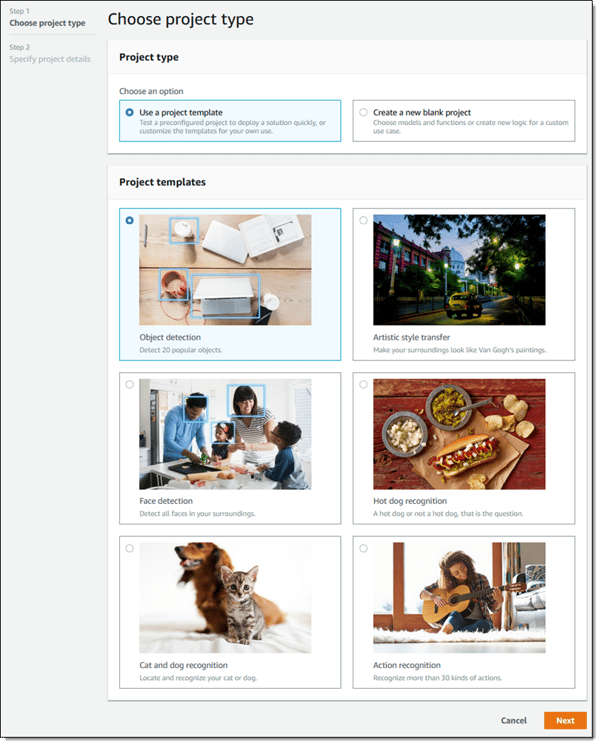
To start, DeepLens comes with a number of "templates," or recognition technologies that users can build upon for their own projects. Object and action recognition, for example, can help to more seamlessly create something like product tutorials or demonstrations, by developing a system or algorithm that learns to recognize how the two are paired for different outcomes.
For example, if you're demonstrating how a certain cooking appliance can be applied to different scenarios, it seems that DeepLens can be utilized in building a system to recognize the appliance itself (like a standing mixer), the actions the user can take with it (like mixing cake batter), and the resulting outcome (a delicious cake).
Anyone with a journalism background is more than familiar with the headache joy of transcribing spoken interviews. We want to get it just right, be sure not to misquote the interviewee, and communicate what was said in the right context.
If only, back in my earliest days of reporting, there were advanced transcription services available to the common writer.
But now, there's Transcribe: an AWS service that uses machine learning technologies to recognize the spoken word and transcribe it into text.
While the function itself is fairly intuitive, the benefits might not be. So let's lay out two instances where technology like this can be applied to a marketer's world:
Interview transcription. I already covered this a few paragraphs earlier, but let's say you're writing up a blog post that requires quotes from a spoken interview. This technology eliminates the time-consuming step of transcribing what was said, and leaves you instead with all of the text from that conversation, allowing you to pick and choose the quotes you want to incorporate.
Video transcription. Accessibility is no longer optional. It's important to provide a way for individuals who are hearing impaired to be able to consume and enjoy your video content, even without the audio. Transcribing what is said in the video by way of full paragraphs or subtitles allows them to do so -- and, it allows those who simply prefer to watch videos without sound to be able to absorb the content, as well.
These are only two of the more prominent examples of how such technology could be applied, but there are many more, from transcribing podcasts to documenting notes from an important meeting.
7. What Is Amazon Translate?
This development might be my favorite.
Around here, we talk a great deal about approaching marketing with a global mindset. While I might use JetBlue as a remarkable example of marketing, it might not resonate as much with audiences in countries where this airline doesn't operate.
To put it simply, the internet is a global, international destination. The people reading your content might not regularly engage with the same brands you do, and they might not speak the same language.
That's why a growing number of developers and marketers are building a multilingual web presence -- one where their online properties and content can be seamlessly viewed in the language preferred by the user. It's a trend that, as HubSpot's own global presence continues to grow, I take inordinate glee in seeing.
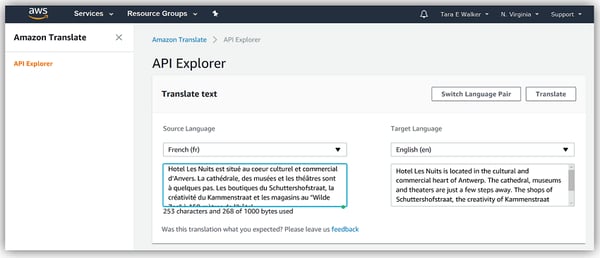
It's also why I love seeing tools become available that make it easier to approach marketing with a "global first" mindset. Translate is one such tool: a service that uses machine learning to more naturally translate text from one language to another.
Here's a look at how it worked when translating a French paragraph to English:
So, here's the million-dollar question: Is Amazon creeping into Google's territory?
Maybe.
It's not the definitive answer I hoped to have, but in these early release days, it might be too soon to tell. While most of Google's headline-making AI developments are largely consumer-centric (like the previous example of Clips), it is true that the company has been working on its own stack of machine learning capabilities for businesses. Look no further than Google.ai, for example, where the mission is to bring "the benefits of AI to everyone" -- including, I assume, marketers.
This is only the beginning.
What are you most excited about? What confuses or scares you, and what fills you with delight? Feel free to weigh in with your thoughts on these AWS AI developments on Twitter, or let me know if you have a question about it.
Social media is no longer an optional marketing channel -- it's a necessary one.
But that doesn't mean results are a given. When it comes to social
media, you'll either have a lot of success interacting with your
customers, or you'll see little results -- and that depends on the level
of effort you put into it.
Few brands do social media really well, and those who do, see great
things come from it. But for everyone who does social media well, there
are hundreds of others seemingly spinning their social wheels with no
tangible results.
For many, social media is simply a place to post links to content
they've created in hopes that thousands will see it, click through, and
share with their followers. So they have profiles on every network, and
every network looks exactly the same; line after line of self-promotion.
This is not going to bring results. In fact, Facebook's algorithm now
penalizes link-based content, and Instagram has made it
all-but-impossible to share a link.
Half-heartedly sharing your content on social media is not social media marketing. It's spamming.
Social marketing is a lot of work, and it takes time listening and
responding. After all, it's social, and anything social takes an
investment of effort and skill.
To hone these skills, check out these resources that will help you develop the skills needed to be effective on social media. (You may want to bookmark this post so you can easily refer to it again later.)
How to Learn Social Media Marketing: 30 Free Resources
Blogs About Social Media
Social marketing is a science involving special communication skills. And the landscape changes constantly.
One of the best ways to develop your social media prowess and to stay
up-to-date is to follow experts in the field. These blogs are always
fresh with actionable information you can use to improve your marketing:
SME is both a strategic services agency and a blog with a bevy of
social media and marketing experts. The SME blog is consistently
considered one of the most insightful in the industry, and several of
its authors have written popular books on several aspects of digital and
social marketing.
Monty is a marketing guru who covers a ton of subjects. However, his
social media articles are always eye-opening. If you haven't heard of
him yet, check out his "this week in digital" posts -- these will keep
you up-to-date with all the news on social, and every other aspect of
digital marketing as well.
Not to be confused with Social Media Explorer, the Examiner is one of
the top blogs in the world for social media. Its social media reports
are filled with all the important data social marketers want, and the
blog posts are filled with valuable tips, as well. If I had to pick just
one social media blog to follow, this is the one I would choose.
If you're building a company page for the first time,
or trying to upgrade your page, this guide will show you exactly how to
do everything from crafting an engaging company description to creating
an eye-catching banner image.
HubSpot partnered with the experts at Twitter to provide actionable
tips for social media managers starting new accounts to build a
following, and fast.
Last, but definitely not least, is this amazing guide from Moz. The
12 chapters in this book are filled with valuable information that every
marketer absolutely needs to know. Bookmark this guide, you'll refer to
it more than once.
Videos About Social Media
Videos are my second favorite medium to learn, behind books. Being
able to glean from the brightest minds on any subject as if you're
face-to-face is powerful. These videos will give you valuable insights,
just how to do social media, but you'll get insights into the why and what as well.
You can't talk about social media without talking about the speaker,
author, and social expert Gary Vaynerchuk. On the Gary Vee Show, he
takes questions from his audience and answers them as only he can. If
you have a burning question on social media marketing, send it to him.
If you aren't in love with TED, you might want to check your pulse.
This is a playlist of videos from TED Talks on social media. There may
not be that much actionable advice in these videos, but if you want to
become an expert on social media, these videos will give you insight
into the deeper subject like "the hidden influence of social networks."
If you're really new to social media, and you want to learn through a
structured lesson experience, consider Lynda's massive library on
social marketing classes.
Podcasts on Social Media
If you like to learn while you chill, work out, or commute to and
from work, podcasts are one of the best ways to do it. And these
podcasts will help you develop your social media expertise.
Rather than deep dives, the SME Show gives you small, bite-sized
content for social media every day. This is a great podcast to get
actionable quick-tips on a daily basis. It'll keep you motivated while
you develop your skills.
Every episode of the Social Pros Podcast shines the light on real
pros doing real work for real companies. You'll get insights from Jay
Baer of Convince and Convert when you tune in.
Slideshows and Infographics About Social Media
If you're a visual learner, these slide decks and infographics provide great ways to learn social media.
This SlideShare walks you through the channels and tools you'll need
to be most effective at B2B social media marketing. Sometimes, success
can be found by using the right tools and channels for the right
audience.
Timing is very important when it comes to social media. Post it the
wrong time, and your update can go completely unnoticed because of the
flood of updates in your audience's feeds. Being able to master the
timing of social media is critical to effective marketing.
This slideshow is from the folks at Content Marketing Institute. This
deck shows the proper methods for promoting your content over social
media. This is a must-read for any social marketer who wants to use
those channels to promote content.
Again, timing is everything. This infographic lays out the best and
worst times to post on each major network. You should save this
infographic for referencing when you schedule your social media posts.
Books About Social Media
Books are my favorite way to learn. Many experts agree that if you
read a book a week, on your area of expertise, for 5 years, you will
have the equivalent of a Ph.D. on the subject. That may or may not be
true, but reading books from the experts definitely doesn't make you a worse marketer. Here are some books to get you started.
You've got to read this book by the legendary former Chief Evangelist
of Apple, Guy Kawasaki. He's one of the pioneers of social and content
marketing, and this book is filled with expert advice from one of the
best.
This book is supposed to be for busy marketers who need to get the
basics of Twitter down quickly. It shows you how to connect and start
creating meaningful connections in less than two hours.
Facebook is one of the most effective advertising and PPC platforms
available. You can target a plethora of metrics, allowing you to drill
down and advertise to a very specific audience. This book will show you
how to optimize your Facebook ads.
Gary Vaynerchuk gives insight into how he uses a conversational,
reactionary approach to engaging his audience. He gives concrete, visual
examples of great social marketing, as well as not-so-great ones.
David Meerman Scott's book on digital marketing is an international
bestseller, and worth every penny. Some argue that it should be required
reading for any marketer -- and in this marketer's opinion, "Just read
it."
Dave Kerpen claims the secret to viral social marketing is to be
likable. When someone likes you, they'll recommend you. But being
likable on social networks is easier said than done. This book will help
you crack that code.
One of my mentors taught me to read children's books on a subject if I
just couldn't grasp a concept. That principle gave way to movements
like "Explain It Like I'm 5." And, sometimes you just need it broken
down like you're, well, less than an expert on the topic, to put it
gently. If that's you, this book is valuable. Go ahead and buy it -- we
won't call you dummy.
This book by Jonah Berger provides a strong foundation to understand
how content goes viral -- and how to create ideas on social media that
are so catchy, your audience won't be able to help but click them.
The Secret to Social Media Success
No matter how many social networks you set out to master, or how long
you work in the social marketing field, there is one secret that will
ensure you're successful: Never stop learning.
This list is massive, I know, and there's no way to consume all these
resources in the next week. But if you set yourself to learning every
day, every week, every month, every year, you'll eventually be the one
writing the books that help others learn social marketing.
It all begins with learning.
10 Things I've Learned About Social Media:
Social marketing requires listening.
Conversations should be the goal of social marketing.
Team #Followback is a waste of time.
Social marketing isn't broadcasting, it's communicating.
Never auto-post your content to your social profiles.
Never copy/paste the same message into every social profile.
Social marketing requires time. It's relationship-building on a massive scale.
Be helpful. Period.
Social support is faster than live chat, email, or phone calls. Embrace it.
You don't have to be on every network. Go where your customers are.
When it comes to your email marketing, you already have a lot working against you in a subscriber’s inbox. Family news, party invites, and every other online business owner vying for some attention are your competition, and you’ve got to find a way to rise above the chatter. The best way to do that? Email segmentation.
The name itself might not initially sound like a strategy for increased open and click rates, but once I start to unpack it a little more, you’ll quickly see why email segmentation is going to be your new best friend. In fact, according to DMA, 77% of email marketing ROI came from segmented, targeted, and triggered campaigns in 2015. So I’m not just talking about deliverability anymore – I’m talking about product sales and money in your pocket.
Stated simply, email segmentation is the process of putting your email subscribers into different buckets and speaking to each of those groups directly. Think of it as meeting your subscribers where they’re at on their customer journey so you can send them targeted content that speaks specifically to their needs and goals at that point in time. To do that, you’re going to need to do some recon on your subscribers, but we’ll talk about that later. First let me tell you a bit more about the benefits of email segmentation.
Why you need email segmenting in your email marketing
Email segmentation is one of the key distinctions between a list that converts and one that makes it hard to reach your goals. Knowing your subscriber's backstory and how they interact with your content is key to understanding how to communicate with them and pitch your products.
For example, if you know that your subscriber is a newbie on your topic, you can specifically send them your intro level eBooks for free and put them into a sequence where you teach them the basics of your topic to gain their trust and build authority.
But if you find that another of your subscribers is more knowledgeable on your topic, you can send them one of your more complex eBooks and put them into a sequence that eventually pitches them one of your more expensive and advanced products. See how that works?
Now you know that email segmentation helps you meet your subscribers where they’re at, but here’s what segmentation actually means for your email deliverability:
Increased Open Rates
An email in an inbox is only as good as the person reading it. Having a segmented list allows you to send the same email but with custom subject lines to specific subscriber groups that appeal to their needs.
Your customers aren’t all the same person and segmentation can help you get more specific with smaller groups of your list.
Better Click-Through Rates
Once you have those custom subject lines set up for your different subscriber groups and you’ve sent your emails off, it’s up to your subscribers for the next step– click-throughs.
Setting up targeted emails alone won’t put money in the bank. You need your email subscribers to interact with your content by clicking through on links to your articles, videos, and, ultimately, your products.
ConvertKit customers with targeted segmentation often see click-through rates of as high as 10-14%. Considering the industry average across all email marketing platforms is roughly 6%, that’s at least a 66% increase. Your subscribers are also much happier as they’re now getting emails they actually want to open and click on. It’s definitely a win-win.
Maximized Conversions
When you’ve reached that trust point and are ready to send your sales email to your list, the last thing you want to see is zero conversions. If you’re emailing your entire list of subscribers who may or may not be interested in that particular offering, you risk losing them as a subscriber and you certainly risk losing the sale. You’ve got to narrow your audience based on your subject.
With good segmentation you can track who clicks on your links and then send targeted emails just to those people with a reminder about any details, some FAQs, or anything else they need to know to seal the deal. Emailing just the people who have shown direct interest is not just a smart business move, it makes you look like a real human on the other side of the computer screen too.
Using segmentation to your advantage will keep the number of unsubscribes to your account at a minimum. You’ll still have people who clean up their inboxes for time to time, but the more targeted you can get with the emails you send, the more likely your subscribers are to hang out.
Avoid The Dreaded SPAM Filter
The whole point of email marketing is to have the emails you send actually delivered and read, right? Spam folders are notorious for making that hard on marketers, but there are actions you can take to make it better.
Email service providers (ESPs) want to see that your subscribers are opening emails, clicking on links, sharing emails, replying to emails, marking them as important, and not immediately hitting delete. Sending targeted email content through segmentation helps you avoid being flagged by those ESPs.
Want to know more about how to increase the quality of your list and avoid the SPAM filter? Read up right here.
Hopefully now you see that email segmentation is the best way to create targeted content for your email subscribers to help with your click rates, revenue, and so much more. Now let me tell you how easy it is to create segmentation in ConvertKit.
How to segment email subscribers with tags in ConvertKit
In ConvertKit, we create segmentation by tagging subscribers and then grouping those tags together. So basically tags organize people and segments organize tags.
Tags allow you to organize and group your subscribers based on actions, interest, and more. Because we are subscriber-centric and not list-centric, you only have one list of subscribers, and tags help you keep that one list organized.
Ways you can add tags to your customers are:
With Link Triggers, you can add a tag when a subscriber clicks a link.
With certain integrations, you can add a tag based on a purchase.
You can import into a tag, so you know when you brought over certain subscribers
Within the ConvertKit app:
Tags can be created on the Subscriber page or within an Automation.
Tags can be added to existing subscribers on the Subscriber page via Bulk Actions, or within an individual Subscriber profile.
Here's a quick video that explains how to use forms, tags and segments effectively.
Figuring out the best way to segment your email marketing lists can be a huge undertaking. But the more you tag, the better you can target your emails with content that feels tailor made for each subscriber.
Types of subscriber data to collect for email segmentation
You could also think of tags in terms of data you collect about your subscribers. This data will help you get to know your subscribers better– what they’re interested in, where they’re from, what they want to learn from you– so that you can send them more targeted content and in turn pitch them products they actually want. Here are some tags that we suggest our customers use for collecting data for their subscribers:
Where the subscriber is at on their customer journey
Other than the basic information, this is one of the first pieces of data email marketers use to start segmenting their list. Knowing this initial starting point will help you know what level of skill, knowledge, and engagement your subscriber has with your topic. This can give you insight on everything from what kind of product to pitch to how much teaching content you need to prepare.
How to use this tag– In your introductory email, ask your subscribers what their main struggle is by offering five different options to choose from. The reader will respond by clicking on the link they identify with which will trigger a sequence that ends by pitching a product geared toward that struggle.
Products they’ve bought/downloaded from you
The next thing you'll want to track is when subscribers purchase your product. It helps to create a tag called “Purchase: Product Name” for each product. Then Gumroad, Shopify, Teachable, or whatever other e-commerce provider you are using can add customers to that tag once they make a purchase through an automation. And don't forget to include these purchase tags in your newsletter or all subscribers segments
How to use this tag– Knowing what a subscriber has already purchased helps you in a couple different ways.
You can exclude that person (through their tag of Purchase: Product Name) from any further communication about that product. They don’t need your sequences that pitch that product any more since they’ve already bought it, right?
You can make an assumption on what other products they might enjoy based on their first purchase. You can set up a link trigger that sets them into a new sequence that pitches your subscriber that similar product.
Webinar attendee
People who join webinars are generally people who are excited to learn. A webinar attendee has already given you their email address so they could attend your webinar, so make sure to make the most of this list growth by adding a webinar tag to their name.
How to use this tag- You’ve most likely given away a free product or pitched something on a webinar, so you know that anyone with that tag already has a basic knowledge of who you are and what you do. You can parlay that knowledge by putting people with that tag through a sequence that teaches them more in depth on your webinar topic and ends with a hard pitch for one of your products for sale.
Event attendee
Don't miss the opportunity to reach out to leads and potential customers you've already made a positive connection with at a live event.
How to use this tag- Segment your email list depending on the type, topic, or theme of event or even to RSVPs who didn't make it out. You'll be able to keep inviting them to events while sharing relevant content offers based on what you learned about them from past events.
Where the subscriber’s sign up form came from
Did your new subscriber sign up because of your podcast or video show? Did they read your guest blog post you wrote or find you through a contest you contributed a product to? Knowing the type of content your subscriber originally found you on can tell you a lot about what kind of content they like and how they like to consume it.
How to use this tag- If a subscriber found you through your podcast, you know that you can push any products you have related to creating and hosting podcasts. If a subscriber found you through a guest post, you can create content and products that relate to the core topic of the blog that hosted your guest post (or at least reach out to more blogs in that industry to expand your audience).
If they refer your products/services often
If you have customers who constantly refer you to new clients or other businesses, it’s a good idea to create a tag for them. These customers are your biggest advocates and you should give them extras from time to time.
How to use this tag- You can use these advocates as beta-testers when you have a new product coming out. And to give them extra incentive to keep referring you, you could send them extras like discounts, free trials, or even set up some kind of affiliate system.
What affiliate the subscriber came from
If you already have an affiliate program setup, it’s smart to keep the sign ups for each affiliate separate. Every affiliate will cover their own niche topic so knowing which affiliate a new subscriber comes from helps you craft content specifically for them.
How to use this tag- If you blog about baking cakes and you have an affiliate that blogs about wedding inspiration, you could create an eBook or another small free giveaway about popular wedding cake flavor combinations or color schemes that you can send to subscribers who came specifically from that affiliate.
Interests
If you blog on different topics, it’s very important to keep all your readers grouped into their correct interest so you’re not talking to them about the stuff they don’t need.
How to use this tag-You could run a survey asking your readers to click one of five topics you blog about. The link they click will tag them by their favorite interest, and now you know more specifically who to send content to when you deal with multiple topics.
Interested in, but hasn’t bought
A subscriber can go through a whole teaching sequence of yours and still not end up purchasing anything. You can create a link in the final email of that sequence that tags those subscribers as “interest in: product name”
How to use this tag- When that subscriber goes through your sequences and ends up not purchasing and being tagged as “interested”, you can send them a follow up sequence with a downsell of that product they are interested in. It could be a smaller version at a lower price or just a lower priced product that you think compliments the original product you were pitching. Doing this shows that subscriber that you care about them getting a product that truly helps them reach their goals and can go a long way in building trust and authority.
Customer tag
Whenever a subscriber buys anything from you, give them a ‘customer’ tag. Knowing what subscribers have made a purchase from you lets you know that they might be willing to buy other products from you. The difference between the “interested in” tag and the “customer” tag here is big. It’s the difference between sending a subscriber through another teaching sequence and offering free incentives or sending them through a sequence with a hard pitch that doesn’t involve as much trust building.
How to use this tag- If a subscriber purchases your course on “How to use gluten-free flours in baking”, you can assume that since they bought a course on this subject from you, they might also purchase another course from you in a similar topic. You could send them into a sequence with a hard pitch on your more targeted course “Gluten-free bread baking”.
Time to get tagging
It’s a Type A’s dream, right? Gathering all the information and putting your subscribers in their designated places will not only help you understand your audience more, it’s also going to help your audience feel understood. The more you send them content that feels like you wrote it just for them, the more they’ll trust you and your work– that means increased revenue numbers.
Do these data points we talked about work for your audience? What other tags would add to this list? Let’s talk about it in the comments.




 Where the subscriber is at on their customer journey
 Products they’ve bought/downloaded from you
 Webinar attendee
 Event attendee
 Where the subscriber’s sign up form came from
 If they refer your products/services often
 What affiliate the subscriber came from
 Interests
 Interested in, but hasn’t bought
 Customer tag