Showing posts with label CTR. Show all posts

Monday, 26 February 2018

Social Media Automation: What Makes Marketers Cringe & the Surprising Truth


If social media automation scares you, think about how email marketing has evolved. Today, most companies see email as the ultimate one-on-one marketing channel irrespective of the industry to which they belong. Yet, how many email marketers send individual emails? At most, companies send individualized emails managed by automation software. In fact, supermarket chain Safeway enjoys a 224% greater CTR than industry average on its emails by using automation; automation to collect customer behavior data and use it effectively.
The future is automation; embrace it.

Image 2
Even so, there are many marketers who accept email automation but cringe at the thought of social media automation. Do you believe that –
  • Automation defeats the purpose of social media?
  • Social media automation isn’t as mature as email automation?
  • You lose control with social media automation?
  • Fans despise automated content?
  • Automation destroys the human element?
Well, you’re not alone in harboring these fears, but they’re not necessarily based on fact. Below are reasons why these beliefs are limiting more than preventive and tips to automate your social media marketing the right way. Skip to the bottom of the post to see how you can get hours of your life back using DrumUp for social media management.

Social media automation: Mistake or marvel?

I concede. Nothing can replace the exchange of personal dialogues between you and your customer. But to impact more people, you need to scale one-on-one interaction. Can you manually scale personal conversations? Not likely. You might get to 10 or even 50 people a day, depending on how much time you can dedicate to the exercise. Social media automation, however, can effectively solve this problem.
Let’s revisit common fears about social media automation and address them with examples.

1. Does automation defeat the purpose of social media?

Automation doesn’t defeat the purpose of social media, but the messages you automate could. For instance, even if you use a social media listening tool to sort through noise and identify pertinent conversations in which to participate, how you participate matters. If your reply is a “standard template” with small tweaks, the recipient will sense the lack of effort.
On the other hand, if you understand the situation, acknowledge your subject’s pain/concern and truly try to help, he/she will sense your care. Humor is a bonus; an excellent ice-breaker and tool for endearment.
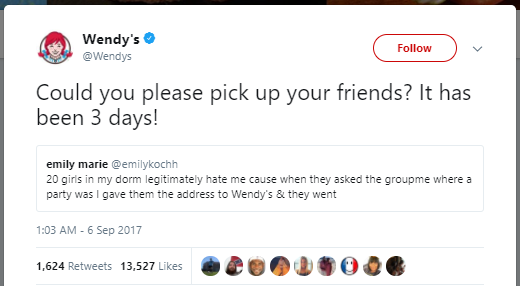
Image 3
Automation is merely a means to scale business-customer interactions; it is has nothing to do with the message you broadcast.

2. Social media automation isn’t as mature as email automation

While email marketing software have had a head-start at advancement, social media automation software aren’t far behind. There exist a myriad of intelligent social media solutions in the market. At DrumUp, one of the first solutions we built – the content curation module – was fit with a NLP (Natural Language Processing) algorithm to scan thousands of websites and filter content that is exactly right for your brand to use.
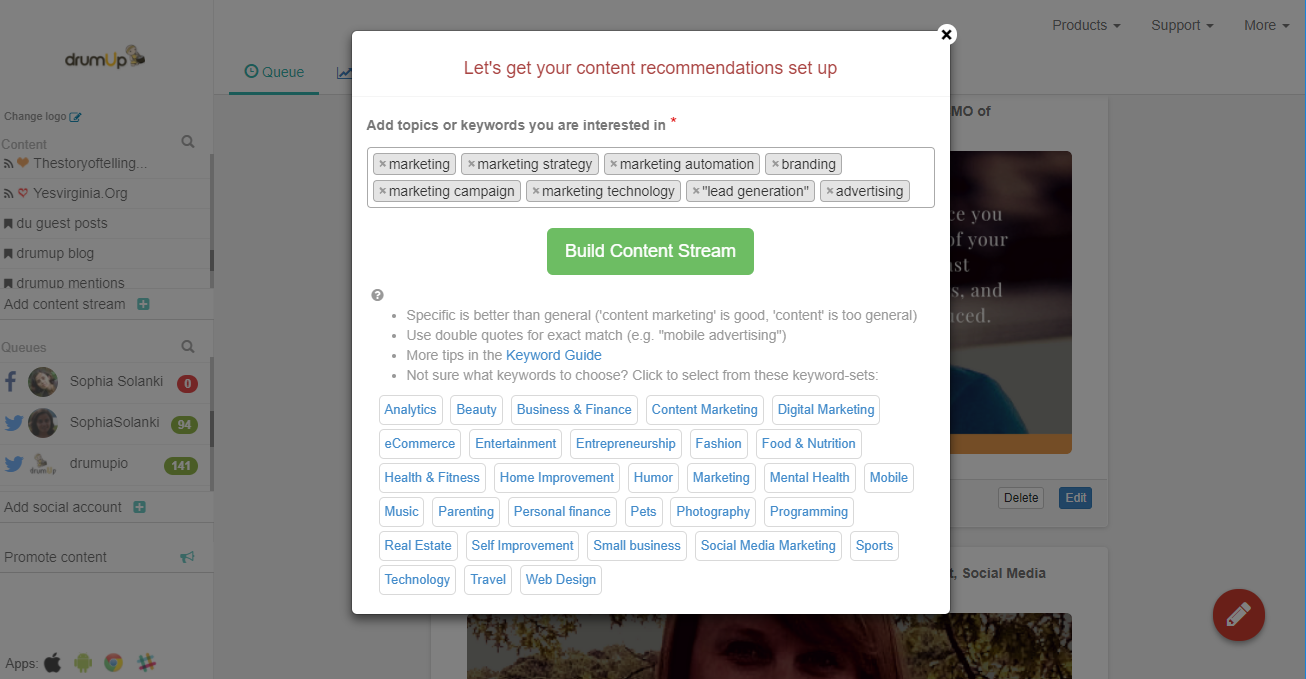
Image 4
However, the software you choose doesn’t have to be intelligent to bear benefits for your social media marketing. It’s useful to consider automation extra support; extra pairs of hands that can manage work that doesn’t need your personal attention.

3. Does automation take away absolute control?

Why do marketers crave control? They need absolute control to prevent untoward disasters. Messages broadcast by marketers represent brands on public platforms, thus demanding extra care and vigilance. Automation requires relinquishing some amount of control, and this requirement makes many marketers uneasy.
Fortunately, like AI’s popular control mechanism – the kill-switch, social media automation software have built-in control mechanisms that help marketers retain complete command over marketing. Settings, filters, delete buttons, review mechanisms and easy access to each of the listed features via apps across devices makes it easier for marketers to place trust in automation software. Many automation software companies also maintain open communication with their users to ensure that their specific needs and met, and concerns are addressed.

4. Do customers despise automated content?

Not necessarily. What customers despise is impersonal content that suggests an apathy towards them. Customers are unlikely to care about automation if the messages are relevant to them and their needs. In fact, automation can help you create and deliver messages that are more relevant to your target groups.
Relevance in the previous paragraph refers not only to the content of your messages, but also their frequency, delivery time, tone, design and ease of navigation. It pays to focus on the details, because they can amount to the success of your social media marketing efforts.

5. Does automation destroy the human element?

This post below could have been scheduled. I know it’s not human, but… :)

Image 5
With the assistance of automation, you can scale the human element by increasing the relevance of the content you share, targeting specific people and delivering your messages on time and consistently.
The only time that automation ever kills the human element is when the marketer in charge of it slips up and makes an error. Some errors include spamming customers, sharing irrelevant and pointless content and making contact at inconvenient times during the day. By automating the delivery of the “right messages”, you could make a real impact in your target market.
Now that we have cleared the air about what automation isn’t, let’s discuss what automation can bring into your life.

Social media automation: Uses and benefits

Sure, automation doesn’t hinder marketing, but why choose to use it? If used correctly, automation can transform your social media presence and help you achieve business goals. In fact, if you choose to ignore social media automation, you might miss out on a considerable amount of traction.

1. Save time to spend on more pressing issues

The most obvious benefit of social media automation is that marketers can stop “fighting fires” and focus on actions that move the business needle. Although publishing, liking and monitoring social media posts are important tasks, they don’t represent the big picture of social media marketing well.
With social media automation, you can not only schedule posts in advance http://drumup.io/schedule-posts-add-blog-feed-social-media-tool and maximize promotion returns, but also easily identify which conversations actually justify your attention and find PR and partnership opportunities that you may never find otherwise. For instance, by setting up “marketing event” as a keyword, you can identify the right events to attend to meet customers of marketing products.

2. Stay active when customers are without losing sleep

Publish your content at the wrong time and your customers may never even see it. If your company is competing in the global market, your social media page has got to be active through the day; a feat that can seem hectic for anyone to accomplish manually. With automation, you can identify “windows of activity” and ensure that there are posts getting published during them.
Once you have discovered your windows of activity, using a tool like DrumUp, you can ensure that there’s something going out during those windows, without having to manually schedule posts.
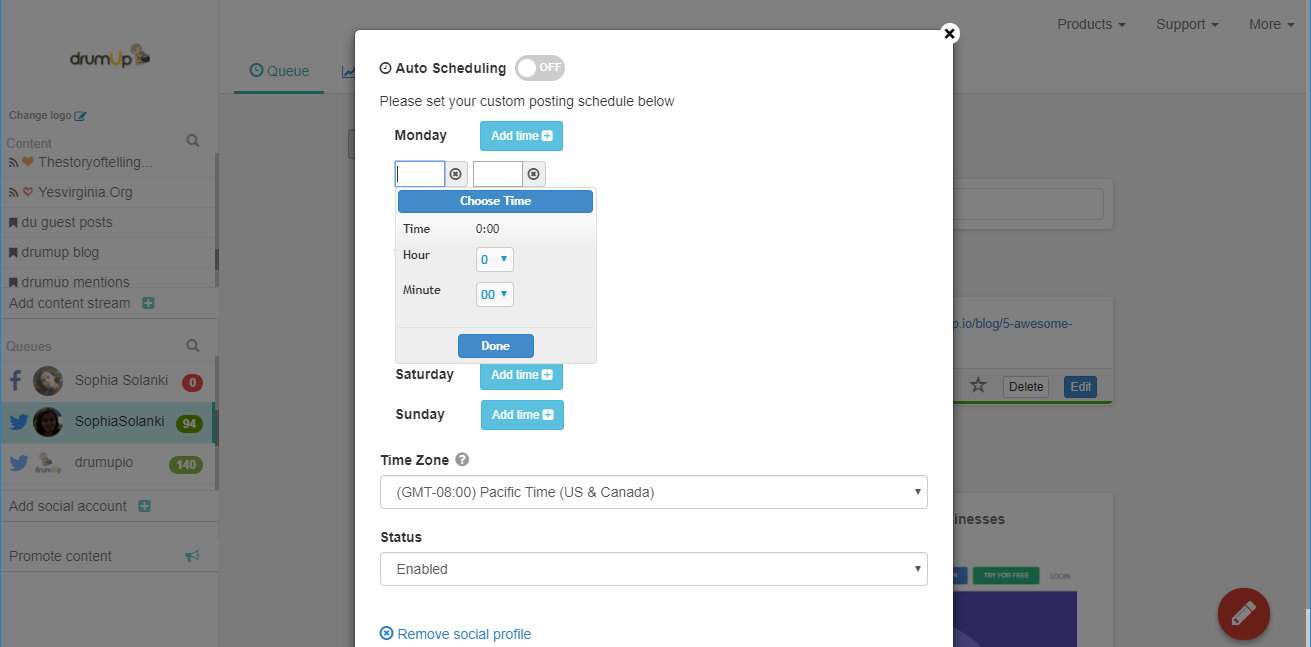
Image 6

3. Attract fans and future customers effortlessly

Imagine building your following brick by brick; you would have to find opportunities or exposure manually, one step at a time. Instead, what if you used an algorithm to hunt for opportunities and for content to share within it? By automating both, you would save so much time. Every marketer knows the time and effort it takes to create great content.
On DrumUp, you can set-up three types of content sources, within minutes. First, add RSS feeds to your blog and the blogs you follow for news and content ideas. Next, set-up important industry keywords for content suggestions. Finally, bulk-upload your best-performing social media posts into content libraries (you can also do this individually per post). Once all of this is done, these three types of content streams can serve as content repositories for you to custom schedule or “1-click schedule” to share on your social media pages.

4. Make a lasting impression on fans

People pay attention when you do something incredible; respond quicker than expected or join conversations where your brand is relevant. To do this, you need to have ears sharper than your own, eyes that can search through large numbers of social media posts real-time. What you set-up as watch keywords matter, because they decide the types of conversations that you set yourself up to join. Don’t limit yourself to the obvious possibilities. Bear in mind that social media can be used for anything from branding to sales, PR and customer support.
When you do find conversations to participate in, use a personal tone and humor if possible, to leave a lasting impression on fans.
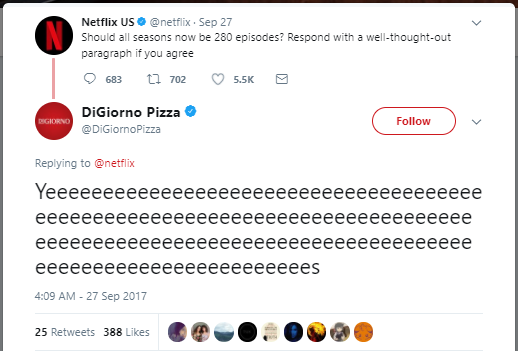
Image 7
Now that we have discussed the benefits of social media automation, let’s conclude with the important pointers to bear in mind when implementing your strategy.

How to social media automation right

Among the factors that result in social media success are your discretion of what to automate, how much to automate and what the content of the messages should be.
1. Don’t spam your audience. Choose the best frequency of posting for each social media platform. For instance, on Facebook posting five times a day may be seen as a heinous crime, but on Twitter, publishing five posts a day is a necessity.
2. Choose what to automate. While you can set evergreen posts on repeat publishing schedules, it’s probably not a good idea to set time-sensitive posts like a review of the latest elections or changes in algorithms of social media platforms on a repeat posting schedule.
3. Be smart about delivery times. Based on who your target audience is, assess when they might be active on social media, and ensure that there always are posts going out at those times.
4. Customize your content. Don’t use standard “template” messages that your audience might find “bleh” or annoying. Show that you are making an effort.
5. Maximize your efficiency. Choose a social media management tool that can maximize your reach and engagement, by allowing you to store and sort content, and set it on extensive and specific publishing schedules, across your social accounts, easily.
Wrap
There’s no reason to shy away from social media automation because it simply means to expand your current capacity. It doesn’t take anything away from your content, and in fact, can help you craft more personalized and relevant marketing messages. Now that you know this, it’s over to you to make the most of social media marketing with the support of social media automation software.
Feature image via Pexels.com

Thursday, 7 December 2017

7 Tips to Help You Set up a Killer Email Drip Campaign


How are you planning to market your products and services?

That's probably the most relevant question for any business owner.

And the answer isn't an easy one.

Not because you don't have any marketing procedure to embrace, but because you're spoilt for choice these days.


But have you ever given a thought about embracing drip marketing for your business?
They are in-vogue these days.

Want to know why?
Because email drip marketing increases the open rate of emails significantly.

Average single open rate of drip campaigns is 32.85%. In fact, drip open rates are about 3 times higher than the click through rates of emails sent individually.

So, there’s no reason why you shouldn’t start a drip campaign to increase the return on investment for your business.

So, what's the best way to do that?

In this post, I’ll discuss how powerful drip campaigns are and will share actionable tips to build a killer email campaign that’ll increase sales and enhance customer retention.


Benefits of Email Marketing

Email is an extremely effective marketing tool for businesses, both established and start-ups. And that's not without any reason.
Did You Know?
• 82% of B2B and B2C companies use email marketing to reach out to their customers.

• Automated email messages experience 70.5% more open rates and 152% greater click-through rates than any business email.

• With email marketing, you are 40 times more likely than Twitter or Facebook to get new customers for your business.

Besides, here are a few benefits of email marketing, which can come in really handy at times.

• It reduces your marketing costs by helping you go digital.
• You can easily connect with your target audience.
• It helps to spread the word about your business.
• Ensures that you can connect with existing customer and attract potential ones.

In short, email marketing can help you reach out to a wider audience within a short time.

So, what is an email drip campaign?

An email drip campaign refers to sets of automated emails, which are sent out based on various aspects, such as user actions, specific timelines, and so on. For example, when a user registers for an account or performs an action on a site, an email is sent out to him. So, the emails sent out for drip campaigns are not required to be written manually every time. They are chosen from a set of already written emails, which are sent out to share the necessary information with the audience at the right time.

Is the email drip campaign really useful? How do they work?

Let’s have a quick look at a couple of case studies about the use of the email drip campaign.

Case study 1: A visitor registers on your website. An automated email is sent to the user to welcome him.

Case study 2: A document detailing your business is sent to a user. If he opens it, he is given one option. If he doesn't open it, another method is tried until the end of the drip.

This flowchart from the infographic on the website of Pardot, the marketing automation company, is a perfect graphical representation of the details of the drip campaign.

graphical representation of the details of the drip campaign

So, the email drip campaign can come in extremely handy to establish a brand name for your business. But that’s not an easy task. You’ll have to ensure that the right steps are undertaken to give an edge to the email drip campaign’s efforts.

So, how can you make your email drip campaign effective?

Here are a few tips that can come in quite handy for the purpose.

Know What You Want to Achieve

Why are you planning to begin an email drip campaign?

The objectives are usually quite simple: it's either to boost the sales and get new customers, to increase brand awareness, or to retain the existing customers.

But when you are starting the campaign, you should have a clear idea, which of these things you want.

How will having a clear goal help?

You can plan your steps of the email campaign in such a manner that they are meant to achieve the target you've already set for yourself.

Focus on the Quality of the Content

You have planned your email drip campaign. You have a proper goal in mind and you have also decided about the frequency of sending out the emails.

Yet, you are not achieving the desired results.

There can be several reasons behind this.

The most common, in fact, is that the quality of the content shared on the emails is not quite as good as your target audience would like them to be. Remember, when you are sending out emails for marketing and for generating leads, you can't send out any write-up.

So, you must create excellent email content before sending them out. Ensure that the content is engaging. You can shift from sharing simple text-based content and include various other media, such as images, videos, and so on.

Decide the Frequency

When you are engaging in a marketing campaign involving emails, you need to focus on one thing properly.

That's the frequency of sending out the emails.

You must have a clear idea about how frequently you should mail your current and prospective clients.

• 42% people think you should email your customers 2-3 times a week.

• 17% thinks you should mail 4-6 times.

• Only a few people (4%) think sending mails more than six times a week actually helps.

The frequency of sending out the emails will depend on the objective of your campaign.

For what are you sending the emails?

This will define whether the emails should be sent on a daily, weekly, fortnightly, or monthly basis.

Remember, one of the most important reasons for sending the emails through drip campaigns is to ensure that your brand remains in the mind of the current and prospective customers. It will also drive them to subscribe for your products and services.

The whitepapers or other documents can also be sent through drip campaigns. And these are mostly sent out on a fortnightly or monthly basis.

You can also set the time of sending out the emails. They should be planned in such a way that the target audience gets it during such a time of the day when he is most likely to open and go through it.

Keep an Eye on the Sequence

Even when you are sending the emails following the right frequency, you might get it wrong somewhere else. For example, you might send the emails on a wrong sequence. And that can be as bad as it can get!

In fact, an error like this can impact your brand name. Besides, your target audience might feel that you are spamming them.

How can this happen?

Here's an example.

When a person registers on your website, you are supposed to send a welcome email. You have set it to send out on day one. The next day, you are supposed to send out an email, which will ask the user how his experience of using your website has been.

Imagine a situation where the second email is sent out first and then, the user receives the first email the next day. This surely is going to be a debacle.

So, it is essential that you keep an eye on the sequence at which the emails are being sent out. This will help you perform the email drip campaign in a proper way.

Maintain a Checklist

There are quite a few things that you need to manage while creating an email drip campaign.

But it’s really not an easy task. And with so many things to do, you might miss out on one or two.

Well, that’s really going to be the worst thing possible. Missing even a single of those emails or sending them on a date, which isn’t scheduled can have an extremely negative impact on the email drip campaign.

So, is there a way to solve this problem?

Of course, there is.

You can create a checklist, which will help you keep a track of all the steps of the campaign.

It will also come in handy to have an idea of the emails, which are going to be sent to the potential as well as existing customers through the campaign.


Source

Don’t Do It! Most Common Email Marketing Mistakes


 Email marketing is one of the simplest forms of marketing, however, even with its simplicity there are a lot of common mistakes that Marketers can make. We’ve put together some of the most common email mistakes and tips on how to avoid them.

Mistakes in Subject/Preview Lines

Subject and preview lines are one of the most important components of an email however this is where mistakes are often made. Marketers tend to focus a lot on the actual content of the email and, more than often when testing or reviewing, the subject and preview lines are overlooked.

The best way to avoid this is to send test versions of your emails to a group of people within your office – this way the chance of mistakes slipping through the net is much more unlikely.


Email not Optimised for Mobile

In this day and age not having your emails optimised for mobile is a cardinal sin and there is no excuse for it. Up to 75% of emails are opened on mobiles or tablets so it’s crucial that you make them compatible for mobile viewing.

Your email builder should offer the option to create mobile-optimised templates at the least or in other builders such as Maxemail, the builder will automatically create a mobile version which can then be edited.

When testing your email always ensure you check it on mobile variants too!


Using A ‘No Reply’ Email Address

A big part of email is being connected and able to communicate – having a ‘no reply’ email address signifies the complete opposite. Recipients like to know there is someone ready and available to talk to if needed but being faced with an email they can’t reply to can lead to missed engagement opportunities.

To combat this you can use an email such as ‘contact@’ to encourage correspondance and include details of how recipients can get in contact with you if required. This promotes a much more friendly and helpful customer service.


Non-Personalised Content

Every recipient is different and has varied interests. Often Marketers send bulk blast emails to their whole list of contacts without regard to what individuals are actually interested in. Not only does this cause low engagement/click through rates it increases the amount of unsubscribes and spam marking as recipients are effectively being spammed with information they are uninterested in.

To keep your customers engaged and subscribed to your emails, personalise your emails to suit individuals. Use a mixture of segmentation, dynamic content and automation to tailor your emails to be relevant for recipients.

Find out some more tips on personalisation.


Not Using Automation

Automation is the hottest trend within the email marketing industry at the moment, so not using it would be one of the biggest mistakes you could make! Marketers can spend hours trying to create perfect workflows for customers’ and their journeys, but with automation, this time can be significantly reduced. Multiple programmes and workflows can be set up within minutes with ease and emails are so much more targeted for recipients – which ultimately improves the experience for recipients.

We’ve recently launched a brand new visual marketing automation system, Maxautomation. Find out more here!


Source

Tuesday, 31 October 2017

4 Tricks to Boost Your Email Click-Through Rates


Want to know how to increase the click-through rate of your emails?
To increase email click-through, you need to nurture your list. Email nurturing is essential because no one wants to engage with an email sent by a stranger.
On average, 13+ promotional emails are hitting the inbox of your subscribers daily from various brands. It goes without saying that if you don’t build a relationship with your subscribers, it is hard to get your emails noticed, let alone receive clicks and engagement.
Let’s take a look at a few tricks that could help you boost your email click-through rate.

1. Create a scarcity effect

Creating a sense of urgency (the scarcity principle) is the best way to persuade your leads to engage with your emails. Urgency works because when you put a deadline on a specific action like the purchase of a product before an offer ends, people automatically lean towards taking that action by engaging with your email.
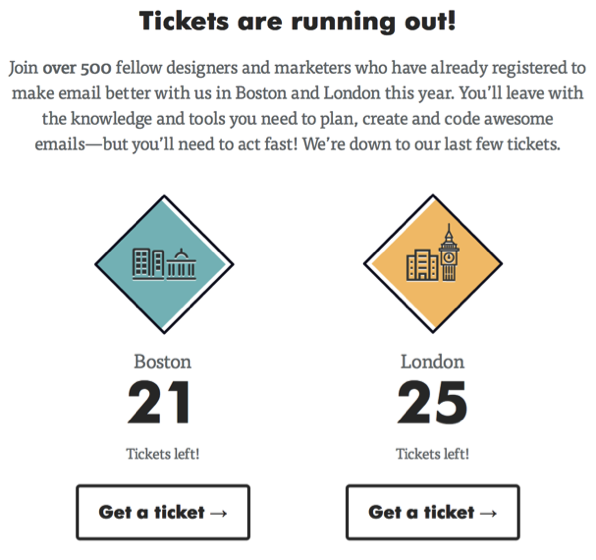
Litmus’ email campaign is a perfect example of using urgency to drive people to complete an action based on urgency. It persuades users to purchase tickets before they get sold out by showing the exact number of tickets that are left for the event.


boost-email-click-through-rates1

There are two types of urgency you can make use of in your email marketing campaigns: time-based urgency and scarcity-based urgency.
Time-based urgency entices prospects to engage with a campaign by providing only a limited timeframe. Whereas scarcity-based urgency capitalizes on scarcity to make it work just like the Litmus example mentioned above.

2. Send personalized emails

The best way to improve email click-through rates is to send more personalized emails to your leads. When emails are personalized on the basis of your individual subscriber’s unique behavior and interests, they are more likely to engage with your emails.
Now, it’s next to impossible to manually personalize emails. This is where segmentation comes in.
Email segmentation allows you to classify your leads on the basis of common interests and behaviors. This way you can send targeted emails to each individual group addressing the needs of their concerns and behaviors.
Some ways to segment your email list are:

  • Ask your subscribers’ email preference
  • Know their locations
  • Pay attention to purchasing behavior
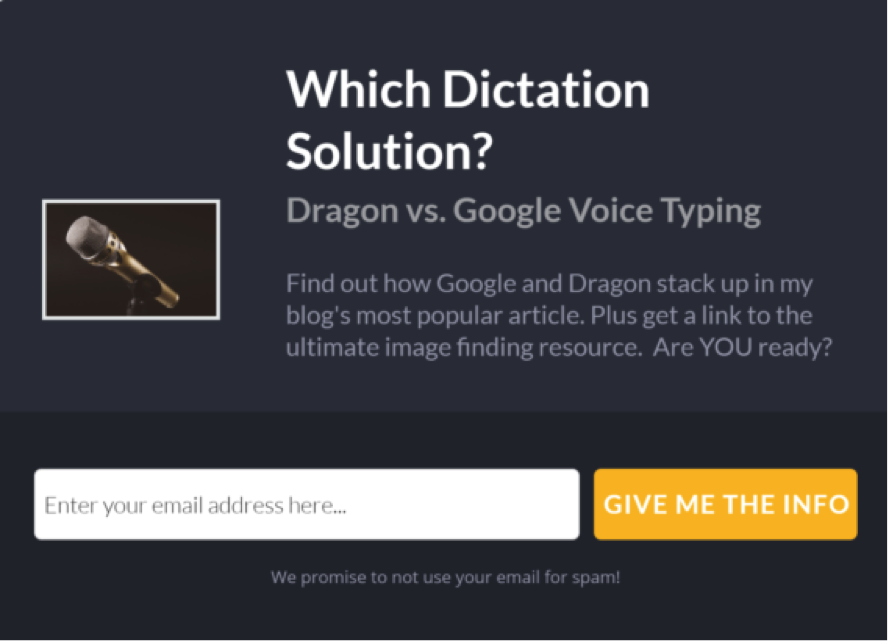
Email segmentation isn’t scary as it seems to be. With a tool like OptinMonster, one of Constant Contact’s integration partners, you can easily build a hyper targeted and segmented email list based on visitors’ location and user activity. Combining with its exit intent technology, you can rapidly grow a hyper segmented email list by prompting a targeted popup form to abandoning visitors at the precise moment they’re about to leave.

boost-email-click-through-rates2

After building a segmented email list, you can start sending personalized emails to your subscribers. Here are a few ideas for email personalization:

  • Educate your leads: Let’s say you recently launched a mobile app. Based on users’ activity, create a segment of leads who probably didn’t know it existed. The idea is to teach a subscriber what they mightn’t know about your product or services.
  • Notify your customer about an activity: For example, if a customer recently added a product to the cart but didn’t complete the purchase, you can notify them to complete the purchase.
  • Send product recommendations: Send a personalized email promoting products that you know your leads are more likely to buy.


3. Ask email preferences

Sending too many emails can be annoying to your potential customers, which makes them unsubscribe from the list. To make your list active and to boost click-through rate, it is essential to know your subscribers’ email preferences.
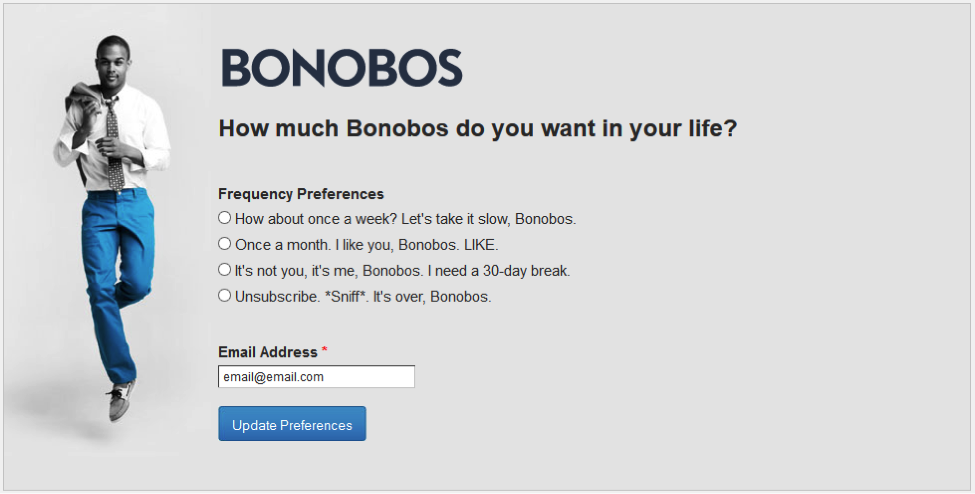
You can ask your subscribers how often they wish to receive your emails and the types of email they want to receive from you. This way, you can ensure that you’re not annoying your leads, keep them longer on your email list and more importantly, keep them engaged with your emails.


boost-email-click-through-rates3

By asking email preferences of subscribers, Bonobos maintained strong user engagement ratios, sent 2-3X more emails to highly engaged contacts and also increased engagement with lower-engaged contacts due to reduced frequency.

4. Create a win-back email campaign

The harsh reality of email marketing is that an average of 60% of email lists are full of dead email subscribers. Since every subscriber is costing you, you need to make your list active by regularly cleaning up your inactive emails from the list. Additionally, having a high number of inactive leads can even adversely affect your email deliverability and cause your emails to be delivered to spam.
Before you clean up your list, you need to take the last step to make your leads re-engaged with your emails by creating a win-back email campaign. According to a study, an average open rate of win back emails is 12%. This rate is respectable since all leads were identified as inactive before.
One of the best ways to persuade your inactive leads to engage with your emails is to make an offer they can’t refuse.
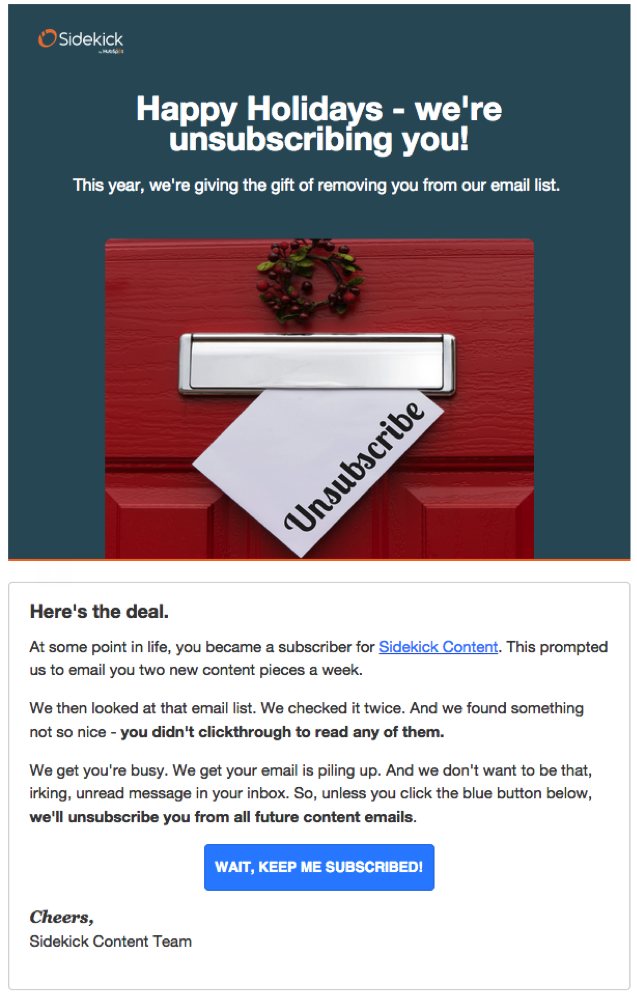
Another strategy to make a list engaged is to send an unsubscription notice to your leads who haven’t engaged with your list for a while.


boost-email-click-through-rates4

In addition to unsubscription notice, Sidekick also provides an option to users to remain in the list by clicking the ‘Keep me subscribed’ button.

Evaluate your email click-through rates

If you feel that you could do better, you can follow these recommendations to boost your click-through rates.
What is your favorite trick to boost email CTRs? Let us know by commenting below!


Source

Sunday, 17 September 2017

Five Metrics to Analyze in Email Marketing


ONE of the main worries that businesses who are trying to reach customers through email marketing have is whether the message is going to reach the customer at all. We all receive numerous emails on daily basis, and it’s often impossible to really go through each and every one of them, which is why a certain percentage of email messages is never opened.
In order to fully understand the process of email marketing and analyze its success in terms of goals achievement, every business should analyze the following metrics:

Click-through rate (CTR)

Majority of marketers state that this is the most important metric to analyze in email marketing. It represents the number of people who clicked on one or more links in your email. Using this metric you are able to analyze the performance of your campaign, as you can see the number of people who have been encouraged to take action, in this case clicking on one of the links. As a result, you can analyze the success of your message, as low click-through rate is surely an indicator that your message doesn’t get response you were hoping for.
Click-through rate is also important as a way to get email recipients to visit your website. As you grow your business, your email database will expand. You can be sure that among email recipients from your database, there are those who haven’t visited your website in a while, and email marketing is a great tool to encourage them to go back. More clicks means that more people are interested in your brand, your offer and your content that is shared through email marketing, so this is one of the metrics to pay attention to if you want to improve the performance of email marketing strategy.

Conversion rate

Another very important metric for email marketing analysis is conversion rate. Unlike click-through rate, which focuses on the number of clicks, conversion rate is a metric that tracks the number of users who clicked on the link in the email and then completed an action, which is considered a conversion. A conversion can be any action that a business owner deems valuable, such as generation of a lead, filling in a form, completing a survey, claiming a coupon, making a sale, etc. A conversion is actually a goal you set up in your email marketing strategy.
The percentage of conversion rate indicates the percentage of people your email marketing campaign has managed to encourage to perform a certain action, which is why this is a great indicator of whether the email marketing strategy is good or not. Ultimately, this metric helps you determine if, and to which extent you have managed to achieve your goals. As such, this metric is an important element of the process of evaluating the overall performance of your marketing strategy.

Email sharing rate

Implementation of analytics into email marketing helps you find out the rate at which your emails are shared (or forwarded), which is a very useful metric to have in mind, as it basically shows if the users consider your emails relevant and worth sharing/forwarding.
Valuable and high quality content is one of the basic pillars of internet marketing nowadays, and email sharing rate is an indicator of the content quality in emails that you share with your customers or potential customers through the email marketing campaigns. High email sharing rate is certainly an indicator that the content you send through emails is relevant and informative for the recipients, which is why they consider sharing with their email contacts, resulting in increasing the online influence of your brand. This metric also helps with figuring out which type of content is the most shareable, valuable information that helps you improve your content strategy.

Bounce rate

Bounce rate represents the percentage of emails that have never been delivered to the end users. Unlike previous metrics, which help with monitoring success of your campaign and the extent of goal achievement, this metric is important for a different reason.
Internet service providers take into consideration bounce rate as one of the factors to determine the reputation of the sender. This means that if the providers detect that you have a bounce rate that is too high, your emails might get marked as spam. Subsequently this has a negative effect on the email deliverability in the future, as your future emails might automatically be marked as spam, in which case they will completely skip the user’s inbox, ending up in spam instead. In order to avoid this, make sure that you monitor this metric and remove all the addresses that have bounced from your email list. Ultimately, this will help you with email deliverability in the future email marketing campaigns.

ROI

Overall return on investment (ROI) is the indicator of the successfulness of the email marketing campaign. As with every business strategy, email marketing requires an investment, having in mind a number of costs that come your way. However, email marketing is also a great strategy to generate revenue, hence making it profitable for your business despite the expenses.
In order to analyze the return on investment, you should divide the total revenue with the total expenses associated with email marketing. The estimates will assist with determining whether to invest more in email marketing, or perhaps you need to focus your efforts on a different strategy.
Finally, email marketing monitoring is essential due to the fact that you’ll be able to access the performance of your email marketing, as well as of any other strategies, such as content promotion, paid advertising etc. Constantly monitoring the metrics results in you being able to adjust and improve the strategy used in email marketing, with the purpose of maximizing the goals success rate. Email marketing doesn’t work as a standalone strategy, and you need to coordinate your goals and your plans with other segments of the company, in order to achieve higher goals and increase sales through online promotion.
Source

Tuesday, 12 September 2017

Deliverability 101: How to Reach Your Subscriber’s Inbox


Email accounts are getting swamped more and more each year. With reports of more than 205 billion emails sent and received each day and a 5% increase expected every 365 days, it’s safe to say that there is a real battle going on in everyone’s inbox.
Businesses everywhere are trying to win this battle and be more visible to subscribers. Everyone is constantly talking engagement and discovering different ways to increase interaction. But, that conversation overlooks a crucial component in any email marketing strategy: delivery of your emails.
When it comes down to it, your first priority needs to be making sure your message actually reaches your subscribers. Here are some best practices, tips and methods for ways to do just that.

Getting Started

Before you send your first (or next) email, there are some things you should know. These are the most basic of best practices and will help set you up for success with each message you send.


Don’t buy a list

Never (and I mean NEVER) purchase an email list.
As much as it sounds tempting to get your hands on a huge number of email addresses, this is a practice you should avoid at all costs.
As a trustworthy, credible online marketer there is no point in buying a list. Sending emails to users who haven’t willingly provided their addresses to you only leads to a large number of unopened or reported emails, which will have a negative effect on your reputation.
Plus, you have no way of knowing whether those addresses are even remotely relevant to your business, or if they are real emails in the first place.
So, from a business standpoint alone – if purchased lists contain fake or typo ridden email addresses or even users who aren’t in your target group, your email campaign would be in vain, as no results would come from it. That is a huge waste.
On the other hand, building an email list does require time and effort, but is worth it. You’ll know that the emails collected belong to real subscribers who are genuinely interested in your brand!


Send from your domain

Another step in improving email deliverability is to establish a recognizable domain name. If you have your own website, instead of using external services, send emails from your own domain.
Users who have signed up via your website and provided their email address will recognize your domain and associate your brand with the site they already visited. This is a great way to up your credibility and maintain consistency for visitors and subscribers alike.
Don’t have your own site just yet? Not to worry. There are services out there like NameCheap that offer custom Domain Forwarding, so you can still begin establishing yourself in a more credible way.
Another plus for this step – it helps with raising brand awareness which is great for building your online reputation


Ask recipients to whitelist you

If someone chooses to whitelist you, it means that you have been added to the safe senders list of that recipient. Not only does this mean that the recipient in question will successfully receive all your future emails, but such action is also considered by ISPs and ESPs to be a good signal.
Getting whitelisted gives credibility to your email address and improves your reputation. Start off on the right foot, and ask subscribers to take this step as soon as they join your list.
Want to learn a really easy way to be whitelisted by new subscribers? Read this great post to do just that while also increasing engagement.

Monitor & Maintain

Once you’ve started to focus on getting your emails to subscribers inboxes, it’s important that you assess your deliverability with each message you send.
Email management tools, such as Sendlane, provide insights related to many different aspects of your email campaigns. Analysis of these metrics help you conclude the efficiency of your sending, as well as the engagement of your subscribers.


Here are some metrics that can help analyze the success of your email marketing campaign:
  • Successful Deliveries
  • Open Rate
  • Click Rate
  • Unsubscribed
  • Bounced
  • Spam reports
Once you know where you stand, it’s important to use the information wisely. But, you also need to have a frame of reference.
MailChimp compiled some really useful Email Marketing Benchmarks that should help you interpret your stats based on the size of your business.


Company Size
Open Rate
Click Rate
Soft Rate
Hard Rate
Abuse Rate
Unsubscribe Rate
1 to 10
21.73%
2.93%
0.64%
0.51%
0.03%
0.30%
11 to 25
20.84%
2.52%
0.63%
0.51%
0.02%
0.25%
26 to 50
21.59%
2.89%
0.40%
0.30%
0.01%
0.17%
50+
22.95%
2.83%
0.60%
0.56%
0.02%
0.20%

So, how do you stack up?
If you need to do some work, there are a few key places that often have room for improvement.


Bounce rate

Bounce rate in an email campaign is the percentage of sent messages that are returned by a recipient’s email host.  Or, the number of emails that were not delivered, which clearly is not a good thing when talking deliverability!
Bounces may be:
  • Soft – an intermittent/temporary issue. Perhaps due to a full inbox, a server issue, an offline account or message size
  • Hard – a permanent error due to an invalid email address or domain aka ‘unknown user’ – either because the email is not correct or no longer works – or blocked delivery
In both of these cases, your message didn’t reach its intended recipient.
Cleaning up your list (aka performing list hygiene) from time to time is a great way to prevent additional bounces.  List hygiene has the added bonus of helping reduce spam complaints and avoiding spam traps by helping you remove any subscribers with consistently poor engagement.


Spam rate

This probably sounds obvious, but while we all know spam is a bad thing, you may not know  why, or how to prevent being labeled as such.
If you’re new to email marketing, take a minute and learn about the CAN-SPAM Act before you move on.
Being marked as spam by a subscriber will send any future emails directly to spam for that email account. Not only that, but it also serves as a negative signal to Internet Service Providers (ISPs) & Email Service Providers (ESPs) who will then monitor your activity.
If you receive a number of spam complaints from different subscribers, this will significantly increase the chances of your emails automatically being filtered as spam every time you hit send. Of course, this will have a negative effect on email deliverability and you will not see valuable results from the campaign.
Here are a few tips on how to avoid being marked as spam:
  • Don’t buy a list (I’m really trying to drive this point home here), borrow a list or send to someone else’s list
  • Write relevant and engaging subject lines
  • Send content driven and useful messages
  • Include a clear area for subscription preferences & an unsubscribe button
  • Make sure all of the links in your messages are fully functional
  • Keep your frequency in check
Quick Note about this – Fluctuations in frequency, timing, or anything that conveys erratic behavior can be negative, not only in terms of spam, but also engagement. If you overwhelm your list with too many messages, neglect them with too few, or confuse them by sending sporadically/inconsistently or stopping & starting back up, subscribers are more likely to mark you as spam. Those that don’t will probably view you as an unreliable resource, lose interest or forget why they subscribed in the first place. Consistency is key!
These are just a few tips to help with deliverability. Want to read up on a few more?
Check out these 10 Tips to Keep Your Marketing Emails Out of the Spam Folder from Sendlane.

Know your sending reputation

With 83% of email delivery failures reportedly caused by sending reputation issues, this is clearly something you need to pay attention to.
Your reputation is taken into account by ISPs and ESPs and basically determines whether an email you send will reach an inbox – versus junk or spam folders – or be blocked entirely.
Your reputation is based on many different things including:
  • Volume of emails you send
  • Sending patterns
  • Spam complaints
  • Bounce rate/Sending to spam traps
A better reputation will increase the number of delivered emails, while having a negative reputation might result in your message never being seen.
If you send a large number of emails each month, it is time for you to be proactive. Most Autoresponder tools provide built-in reporting, which is a great start. To really go above the standard, take a look at this great article from SendGrid about 5 Ways to Check Your Sending Reputation.
Keep in mind that investigating your sending rep will not solve all of your email deliverability problems but it is an important step in knowing where to make adjustments.

Coming full circle

Even though online users receive a TON of emails on a daily basis, the benefits of email marketing are still huge. Combine healthy email habits with analyzing your campaign performance and knowing your sending reputation to increase deliverability.
Since you know the basics of how to improve email deliverability, what’s next?
Be sure you learn what words to avoid and how to avoid the Gmail promotional tab.
It is worth investing time into exploring these techniques and applying them in your own campaigns. Soon enough, you’ll see the results of messages arriving directly in subscribers inboxes!

If you found these techniques helpful, chances are other email marketers will too. Please Like and Share this post to spread the word.

Source

Goal Setting 101: How to Set Goals for Your Email Marketing


As a marketer, you know that building an email list is a vital part of most online business endeavors.
But if your only goal is to simply grow your list, then you’re missing the point of email marketing altogether.
Confused? Let me illustrate it another way. Let’s say you want to run in a 5K race. (Ugh, exercise, right?)
In your mind, the goal is to run in the race.
So you do a bit of cardio a few days a week to get your body in shape, and some days you decide to eat a little better too. Come race day, you’re seemingly ready.
You have your game face on, your runner’s number pinned to your nice new running smock and when the gunshot for the start of the race goes off, there your are right in the thick of the race.
But after about 15 minutes, you realize something…
This whole time, your goal has been to simply run in the race. However, the goal of the race is to cross the finish line. And guess what? You didn’t train to finish the race. You trained just to run in it.
Your goal was wrong from the start and you didn’t know it until just now.
So, let’s end this little story and bring it back to our topic of email marketing. What does this have to do with list building?
Well, in many cases, when people are focusing solely of building a list they are like that runner whose only goal was to run the race. However, like that runner, they soon realize that  just building a list won’t help them “cross the finish line” into successful email marketing.
Building a list is only one part of marketing with email just like entering to run a race is just one part of actually finishing it.
If you want to win at email marketing than you need to have goals in place so that you’re not lagging behind or losing out altogether.

Why Set Goals for Email Marketing?

Why set goals? Because they matter!
Obviously, that’s an oversimplification, but it doesn’t change the fact that goals make a difference in just about every part of your life — including email.
What’s the simplest reason behind why you need them? Without goals you will have nothing to shoot at and you also have no way of measuring any real results.
Think of it this way:
A goal is a target and your efforts are the arrows. With no target to hit, your efforts are pointless.
The other side of the coin is goals are motivating. And if you work with a team of people, well thought-out goals can keep everyone on a similar path. They help cut out the frustration of everyone doing busy work without seeing the benefits.
So now that we’ve covered why you need goals, let’s dig into this a little deeper.

Email Marketing Goals Are Great, But You Need These Too…

Right now you’re at the point where you probably understand how much you need goals. But… they aren’t the only thing you need to set.
You should also be establishing objectives.
How are goals and objectives different?
Let’s go back to the illustration of archery. As we touched on before, a goal is like a target you plan to hit and an objective is like the bullseye.


Here’s what I mean.
Goal: I want to make more money from my email list.
Objective: I want to increase affiliate sales through my email list by 20% for the first quarter.
Did you catch the difference? The goal was broad, but the objective makes it specific.
So to make a goal even easier to measure, adding objectives to it is a great way to make sure you (and your team, if applicable) can stay on track and know exactly how your efforts are paying off.

How To Set a Plan That Works for YOU

Since every business is a bit different, there’s no such thing as a “one-size fits all” approach to setting goals.
And if you pick a goal without considering how it fits into your overall business strategy, you could be wasting a lot of your time.
However, one rather effective goal setting method is called Backward Goal-Setting which is pretty much exactly what it sounds like:
You start with your end destination (goal) and work back from there.


I don’t want to take too much time going over it, so I’ll just give you the cliff notes of how to do break this down:
  1. Start with one of your main business goals.
  2. Break down that goal into necessary milestones/objectives.
  3. List out daily actions to help you reach those milestones.
Now, to make it easier to understand how the process works, here is an example.
Let’s say that Sam is a freelance Facebook Ad Specialist.
Sam wants to make $80K this year from her business. In order to reach this goal, she has a few milestones she needs to accomplish:
  1. Increase conversion on her main landing page by 7%.
  2. Make 50+ sales on her course for DIY customers.
  3. Drive 5% more sales to her digital book about FB Ads for Entrepreneurs.
So, now that Sam knows the objectives she has to reach, she sits down and starts listing out ways to go about hitting her mark:
  • A/B Test her landing page.
  • Using FB ads to send warm traffic to this page.
  • Drive all cold traffic to free email course.
  • Increase email list by double.
  • Add affiliate options.
  • Promote affiliate options to email list and online friends.
  • Add book to tripwire in her funnel.
  • Send paid traffic to the landing page for her book.
This list could go on for quite a bit, but I think you get the point. Do you see what Sam did here?
By working backwards she was able to narrow down exactly what she needed to do to reach her main business goal. For each of the daily tasks she’s listed, there is more detailed strategizing to do, but this gives you idea of how to break it down.
Using that example, you should have a better idea of how to choose reasonable objectives and set up daily actions to reach your goals. If you want a more strategic approach to this, then the SELF Journal is a great option to get you moving in the right direction.
Now let’s get into the nitty gritty.

Email Marketing Goals For Your Business

The interesting thing with email marketing is that you can leverage it to meet other goals in your business strategy. For instance, you can use email to support content marketing goals like getting more readers to see your posts or help social media efforts by increasing social shares.
Below you’ll find a few goals that you can use for your email marketing campaigns.
There are more goals and objectives than the ones listed here, but they are a great place to start for just about any business.

Goal: Increase Open-Rate


Focusing on improving your open-rate is a great goal to start with.
While sending emails to your list is important, getting people to actually open them is the most important thing. After all, if subscribers are not opening your emails in the first place, your efforts from here on out are essentially a waste of time.
If you’re a bit lost as to how to do about this, first consider what your main objective will be.


Open Rate Objectives

For example, you may want to increase open-rate…
  • for every email sent by X amount.
  • by X percent for the entire year.
  • of your less engaged users by X amount.
These ideas are just a few things you could focus on. Now, how do you accomplish this?


How To Reach Your Objective


1. Write Better Subject Lines
You probably already know this, but your subject lines affect your open rate by A LOT. On average, about 35% of people say they open an email based on the subject.
And let’s be honest, when you do that daily email purge, if you haven’t read it yet and the subject isn’t compelling it winds up in the trash, right? Yup, I do it too, so it’s not hard to understand this.
If you really want to spruce up your subject lines, this article has some proven ways to create powerful headlines so people actually open your emails.

2. Check Your Deliverability
What if you know your subject lines are killer? A deliverability issue could be the reason your open rate is struggling.
For example, do your emails land in the Promotions tab of your subscribers Gmail account? That can ding your open-rate.
Who is your email marketing provider? Some do better than others when it comes to getting your emails front and center of an inbox.
If you can figure out where your emails wind up and why, then you’ll be in much better shape moving forward. Start by reading up on how to reach your subscriber’s inbox with our Deliverability 101 post.
Now, let’s look at another possible goal for your email marketing efforts.

Goal: Increase Click-Through Rate

Ah, yes. CTR…
With every email you send, there is a link somewhere that you’d like subscribers to click on. Click-throughs to your linked content is what makes up your CTR and if you’re struggling with good numbers, you’re not alone.
But mastering this metric can help in more ways than one. Not only does it get people to where you want them to be, it also keeps up the health of your email account.
Yep, email marketing tools keep track of this stuff too and if you’re not doing well on things like open-rate or CTR, then your account could be considered spammy. How’s that for a kick in the gut, right?
So, how can you fix this? Again, first start with your objective.


Click Through Rate Objectives

I want to increase the CTR…
  • of my new subscribers by X.
  • of my entire list by X.
  • of X segmented list by X.
Got it? Great!
Now the real issue. How do you do this?


How To Reach Your Objective

Depending on the objective here, the way you reach this goal could be a little different. But basics email marketing principles still apply. If you need to brush up on some of these basics, you could try one of these 11 surefire tricks from HubSpot to get you started.
But here are some great tactics that have worked for others:

1. Include Video
Here’s how you do this:
In your email, include a screenshot of a video with a play-button icon on it that links to your desired content.

The play button acts as a call-to-action that leads to an almost compulsory click.
Bam! Your click through rate just exploded!

2. A/B Test Your CTA
When in doubt, test it out.
I know that sounds like something Bill Nye might have said, but this holds as true in marketing as it does other things in life. Not only can you A/B test your calls-to-action to see if one performs better than another, you can also add tracking to see which links are getting the most action.
This gives you more chances to improve your CTR and help you figure out what is working better for segmented lists too.
One great tool to help with A/B testing, click monitoring and tracking links is called ClickPerfect. This is a tool we use ourselves every day which has helped Snaptactix get amazing results.

Set Email Marketing Goals

Email has a place in every business out there, but not every business has the same goals.
By hunkering down and establishing clear, attainable goals, you’ll have the ability to figure out exactly where it fits in the grand scheme of things.
Depending on your objectives and how you’ll actually reach them, you can decide just how much time you should be investing in your email efforts.
Mastering email marketing is not an easy feat, but as with just about everything else in life, practice can make all the difference.

Your turn! What areas of email marketing do you struggle with? Let us know in the comments below and if you liked this post, please share with a friend who could benefit from the info!

Source