Showing posts with label Mobile Email. Show all posts

Saturday, 16 December 2017

What will email marketing look like in five years? #emailin5years


Every December I type up a blog post near the end of the year called `future of e-mail marketing`. Some thinking about what is going to happen keeps you sharp.

A conversation broke out on twitter with the hashtag #emailin5years where several email experts gave their ideas about email, email marketing and where it will be in five years from now.

Here are some of the top picks, although each tweet would almost justify a whole blog post on its’ own.

What are your ideas about email in 5 years?
Leave your comments below or connect on twitter @jvanrijn / #emailin5years.

Will email shift to a more mobile experience?

There will be a new mobile-only email player with >100 million users (Joshua Baer @joshuabaer)
In 5 years, your email client will be linked tightly to your Google/Windows wallet or Apple Passbook (George Bilbrey @gbilbrey)

In 5 years people will be asking, “Why would anyone want to check email on a computer?” Not everyone, but 100’s of millions. (Joshua Baer @joshuabaer)

Email is going more and more mobile, just take a look at these mobile email marketing statistics.

How about deliverability and spam?

There will be no more Spam folder (or it will be hidden away) (Joshua Baer @joshuabaer)
Smarter delivery: no more bounces, emails will find their way to the right destination. Guaranteed delivery. (Josh Kerr @joshkerr)

#EmailIn5Years will have more affirmative opt-in regulatory requirements. Also more reliant on domain reputation with IPv6 coming. (@ddayman)

How will this inbox look like and act like?

How close you’re connected to people will influence the inbox view. No longer a simple “newest on top” list. (Bruno Morency @brunomorency)

Business apps will show you, categorize, and act upon relevant emails for the process they manage. (Context.IO @ContextIO #EmailIn5Years)

Restaurant receipts will be tucked away and services will display your health and spending habits #EmailIn5Years (Yaniv Tal @yanivtalmusic)

Mail will be much more dynamic, less accumulation of expired offers, more fluid experience #emailin5years (Christine M Borgia @ChristineBorgia)

There will be multiple Inboxes – people, notifications, groups, receipts, travel, etc. (Joshua Baer @joshuabaer #EmailIn5Years)

Emails will be more structured, inbox will be treated as a core data source for companies; UI will be unrecognizable to today (Zvi Band @skeevis #EmailIn5Years)

#EmailIn5Years 4D thats all i’m saying (Adrian Gray @ady_gray)

How will email usage evolve?

Lines between different mediums will blur & conversations will flow freely (ToutApp @toutapp #EmailIn5Years)

#EmailIn5Years will know if you’ve already received /dealt with the message in another channel and mark itself read (Michael McCubbing @M_McCubbing )

#emailin5years will be spoken not written. @domain will be gone. Attachments will point to the cloud, not actual be sent via. (Josh Kerr @joshkerr )

Better html5 support and more paperless shopping – your bills will go to inbox like in Apple Stores (Becs Rivett @becksr)

Email will be more regulated, more important, more comprehensive, more linked & more alive #EmailIn5Years (Marc BErgers @marc_bergers)

Denton Hill Digital goeg even a bit further: Better CSS/Html5 support, standardised code base… Secure Java code and video feeds from trusted senders (@dhdigitalchat)

And of course, when Joshua Baer tweeted “Facebook will be the largest email provider, with a full-featured mail client”, no better excuse to make fun of “Facebook messages” that was announced to be The email killer, but to date has not gained any traction at all.

Some of the comments:

@HCB_Joe < nice prognostication!

Brandon Hudgeons @bhudgeons If Josh says …

Emailblog @Emailblog Why? FB email not used now.
SnoopDobb @snoopdobb #Frightening

What are your ideas about email in 5 years?

Leave your comments below or connect on twitter @jvanrijn / #emailin5years.


Source

Thursday, 7 December 2017

Don’t Do It! Most Common Email Marketing Mistakes


 Email marketing is one of the simplest forms of marketing, however, even with its simplicity there are a lot of common mistakes that Marketers can make. We’ve put together some of the most common email mistakes and tips on how to avoid them.

Mistakes in Subject/Preview Lines

Subject and preview lines are one of the most important components of an email however this is where mistakes are often made. Marketers tend to focus a lot on the actual content of the email and, more than often when testing or reviewing, the subject and preview lines are overlooked.

The best way to avoid this is to send test versions of your emails to a group of people within your office – this way the chance of mistakes slipping through the net is much more unlikely.


Email not Optimised for Mobile

In this day and age not having your emails optimised for mobile is a cardinal sin and there is no excuse for it. Up to 75% of emails are opened on mobiles or tablets so it’s crucial that you make them compatible for mobile viewing.

Your email builder should offer the option to create mobile-optimised templates at the least or in other builders such as Maxemail, the builder will automatically create a mobile version which can then be edited.

When testing your email always ensure you check it on mobile variants too!


Using A ‘No Reply’ Email Address

A big part of email is being connected and able to communicate – having a ‘no reply’ email address signifies the complete opposite. Recipients like to know there is someone ready and available to talk to if needed but being faced with an email they can’t reply to can lead to missed engagement opportunities.

To combat this you can use an email such as ‘contact@’ to encourage correspondance and include details of how recipients can get in contact with you if required. This promotes a much more friendly and helpful customer service.


Non-Personalised Content

Every recipient is different and has varied interests. Often Marketers send bulk blast emails to their whole list of contacts without regard to what individuals are actually interested in. Not only does this cause low engagement/click through rates it increases the amount of unsubscribes and spam marking as recipients are effectively being spammed with information they are uninterested in.

To keep your customers engaged and subscribed to your emails, personalise your emails to suit individuals. Use a mixture of segmentation, dynamic content and automation to tailor your emails to be relevant for recipients.

Find out some more tips on personalisation.


Not Using Automation

Automation is the hottest trend within the email marketing industry at the moment, so not using it would be one of the biggest mistakes you could make! Marketers can spend hours trying to create perfect workflows for customers’ and their journeys, but with automation, this time can be significantly reduced. Multiple programmes and workflows can be set up within minutes with ease and emails are so much more targeted for recipients – which ultimately improves the experience for recipients.

We’ve recently launched a brand new visual marketing automation system, Maxautomation. Find out more here!


Source

Thursday, 2 November 2017

The surprisingly best times to send your email marketing campaigns


When asked about the best time to send email, email marketers have often replied, “Tuesday through Thursday morning, between 8 and 10 am.” It’s been common knowledge throughout the industry that people tend to open their email in the mornings. But as customers are becoming more and more mobile, email opens occur at all hours, on all devices. Let’s visit some current email marketing trends that are creating shifts in open rates, and how they’ll impact your next email send.

Best time to send email marketing campaigns
AdWeek Infographic based on Experian study

An Experian email marketing benchmark study across all industries found that recipients are surprisingly active late at night. Unique open rates averaged 21.7 percent from 8 pm to 11:59 pm and 17.6 percent for 12 am to 4 am. Moreover, this late-night group was more likely to click through, with open rates of 4.2 percent and 3.2 percent, respectively. These night owls also had the highest click-through rates for all times of the day. Revenue per email was also the highest in the 8 pm to 11:59 pm group. Additionally, more than 54 percent of emails are now opened on a mobile device. 

A 2016 Deloitte mobile consumer survey found that 40 percent of consumers check their phones within five minutes of waking up. Once the day is over, over 30 percent of consumers check their devices five minutes before going to sleep. And about 50 percent check their devices in the middle of the night. With consumers constantly active on their mobile devices, especially outside of standard nine to five working hours spent at an office desktop, testing sends outside the traditional morning hours is essential.

As for which day of the week performed best, emails sent on Mondays had the highest ROI, but emails sent on Friday had a higher click-through rate. Ironically, Saturday and Sunday had the lowest volume rates, but the highest open and click-through rates in the study. So even though the weekend was not the most popular time to send emails, those who opened were much more likely to engage with emails they received, and click through or purchase.
Based on these findings, you might want to experiment with sending your emails at unconventional times – such as 11 pm or 6 pm and on the weekend – to see if it yields better results.


Weekend warriors

Fewer promotional emails are sent on the weekends. This has created an opportunity for some businesses to scoop up some email love when there is less competition.
Experian’s email marketing study found that recipients responded more to promotional emails they received on the weekends – when the send volume was the lowest. The unique open rate for Saturday and Sunday was 17.8 percent for both days, the highest percentages of the week.
Before you change all your email launches to Saturday and Sunday, we recommend you test weekends first. (Remember that open rates on these days are still lower.) Try splitting your list in half and send the same email to group A on Sunday and group B on Monday or Tuesday. Repeat this a few times to see when you get better results.


Mobile matters

The same study by Experian we touched upon earlier found that not only are 54 percent of all emails viewed on a mobile device, but this percentage is on the rise. Because mobile click-through rates are lower, you want to be sure your call to action is clear and direct, and that your links are easy to spot and click (no matter what time of day you’re sending).
Email open rates also can depend on the device the recipient is using. Tablet users, for example, are more like to open emails outside of business hours (from 5 pm to 8 am), while desktop users are more likely to open during business hours. Our Email Analytics feature tracks which devices your readers use to open your emails, so use this data to determine how the majority of your subscribers open your messages and time your campaigns accordingly.
Finally, when considering the importance of mobile in your email sends, remember that if your customers can’t read your emails, they’re not likely to continue to interact with them, affecting your future campaigns. Litmus found that by testing a non-responsive versus responsive email design, they were able to increase click-throughs by 130 percent.
Try sending a split test to half of your list in the morning during work hours and the other half at 7 or 8 pm and note any differences.


Timing isn’t everything

If you notice a dip in your open rates, other factors may be contributing to the decline. Here are some additional email marketing tips to help with your open and click-through rates:
  1. Test your email to make sure it’s rendering properly in multiple browsers and email service providers (VerticalResponse’s easy email editor offers multiple previews of your emails in different browsers and email service providers.)
  2. Review your email list. How old is it? Are there emails that should be removed? How can you grow your email list effectively?
  3. Are you effectively rocking your subject line? The subject line is your one brief opportunity to get someone to open your email. Be sure you know the best practices when creating this magic line. Check out how you can use A/B testing to boost the effectiveness of your subject lines.
  4. Frequency. Are you sending too often? Be sure to play it cool and segment your lists, so you aren’t bombarding your recipients with unwanted email.

So when is the best time to send email? As you can see, there is no one right answer. Start testing different tactics, and see what works with your readers.

Source

[Worksheet] How to Write an Email in 15 Minutes or Less


When you’re caught up in the day-to-day of running your business, it’s easy to push your email marketing off.
But what if you could sit down and write an email in 15 minutes or less?

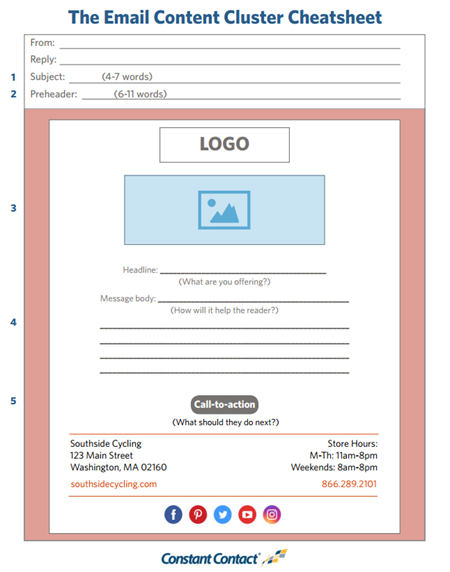
Use this worksheet to write your email content in minutes.

Worksheet -- How to Write Your Email in 15 Minutes
Writing your email is faster when you break it down into smaller pieces. Focus on your email subject line, preheader text, image, message body, and call-to-action.

We’ll show you how it’s done in our next workshop: Write Your Email Content in 15 Minutes or Less. Can’t attend live? Register anyway. We’ll send you a recording.

Want to start writing your email right away?

Print out our Email Content Worksheet and follow the five steps below to create an email in record time.

1. Write a standout subject line

Your subject line is one of the most important lines of text in your email. This is your chance to pique your readers’ interest in the inbox and entice them to open your message.
You can be creative by asking questions, teasing your content, or adding a pun. Just be clear about what the reader should expect when they open the email and keep your subject line short — about 4-7 words — so nothing gets cut off in mobile inboxes.

Tip: Use these 11 Surefire Secrets to Standout Subject Lines for inspiration.

2. Add your preheader text

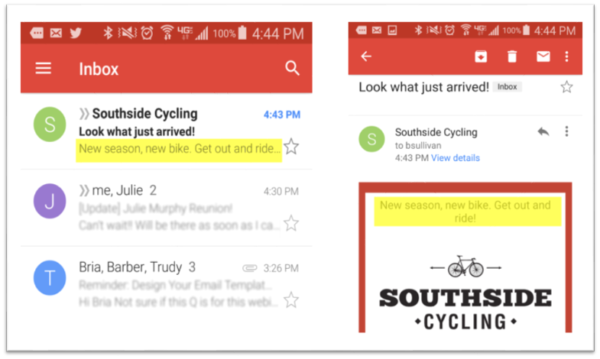
The preheader is the line of text that appears beneath the subject line in the mobile inbox. Think of it as an extension of your subject line. Most mobile inboxes display 75–100 characters; limit yourself to 6-11 words to catch your reader’s attention.
Here’s what your preheader will look like in the mobile inbox:
email design checklist -- preheader

3. Include your logo and an image

Putting your logo at the top of your message reinforces your brand and personalizes your message. Make sure your image links back to your company website, as well.
Adding an eye-catching image that supports your message will also draw people in and persuade them to read on. Don’t go overboard — we found that messages with 1-3 images result in the highest engagement.

Tip: Not sure what images to include? Here’s How to Use the Right Images in Your Email Design.

4. Write your message body

Start with an attention-grabbing headline, either before or directly after your image. Then, write a few sentences to answer: What are you offering? How will it help the reader? What should they do next?
A few sentences will work just fine. On average, emails with 20 lines of text or less see the highest click-through rates.
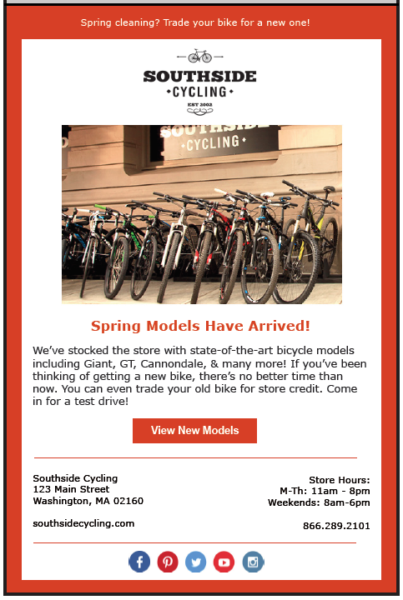
Here’s an example:
southside cycling example image

5. Include a compelling call-to-action

Give your readers one clear action to take in every email. Position your call-to-action towards the top of your email so that it’s visible without readers having to scroll down. If your call-to-action includes a link, make it stand out using a button.

Create your next email in record time!

Writing an email doesn’t have to be a huge undertaking. Use these tips and worksheet the next time you have a spare 15 minutes in your day.


Source

Friday, 27 October 2017

Making it through the mobile email filter


With the increase of consumers that own a mobile phone, more and more email is read on smartphones. But mobile email has its’ own set of rules.

Mobile email can now account for 15 to 75% of email opens and that percentage is still increasing. So marketers have to take mobile email marketing more seriously.

But the first question is:  How to get through the mobile email filter and reach that subscriber on the go?


Mobile email as a first filter

Many users prioritize their email when viewing it on their mobile. They might still behave in a chaotic always on, always busy kind of way, but there is some logic involved.

Truly urgent or personal emails are treated differently than commercial emailing when they land in the mobile inbox
Urgent and interesting emails are checked and answered first. After that they progress through the rest of the emails, deleting or mentally labelling the uninteresting ones.

Effectively keeping the most interesting emails to open on a different platform even if they read it as mobile email first. B Looking at it that way, our goal is to make it through that mental mobile email filter and stay undeleted. ut this is only a very small percentage. According to a recent Knotice report, only 2,39 percent of emails opened both on desktop and mobile, so you want to be in that double openers category, but how to get there?


Value and brand: Coca-Cola has a head start

As with all email, the presentation and technical aspects seem less important to the end user than the content, well we will get back to that.


But the value of every message is largely determined by the sender. Meaning that different people or brands sending exactly the same message get a different response. This is the same for both desktop email, mobile email, and all other types of communication.


So working on the ‘whats in it for them’ at the same time as working on the ‘who is in it with them’ gets the largest increase in email results.Let’s go back to purely mobile email.

But you have to make sure your email looks good on mobile too. Because if an email does not display correctly, 69,7% will delete it immediately according to a study by BlueHornet.

Make your content scannable: 3 key elements

In filtering the mobile email,  there are three key elements. The items that show at first glance. In a mobile inbox, there is no real preview pane so we can count that one out for mobile email filtration.

1. Optimized Sender Name
Your sender name needs to be recognisable. So be sure to use a consistent one. Keep the sender name short too, as you only have a limited number of characters that will be displayed, the rest gets broken off.


Ditch the “Newsletter” in the sender name and keep it to the brand, person, organisation or campaign name. The one that they will recognise. If you are doing a combined name and brand, put the most recognisable first.

2. Subject line for mobile email readers
The subject line also suffers the same fate as the Sender Name; only a limited number of characters are shown. For this reason, it is advised to frontload your subject line.

Put the most compelling information first. This might be different for different segments of your email list, using dynamic or personalised subject lines you can optimize them for the individual.

3. Extend your subject line with the Pre-header
Next, to the sender name and subject line, many mobile email clients also display the pre-header text in the inbox view. Extra space for capturing attention.

So be sure to make use of the pre-header. A preheader text is the first line of text that is found in the email. It would be a loss to use this valuable space in the mobile inbox to say “click here for the online version”. You can see your pre-header text as an extension to your subject line.


The next step for your mobile email

We have covered how to get through the mobile email filter. The mental filter that is hard-wired in the brains of all your subscribers to quickly recognise non-important email.

Your email might be opened the desktop later, could be opened directly on the mobile itself or ignored altogether. Know that passing the first level of filtration, is just the first step. Read more about creating a mobile email strategy.


Source