Showing posts with label market. Show all posts

Monday, 14 May 2018

5 Questions If You Launching a New Business


Successful entrepreneurs share some common traits. You have definitely heard about many of these. Passion, motivation, self-belief, flexibility, hard work and networking, right?
But there’s one trait which overrides all – ‘’asking the right questions.’’
If you are planning to launch a new business, you have multiple challenges that stare you in the face. At any given point of time, you’re asking yourself whether you should do something or you shouldn’t do something. In fact, there are millions of questions that you face. But only a few of them actually matter, ones that you should really ask yourself to get started right and lead your business in the right direction. You need to know what those questions are.
Given below is a list of five questions that are essential to your success as an entrepreneur.

1. Is my market segment profitable enough?

Before you start to operate your business, you should find out whether that market offers opportunities for making sufficient revenue. On the surface, the market you pick may look like a promising one. But the truth emerges when you dig deeper and explore. Nowadays, most market segments are highly competitive because they have been so saturated.
Do adequate research and make sure that the market you choose will allow you to build a profitable business.

2. What are my target audience demographics?

Your business can’t win them all. To achieve success, you must reach a specific group of people who have a specific need. The challenge for you, as an entrepreneur, is to identify that specific audience.
It requires you to know as much about your target audience as possible. Once you have collected that information, you’ll find yourself in a better position to reach out to them and make a real impact. Start your research by looking at the key demographics of the geographical location that’s on your radar. Study groups of people in terms of their age, gender, income range, marital status, occupation and education among others.

3. What are the needs of my potential customers?

Now, move on to the next vital piece of information: customer needs. Why would people purchase your product or service?
The answer lies in understanding what your customer needs are. If you are going to start a business in health and fitness, you need to find out what your customers care about. Are your customers looking for home-based exercise? Do they have time to attend a gym? Conduct thorough research and connect with friends and colleagues who are conscious about their health and aspire to lead a happy and disease-free life, for insights.
That way, you’ll be able to craft a product which fits in with the actual needs of your customers and marketing will be easier too.

4. Who are my key competitors?

To beat competitors, you need to know and understand competitors. When you start a new business, one of the first things you should ask yourself is what your key five or ten competitors look like.
Find out who your top competitors are so that you can learn from them and improve your own offer. When you keep a close watch, you’ll always be aware of the changes they make to their marketing and advertising, which in turn reveals new processes and strategies. Use different tools for researching content strategies, display ad strategies, ranking strategies etc. It will help you size up the competition really well.

5. What are my business goals?

Be crystal clear about what you want to achieve from your business – both for the short and long term. Not just business goals, you should also take your personal and financial goals into consideration. Knowing your expectations from day one will help you make the right decisions.


Sunday, 15 October 2017

Reasons to Ditch “Batch and Blast” and Get Started with Email Marketing Personalization


We all like to believe we’re special. Or as anthropologist Margaret Mead wryly put it, “Always remember that you are absolutely unique — just like everyone else.”  
That belief (or state of denial) is why so-called “batch and blast” email is usually less effective than email campaigns customized to your unique market. In a recent study of marketing professionals by Experian Marketing Services, 62 percent said a personalized email subject line is crucial.
The study also revealed that personalized promotional emails generated transaction rates and revenue per email six times higher than non-personalized emails. The personalized mailings had 29 percent higher unique open rates and 41 percent higher unique click rates. For triggered email campaigns (in which emails are triggered by a calendar event, a business action or an action taken by a website visitor), personalization doubled transaction rates.
Because today’s email marketing services allow for more detailed data about customers, users can implement some pretty impressive personalization that likely wouldn’t have been possible a couple of decades ago. Logistics like fully optimized mobile applications and time-delayed messaging are now par for the course, as is message micro-customization based on consumer behavior.  
“With so many available tools, businesses of all sizes can now employ the best email strategies for reaching customers,” writes Jayson DeMers in the Huffington Post. “When used correctly, these tools let businesses of all sizes compete with even the largest corporations. As more marketers discover the value of personalized marketing, businesses that don’t personalize their efforts will likely find their campaigns are largely unsuccessful.”

Reasons to Ditch "Batch and Blast" and Get Started with Email Marketing Personalization

“To get started with such customization, conducting customer research is imperative,” explains Vertical Response Senior Content Marketing Manager, Linzi Breckenridge. “Your success with email marketing lies in understanding as much as you can about your contacts so you can better communicate with the groups of people likely to find your message relevant,” she says.  
Since personalizing messages for a world’s worth of potential customers is probably still out of technology’s reach, here are tips for identifying whom to target in your next campaign.  
  • Identify your target market(s), segmenting the groups of customers most likely to buy your goods and services. Think about which segment of the population has a problem your product is able to solve. Narrowing that down keeps you from wasting time and energy, and maximizes your chance of gaining and keeping customers, growing profits and expanding market share.
  • The most common ways to segment are by demographics, geographic location, purchasing behavior and/or psychographic segmentation (interests, hobbies, lifestyles, values and attitudes). The most common demographics used are age, gender and income level, notes social media blogger Lisa Furgison, all of which can be collected from your customers and embedded for reference onto your website or blog platform.
  • To help you form your messages, some marketing professionals recommend identifying common themes among your best customers and conceiving of actual “personas” that represent them in their various forms — including their shopping objectives and possible objections to buying.
  • Further fine-tune your target market by analyzing email data to identify customers who answered calls to action, like clicking to open windows announcing new product arrivals. “Knowing if, when and how contacts engage with your email is useful in determining which contacts find the message relevant,” notes Breckenridge. “You can continue the communication with those who respond, and tweak or completely change the message for those who don’t.”
  • Limit your target market to a manageable size. Warns Furgison: “If you overdose on segmentation, you could get frustrated and make your email marketing strategy more complicated than it needs to be.”
  • Consider rewarding loyal customers with discounts or special sneak peeks of products. “With a marketplace overflowing with options, repeat buyers are a much smaller segment than they once were,” Furgison notes.
  • Identify, target, and maybe reward brand advocates — customers who praise your products on social media or provide you positive feedback.  
  • Make an effort to bring back inactive customers, possibly with a promo. Such emails have titles like “We miss you!” or “It’s been a while,” notes Furgison, who also advises that surveys should find out why customers have strayed.  
  • Place the customer’s first name or user ID at the top of the message to quickly capture attention, advises Kevin Gao on targetmarketingmag.com. “If the user took the time to register with your business, then there is some implicit trust between both of you,” he says. “Remind them of your relationship by promptly showing their names. This tactic is especially important for consumers on mobile devices as the limited space means brands need logical personalization right away.”
  • Ask customers for information so you can provide even more apt customization in the future. “But avoid being greedy,” warns Gao. “Customers don’t want to spend time with a detailed registration page that asks for demographic data or other personal information. Ask for the minimum, use that in personalized emails, and expand your data as the relationship grows.”
  • Messages to customers triggered by real-time behaviors — such as reminders that items have been left in a “shopping cart” — can be very effective. “Even if the visitor receives it minutes after leaving the site, it does help the brand to stick in their mind,” states Gao. “Personalization should also be included in standard messages, such as shipment confirmations, where companies can suggest additional products or services, perhaps at a discount.”
  • Consider customizing email messages to arrive at the optimal times for your customers depending on demographics and time zone. For example, emails to student customers could arrive in the evenings when they’re most likely to be browsing via computer.
Lastly, always test your email campaign before sending. Having more than one pair of eyes review the email reduces the chance of suffering from an error. After making the effort to boost open and click rates with personalization and segmentation, the last thing you want is to waste it on a typo.

Conclusion:  Move beyond the old-fashioned and ineffective approach of “batch and blast” to get the best results with email marketing.

Source

Monday, 6 March 2017

How to Create a Facebook Messenger Chatbot

 Does your business want to do more with Facebook Messenger?
Interested in using a chatbot for customer service and marketing?
Facebook Messenger chatbots can help your followers get answers to frequently asked questions and more.
In this article, you’ll discover how to set up a Facebook Messenger chatbot for your business.


Why a Chatbot for Facebook Messenger?

Facebook now lets you install Messenger chatbots on your business page. Chatbots allow you to have an automated conversation with people who click on your Facebook Messenger to start a dialogue.
A series of menus or keywords guides customers to the next steps, saving time and eliminating frivolous requests that don’t lead to sales. It’s an easy way to allow people to interact with your business to buy tickets for an event, get directions, see a menu, set up an appointment, or ask a common question.
The chatbot uses keywords that users type in the chat line and guesses what they may be looking for. For example, if you own a restaurant that has vegan options on the menu, you might program the word “vegan” into the bot. Then when users type in that word, the return message will include vegan options from the menu or point out the menu section that features these dishes.
You can create an artifical intelligence bot with triggers that you define. Your bot can respond with blocks of text that help whittle down the pathways for users to take to get answers.
How It Works on a Page
The Denver Broncos Facebook page uses a combination of a simple menu-based bot and an artificial intelligence component. When you click the Message button on their page, a Facebook Messenger window opens. Click Get Started from inside Messenger.
The page responds with several options to choose from. If you want to sign up for the daily digest, click on “Yep. That’s true.” If not, click “No, thanks.” You’ll then see a second menu, depending on which answer you chose. From here, you can manage your subscriptions or get a list of AI bot commands to interact further.
If you start typing a message in the text box instead of selecting a menu item, the artificial intelligence bot responds with a list of keywords you can try.
For example, typing “news” takes you to a Quick Reply message (“Just a sec, I’m looking that up…”) followed by a gallery of images to view Broncos news content on the web.
Benefits to Your Business
As more people rely on Facebook for information, auto-responders can help boost direct engagement with your customers. This allows you to remarket to customers with ad campaigns in their news feeds even if they haven’t liked your Facebook page yet.
Want to initiate the conversation with customers from your Facebook page rather than wait for them to come to you? Facebook lets you do that. You can load email addresses and phone numbers from your subscriber list into custom Facebook audiences. To discourage spam, Facebook charges a fee to use this service. You can then send a message directly from your page to the audience you created.
Note that if a customer logs into Facebook with a different email address from the one in your list, Facebook may not be able to create a match to the customer from your subscriber list.

#1: Create a Chatbot

Tools like ChatfuelBotsify, and OnSequel will let you create a chatbot without complicated programming.
This article walks you through how to use Chatfuel to create a free chatbot based on a menu system that you preselect. Users will see options they can click, which will lead them through the menus you’ve created.
Chatbot Lingo
Before you create a chatbot, let’s go over some definitions of the features you’ll encounter.
block contains one or more cards (messages). Multiple cards can be delivered at the same time within a block. You can add a button to the bottom of a card to give users a phone number to call, a URL to click on and leave Facebook, or open a new block with a new card or cards.
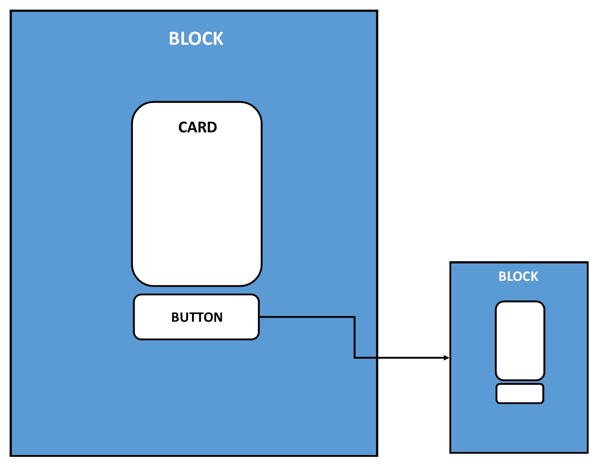
This is a visual representation of the placement of blocks, cards, and buttons in a chatbot.
The types of cards available are gallery, text card, image, or plugin:
  • gallery card can include multiple images in a carousel, each with a heading, subtitle, URL, buttons, or a quick reply. A quick reply is an extra card that can act as a prompt with further instructions from your page if the user doesn’t know what to do next in your sequence of automated messages.
  • text card includes a place for text, buttons, or a quick reply.
  • An image card includes an image and a quick reply.
  • plugin card includes integration options such as letting people read or subscribe to your blog via RSS, send a post from your Instagram, Twitter, or YouTube accounts with IFTTT or Zapier, and many more options like Google Sheets or Google Calendar.
To create a chatbot with Chatfuel, first set up a Chatfuel account. After you log into your Facebook accountclick the + sign to start a new chatbot.
Next, choose a template to edit or create a blank chatbot from scratch. Enter a name for the chatbot in the text box and click the red Create a Chatbot button to create it.
On the next page, click Connect to Facebook.
Choose an existing Facebook business page or create a new page where the bot will reside.
Now click Build in the sidebar menu to start building your chatbot.
The default welcome message is on a text card; it’s the first thing users will see when they enter your Messenger. You can keep this text card, add another one to it (such as an image), or start over with one of the other options available, like a gallery or plugin.
Enter the features of the card you’ve selected. Also add buttons to the card that users can click to take the next action such as get a phone number, visit a URL, or open a new block.
The default answer is the block shown in the Main Menu button when you begin. Chatfuel lets you change the message that will be your first response after the user asks something. You can either change the text here or create a custom block to add in place of the default answer.
Note that you can add more than one button under this card, so if the most common customer requests are your hours, location, phone number, or directions, create additional blocks with that information to return to the user. If you’re an online service-based business, you may want to include blocks in your buttons that give more information on a particular segment of your business.
If you want to create a new blockclick + Add Block.
A new screen will appear that allows you to start fresh with new cards and buttons to send the user down a new path.
Once you’re satisfied with your bot, click Test This Chatbot to save your work.
Then click View on Messenger.com to test it out.
You’ll also want to have other people test your bot from a desktop, smartphone, and tablet. If something doesn’t work as expected, click the help icon in the bottom-right corner to review the procedures or contact the company for help.

#2: Drive Customers to Your Chatbot

Once you’ve created your first automated chatbot, tested it, and know it’s working properly, change the call-to-action button on your Facebook page to Send Message to drive traffic to your chatbot.
You can also direct paid advertising to this call to action by grabbing the URL of your Messenger.
Finally, consider installing plugins (Message Us or Send to Messenger) on your website for people to message you on Facebook.
Frequently Asked Questions About Chatbots
Once you get your chatbot up and running, here are some questions you may have:
What if the user wants to go back and choose a different selection?
In the text box where users type their message to you, there are three lines representing a menu bar. The elements of your bot will be included in that menu. Users can either go back to a particular block or choose Restart Bot to go back to your welcome message.
When the user goes to my Messenger, nothing happens. What next?
Sometimes a message is already there that says “Get Started.” In this case, the user must click this to begin.
What if the user doesn’t see Get Started and still nothing happens?
From time to time, the chatbot won’t load for some people but will for others. As with any new technology and with Facebook’s ever-changing platform, there may be a few kinks yet to work out. Contact the software company you’re using (Chatfuel in this example) to troubleshoot issues like this.
What happens if someone can’t get the answers they want from the chatbot? Will we be able to respond?
The beauty of creating an automated responder is that you can step in at any time with a personal message letting users know there’s someone behind the bot and that you’re there to answer questions personally.
Conclusion
Setting up a chatbot doesn’t preclude you from checking your Messenger for messages, but it can save you time with a simple menu for people to follow.
What do you think? Have you installed a chatbot in your Messenger? Please share your thoughts in the comments below.