Showing posts with label advertising. Show all posts

Tuesday, 3 July 2018

How to Simplify Social Media Ad Creation


For most organizations, social media marketing is an important piece of the overall strategy.

For good reason, too. The audience on these platforms is extremely active – and it’s constantly growing. Some data shows that by 2018, we can expect to see as many as 2.5 billion social media users around the world.


And while there’s a large audience here, for many marketers, the obstacle is getting content in front of the right audiences. Thanks to algorithms that limit who sees what content and when they are now turning to advertising on social media to specifically target their ideal customers.
Let’s take a deeper look at the growing adoption of social media ads, as well as some of the common obstacles and problem-solving tools being used to get the most out of it.

The Rise of Social Media Advertising


Last year, companies spent more than $24 billion on ads in spaces like Facebook, Instagram, YouTube, and Twitter. And this spending is only expected to grow. According to eMarketer, in 2017, analysts predict a 26.3% global increase on spending for social media ads.
Why? A couple of important reasons:
For one thing, they’re battling decreased organic reach. On platforms like Facebook, Instagram, and Twitter where reach of posts is limited by a company algorithm, organic exposure is at an all-time low. In order for companies to get their messages in front of the right people, they’re paying for more targeted ads on these platforms.
Then there’s the simple fact that advertising here works. As more companies see positive results from their ads (think boosted website traffic, higher sales, more customer engagement), they’re investing more in these channels. On Facebook alone, ad spending increased 50% from 2015 to 2016…which means companies must be seeing strong results.
So while social media advertising is producing impressive results, many marketers are facing the same point of struggle when it comes to advertising (and content creation in general) in these spaces: Graphic design. 

Graphic Design & Social Media


Social Media Examiner tells us that 74% of social media marketers use visual assets in their social media marketing. Why? Because Facebook posts with images see 2.3X more engagement than those without images – making a pretty strong case for using visuals.


But there’s a problem: Designing these images can be difficult. And without Photoshop skills or a graphic design degree, many marketers are having to hire graphic design help to create post-worthy graphics on a regular basis. It’s just one more expense on top of advertising that cuts into the company’s ROI.
When it comes down to it, difficult and expensive is not what we’re all about… so that is why we created our own solution – Social Studio FX.
Social Studio FX is an all-in-one, social media graphics tool that puts creative control directly in your hands. Using this tool, there’s no need for hiring a freelance designer, learning Photoshop, spending $100-$500 per design, waiting for designs, working through editing processes, and not being able to fully communicate your vision.
With this easy-to-use toolkit, marketers are finally able to design, create, and share the exact social media images they need. And with more than 180 fonts and 8,000 royalty-free graphics, this tool can help save time and money. From ads to everyday posts, this tool is helping make graphic design simpler than ever before.

How it Works

With this social media design toolkit, there’s no guesswork…just three simple steps:

1. Select a design/start from scratch

Browse the library of more than 13,200 templates and designs from 23 niche categories, or pick from over 200 done-for-you templates and 66 pre-sized social media layouts.

2. Customize your design

Using simple drag and drop tools, you can customize your content in a few simple clicks.

3. Download and publish


Once your design is complete, just download the material in PNG, JPEG, PDF, or TIFF format and use it on your preferred social media platform.
Simple, right? This tool is already being used by social media managers, affiliate marketers, bloggers, and ecommerce store owners alike because it’s cloud-based, powerful, and professional–and doesn’t require hours of initial training. In minutes, you can design high quality graphics for social media that can be launched right away.


Social Media Marketing: Don’t Let Graphic Design Over-Complicate


With Social Studio FX, you too can start getting the most out of your social media marketing presence without spending a fortune on graphic design help. Get empowered to take control of own design work and make your advertising and posting efforts look and feel the way they do in your mind. In no time at all, you’ll be creating ads and connecting with the engaged audience in spaces like Twitter, Facebook, and beyond with beautiful, professional visuals that are seen and shared.
Speaking of engagement, please take a moment to like, share and comment below. We’d love to know how you simplify your own social media ad creation!

Wednesday, 27 June 2018

11 Reasons Why Every Affiliate Marketer Should Learn SEO


 As an affiliate marketer, you probably spend a LOT of time thinking of ways to drive traffic to your site.
After all, no traffic = no affiliate sales.
The two main sources of traffic for most websites are usually:
1. Organic Search
2. Paid Advertising
Social media and other sources will also bring visitors to your site, but these are usually your two best bets for consistent, ongoing traffic.

Why Should You Care About Organic Search? 

Of these two main sources of traffic, search always comes out on top. In fact, a recent study by Experian Marketing Services found that on average, 87% of a website’s traffic comes from organic sources. This percentage of course, varies by industry. However it doesn’t change the fact that the majority of traffic in almost every industry comes from people typing their queries into Google or another search engine and clicking on the links in the results. 
This means if your website is not optimized for search, you are potentially losing out on large amounts of traffic. 
But what do I mean by "optimized for search"? I mean, your website should be created and maintained according to several widely accepted best practices for search engine optimization. You should also implement your other marketing efforts (especially content marketing and social media marketing) keeping your SEO goals in mind.

Why Should You Learn SEO?

OK, so we know SEO is important. But, there are thousands of SEO experts in the world. Wouldn’t it just be easier to hire someone to do your SEO instead of trying to understand it all?
Yes, of course. I definitely think it’s a good idea to hire someone with SEO expertise to help you out. However, if you develop an understanding of how search engine optimization works, your affiliate marketing efforts will ultimately benefit from it. In fact, by understanding what your SEO provider does, you may be able to get more out of the services they provide. 
But if you're still not convinced the additional SEO knowledge will do you any good, here are 11 reasons why every affiliate marketer should learn SEO. 
(By the way, our free lesson, Introduction to Affiliate Marketing SEO, is a great place to get started with your SEO learning.)

1. Understand Search Engines

You get that search traffic is important, but do you understand what it takes for your website to do well on a search engine? How do GoogleBing and Yahoo even work?
google
When you learn SEO, you don't just learn a new marketing skill. You actually start to understand how search engines work. This is hugely useful when you're in the business of driving traffic to your site.
Search engines consistently crawl the web for new content (links) and index them so when a person performs an online search, Google/Bing/Yahoo can deliver the most relevant results for their search query. The results are ranked so the most popular link for a search term (or the one most likely to give an answer) appears at the top (number 1 position). 
But how does a search engine determine the most popular and relevant site for a search term? 
Well, we don't actually know. Search engines rely on secret algorithms to decide what pages to show. SEO experts make educated guesses about what goes into those algorithms based on common factors in high-ranking websites. And Google occasionally drops little hints about what's important, too. These have led to best practices and general guidelines for SEO that make it possible for website owners like yourself to build sites specifically to get found by the search engines.  
I recommend checking out Google's website on How Search Works to get a deeper understanding of what really goes on behind the scenes of the number one search engine. 
If you're interested in learning more about best-practice recommendations for ranking on the major search engines, check these out: 
By developing a more thorough understanding of search engines and terms like crawling and indexingpage rank and more, you will become more aware of what it takes to optimize your website and benefit from increased search traffic.

2. Improve Your Website's Design

Once you begin to understand how search engines work, you will see that a good website is not just about a pretty design and some clever content. While the focus of modern SEO is to make websites human-friendly, it's important to remember that how you and I see a website is different from how search engines view it. 
For your website to be truly search engine friendly, it must follow some pretty technical specifications for design and development.
Learning SEO will help you grasp the importance of aspects of website creation, such as:
  • Creating quality content.
  • Making your content indexable. 
  • Organizing your website into a proper structure.
  • The proper use of keywords in your site content.
  • Having quality inbound and outbound links for your website
Here's some advice from Google on how to create a Google-friendly site.
An understanding of SEO will ensure you don't waste your time making website changes that don't deliver results. Plus, for any new websites you launch, you will also know how to structure your site and optimize it right from the start.

3. Optimize Your Content

You don't need me to tell you this, but... content is king.
On your site, on your blog, on social media... everywhere you look, the web is overflowing with millions of pieces of content.
But, how much of it is actually good quality?
In the early days of the web, it took very little to get your website to do well on a search engine. In 2015, that has completely changed. The major search engines are heavily focused on the quality of your website now, and your content has a lot to do with it. 
Quality content is not just about creating a great blog post or a fun infographic. It's about building an entire website that delivers that same quality. For search engines, good content is a sign of a site that is considerate of its visitors; one that tries to anticipate and answer questions. It's all about a good user experience.
11 types of contentCheck out this really helpful e-book by SEO.com on 11 Types of Content You Should Be Creating For SEO Right Now.
Here are some guidelines from the major search engines on how to create quality content for your site:
If you're hiring people to do your content, it's important that they create something that won't get you penalized by search engines. When you learn SEO, you also learn what makes for good content so you can guide your writers, designers, bloggers and other content creators in the right direction. Or, if you're doing it all yourself, you'll know how to produce content that will impress your site visitors and search engines.

4. Figure Out What to Do with Keywords

Most people, even if they don't quite get SEO, understand that keywords play a big role in the world of search engines. This is true.
Keywords are fundamental to the search process. It's how users communicate what they're searching for. The search engines deliver results based on these keywords. 
Search engines measure how keywords are used within your website. This helps them determine how relevant your website is for particular search queries. So, it's essential that you use specific, highly relevant keywords to maximize your opportunities for appearing in search results.
But, be careful of keyword abuse. In the early days of the web, stuffing as many keywords as possible onto a page was a common practice. This no longer works and in fact, will count as keyword abuse and will probably get you penalized. Now, it's more important to use your keywords in a relevant, natural way.
keyword stuffing
Don't be this person! Write naturally so your visitors feel you're having a real conversation. 
Understanding how keywords work will be very helpful for you because:
  • You can identify which keywords are relevant for you.
  • When you do keyword research, you now know what to look for.
  • If you hire a writer for your web content, you can guide them on proper keyword usage.
  • You will understand where keywords need to be used, e.g., on page content, in title tags, in meta descriptions, etc. 

5. Understand How Link-Building Works

Links are another big part of the SEO puzzle. 
Search engines use links to analyze a website's popularity, trustworthiness, authority, and much more.  However, not all links are made equal. A trustworthy site is likely to link to another trustworthy site — not to spammy sites. This often helps a search engine determine the quality of links.
The more popular and trustworthy a site, the more significant it is to have a link from them. 
So, to make the most of your link-building efforts, you need to make sure you're acquiring links from other relevant, popular and trustworthy sites. These will be helpful for your website's SEO. Paying for 1,000 irrelevant links will do you no good.
link building
Link-building is an important task for SEO. Whether you're doing your own link building or hiring someone else to do it, you need to understand how it works to make sure you're only building quality links. 

6. Build Your Online Reputation

When you learn SEO and do it right, your site will start to show up in more search results, thus boosting your brand's online visibility. 
How does a boost in your visibility help you? When you start to show up in the results for all the relevant search terms for your industry, your audience and customers will start to think of you as a leader in the industry.
I'm not making this up. People trust organic search engine results more than paid ads.
On average, people believe organic results are more likely to be current and relevant. They want the most authoritative sources. In short, they believe they are getting the best information via search engine results. 
So when you understand SEO, you can figure out how to optimize your site to appear in the results for more queries that are relevant for your customers. The more they see you, the more they will start to trust your site. 

7. Get More Traffic to Your Website

A website optimized for search engines is definitely going to start getting you more traffic.
Another experiment also found that 60% of "direct traffic" reported in your data may actually be attributed to organic search.
With people more likely to click on search results than paid ads, it's only natural that if your website is more visible online, you will start to see more people visiting your site. 
Search engines are the first point of contact for most people looking for information. SEO helps you understand how to make your site more visible to the right audience, which in turn results in more traffic to your site.

8. Make More Money

make more moneySay your website currently gets a 100 visitors a day. Let's also say that 2% of your visitors click through to your ads and this makes you $2 a day. 
Now, your website is getting a 1,000 visitors a day thanks to solid SEO. You have the same 2% click-through rate. This means you're now making $20 a day!
If you experience a jump in traffic thanks to your SEO efforts, this is eventually going to boil down to increased revenue from your website — especially if your website is optimized to make your traffic convert to sales. Who doesn't like more money?
But to make this extra money, you really have to develop an understanding of what SEO is, how it works and how you can make it work for you.

9. Market Yourself for Free

SEO is free marketing.
Pay-per-click advertising requires you to set daily/monthly budgets that you are willing to spend to buy advertising space on search engines. Each click on an ad will cost you money, and if you're in a particularly competitive industry, clicks can sometimes cost $40-50! 
free marketing
Clicks on organic results don't cost you any money. All you have to do is maintain your position in the rankings, and the traffic you get is completely free.
Of course, you will be spending time and energy optimizing your site in the first place. It's going to cost you some hours, even if it costs you no money. You can also hire someone else to do the initial work, which will put a dent in your budget. But then you can save money by doing your ongoing SEO maintenance yourself — because you'll understand how SEO works! 

10. Protect Yourself From Sketchy SEO Practices

If you're working with an SEO expert, it's doubly important to at least have an idea of what they're going to do for your site. 
There are thousands of SEO providers out there, and while a lot of them are very good, some will engage in sketchy practices. Their aim is to show you results right away, but there's a few problems with that:
  1. These results will be short term.
  2. Your site could end up with a penalty. 
  3. Google could de-index you for spammy SEO practices.
By learning a bit about search engine optimization, you'll learn the difference between what is good (white hat SEO) and what is bad (black hat SEO). Avoid black hat tactics, and if your SEO provider tries to suggest anything sketchy that falls into this category, you know to send them packing straightaway. SEO takes time, so don't be frustrated if you don't jump in the search rankings overnight!  

11. Become a Better Affiliate Marketer 

Your end goal is not to become better at SEO, but to become better at affiliate marketing...right?
By gaining an understanding of SEO, you will:
  • Make better, more SEO-friendly websites, right from the beginning. 
  • Get better at driving traffic to your website.
  • Create better, more relevant content for your site.
  • Build high quality links to your site. 
  • Improve your website's authority in the industry. 
  • Outdo the competition (especially if they're not doing SEO).
  • Spot more opportunities for growing your site and business.
Nobody knows your business better than you, and SEO will only help to enhance that. 
Does this make you want to learn SEO to improve your affiliate marketing efforts? 
If you already do SEO for yourself, what do you think has been the number one benefit of learning SEO for affiliate marketing?
P.S. If you're looking for a tool that shows you whether your SEO efforts are getting you anywhere, we have something for you: AffiloTools automatically tracks your rankings in great detail and in multiple search engines so you can see real results.

Sunday, 21 January 2018

How to Write Copy People Notice, Read, and Trust: Lessons from "The World’s Best Copywriter"


The phone rang a couple times before he picked up.
“Hello?”
“Hi,” I said. “Is this Pat Corpora?”
“Yes, it is.”
“It’s Eddie Shleyner,” I said. Silence. “I sent you a message on LinkedIn … about the Sampler. You replied with your number … told me to call.”
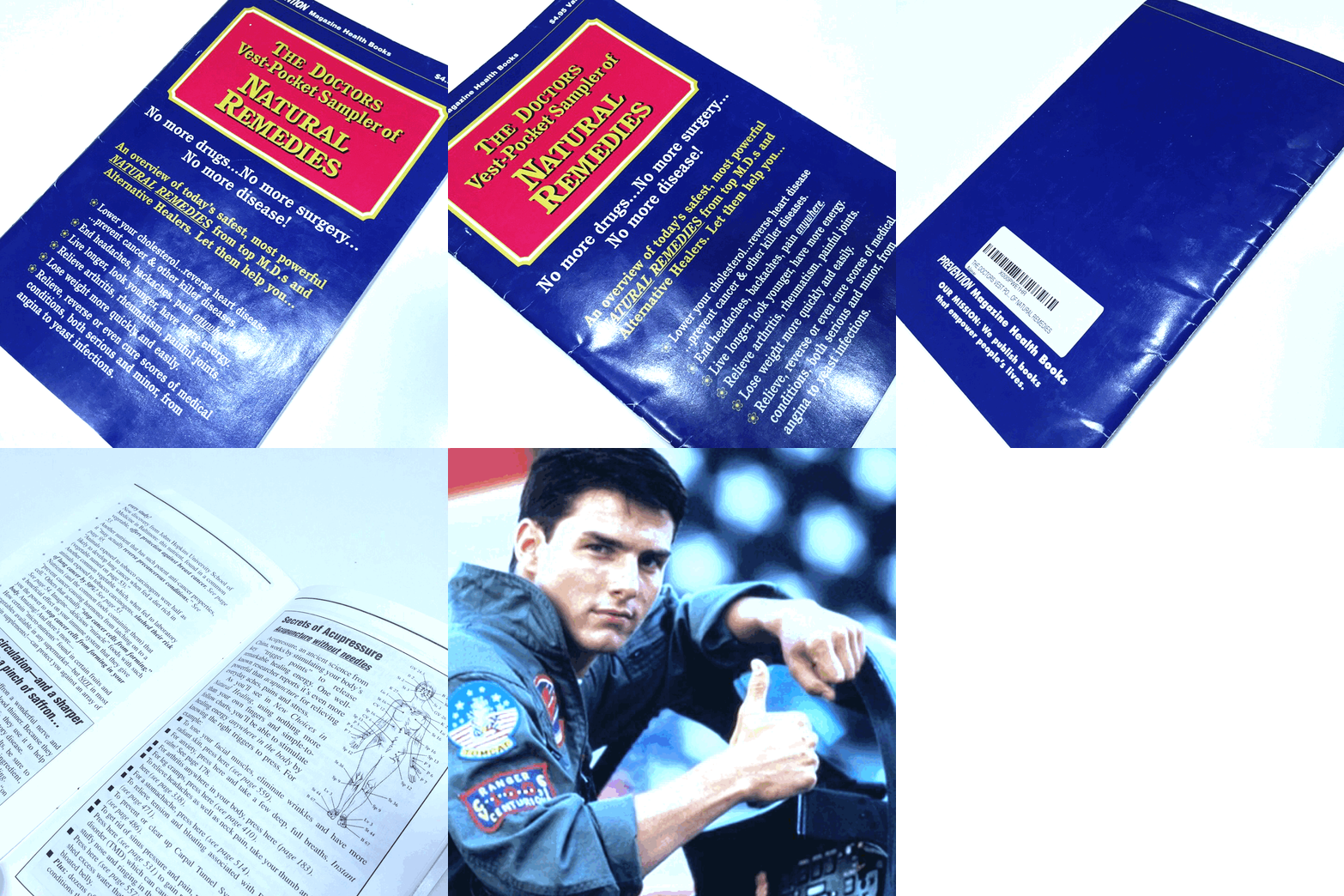
In 1995, Pat published The Doctor’s Vest-Pocket Sampler of Natural Remedies, a piece of direct response mail designed to sell a bigger, more complete book called New Choices in Natural Healing.
In other words, the free “sampler” book was designed to garner the attention, engagement, and trust necessary to sell prospect’s on the real product, the money-maker.

Download our free guide here for tips to become a better writer. 

 “Oh!” he said. “Hi, Eddie.” He sounded enthused. I could tell he was a nice guy. “How can I help?”

“Well,” I said. “I’m sure you know, the Sampler is famous.”
Pat smirked. “Okay.”
“At least it is among copywriters,” I said. “That’s why I’m calling: I’m writing an article about the Sampler -- because it’s a master class in written persuasion -- and I want to make sure I get the facts right.”
“Sure.”
“Well, first of all,” I said, “how many did you send out?”
“Oh, I’m sure we mailed 50 million copies,” said Pat. He paused. “Yeah, about that many.” He paused again. “It was a huge number.”
“And how many books did that sell?”
“Oh, millions.”
“Millions?” I said.
Millions. It was our most successful mailer ever.”

How did Pat sell all those books?

He hired Gary Bencivenga to write the copy.


Bencivenga is a Hall of Fame copywriter. He’s on par with John Caples and Eugene Schwartz, David Ogilvy and Joe Sugarman. He knew what he was doing. That is, he knew how to write copy that captured attention, garnered engagement, and drove readers to take action.
Like any effective copywriter, Bencivenga was part writer, part psychologist. As a writer, he was able to produce clear, concise sentences. As a psychologist, he excelled at thinking like his prospect. He understood her, empathized with her. And that’s what this article is about.
It’s about the big-picture concepts you can learn by studying one of Bencivenga’s most successful controls. In other words, this article won’t teach you how to write like a copywriter as much as it’ll teach you how to think like one.
You’ll learn the rules of the trade, the fundamentals of crafting ad copy people notice, read, and trust.

How to write copy people notice, read, and trust.

If you don’t already own The Doctor’s Vest-Pocket Sampler of Natural Remedies, you can buy one on Amazon for a buck or two plus shipping. If you’re a serious student of copywriting, I recommend ordering your copy as soon as possible, reading it daily, and transcribing it often.


When you receive it, smile. You're holding one of the finest direct marketing assets ever created.
What makes it great? It follows three important principles:

1. It hones in on a single, primary desire.

That’s why people notice it in the first place.
People buy things to achieve their desires. Period.
“Every product appeals to two, or three or four of these mass desires,” writes Eugene Schwartz in his classic book, Breakthrough Advertising. “But only one can predominate.”
The Sampler’s target audience was older, likely suffering from an ailment, likely fatigued from the side-effects of conventional medicine, and likely eager for alternatives. Natural alternatives. Bencivenga honed in on this.

How to Hone In

Once you know, with absolute certainty, what it is your prospect desires:
a) Make the desire plainly visible and unmistakably clear.
This will ensure that the prospect sees it.
The Sampler displays the words “NATURAL REMEDIES” in big, bold, capital letters on its cover. In fact, those words appear twice, which brings us to my next point …
b) Repeat the desire over and over, using synonymous terms.
This will keep the prospect engaged without wearing her out on the same verbiage.
The Sampler alludes to the concept of “natural remedies” using many different terms, including “self-help remedies” and “non-surgical remedies” and a half-dozen others. Each is a new and engaging way to remind the prospect about the same thing. Each variation whispers, “This is what you want, Dear Reader. Remember? This is what you need!”
c) Sound realistic.
This will allow the prospect to take your copy seriously.
The Sampler doesn’t over-step its product’s promise. For instance, the word “antidotes” sounds more compelling than “remedies” but it’s also less plausible, which is why Bencivenga never uses it. After all, he’s selling a book with thousands of medical suggestions. They’re not all winners. Reasonable people know this.
If you say something that plants doubt in your prospect’s mind, even once, you might lose her. Fantastic claims are risky because they're hard to believe. Temper your promise to give the message a chance.

2. It doesn’t look like an ad.

That’s why people read it.
The Doctor’s Vest-Pocket Sampler of Natural Remedies doesn't look like a mailer. It looks like a book:


The cover is card stock and paper inside is thick, too. The back is blank, clean, except for the publisher’s mission statement: “We publish books that empower people’s lives.”
The Sampler is also 50 pages long, neatly organized into four enticing chapters:
Chapter 1: Natural Remedies for Whatever Ails You …
Chapter 2: Secret Healing Triggers …
Chapter 3: How to Instantly Get a Second Opinion, or a Third, Fourth, or Tenth!
Chapter 4: For a Lifetime of Greater Health, Try This …
Each chapter is well-formatted and written in plain English that’s scannable and digestible, peppered with bolding and italics that highlight value. Bencivenga gave the Sampler all the characteristics of a real book, which is why Debra-from-Nebraska pulled it from her mailbox, then sat down, put on her glasses, and actually took the time to read it.
“Allow the reader to enter into your ad with the least possible mental shifting of gears from ‘editorial’ to ‘advertisement’,” writes Schwartz. “A single change in format can add 50% to your readership, and your results.” Schwartz calls this concept Copy Camouflage. It refers to taking elements from trusted mediums and using them to lend clout to your ad. This is also known as “borrowed believability.”
Online advertorial articles, or “sponsored” posts, are a good example of this: they look and read like typical articles but have a hidden sales agenda. Bencivenga uses the same tactic, except he camouflaged the Sampler to look and read like a book.

How to Camouflage

Once you know the medium your prospect recognizes, likes, and believes:
a) Borrow the format.
This will help your promotion look familiar to the prospect.
The Sampler looks like a book because it was published before the internet took root (circ. 1995), when physical mediums (e.g., books and newspapers) were among the only recognized, credible sources of written information.
b) Borrow the words and tone.
This will help your copy sound familiar to the prospect.
The Sampler sounds comprehensible, colloquial. It uses simple words -- not medical speak -- to convey clear, concise advice that makes sense to people. And that brings us to the final principle …

3. It’s valuable.

That’s why people trust it.
Bencivenga packed the Sampler with advice that can help people live more comfortable lives:

  • On page 14, he shares a juice recipe that treats asthma.
  • On page 15, he shares a tonic recipe that quells cigarette cravings.
  • On page 16, he shares a cocktail recipe that relieves leg cramps.
In fact, almost every page lends a valuable suggestion, something that makes the reader feel excited about the future, hopeful. Something that makes her say, “Wow, I had no idea ...” Over time, these feelings compound and intensify in the reader, engendering trust.

“Couldn’t it be that if someone took care of you, very good care of you; if this person would do anything for you; if your well-being was his only thought: is it impossible that you might begin to feel something for him?" - Bob Benson, Mad Men

How to Deliver Value

Once you know what your prospect values:
a) Highlight it.
This, again, will ensure that the prospect sees it.
The Sampler is full of bolded, italicized, and underlined words and phrases. It’s full of headlines and subheads, sidebars and images. Remember, people can’t begin to draw value from information if they never even see it.
b) Make it clear and concise.
This will fill the prospect with hope and excitement over her newfound knowledge.
The Sampler uses clear language and short, crisp sentences. Even though it’s a medical book, a native English speaker will comprehend every word. Remember, people will only get value from information they understand.
c) Make it actionable.
This will satisfy the prospect, making her happy.
The Sampler tells readers what to do but also explains how to do it. For example, want to treat asthma? “Blend two ounces of onion juice with two ounces of carrot juice and two ounces of parsley juice, then drink this blend twice each day,” writes Bencivenga. “Of course, use this remedy in conjunction with proper medical treatment.”
Remember, people will get the most value from information they can put to use.

“So, what did working with Gary teach you?” I asked.
“Well,” said Pat, “like many other tests I was involved in, it proved the power and importance of copy.”
I nodded, silently, on the other end.
“When we launched new titles, we always tested two or three different copywriters, “ said Pat. “Sometimes the different approaches were close, within 10 percent. But sometimes, it was a 100 percent difference in response rate. That’s what it was with the Vest-Pocket Sampler. That’s the power of great copy.”


Source

Sunday, 7 January 2018

Meat and Potatoes for Your Affiliate Diet


 Think of banner ads as the spice in your affiliate diet. Sprinkle them around, but for a heartier helping of sales, you’ll need something more solid!
Learn to give your visitors longer, more descriptive pre-sales text. Revamp your affiliate advertising using these simple steps:

  1. Pull the Reader in
  2. Introduce the Product
  3. Explain the Product’s Significance
  4. Tell the Reader to Make a Purchase

Pull the Reader in

To convince your audience that your text is worth reading, make your first sentence or two very interesting. Make a bold statement, say something seemingly ridiculous, or appeal to your prospect’s emotional side. Then, tie this grabber in with the rest of your copy.

Introduce the Product

What is the product you’re advertising? What does it do? Directly after your grabber, give a compact explanation of your product. Keep this explanation short, while still being very clear. This should still be a very short section of your text.

Explain the Product’s Significance

What will it do for me?
By writing your own copy, you can directly target your unique audience. Make the most of this opportunity! Clearly explain how your readers will benefit from this product.
No one knows your audience like you do. Suggest a variety of product uses just for them, and give examples. This is the time for details – make this section long and rich.

Tell the Reader to Make a Purchase

You’ve come so far – you’ve laid out exactly what the product is and how it will help your unique audience. Now, seal the deal – tell your readers to purchase the product! Include your affiliate link in this section.
This step may sound strange, but it’s necessary. Often, people hear about a product and are genuinely interested, but fail to actually make a purchase. A clear call to a simple action cuts down on buyer ambivalence. Don’t be pushy – just change your verb tenses to the imperative. Instead of:
“If you think that you fit this profile, you might want to think about buying this product.”
Say: “Click here to order an account today.”
Drive Sales – Use Long Copy

If you don’t feel ready to write long copy yourself, ask your affiliate program manager for help! Many companies release well-written articles by respected authors that you can reprint free of charge.
The novelty of the Web is wearing off. People online now are busy. Surfers won’t make a purchase unless you make a great case for what they’ll get out of it. And you’re not going to do that with just a banner ad.
Do you use long or short copy? Tell us this in the comments below. If you find this content useful share it with your friends.

Saturday, 30 December 2017

How to Get Started With LinkedIn's New Website Demographics


I don't know about you, but I have an odd fascination with LinkedIn's "Who's Viewed Your Profile" feature.
There's a natural curiosity about who's checking it out, and why. A fan of my writing? My manager? An ex-boyfriend who’s feeling remorseful as a result of seeing all the great things I’m doing with my life?
Regardless of my own profile viewers, the fact remains that LinkedIn has always served as an interesting platform to digitally network, share information, recruit, and advertise.
It's that last part where one of the newest developments have taken place. LinkedIn has provided helpful insights and ad tracking for some time now, allowing advertisers to view details about the composition of who this promoted content has reached. But now, LinkedIn has developed new tools for marketers who want to see that same information about the users visiting their websites.

Click here to learn about using social media in every stage of the funnel.

 Ladies and gentlemen, I'd like to introduce you to LinkedIn's Website Demographics.

Getting Started With LinkedIn's Website Demographics

1. Make sure you have a LinkedIn Ads account.

Website Demographics are only available to those who already have a LinkedIn Ads account. If you don't have one, check out this beginner's guide to setting up and running LinkedIn Ad campaigns.

2. Generate your Insight Tag and add it to your Website.

Once you've established an Ads account, go to your Campaign Manager, and click "Website Demographics."

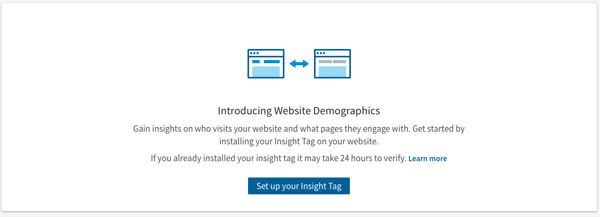
If you haven't previously set up Website Demographics, you'll receive this message prompting you to set up an Insight Tag:
The Insight Tag is essentially a short blurb of JavaScript code that allows Website Demographics to track visitors to a page, as well as conversion and analytics that are crucial when evaluating the performance of a LinkedIn ad campaign. In other words, without it, Website Demographics won't be able to track any visitor behavior or insights.
Screen Shot 2017-11-27 at 4.35.33 PM
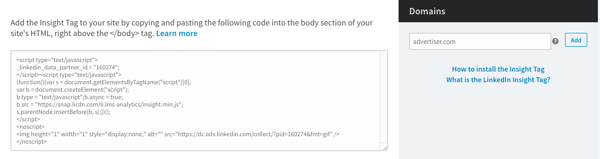
Copy and paste this code, and it to every page on your domain. According to LinkedIn, the optimal placement for the code is right before the end of the <body> tag, in the global footer.
Once the code has been added to your web pages, add your domain (or domains, if you added it to multiple pages) to the area to the right of the code, where it says "Domains," as per the image above.
LinkedIn will have to verify that the tag has been added to these URLs correctly, which could take up to 24 hours, but once that's done, each URL will have the word "verified" next to its name in the domain list.
Be careful: According to LinkedIn, domains must not include "www" when you're adding them.

3. Build your audience.

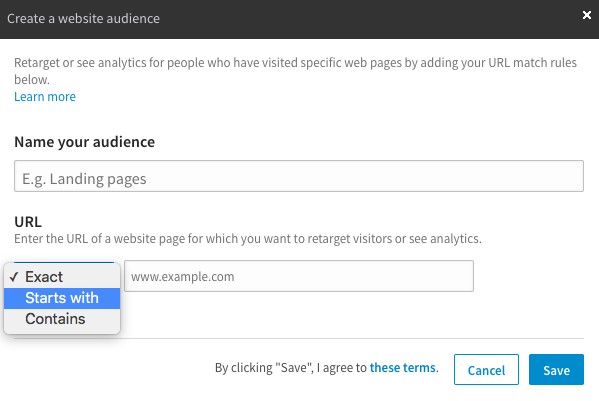
Once your Insight Tag has been added and all associated domains have been verified, you'll need to create a website audience. Don't let the name of this step fool you -- rather than customizing the desired composition of your audience, you'll actually just be segmenting different URLs for which you want to analyze visitors.
It'll look like this:

Source: Distilled
For example, you might want to drive a different audience to a specific landing page than you do to a certain blog post. That's where segmenting audience analytics becomes helpful.
You'll need a minimum of 300 LinkedIn members to visit a given domain that you're tracking -- until you do, there won't be any data available in the Website Demographics section of your Campaign Manager. How long that takes really varies -- it depends on each page's average traffic.

4. Monitor and analyze the data.

According to Distilled, "LinkedIn developed and released Website Demographics because it anticipates that with this new information, companies will be more likely to spend on their platform." That makes sense -- the demographics available to track within this new tool match the same targeting criteria available for LinkedIn Ad campaigns.
That said, the purpose may also be to help LinkedIn advertisers spend more effectively. Let's say, for example, that prior to setting up your Website Demographics, you already have a LinkedIn Ads campaign running. Once you're able to capture more detailed data on which types of users are visiting your web pages -- according to job title, industry, and more -- you'll be able to see if that information aligns. Does the Website Demographics match the targeted audience criteria you used in your Ad campaign? If not, you now have the data to better inform your audience targeting.
The best part is that this information isn't restricted to your promotion efforts within LinkedIn. Now, you're newly equipped with details about the actual human beings visiting your website (with respect to member privacy, says the platform). And while every social media channel has its own trends and patterns of users, having these insights can help you gain a better idea of who's clicking, and why they might be seeking information from your brand.
I'll be keeping an eye on the results as more advertisers begin to use and track the results of this tool, but as always, feel free to reach out on Twitter to share your own experience with it.
How to Use Social Media at Every Stage of the Funnel


Source

Friday, 1 December 2017

Can You Use Instagram To Grow Your Business?


When you think of using social media to promote and advertise your business, Instagram probably isn’t the first network to come to mind.
Typically, you think of Facebook Ads or networking on Twitter as traditional avenues many businesses use.
But, with Instagram being one of the fastest growing social media platforms in the last year or two, more and more businesses, brands and solopreneurs are looking there to reach a new, younger market.
And it makes sense if your brand has a strong visual component to it like Birchbox, for example. But, Instagram is also great even for businesses that are more content focused. So, whether you are a freelancer, blogger, or small business, it’s time to start looking at how Instagram can help you grow.


What is Instagram?

Instagram started out as a trendy, mobile photo-sharing app on iOS.
It made the square photo hip, it let people add digital filters to their photos – the “Instagram look” – and it incorporated social features like profiles, followers and comments.
Instagram Look
In the spring of 2012, Instagram launched on Android phones and was bought by Facebook for one billion dollars – cementing itself as the social photo-sharing app.
Nowadays, Instagram also allows you to share video, and they have a growing advertising platform, but it’s still mainly a mobile app. You can’t, for instance, upload new pictures to your account from Instagram’s website.


Instagram and Business

With Instagram primarily photo-based can businesses of all shapes and sizes really succeed on this platform?
As of September 2015, Instagram had 400 million active users, and it’s still growing. Thirty-one percent of all women online use Instagram, with 24% of men using it too – over half of these users are 18-29 years old.
That would put Millennials as the largest demographic and if you’re targeting teens in particular, they consider Instagram to be the most important social network.
So, if your target audience is in this demographic, using Instagram can be the perfect platform to reach them. And if you’re in the food, travel or fashion niches, there’s no better place to be than on Instagram since those industries rely on visual marketing strategies.
But even if you’re not in those niches, don’t overlook the brand building and audience engagement potential of Instagram.
With a solid strategy, your business can really get a boost from spending some time using this platform.


Developing your Instagram strategy

You probably have a content strategy for your blog, and a social strategy for Twitter and Facebook; Instagram should be no different.
Without a strong visual presence on Instagram, your business and brand will be easily ignored by the short-attention span of its demographic.
To start, try using Instagram yourself to get accustomed with the platform. Go ahead and download the app (it’s free) for either iOS or Android.
Also, look at other businesses in your niche to see how they are positioning themselves on Instagram, and to see what sort of images they post.
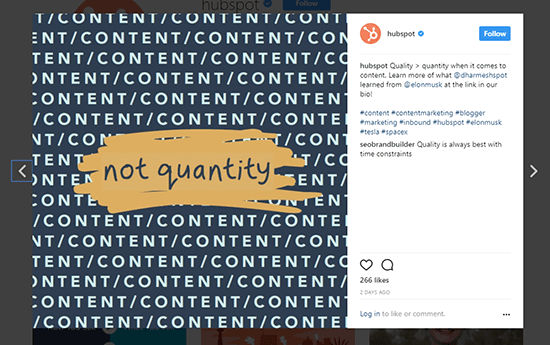
For example, here’s one of Hubspot’s postings:
Example Hubspot
Once you create an account for your business, you’ll need to choose a username. For brand consistency and recognizability, use the same nickname you use on other social platforms, if it’s available.
Once you create your account and update your bio (which we cover later), you’re going to want to start participating. Follow influencers in your industry and follow engaging users and past clients – some should follow you back – to get the ball rolling.
If you need a starting point:
From there you’ll want to establish your presence by commenting on other people’s photos. You’ll quickly see how fast your Instagram follower count grows by doing a few simple things.
But, don’t feel you have to devote hours a day to developing your strategy. For entrepreneurs and business owners, social media is usually a task that’s automated or outsourced.
Scheduling apps like Hootsuite allow you to schedule your Instagram posts, but it’s not entirely hands-off like many other platforms.
Instagram requires all posts to be published through its mobile app so you’ll receive a notification from Hootsuite on your phone when it’s time for a post to go live. Then, you just open the photo in the Instagram app and share it.
Let’s look at three ways you can strategically build your presence on Instagram and grow your business at the same time.


1. Optimize your Instagram bio

One of the first things you can do is optimize your bio to attract more followers, which means, more potential business.
Focus on using your copywriting skills to fill this valuable space – you only get 150 characters – with a brief benefit-laden description of what followers can expect from you, and a call to action.
Your URL – the only clickable link you’ll get on Instagram (they don’t enable live links in comments) – can direct people to your homepage, or better yet, a landing page featuring your lead magnet or email capture form.
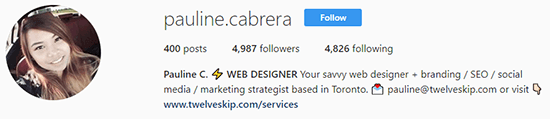
Check out Pauline Cabrera of Twelvekip and her bio copy on Instagram.
Pauline Cabrera
Pauline makes it clear who she is and where she’s based. She also includes a link to her services page, helping her seal the deal if prospects happen to check out her Instagram account.
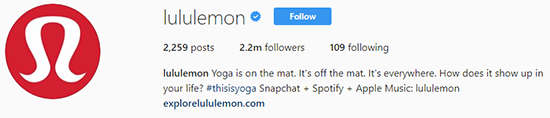
If you’re going to use a branded hashtag, include it here too. Lululemon, an athletic wear company, makes sure to include their hashtag #thesweatlife, along with their Snapchat username.
lululemon
On the other hand, depending on your industry, sometimes you can let your photos speak for themselves. Lindsay’s Pinch Of Yum bio is short and sweet, but she still has nearly 160,000 Instagram followers.
pinchofyum
Food is a tremendously popular niche on Instagram, so she can take advantage of that. Although if Lindsay put a CTA in her bio sending people to a landing page, it would be interesting to see the impact on her email subscriber growth rate.


2. Grow your community

The number one tip for growing your community is to be attentive and genuine. Use a real profile photo, leave sincere comments on people’s pictures, and respond to your followers quickly – and engage with them.
One thing many online businesses use Instagram for is to show the behind-the-scenes of their growing business. People always want to feel they are getting something exclusive, so include photos you don’t share anywhere else.
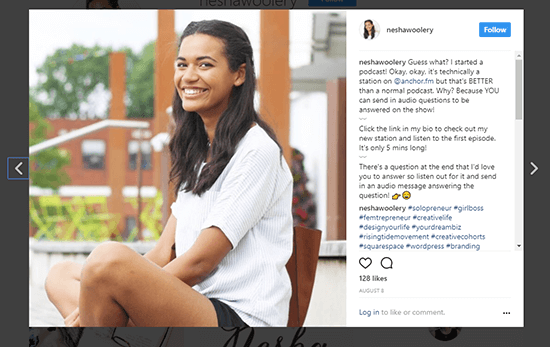
For example, Nesha Woolery, lets us know about her new podcast.
Example Nesha Woolery
This not only indirectly promotes her podcast, but it also humanizes her and shows her dedication towards her audience by getting them engaged in her activities.
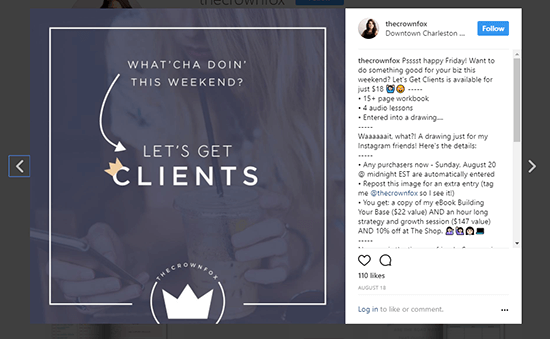
Another way to use Instagram is to create visually appealing quotes. This is something Kaitlyn of the Crown Fox does, and she makes sure to brand each of her quotes.
Example The Crown Fox
One thing to note is that hashtags are used extensively on Instagram. You can find a list of the most popular hashtags here, but to really stand out on Instagram and grow awareness of your brand, create a branded hashtag.
You don’t just want to use your company name as the hashtag. Instead, be creative. Think of using a hashtag that embodies your presence on Instagram. It should be something that encourages your followers to get involved and share.
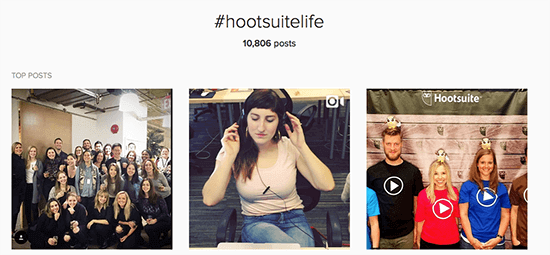
Hootsuite’s branded hashtag is #hootsuitelife, which has generated over 10,000 posts.
Hootsuite Hashtag


3. Build your Brand

Instagram is a visual medium, so to build your brand you’re going to need to incorporate strong photos. Now these don’t have to be professionally staged photos – it’s actually better if they’re not – but they do need to relate to your brand, and your audience.
To maintain brand consistency, if you’re going to use an Instagram filter, pick one and stick with it. The Normal filter (no filter) is the most popular, but if you want to enhance your images, Clarendon is a close second. Try a few of the top choices to see if your style of photos benefit from a filter.
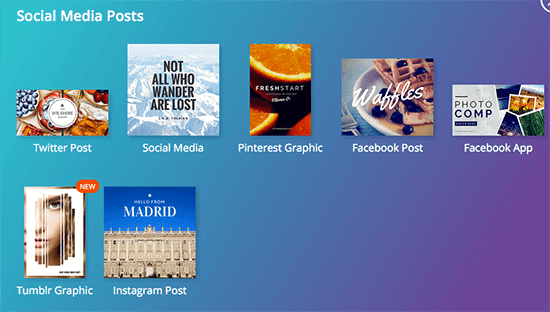
You can also use Canva to help you create an Instagram post with their Instagram template.
Canva Instagram
Finally, to build a consistent visual brand, keep your images similar-looking in terms of color and composition.
Allison from Wonderlass has a magnetic and colorful personality and her brand exemplifies this.
Just take a look at her Instagram posts.
Allison Wonderlass
A follower won’t mix up her posts with someone else’s posts, that’s for sure.
By creating a clear visual brand on Instagram, you’ll be able to reach more people and grow your business at the same time.


Wrapping it up

If you’re currently focusing all your social marketing efforts on Twitter, Facebook and maybe Pinterest or LinkedIn, you’re missing out on the hottest, most popular social network around – Instagram.
It’s not just a place for people to post selfies or pictures of their food, but a prime social platform with a rapidly growing audience in the 18-34 demographic.
Take some time to plan out your Instagram strategy. Be sure to optimize your bio with a strong call-to-action, and work towards building a community of brand advocates.
Develop your visual brand by deciding on a certain style of image, stick to a consistent posting schedule, and interact genuinely with your followers.
Instagram might not seem like the ideal platform for all industries – especially non-visual ones – but with the right approach, you can have success.