I wasn’t a big fan of email marketing until I actually took the plunge, signed up with email marketing service and added an email opt-in box for my most visited pages.
Results?
After 2 months I had already 5000 subscribers (yes, I know it also largely depends on my traffic which I’ve built up using this traffic strategy
here.)
It’s nearly
40x more effective than Facebook or Twitter. And it has the power to deliver a “3800% ROI and $38 for every $1 spent, according to
Campaign Monitor (#2 on my list).
But before I signed up with ConstantContact (#1 on my list), I decided to test out them out to know which one is actually good.
Here’s a rundown of the top 10 best email software for small business. I’ve personally used almost all of these ten over the past few years. And I continue to use at least one or two on a weekly basis.
Let’s get started.
Email Marketing Software for Who?
We’re not going to cover expensive, complex software like HubSpot or Infusionsoft. Those are great. But they can also set you back thousands of dollars each year and they are mostly towards enterprises.
Instead, we’re going to take a look at the most practical and realistic email marketing providers based on what YOUR needs are. So these ten are perfect for:
- small business owners
- writers
- musicians
- artists
- photographers
- wedding planners
- and so on…
Best Email Services for Small Business (Review)
We’ll start with the best ones that you should definitely check out. The middle group contains some perfect options that can get a little more sophisticated (depending on what your goals are). And then the bottom few should probably be avoided so you don’t waste any more time and money.
Check them out!
1. Constant Contact: Best for Small Business (free trial)
Constant Contact is one of the oldest email marketing software options on the market. They’ve been around. And they’re popular for a reason. Here’s why.
CONS
#1. Embedding their opt-in forms on your website are limited. They work just fine. But your ability to edit their form design options are limited (unless you’re hiring a designer / developer to customize for you).
PROS
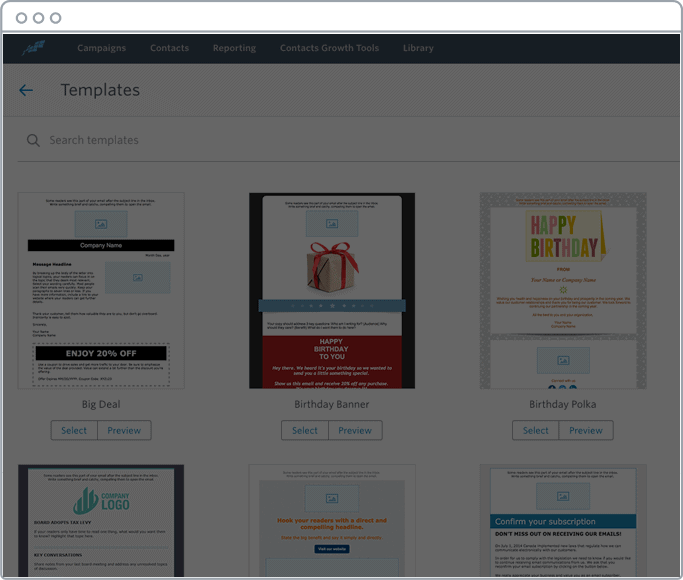
#1. They have easy-to-edit, pre-designed email templates for almost every scenario imaginable. So it’s perfect for everything from brick-and-mortar businesses, to online businesses
or blogs, and all special occasions in between (like Birthdays, etc.). Their email template library is among the biggest as well.
#2. There is something to be said for reliability. They’ve been around for a long time because they work. Email deliverability is good (so you don’t have to worry about emails not getting through to subscribers for some reason). And they’re a great choice for basic, one-off email campaigns like a simple monthly newsletter to a big list. According to their
data, “98% of Constant Contact emails hit customers’ inboxes” vs. “77% of regular email”.
#3. I’ll be honest: Their interface used to be kinda clunky. But they’ve recently had a facelift and the new one is extremely easy to use. It might not be as smooth and sexy as MailChimp, or as user-friendly as Drip or ConvertKit, but it’s right there at the top of the pack.
#4. If you are looking for simple automation, Constant Contact can help you there, too. It’s not as sophisticated or fully featured as Drip or Autopilot, but it can help you deliver few nice follow-up messages simply and easily.
#5. Constant Contact does police its service to make sure people aren’t using it to spam subscribers. However, I’ve found that they’re a little more lenient with customers and not as aggressive in stopping or suspending accounts (like MailChimp, for example).
#6. Constant Contact offers a longer than usual 60-day free trial. That gives you a LONG time to test out their service and make sure you’re happy before committing to them (or paying them a dime).
Do I recommend it? Yes!
Constant Contact is one of the best email marketing services you can choose. They’ve got a giant template library (with tons of variety). The email builder is good for beginners on up to advanced users. And they have an excellent 60-day free trial so you have almost no risk when signing up.
2. MailChimp: Easy to use and affordable
MailChimp is easy to use, offers beautiful pre-built templates, and inexpensive.
There’s a reason they’re among the most popular email marketing services for small businesses, sending a billion emails each and every single day.
CONS
#1. MailChimp is perfect for many. But might not be right for everyone. They enforce a strict double opt-in policy and prohibit many different kinds of both content and industries.
The reason? Sending a billion emails isn’t the hard part. Actually getting those delivered– through spam filters and into someone’s inbox – is the problem. By keeping a tight leash of how their services is used, they’re able to deliver (pun intended) better performance for all of their customers who are abiding by their guidelines. So this is point could actually be a PRO or a CON depending on how you look at it.
PROS
Many other email marketing services (even those listed below) come with pre-designed templates that look like they’re from the 90s (you know, Geocities-style). They almost force you to go out and pay a designer for a custom one.
However, you don’t have that problem with MailChimp. You can easily get by with one of their preset designs and all you have to do is upload an image, tweak the colors, and you’re good to go.
#2. MailChimp is also one of the most user-friendly options on the list, too.
Their campaign builder is intuitive, guiding you through each step of the way. You’ll quickly get the hang of it after creating your first few campaigns. And then you can simply copy an existing campaign to update and send a new one in less than five minutes.
#3. Easy to use segmenting options also help you identify specific groups of people that might be suited to a special deal or maybe need a few incentives because they haven’t interacted with your emails in a while.
Instead of a complicated setup, they provide a few helpful ‘shortcuts’, like selecting an average of the last few campaigns or a simple star rating, to quickly identify and send to these groups.
#4. MailChimp integrates with almost every other popular software for small business you can think of. For example, they’ll natively work with popular platforms like Shopifyso that you can automatically add new customers from your store to an email list and then automatically send them a follow-up campaign. (Or if you’re advanced, you can integrate with Zapier to really unlock its potential).
#5. MailChimp’s automation feature continues to get better and better. But one of the things I love most is that they have ‘templates’ you can simply copy and paste. For example, instead of having to manually try and string together a bunch of complicated emails to form one sequence, their library has them pre-built so that you can simple point, click, and then update content before it goes live. That means it might only take an hour, instead of a full day, to create and go live.
#6. MailChimp has a forever free account that lets you have up to 2,000 subscribers. (There are some plan limitations to be aware of, however.) From there, it rises up to only about $10 / month depending on subscriber count.
Do I recommend it? Yes
MailChimp is easy to use, inexpensive and comes packed with beautiful pre-built designs.
One of the options below might have one or two better features, however it’s going to be hard to beat MailChimp’s all around excellence.
3. Campaign Monitor: Good looking templates
Campaign Monitor has a lot to like. They’re big (helping over 200,000 customers). And despite being around for awhile, they’ve kept pace with the latest email marketing trends.
CONS
#1. Campaign Monitor’s closest competition on this list for best all around is MailChimp. But unfortunately, unlike them, they do not offer any type of free plan after the 30-day trial period.
PROS
#1. Campaign Monitor has been around for awhile, but their email templates are anything but dated. They’re sleek and modern. And can be quickly customized with the drag and drop campaign builder.
#2. Campaign Monitor also allows you to segment your database and automate email campaigns to that leads get one message while existing customers get a different one. That’s extended with their ability to hook into your website or application and send off transactional emails triggered to send at the exact right time.
#3. Campaign Monitor’s App Store is among the best, helping you sync your email database with other internal tools like your CRM, store (like Shopify) and even WooCommerce. Their App Store also includes integrations like AdRoll, which will allow you to automatically run retargeting ads to the people on your list as they browse around the internet.
#4. You can send 2500 emails to 500 contacts for only $9/month. That puts them at one of the most affordable options on this list.
Do I recommend it? YES
Campaign Monitor is perfect for those looking for affordable email marketing software with beautiful templates that can go out a few times a month to a big list of contacts. They’re a solid introductory tool.
4. Active Campaign: Expensive, but flexible
ActiveCampaign goes beyond basic email marketing and includes marketing automation with sales and a fully featured CRM.
If you’re looking for a solid all-in-one tool, this might be it.
CONS
#1. Pricing for basic email features is A-OK. But when you want to take advantage of their extra features (like sales automation and CRM) it’s gonna set you back $49 / month to start with (no matter how many subscribers you have).
PROS
#1. ActiveCampaign covers all the basics well. So you get the normal one-off email campaigns. But you also get more advanced automation and segmentation, too.
#2. Many small business don’t have (or need) a fully-fledged CRM (like Salesforce). It would just be overkill.
You do need something though to manage basic contacts and keep track of who’s interested in your services (or who might be interested again in the future). ActiveCampaign solves that problem by providing a more well-rounded CRM tool than most you’ll find on this list.
So now you can see and track all marketing + sales-related information inside one easy to use tool.
#3. ActiveCampaign has a unique contact discovery feature that will automatically try to pull in more information about each new contact (like their location, social profiles, and more).
#4. There’s a critical difference between when someone’s a basic marketing lead vs. a sales-ready one. ActiveCampaign helps you automatically tell the difference by applying triggers and rules that change someone’s status based on the actions or behavior they might be exhibiting (like visiting your website over and over, looking at key pricing pages, etc.)
Do I recommend it? Yes
ActiveCampaign delivers a solid email marketing service for a completely affordable $9/month.
And although pricing can get more expensive with some of the extra features, the fact that you have them at your disposal (without having to add a bunch of other tools to the mix) is an awesome perk worth checking out.
5. GetResponse: Most popular among bloggers
GetResponse aims to be an ‘all-in-one’ platform to grow your business. It extends beyond just the usual email marketing stuff and into landing pages, full-fledged marketing automation and also webinars.
CONS
#1. The starting email price of $15/mo for 1000 contact isn’t too bad. But if you’d like access to their advanced features (like webinars), that price quickly jumps up to $49/month. And that’s for only 100 attendees! If you want more, it jumps up to $165/month.
PROS
#1. GetResponse comes packed with over 500 email templates and 1,000 stock images to quickly create your first campaign. The bulk of which look pretty clean and modern.
#2. GetResponse can also deliver dynamic content. So content blocks on each email can be personalized to each subscriber’s personal history and data.
#3. GetResponse also comes with segmentation and automation features that can help you easily follow up with customers (without actually doing any of the heavy lifting).
#4. Another item that sets GetResponse apart is their webinar offering. You can create, host, and deliver webinars or live meetings. Integrating this component with your email marketing makes follow-ups a breeze and can help speed up lead gen for B2B companies or professionals.
Do I recommend it? Yes.
GetResponse delivers another solid option with current, updated email designs at a budget-friendly price.
If you’re a B2B company or see yourself using webinars, their native integration and ability to host those for you can be a huge benefit.
6. VerticalResponse
VerticalResponse is more of a bare bones, straightforward email marketing service that just does one thing well. They’re a nice option for newsletter sending or other campaigns that are being sent to a larger group of people.
CONS
#1. They do have a free plan, but otherwise the pricing tends to be on the higher end for what they offer, considering their feature set…
#2. Although it seems like I’m nitpicking, their feature set is also a little ‘slim’ compared to some of the other email services listed above.
PROS
#1. VerticalResponse has 700 templates to choose from. They’re not the best I’ve seen compared to some of the companies on this list, but they’re pretty good and not as bad as a few others, either.
#2. Their data boasts a high 98% inbox deliverability (which as we’ve discussed, is becoming a bigger hurdle each and every day).
#3. VerticalResponse packs some advanced reporting features that help you figure out what subscribers would like to read more of. And their friendly toolset helps recommend or tell you what to do next in order to get better engagement, more opens, and higher click-through rates.
#4. They have a completely free plan up to 300 subscribers. And who doesn’t like free?!
Do I recommend it? Yes (and no)
There’s nothing wrong with VerticalResponse. They have a solid offering.
But is it any better than the others listed higher here? Not really. And it’s slightly more expensive.
So feel free to try them out. Otherwise take a look at the others listed here.
7. Drip
Drip (recently purchased by LeadPages) specializes in being a ‘lightweight’ email automation tool. (I’ll unpack what that means in a second.)
They include some sophisticated features and kick things off with a free plan (which never hurts). Here’s a list of their PROS and CONS.
CONS
#1. Depending on what you need an email marketing service for, Drip’s features might be a little overkill. If you’re just trying to send a basic campaign once a month, there’s probably better options listed here on this list.
You can send basic, one-off campaigns with Drip. But it’ll be a little more complicated and you might end up paying way more than you need to. Which brings us to…
#2. Drip has a free plan (which is great), but after that, their pricing jumps up to $49 per month. That’s on the expensive side (considering the limitations on subscribers, etc. at that low level).
Once again, if you just need to send out basic email newsletters to a big list of people, you’ll probably end up paying more than you need to with Drip.
PROS
#1. Drip’s value lies in its automation rule builder. There are 18 triggers and 16 actionsthat can be selected to quickly create sequences that follow up with customers without your involvement.
For example, let’s say someone abandons their shopping cart before purchasing. Drip can help you create a follow-up sequence that will send out a few reminder emails, or even include a discount to come back and purchase, all while knowing whether or not that person actually does end up taking action.
If they do finally purchase, that ‘trigger’ will be recorded and updated in Drip so that they no longer receive these emails (and instead get something else, like an upsell for a related product).
#2. These automation sequences sound complicated because they kinda are. But Drip’s visual workflow builder makes the process easy and intuitive.
You can set up a series of steps visually to get an overview of how the entire sequence will look. And you can then create those ‘branches’ depending on whether someone does or doesn’t take action.
#3. Drip goes beyond your standard email marketing software by also managing each contact’s lead status. For example, if someone buys or doesn’t buy, each contact gets ‘tagged’ to keep track.
#4. Drip’s pricing can get expensive when you have a lot of contacts, but for new customers (with low list numbers) they have a free plan to get started with. Can’t beat free!
Do I Recommend it? It Depends…
Drip is great. If you plan on taking full advantage of the automation sequences and you enjoy creating those complicated branches depending on what people do.
Only looking for a monthly newsletter-type software? You might want to look elsewhere.
8. ConvertKit
ConvertKit is similar to Drip in that it’s a powerful email marketing service that can slice and dice your contact list to send targeted emails. So you can pull off sophisticated sequences if you’d like, but it’s still simple and enjoyable to use.
They also specialize with professional bloggers, for reasons that you’ll soon see, although anyone can obviously use them.
CONS
#1. Feature overkill might be an issue with ConvertKit if you’re just looking for something nice and simple. Yes, you can do basic email broadcasts to a large list with them. However, their value comes down to being able to segment audiences and send perfectly tailored emails.
#2. Many of the email services listed here will either have a completely free plan or at least a free trial. ConvertKit has neither. Instead, if you’d like to sign up, their pricing starts at $29 a month for up to your first 1,000 contacts.
PROS
#1. ConverKit’s superpower is segmentation. They allow you to create specific forms or other incentives that can be tied back to your post’s topic.
Then the system will automatically record what they downloaded and ‘tag’ that subscriber for you when it comes time to send out a new deal or promotion that would be perfect for those customers.
#2. These calls to action can be included at the bottom of the post or even inside the post content simply to help you generate more subscribers, faster. They have a WordPress plugin that can help you simple install and then integrate them into your posts. And these CTAs are responsive to your website design (meaning they’ll expand or shrink depending on the device.
#3. ConvertKit also provides a few landing page templates to choose from (unlike almost every other email provider listed here).
So you don’t need yet another tool for that, too. Instead, you can use ConvertKit as an all-in-one solution for generating opt-ins for your newsletter, courses, webinars, and more.
And the WordPress plugin can help you host the landing page on your own website, so nobody will know the difference when they visit the page.
#4. ConvertKit’s segmentation means that you can also create those automated sequences for people who just joined your list. That means you can set-and-forget parts of your marketing strategy once it’s up and running, freeing up some of your time to go back to focusing on everything else a small business owner has to worry about on a daily basis.
Do I recommend it? It depends…
Yes and no. Pro blogger or big content site? Then yes, definitely.
Are you interested in tight segmentation of contacts based on what they downloaded (or where they downloaded it)? Then again, yes.
However, for everyone else, it might be overkill.
9. Autopilot
Autopilot can send emails and create powerful, automated sequences like the other guys. But it can also do much more.
Integrating other popular software options allows you to send off text messages, fire off Slack messages, change a contact’s status in your CRM, deliver offline postcards in the old-school mail, and way more.
CONS
#1. Once again, just looking to send a basic email newsletter? Autopilot is probably not a good fit for you, then. It can do that. But it’s designed for small businesses who want to leverage the power of segmentation and automation more.
#2. Autopilot can do a TON. But you have to be comfortable setting up integrations between a bunch of different services. If not, you’ll be limited through
#3. Autopilot is a more advanced tool, so it’s pricing tends to be more advanced as well (compared to the more straightforward email marketing broadcast tools listed here). Pricing starts at about $25 bucks for up to 1,000 contacts.
PROS
#1. If you’re looking for an email tool that does just more than email, and instead integrates with other parts of your business to deliver a seamless customer experience, Autopilot is a perfect choice. You can setup a ‘customer journey’ that takes new website visitors through an entire lead nurturing or purchase process, tying in multiple different channels or tactics.
#2. Autopilot’s email builder is among the easiest to use. The interface is intuitive so that you can simply point and click your way to creating a new campaign in a few seconds.
#3. Autopilot lets you create ‘smart segments’. These are pre-set criteria, like someone opening your email or visiting your website in the past week, that dynamically update. That means as new people meet your established criteria (even in the future), this list will updated automatically and add them as well.
#4. Last but not least, Autopilot offers a free 30-day trial so you can test drive their service. So if you’re on the fence, you can at least try it out for a few days to see if it will meet your needs (or be too complicated for what you’re trying to do).
Do I recommend it? It depends…
Autopilot is great… if you plan on using it to its full potential (and don’t mind getting your hands dirty). Otherwise, it might be overkill and slightly cumbersome for beginners or people looking for a simple monthly newsletter option.
10. AWeber
AWeber used to to be one of the most popular email marketing software companies, often used and touted by almost every big name blogger.
What’s changed since then? Well, to be honest, not a whole lot. Existing competitors have upgraded. New competitors have sprung up.
CONS
#1. It doesn’t seem like AWeber’s changed much over the last 5+ years to be honest. Things have been upgraded. New templates have been introduced. But otherwise, many of the same features seem to look and work just like they did half a decade ago.
#2. To their credit, there are over 700 templates to choose from. However, many of their designs now seem outdated or heavily reliant on stock images… which brings us to the first PRO on the list.
PROS
#1. AWeber’s pre-designed 700+ templates seem to rely heavily on stock images. The good news is that they also include 6,000+ stock images to chose from. That’s incredibly helpful, because otherwise stock images can be (1) time consuming to find the right one, and (2) expensive if you’re buying high-quality images one at a time.
#2. AWeber also lets you match color schemes from emails to the forms you use on your website. That provides visitors with ‘continuity’ and can help increase conversions and retention.
#3. AWeber’s automation sequences haven’t changed much. But they do allow you to create basic workflows with built-in waiting periods and tags. Applying tags to contacts is the secret because it allows you to have different automation sequences interact with each other depending on a contact’s tag. For example, someone tagged as “Customer” might get removed from one campaign (so they no longer receive sales messages) and then added to another (to cross-sell them related products).
#4. AWeber has a 30-day free trial to try out their services. And then if you want to move ahead, you’ll get up to 500 subscribers for $19/month (which is one of the better deals you’ll find).
Do I recommend it? No…
There’s nothing wrong with AWeber per se. Their offering just seems a little stale. And their pricing isn’t as good as some of the competition (like Campaign Monitor or MailChimp) for what they offer.
Review Conclusion
Email marketing is still your best shot at generating new customers.
And yet, most small businesses don’t even send enough email campaigns on a monthly basis.
The result? You’re leaving money on the table. Lots of it.
Fortunately, you can get started with Constant Contact and their 60-day free trial.
MailChimp, Campaign Monitor, and ActiveCampaign are similarly simple tools to get a new campaign out the door by the end of today.
If you’re looking for more sophisticated options, Drip, ConvertKit, and Autopilot are worth a look.
Otherwise, older industry options like AWeber have begun falling behind in recent years.
They’re not awful. But for the same money (or less), you could do better.