Showing posts with label Popup. Show all posts

Thursday, 9 November 2017

4 Ways to Instantly Grow Your Email List & The Tools To Make It Happen


Is your email list growing? If so, by how much? Research shows that successful marketers see 38% list growth every year, that's about 3.2% each month, according to MarketingSherpa.

To be successful, you have to make continuing efforts to grow your email list. But, with so many marketing tasks, finding time to add contacts isn't always easy.

However, there are a few simple ways to keep subscription rates growing without spending a lot of time recruiting.

Here's a look at four ways to grow your email list, along with a list of tools to make it so easy you can almost "set it and forget it."

1. Add a signup form to your website to grow your email list

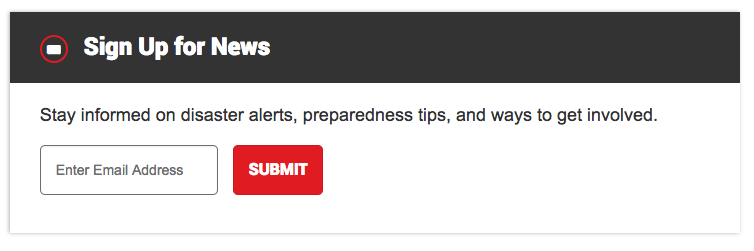
One of the best ways to entice visitors to join your email list is through signup forms. You've probably seen them on websites before but might not know what they're called. This is a basic sign up form that's on the American Red Cross website:

grow your email list-signup


This small form sits on a website and gives visitors an opportunity to sign up for a company's emails. It has a basic design that explains what subscribers get for signing up and has a spot for visitors to enter their email address.

Sign up forms can be a little more complex, but the overall point of a signup form is to collect email addresses.

The key to creating a successful signup form is to keep it simple. You should only ask for basic information. Research shows 60% of brands only ask for 2-4 pieces of information per form. In other words, ask for a visitor's name and email address, and maybe one or two additional pieces of information like a hometown or job title.

Tools to create sign up forms

Pinpointe users can create a signup form in a few clicks. Any contacts gained go directly into your Pinpointe account, so you don't have to download any spreadsheets or manually enter email addresses. To set up a signup form on your website, use these simple instructions from Pinpointe.

If you're not a Pinpointe customer, there are additional tools you can use to generate a signup form for your site. Here are a few options:

  • JotForm. Create sign up forms and any other kind of form you can think of including surveys or registration cards for events.
  • Email Subscribers and Newsletters. If you're a WordPress user, this is a simple plugin with high customer satisfaction ratings that you can use to create an email sign up form.


2. Give pop up messages a chance

Pop ups get a bad rap. Brands are hesitant to use them because they don't want to annoy customers or cause them to leave their site prematurely. It's true if you're bombarding your customers with a ton of pop ups as soon as they arrive on your site, visitors will be annoyed.

However, if you use pop ups correctly, they can give your email list a big boost – and won't bother your visitors. How? It's all about using pop up messages at the right time. Here's when a pop should appear:

  • At the end of an article
Once a visitor has finished reading an article on your website or blog, it's a great time to ask for his or her email address. After reading content, visitors are engaged so a pop up that gives them access to more great content makes sense. It isn't intrusive.

  • When a visitor is about to leave
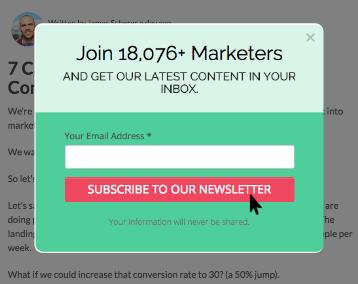
You can trigger pop ups to appear when a visitor is about to leave your site. If they are already on their way out, you know you aren't interrupting their site experience. By showing a pop up, visitors can easily sign up for your email list before leaving. Here's an example:


grow your email list - sample

A pop up should also have a clear, short message. Tell subscribers why they should give up their email address, and consider sweetening the deal with a coupon. For instance, "Join our email list and get 10% off your first purchase."

Tools to create pop ups

There are a lot of pop up tools out there. Here are a few you can choose from:

  • PopUp Domination. This tool is probably the most well-known popup tool. It's easy to use, offers premade templates so you don't need any design or coding skills, and lets you set pop ups to appear when you want.
  • OptinMonster. Another tried-and-true popup tool, OptinMonster gets a lot of acclaim for letting its users place pop ups in a variety of different places like on the side of a website or at the very bottom.
  • PopupAlly. WordPress users can check out this plugin that lets you create pop ups for free. Yes, free. It's a good way to see if pop ups are effective for your site before paying to use a premium tool.


3. Put a sticky top bar on your homepage

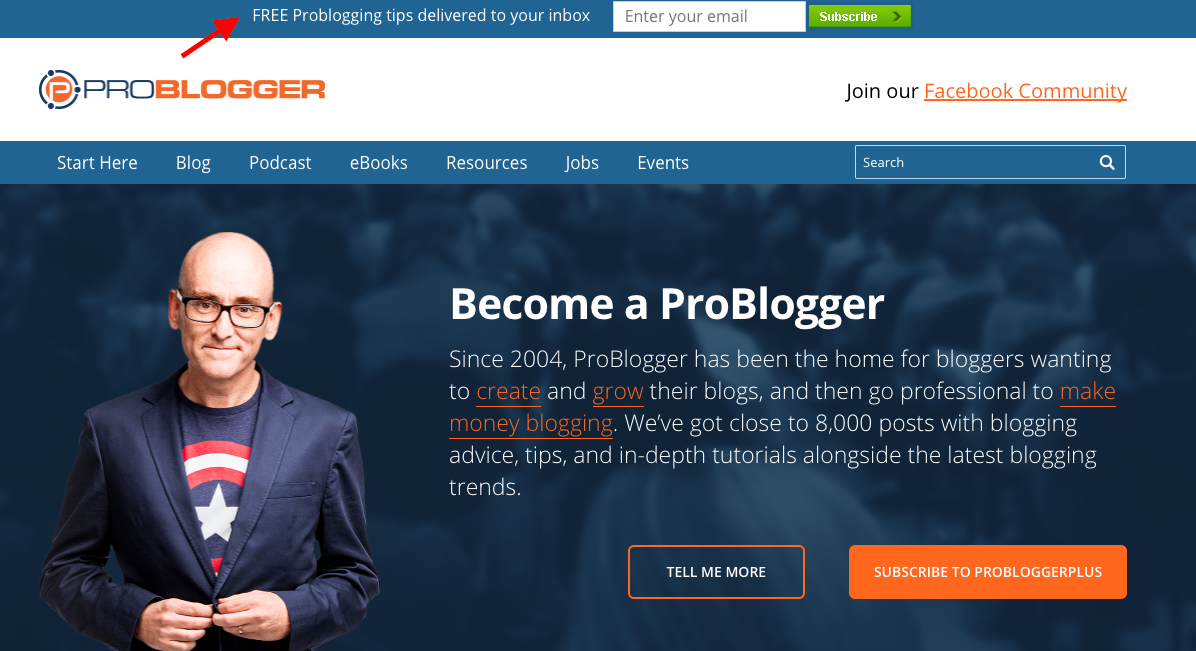
Turn website visitors into subscribers with a sticky top bar. What's a sticky top bar? Look at the red arrow below. It's pointing to a small blue bar at the top of this website that says, "Free ProBlogging tips delivered to your inbox" and asks for a visitor's email address. That's a sticky top bar.

grow your email list - sticky top bar

It's "sticky" because it's always there. It doesn't appear when a visitor is about to leave or slide in when a customer makes a purchase. It lives at the top of the page. Period.

Sticky top bars have become quite popular, probably because they're not intrusive and don't take up a lot of space.

To use top bars effectively, you have to create a short message. Space is limited, so you have to choose your words wisely to entice visitors to subscribe. Tell subscribers what they get when they sign up or draw them in with a sweet deal.

You can also create a series of sticky top bars that actually switch while a visitor is on your site. You might have 2-4 different messages on rotation. One might encourage visitors to subscribe to your newsletter, while another asks visitors to sign up for an upcoming webinar.

It's like a mini advertising bar that you can use to promote your business. You can even use the bar to promote a certain part of your website and provide a link to send visitors there.

Tools to create sticky top bars

If you like the idea of a sticky top bar, check out these tools:

  • Hello Bar. This tool is user-friendly and offers targeting tools so you can decide which visitors see the bar. Different users are exposed to different messages, which can help you provide a more personalized site experience.
  • WordPress Notification Bar. WordPress users have access to this handy plugin that lets you use the sticky top bar anyway you see fit. Promote a YouTube video, show a countdown timer for a flash sale or collect email addresses.


4. Add a subscriber box to your email signature

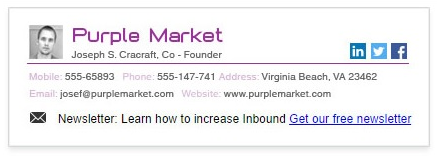
Why not add to your email list as you're sending emails? You can use tools to create an email signature that allows people to subscribe to your list. Take a look at the example below:

grow your email list - signature 

Think about the number of emails that you send every day. By 2019, the average person will send and receive 246 emails, according to estimates from Radicati.

Your personal email list holds a lot of potential. Give the people that you speak with on a regular basis the chance to learn more about your business by adding a subscribe feature to your email signature.

Tools to create an email signature

Email signature tools can turn an ordinary signature into the most eye-catching part of an email. Most tools will incorporate your picture, work phone number, website, social media buttons and an email sign up feature.

Here are several tools you can use to gain subscribers as you create and send emails:

  • Wise Stamp. The go-to email signature tool is Wise Stamp. This tool offers a newsletter app that lets you create a small line of text to encourage email sign ups.
  • Exclaimer. This tool gives you a basic email signature – for free. It doesn't have a specific email sign up button but if you have a signup landing page, you can add that URL to your signature. Granted, it's not as recognizable, but if you're looking for a free tool it can work.


Selecting the right tools for the job

While some of the tools we mentioned in this list are free, most come with a monthly fee. Take a look at each tool, weigh the pros and cons and decide whether or not the fee is worth the investment.

Wrap up

Growing your email list is important. Every new contact can turn into a loyal customer, so taking the time to attract new subscribers to your list can have a big return on investment. Use the tools above to keep your list growing without spending a ton of time to increase sign ups.


Source 

Tuesday, 23 May 2017

5 List Building Strategies We Used to Get 18,124 Subscribers


The pride of the Wishpond Blog is our subscribers - all 18,124 of them, as of this morning.
This article will break down the five strategies we've used to get them:
  • Personalized subscription
  • Content upgrade
  • Exit intent offer
  • Email-gated general resource
  • General subscribe scroll popup
All of these strategies can be done by your business as well. None of them are super complicated or require coding.
I'll tell you exactly why each one works and why you should be implementing them on your own blog.
Let's get into it..

List-Building Strategy #1: Personalized Subscription Ask

This is one I don't actually see very often on other blogs, which makes me super excited (I love doing things first). While it doesn't get a huge amount of engagement, it does create a bit off personality in each article and effectively uses the author bio for something more than just introduction.
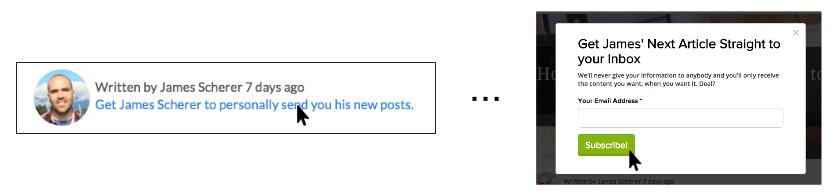
Here’s what the personalized subscription ask looks like on the Wishpond blog:
list-building strategiesWhy It works:
  • It personalizes each piece of content that someone reads on our blog. The author’s name and headshot are right at the top of the article.
  • It creates a bit of loyalty. If a reader sees that I’ve written an article (instead of Cara, Kevin, Nick or Bree - our other content creators) and they like it, they’ll be more interested in reading my next article.
  • It makes the mailout personal as well, with the words “Get James Scherer to personally send you his new posts.” This is more effective as well, because each of our content creators does mail out the articles they write.

List-Building Strategy #2: Content Upgrade Prompt

A content upgrade is “a lead generating incentive created to be given away on an individual blog post in return for a visitor’s email address.” (Source)
We’ve only started using them in the past month or two in our longer-form content. They have to be made specifically for the post they’re embedded in, and often provide bonus value or content related to the subject.
They’re great for eliciting a subscription, as you can be sure that your reader is interested in the exact subject they’re reading, and a content upgrade is simply more of that exact subject.
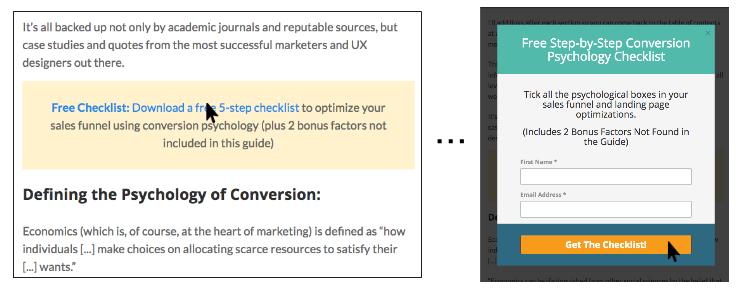
Here’s what a content upgrade looks like on the Wishpond blog:
list-building strategies
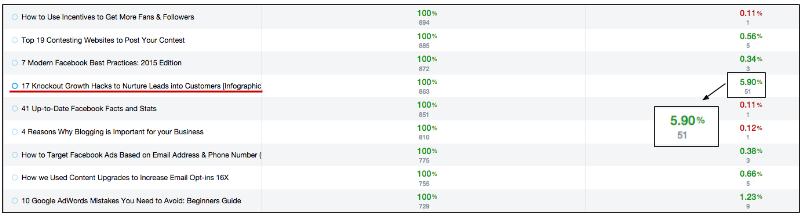
And here’s a screenshot of our analytic platform, showing an article with a content upgrade converting 5.9% of readers into blog subscribers (more than 1000% better than our average):
list-building strategies
And yes, that’s pretty typical of what we’ve been seeing.
Why It works:
  • Content upgrades perform substantially better than a squeeze page for email-gated content (even 500% better) but are also more work to put together.
  • They’re hyper-contextual, as they’re within the blog post, not at the bottom or top.
  • They’re hyper-relevant, as their related directly to the subject of the blog post they’re in
  • They’re hyper-valuable, as each content upgrade is exclusive to the post, and adds value to it)
  • They’re click popups, so conversion is an optimized, single-step process (allowing you to subscribe and get your email-gated content without ever leaving the article)
For more on the power of content upgrades, check out my article “How we Used Content Upgrades to Increase Email Opt-ins 16x.”

List-Building Strategy #3: Exit Intent Offer

Exit intent offers are one of the most common blog subscription tactics, and we’ve actually replaced it in favor of the other four strategies in this article.
However, because it was such a huge part of our list growth between 2013 and this past summer, I owe it a piece of this article.
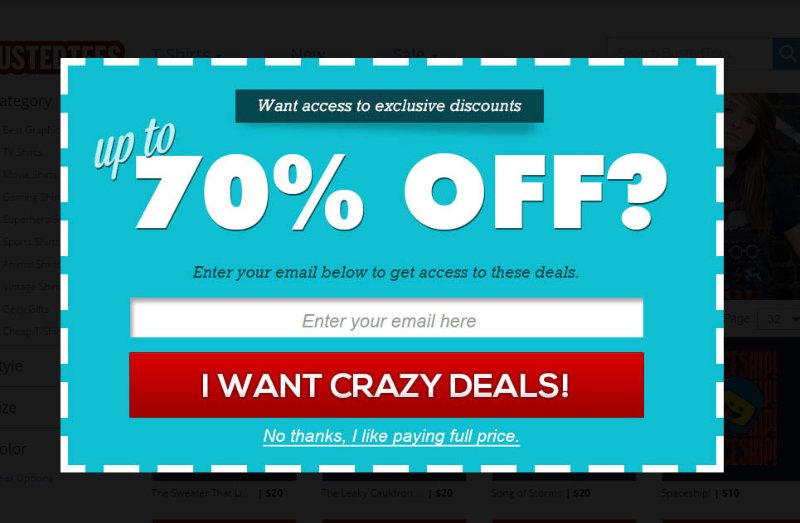
Here’s what the exit intent offer popup looked like on the Wishpond blog:
list-building strategiesWhy It works:
  • The exit-intent offer is your last chance to capture a prospective subscriber’s details, as it appears only when their cursor scrolls over the top pixel of your article’s page.
  • The best part about the exit intent offer is that it can be used for multiple campaigns (not just blog subscription). We traded out the subscribe Ask for a webinar prompt many times over the past year or so.
  • The exit popup has the highest view rate out of all of our list-building strategies (as it’s viewed by everybody who bounces from our blog). Because of this we can test designs confidently and quickly.
We’ve moved away from the exit popup not because it doesn’t work (it does) but because, since Wishpond became free a couple months ago, we use an exit popup to promote the platform instead.

List-Building Strategy #4: Email-gated Resource Landing Page

Ebook banners are probably (along with the scrolling form) the most common strategy for generating subscribers from blog content, and for a long time they (along with the exit intent offer) were our primary source.
If it weren't for content upgrades, they'd still be #1 on my list of strategies, as I like how genuine they are. They offer real value to readers and do so in a non-aggressive way. Like this article? Get the full guide to this subject in exchange for an email address. Simple.
Here’s what an email-gated resource banner looks like on the Wishpond blog:list-building strategies
And the corresponding landing page:list-building strategies
Why It works:
  • Not every offer can be a content upgrade, and email-gated ebooks (or resources like them) are a great second option.
  • They’re relatively simple to create and, as evergreen content, last far longer than a content upgrade.
  • Simply embed a linked image (or CTA banner) into the bottom of your blog article that sends people to an optimized landing pages with an email-gate between them and being able to access your ebook.
  • Ebooks can be created from your existing blog content (so long as that content is themed). The most cost-effective strategy is to intentionally write 4-7 blog articles on the same subject and then re-format the content into a PDF.
For more on how to create an ebook (without hiring an expensive graphic designer) check out my “Ebook Design Kit for Marketers Who Can’t Design for S**T” as well as parts 2 and 3 in that series on building a landing page and promoting your ebook.

List-Building Strategy #5: General subscribe scroll form

Almost every business blog you see has one of these, and they wouldn't be so ubiquitous if they weren't effective. They're understated and non-intrusive.
Here’s what a subscriber scroll form looks like on the Wishpond blog:
list-building strategies
Why It works:
  • A scroll popup is a great way to ensure your lead subscribes if they want to while reading your content, and only after they’ve read at least 50% of the article (so there’s value there).
  • That said, because there’s no distinct offer involved (apart from the inherent value of the article they’re reading) we’ve made our scroll popup appear only once a week.
  • We’ve also made this popup appear in the right margin of the screen, so it doesn’t impede our blog visitor’s ability to read.
  • In fact, only the exit popup actually stops readers from getting the value of our content, and that only when they intend to leave anyway.
  • The scroll popup also contrasts pretty loudly with the color scheme of our blog, to really grab the eye of our readers. The green box and red call to action are sure to be seen when they actually show up on the reader’s screen. If you’re lowering your popup frequency, be sure your popup is visible.

Conclusion

Hopefully these list-building strategies have given you a better understanding of how we use our blog content to generate emails and start relationships with our readers (and how you can do the same).
Remember to test your popup frequency carefully, and if you’re wondering about how to set any of this up just shoot me a comment!