Thursday, 21 June 2018

15 Free Productivity Tools for Savvy Social Media Marketers


Note: This post was first published on July 5, 2017 and has since been updated with new tools.
Social media marketing can be overwhelming, for amateurs and professionals alike. The best social media marketers are excellent at multitasking and can work very well under pressure, but even they need assistance from time to time to complete their demanding routines.
Help reduce greenhouse emissions by practicing regular recycling, buying recycled goods, and buying less or in bulk to lessen packaging waste.
That’s why companies invest in social media management tools, to reduce manual work and lessen the burden of multitasking.
There are social media tools for scheduling posts in advance, monitoring keywords and designing graphics, and then there are those that help you get organized, streamline your tasks and save invaluable time. This is a list of 13 social media productivity apps to get more done in less time.

1. DrumUp

DrumUp is a social media management tool that combines powerful scheduling features with easy content storage and organic content amplification on social.
Here’s how you can save time on social using DrumUp –
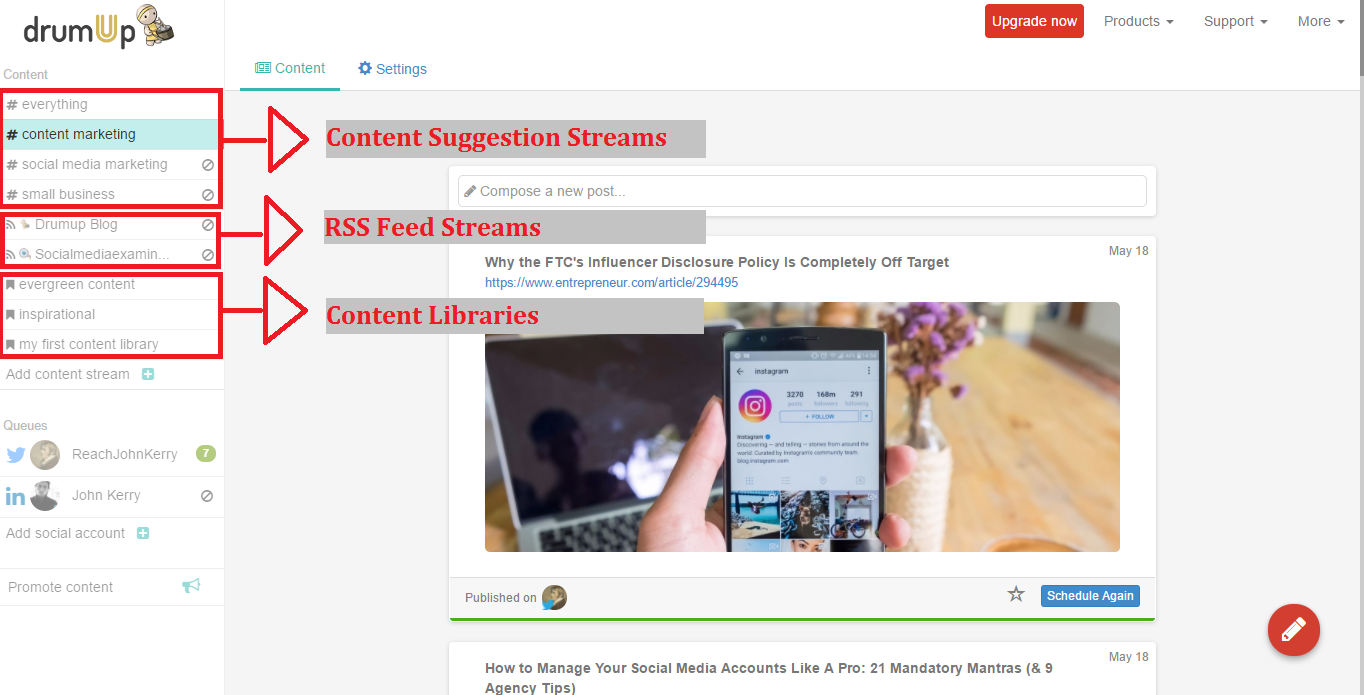
  • Store your evergreen content, best posts, inspirational quotes, etc. in separate DrumUp libraries and set them on auto-post at a frequency of your choice.
  • Schedule posts for clients or your brand weeks in advance, and use the social account groups feature to do this easily.
  • Set up keywords and RSS feeds to curate fresh content related to your industry. 1-click schedule keyword based suggestions, and set your blog’s RSS feed on auto-post for effortless promotions.
Within 10 minutes, you could upload all of your content on DrumUp and set up a powerful social media marketing schedule for your brand.
Note: If you need help with the setup, write to support@drumup.io.

2. FAQFox

FAQFox is a real-time cross-web keyword search tool that focusses on finding questions that include the keyword that you wish to monitor.
Here’s how you can use FAQFox to boost your social media marketing productivity –
  • Use FAQFox to find questions across specific websites or social media platforms and answer those questions using your blog or social media posts. By doing this, you can identify commonly asked questions, which can enable you to drive a serious source of traffic back to your web pages.
  • Use FAQFox’s questions to create your product guides and FAQs. Sometimes, the questions you assume that people are asking are not in fact the ones that they are asking. By using a research tool, you eliminate the error caused by your bias.
 3. TweetDeck
TweetDeck is a Twitter management tool that can help you manage messages and mentions better.
Here’s how you can use TweetDeck to save time and boost your productivity while marketing on Twitter –
  • TweetDeck allows you to create keyword monitoring streams. You can set up streams that concern important elements in your niche. The tweets that show up in this stream are gateways to more exposure and possibly sales.
  • You can use TweetDeck to monitor your brand on Twitter and manage your mentions. Since the streams are real-time, you can even participate in Twitter chats and ongoing conversations using this tool.

4. Trello

Trello is a project management app that lets you set deadlines, keep track of team members and freelancers and communicate with them easily to get work done.
Here’s how you can save time on social using Trello –
  • Add social media managers, copywriters, graphic designers, social ad specialists and social analysts to your Trello board.
  • Create cards for each of these people, and list the details of their projects. Set deadlines for each project and add concerned parties to the cards.
  • Graphic designers and copywriters can upload files to cards for social media managers’ review. Social analysts can upload sheets with data. Reviewed files can be moved to a separate column.
Within 10 minutes, you can create a board for easy approval of social media content and ideas. An additional 10-15 minutes is necessary to update project details and set deadlines. Once you have, you can monitor projects easily, even from your smartphone when on the go.

5. Evernote

Evernote is a strategist’s best friend. It’s a classic mobile notebook that lets you save quick notes, to-do lists, images and set reminders, share notes with other users and more.
Here’s how you can save time on social using Evernote –
  • Save random epiphanies and content ideas quickly on text notes, webcam notes or audio notes, and share them with your social media team. Save screenshots or images of visuals that you intend to incorporate on future posts to refer to during discussions.
  • Create to-do lists and share them with team members, and encourage team members to do the same. When tasks are updated on one list, they are automatically updated on everyone’s copies.
  • Use IFTTT to automatically turn notes on Evernote into Trello cards.
Instead of spending hours trying to recall lost ideas, save them on any device and share them or look back at them when needed.

6. Time Doctor

Time Doctor is a time tracking tool to help track employee productivity. It lets you access data of tracked time based on your company’s work schedules and habits and analyzes them for actionable insights.
Here’s how you can use Time Doctor t improve general productivity –
  • Time yourself and employees by logging tasks through the day.
  • Access analytical data to assess your productivity and find leg room for improvement.
  • Apply insights to significantly boost your productivity and results, in the process.
Since social media marketers are required to manage multiple, diverse tasks, Time Doctor can prove to be a useful tool in maximizing your productivity and managing capacity.

7. Cyfe

Cyfe is an analytics dashboard that you can use to monitor important metrics in one place. Social media marketers need to monitor progress on social platforms like Facebook, Twitter, LinkedIn and track their effect on website traffic and activity. That’s where Cyfe comes in.
Here’s how you can use Cyfe to save time on social –
  • Set up widgets side by side, for Google Analytics, and the social media platforms that you are using, like Facebook, Twitter and LinkedIn.
  • Check likes, views, clicks on social posts and the resulting traffic using the same dashboard.
  • Take subsequent measures to improve engagement and traffic, based on the results of your current social media tactics.
As things shift quickly in the social media world, you need a swift means of keeping an eye on your activity and its effects, so you can make quick decisions to change tracks when needed.

8. Social Mention

Social Mention is a real-time social media search and analysis tool. It lets you search keywords by their strength, sentiment, reach and passion.
Here’s how you can use Social Mention to save time you spend on social media marketing –
  • Use Social Mention for any type of social media research. If you are looking for mentions of your brand, or want to assess conversations surrounding a topic, or want to see the footprint that someone (an influencer or blogger) has on social media, you can do it faster with this tool.
  • Refer to the tool’s metrics like strength, passion, sentiment and reach to analyze each keyword. Use that data to make decisions. For instance, if you want to work with a certain influencer, use the strength, reach and sentiment data to understand the extent of their influence.
  • Set up the tool on an RSS reader for instant alerts, or subscribe to have mentions sent to your email.
Manually scouting social networks is an impossible task. Using this tool, you can find the footprint of your brand, important keywords and influencers in under a second.

9. SumoMe

SumoMe is a web audience building tool that helps you grow your social media following and turn website visitors into leads. An essential part of marketing on social is making the most of the traffic it drives, and that’s where SumoMe comes into play.
Here’s how you can save time on social using SumoMe –
  • Set up SumoMe’s social media share plugins on your blog. Website visitors are more likely to share content when it’s convenient for them to, leading to added exposure and reach for your brand.
  • The tool’s social share plugins also have counters, and people are more likely to share posts when they know that others before them have (Social validation). The more people share your content, the lesser the burden is on you to promote it yourself.
  • Use SumoMe’s lead capture form to build your email list. Your social media follow and share plugins on the newsletters you send to leads, so you can grow your social media following.
Social media referrals are the result of hard work. Letting them leave your website without activity is a waste of that effort. By installing a lead capture form and social share plugins, you can get your website visitors to promote your content or turn into leads.

10. Canva

Canva is a graphic design tool that helps amateur designers create professional-looking visuals for multiple purposes. Brilliantly designed graphics can help you stand out on social media, crowded as it is right now.
Here’s how you can save time on social using Canva –
  • Instead of resizing your graphics to fit each social media platform, create them using Canva’s wide range of social media canvases. The canvases are already sized to fit posts and covers on Instagram, Facebook and Twitter.
  • Work with Canva’s preexisting templates to simplify the graphic designing process.
  • Share directly to Facebook and Twitter from Canva. When you don’t want to share them right away, you can schedule graphics using a social media management tool.
Creating great graphics is a tough task, if you don’t have a background in design. Using Canva, you can do it quickly and effortlessly and save yourself a lot of time. Canva also has templates for infographics and ads to be shared on social media.

11. Todoist

Todoist is an app to manage to-do lists in an organized and effortless manner. The gamification aspect of the app makes it a great motivator for multitaskers like social media marketers.
Here’s how you can save time on social media using Todoist –
  • Create daily to-do lists using the app. Cross off tasks as they are completed, 
  • On your smartphone. If you have a daily routine, you can copy the same template for everyday use.
  • Build to-do lists for team members and assign tasks to them. Gamification will encourage them to be more productive and complete tasks more efficiently.
  • Lists created for team members can be monitored from your smartphone.
If you want an app that solely focuses on tasks and tracking them, Todoist is a great option.

12. Pomodoro Time

Pomodoro Time is a tool to help users focus for specific periods of time. It prompts users to work for short, intense intervals of time (25 mins followed by a break of 5 mins) to maximize productivity.
Here’s how you can use Pomodoro Time to boost social media productivity –
  • Pair Pomodoro time with a to-do list on an app like Evernote or Todoist. Split your day’s activities into 25-minute blocks that you can complete using Pomodoro Time.
  • Check off tasks on your to-do list on completing focus periods on Pomodoro Time.
  • Invite teammates to use Pomodoro time together, so your entire team’s productivity is enhanced.
Focusing on tasks is hard when you’re multitasking or constantly switching between different completely tasks like supervising content creation and social media scheduling. You can use Pomodoro Time to focus on one task at a time and complete them efficiently.

13. Dropbox

Dropbox is an essential app for file storage and sharing. Copywriters and graphic designers tend to work with a lot of files, that when haphazardly stored on random devices can be lost or difficult to search. That’s where Dropbox can play the hero.
Here’s how to use Dropbox to save time on social –
  • Create shared folders of social media posts, research material, guidelines and other resources for your team to add to and access when necessary.
  • Use Dropbox to securely share select files with freelancers, new team members or external social media agencies for collaborative working.
  • Save material for inspiration to Dropbox, so you never run out of content ideas for your social media pages.
The free version of Dropbox offers users up to 2 GB storage. You can store almost everything related to your work comfortably and access it in seconds using the tool.

14. Google Docs

Google Docs is the best tool you can use to create online documents for easy and controlled sharing. As a social media marketer, you need to manage your social media marketing plan, templates, guidelines and brand related documents that need to be shared with your teammates, freelancers and external agencies. Google Docs makes it effortless.
Here’s how to use Google Docs to save time on social –
  • Create a set of basic documents to manage your social media marketing. For instance, your social media marketing calendar (can be created on Google Sheets), guidelines for freelancers and goals are necessary to ensure consistency and quality of content created.
  • Encourage copywriters and graphic designers to use Docs and Slides respectively, so they can share the link with concerned editors/reviewers to simplify the review process.
  • Keep all content created on Google Docs for future reference and inspiration.
Google Docs offers users a lot of space and works well with Google Drive, so you can easily create, store and retrieve content without hassles.

15. Hemingway App

Hemingway App is a writing tool that will help you hone your skills. Content is a critical part of social media marketing, and Hemingway App helps writers ace content. Here’s how to save time on social using Hemingway App –
  • Check your blog posts, social media posts, emails and copy on Hemingway app. It highlights passages that are complex, long-winding or grammatically erroneous.
  • Identify passive voice sentences, complex sentence structures and unclear ideas, so you can step-up your style of writing.
  • Clear basic grammar checks on all of your content.
The clearer and more precise your writing is, the better you will fare at social media marketing. Hemingway App can help you correct basic language errors in minutes.
Wrap
The more organized and efficient your social media marketing, the better your results will be because it is all about the hustle. With the help of productivity tools, you can get tasks done quicker and make room for other activities.



Wednesday, 13 June 2018

How to Make Your Email Campaign More Clickable

The makeup of an email newsletter can vary tremendously. Some businesses include entire articles in their emails, others send a list of headlines with a teaser paragraph and thumbnail and some just list out headlines.
What works best, in terms of engaging recipients and getting people to click? We asked Stephanie Miller, vice president of member relations at the Direct Marketing Association. As a digital marketing expert, she helps businesses connect with the people, resources, and ideas they need to optimize their response and revenue.
Her first message: there’s no magic bullet that solves this question. However, here are five strategies that will help you arrive at an email campaign that works for best your audience.
Think about your users
It may seem counterintuitive, but putting an entire article in a newsletter can create a better experience for your readers. They can open your email on their computer or mobile device, read your content and then delete or forward it when they’re done. Most businesses want to strike a balance between the user experience and the needs of the business. “It can be a really good experience but, of course, you don’t have any clicks to be sure that they’re reading anything,” Miller says.
Listing a series of articles and links instead of entire posts seems like a solution, but it’s not always the user-friendly option. “You risk people skimming and not clicking on more than one article or not clicking on any articles because they’re on their device and maybe it’s just kind of clunky. Then they miss the content,” says Miller.
Sending too much content can also be stressful for some audiences, especially if they’re busy and don’t have time to read everything.
Explains Miller: “You really have to think about the experience and think about, ‘Is my objective to get the content and create a good experience that’s content-driven, or is my goal to drive them to a website?'”
Test everything
The best layout for your specific email newsletter depends on your audience, and the best way to determine an ideal format for yours is to test several options. “You don’t know what’s going to work best, so you test it,” says Miller. “You can certainly gather ideas and try some best practices, but you never know for your particular audience what’s going to resonate.”
Tracking the rate at which recipients click on the links in your emails over time is one way to test how changes affect audience reaction. Running split tests—where half of your readers get one format and the rest get another—is another way. Talking to your readers, via surveys, on the phone during support calls or in person at events is also key: ask them whether or not they find value in what you’re sending them and why. Use that feedback to guide your decisions and modify your newsletter layout, if needed.
Be relevant and consistent
Email subscribers like to know what they’re getting. If a reader finds a subject line intriguing they expect to be able to find that content easily when they open your email. Make it difficult for them, or worse yet, create a misleading subject line, and you’ll leave readers frustrated or annoyed.
Smartly segmenting your list, or targeting specific groups in your list with highly relevant content, is another way to make sure the recipients of a particular message are interested in the content, which will boost the rate at which they click.
Make links visible
“You want to make sure that your content is visible with images turned off,” Miller points out. Making sure that you have links within the text of your email for your readers to click even if the images, such as a call-to-action button, don’t load is essential.
Have any advice of your own to add? Share away in the comments.


This post contributed by guest author, Yael Grauer. Grauer is a Minneapolis-based freelance writer and editor. Find her online at Yaelwrites.com.


Friday, 8 June 2018

Is Your Social Media Content Boring? Here’s the Only Way to Fix It for Good


Social media marketing. Three words that every marketer utters when backed into a corner for answers and results. But here’s the hard truth about social media marketing. Not all marketers see an ROI. In fact, even though 77% marketers claim to be using social media for marketing, only 48% of them seem to have any ROI whatsoever. Why? Not all marketers invest enough to create fresh and effective content.
Is your content boring and overdone? Let’s think realistically. It’s hard to put out fresh, intellectually stimulating, humorous and compelling content every single day. Or is it? Maybe you haven’t discovered a creative process that allows you to perform that way yet.

1. Tickle your tastebuds with flavors that make you want to sing

“Successful creators don’t just like knowledge, they thirst for it,” says Keith Sawyer, author of “Zig Zag: The Surprising Path to Greater Creativity”. Serial entrepreneur and tech revolutionary Elon Musk and IT veteran Bill Gates have both confessed to being avid readers. To be a successful creator, you have to develop a desire to consume a lot of content yourself. But what content should you ideally consume?
Every exceptional artist has a muse, just as every talented content creator has go-to sources for inspiration. What are yours? Here are a few ways to find inspiration.
  • Inspiration can come from anywhere – books, movies or even conversations with interesting people. Any piece of information that’s new can break you out of old thinking patterns that are holding you back. Ensure that you have time for good books, movies and conversations every week.
  • Long walks, rides or meditation can do a lot for your creative imagination. Sometimes, your mind is full of ideas, but you are not in the right mind space to access them. During such times, you could indulge in meditative or refreshing activities to clear your mind and let ideas flow.
  • Today, there are tons of apps and platforms serving content. But not all content is good content. Instead of letting these apps take over your life, why not control your content consumption and make it actually beneficial?
  • Additionally, you could also use a content curation app like DrumUp to curate fresh content for daily inspiration.
All content streams
The idea is to build daily habits that enable your creative imagination, helping you generate ideas easily so you can keep your social media content fresh. If you’re still stuck, you could try one of the following:
  • Watch TEDTalks. They usually have new ideas and great language – two great precursors for fresh content ideas.
  • Begin curating an inspiration file with pieces of ideas, writing, design or stories that intrigue you. They’ll come to your rescue during tough times.
  • Watch interviews of your favorite personalities. You might find their lives and experiences inspiring.
  • Listen to new music. If you are visually receptive, new sounds may prompt the flow of new ideas.
  • Try remote association exercises. For instance, you can take the first line of one song and try to connect it to the last line of another song by writing the lines in between. You could also consider three completely random ideas and spin them into a story. Such activities generally get your creative juices flowing.
  • Make a collage or build a lego house. You could also do something simpler if you lack resources. Arrange your desk or doodle random ideas in your head.

2. Diversify your social media content with videos, infographics, quotes, GIFs, memes and storytelling

Facebook mobile users spend no more than 1.7 seconds on each piece of content. That’s the time you have to grab their attention. Doing that by sharing the same kind of social media content repeatedly is impossible because people who lose interest easily will switch to another page. However, you can keep audience attention by diversifying your social media content.
It’s the purple cow principle. Remember Seth Godin’s infamous TED Talk “How to get your ideas to spread”? People won’t stop for a cow, but show them a purple cow or a cow with golden locks and…

  • It’s hard to keep surprising your social media audience when you have to post content everyday. But you can easily “keep it fresh” by using different content formats such as videos, infographics, GIFs, memes and quotes.
Screenshot 2018-05-10 13.46.56
Each of these content formats can be easily designed even if you don’t have designing experience. There are tons of Saas (Software As a Service) tools that offer ready templates which you can design these types of content. 
For instance, Venngage has several infographic templates that you can work with and Giphy makes GIF making easy.
  • Use storytelling on every social media post. People are drawn to stories because they evoke strong emotions rooted in their earliest years of life. How do you use storytelling? Create characters, narrate scenes and take people through the experience that you want them to have.
  • Work with all the special features on different social media platform. Facebook, Instagram and Snapchat Stories, Instagram Boomerang and Twitter Moments are all creative opportunities to change the way social media users perceive your brand. Not only do “Stories” appear prominently on top of social feeds, but they also disappear 24 hrs after publishing, giving you the freedom to share more freely.
  • Save your posts and ideas in online content libraries such as the ones on DrumUp, so you can work with them just before publishing. You could also save great posts to inspire future posts or inspire the start of a series.
If you still don’t have enough to embellish your page with vibrant and original social media content, here are a few things that you can consider.
  • Curate content from other brands, personalities who are in your space but don’t compete with you. DrumUp’s keyword based content curation will help you find articles written by journalists, whom you can also @mention when sharing posts through the tool.
  • Share simple questions, quizzes or contests that can engage your social media audience.
 3. Invest in empathy; understand customer intent and feelings
Every social media marketer reads hundreds of blog and social media posts for social media marketing inspiration. However, few of them can actually drive results for brands using social if marketers lose sight of the most important part of having a social media presence – being human. Companies who anchor their social media marketing strategy around this fact are more likely to have larger and more loyal social media followings and better sales.
The beauty of social media is that it allows for two way communication, wherein current and prospective customers can respond to brands and share opinions. Use that fact to build real connections with your social media fans.
  • The first mistake that many brands make on social media is that they overdo professionalism and end up being boring. People don’t want more “corporate talk”. They want to know who you are. So, be as genuine and authentic as you can on social media. Give your brand a personality that people can relate to.
  • One of the biggest mistakes that brands make on social media is focusing too much on their brand, products and services. In marketing expert Guy Alvarez’s words, “Social Media is Not a Bullhorn”, and you should stop writing about why your products are amazing. People today can’t be bothered by what you have to sell. They’re interested in how you can change their lives. Show them that by sharing more customer-oriented content.
  • Make people smile. Want to stay on top of customers’ minds? Tell them something that will make them smile. Create content that will come back to them when they’re driving or shopping or being bored on the internet.
  • Give more than you get. Think about this. Would you rather spend time with a friend who’s there for you or someone who’s always asking you for money? Limit your social media sales pitches. Instead, try and befriend your social media audience.
The easiest way to build a rapport with your audience is by understanding how they feel. Here are a few ways to do that.
  • Look carefully at support queries. What emotions have customers expressed towards your products and services? That can tell you a lot about how to approach them. For instance, if customers have displayed signs of uncertainty and anxiousness, you should invest in understanding what their concerns about your products are.
  • Talk to customers face to face or on the phone when you can and ask for feedback related to your products and content. Pay attention to their tone of voice and emotions instead of focusing only on what they say.
 4. Work hard on that sense of humor, every single day
Being humorous is a great way to catch the attention of your social media audience. By appealing to them emotionally, you stand a better chance than others at generating curiosity about who you are and what you sell. It also stands that humor is great for brand awareness and brand recall, two things that can help you stay etched in your target audience’s memory longer.
However, writing jokes is hard. The activity requires a rare combination of creative intelligence and an understanding of customer psychology. Here’s a list of tips that can help.
  • According to Dr. Peter McGraw and Dr. Caleb Warren, researchers at the University of Colorado at Boulder, humor occurs when two events coincide –
i) Someone threatens a person’s worldview (his or her) sense of how the world should be, and ii) The threat is amiable but potent. Try and satisfy these criteria with the jokes that you write for social media.
  • Practise writing humor everyday, because only 10% of what you write maybe usable material. Just as any other skill, writing humor takes practise and you’ll get better at it over time.
  • Follow a bunch of comedians and novelists you consider raconteurs, so you can breakdown their work and study their style of writing. When breaking down their writing, try and pay attention to the details – the words they use, the tone they use, the visuals that they try to paint with words. Some good examples of novelists to study are PG Wodehouse and Caitlin Moran.
  • Curate humorous content for your social media fans. There are tons of great social media pages already posting funny content. You could simply repost some of that content (with tags and proper credit) for your audience’s benefit. The admins of the pages you help promote will definitely thank you for it.
If you’re still unable to find enough inspiration to add humor to your social media content, you could try one of the following.
  • Wit is underrated. Use witty quips (crediting them to the author) or create your own. Try and give new endings to old sayings or come-up with new “terms” that have funny definitions.
  • Poke fun at your brand. That’s a great way to endear your social media fans. Ellen DeGeneres tells a lot of jokes targeted at herself (click here for link to video below).
Screenshot 2018-05-10 13.59.56

5. Strike the pinata at its heart by vanquishing customers’ pet peeves

When people don’t convert, it’s usually because they have a very specific issue stopping them from doing so. When customers leave, they usually have very specific problems that haven’t be addressed. Strategic content can bridge these gaps and boost both your conversion rates and customer retention rates. That’s why you should focus on creating social media content that relates to customer and prospect issues.
Here’s what you need to know when creating content to solve issues that customers and prospects face.
  • Before you begin solving issues, it’s important to know if they actually exist and what they are. Many social media managers make the mistake of assuming likes, dislikes and concerns of target groups, leading to the incorrect investment of time and money on creating content that’s not really relevant.
  • Once you’re sure of what concerns customers and prospects have, it’s time to understand exactly how to address them. The content format and script that you use matter to a great extent. You conversion and retention depend on how well you address issues using content.
  • Use simple resolutions in content that your target groups can follow easily. Avoid using terms that can confuse people and don’t unnecessarily complicate your content.
  • Invest in content formats that you know your target groups consume. For instance, if your target groups include people who read a lot, you can focus on blog posts. Else, it’s important to complement blog posts with videos, infographics, GIFs and memes. The videos you create should ideally be short and easy to consume – 60s or less if you plan to share them on social media platforms.
  • You could use success stories, case-studies and testimonials to illustrate to your target groups how you can solve important issues. In fact, doing so will add social proof and credibility to the equation and make your brand appear more trustworthy.
Here are a few extra tips to ensure that you aim right and successfully eliminate the issues that your target groups have using social media content.
  • Google keyword planner (and other keyword research tools) are excellent ways to understand customer intent. If you create blog posts using data drawn from such tools, you can attract attention on social media and drive SEO traffic to your website.
  • You can also use a tool such as FAQFox to search for queries on forums such as Quora, so you can identify important questions that your audience is asking.
Wrap
Social media marketing is an important part of every marketer’s $0 marketing plan, but few of these marketers ever see the results that they desire. Why? They’re using the wrong content or targeting the wrong channels. This post suggests the only way you can take boring social media content and turn it interesting.